Entwodiksyon
Welcome to the user manual for your new Zipro iConsole+ Elliptical Trainer. This guide provides essential information for safe assembly, operation, maintenance, and troubleshooting to ensure you get the most out of your fitness equipment.
The Zipro iConsole+ Elliptical Trainer is designed for effective home workouts, featuring a robust magnetic resistance system and connectivity with popular fitness applications like iConsole+ and Kinomap.

Figure 1: Zipro iConsole+ Elliptical Trainer (Black and Grey)
This image shows the complete elliptical trainer from a front-side angle, highlighting its sleek black and grey design, the central console, and the moving handlebars and foot pedals.
Enstriksyon Sekirite
- Read all instructions carefully before using the elliptical trainer.
- Konsilte yon doktè anvan ou kòmanse nenpòt nouvo pwogram egzèsis.
- Kenbe timoun ak bèt kay lwen ekipman an pandan operasyon an.
- Mete eliptik la sou yon sifas plat epi ki stab.
- Asire w ke tout boulon ak nwa yo byen sere anvan chak itilizasyon.
- Mete soulye atletik ki apwopriye pandan w ap fè egzèsis.
- Pa depase pwa maksimòm itilizatè a ki se 150 kg (330 lbs).
Enstalasyon ak Asanble
While the Zipro iConsole+ Elliptical Trainer is designed for straightforward assembly, it is recommended to follow these general steps. Refer to the included assembly diagram for detailed part identification and sequence.
- Depake konpozan: Carefully remove all parts from the packaging and lay them out. Verify all components are present against the parts list.
- Mete estabilizatè yo: Sèvi ak boulon ak zouti ki vini ak yo pou byen fikse ba estabilizasyon devan ak dèyè yo sou ankadreman prensipal la.
- Mount Upright Post: Attach the main upright post, which holds the console and handlebars, to the base frame. Ensure all wiring for the console is routed correctly.
- Install Pedals and Handlebars: Connect the foot pedals and moving handlebars to their respective pivot points. Pay attention to left and right designations.
- Assemble Console: Mount the iConsole+ display unit onto the upright post and connect the necessary cables.
- Tcheke final la: Before first use, double-check all connections, bolts, and moving parts to ensure they are secure and move freely.

Figure 2: Elliptical Trainer Dimensions
This image illustrates the overall dimensions of the elliptical trainer: approximately 128 cm in length, 66 cm in width, and 158 cm in height, providing a visual guide for space requirements.
Enstriksyon Operasyon
Konsole Plis paseview ak Fonksyon
The advanced computer console provides comprehensive workout data and control over your training. It displays various metrics to help you monitor your progress.

Figure 3: iConsole+ Display Panel
This image shows a close-up of the elliptical's digital console, displaying various workout metrics such as Time, Calories, Speed, Pulse, Body Fat percentage, and Recovery. The console also features control buttons for mode selection and resistance adjustment.
- TAN: Montre dire antrennman ou an.
- KALORI: Estimates the number of calories burned during your session.
- VITESSE: Montre vitès ou ye kounye a.
- PULS: Measures your heart rate via the integrated pulse sensors on the handlebars.
- GRÈS KOD: Calculates an estimated body fat percentage (refer to manual for specific measurement method).
- RECOVERY: Assesses your heart rate recovery after exercise.
- Ajisteman rezistans: The console allows you to change the level of magnetic resistance, offering 32 levels for varied intensity.
Kòmanse yon antrennman
- Step onto the pedals, ensuring your feet are securely placed.
- Grasp the handlebars. For pulse readings, hold the stationary handlebars with sensors.
- Begin pedaling. The console will automatically activate and display your workout data.
- Adjust resistance using the UP/DOWN buttons on the console to match your desired intensity.
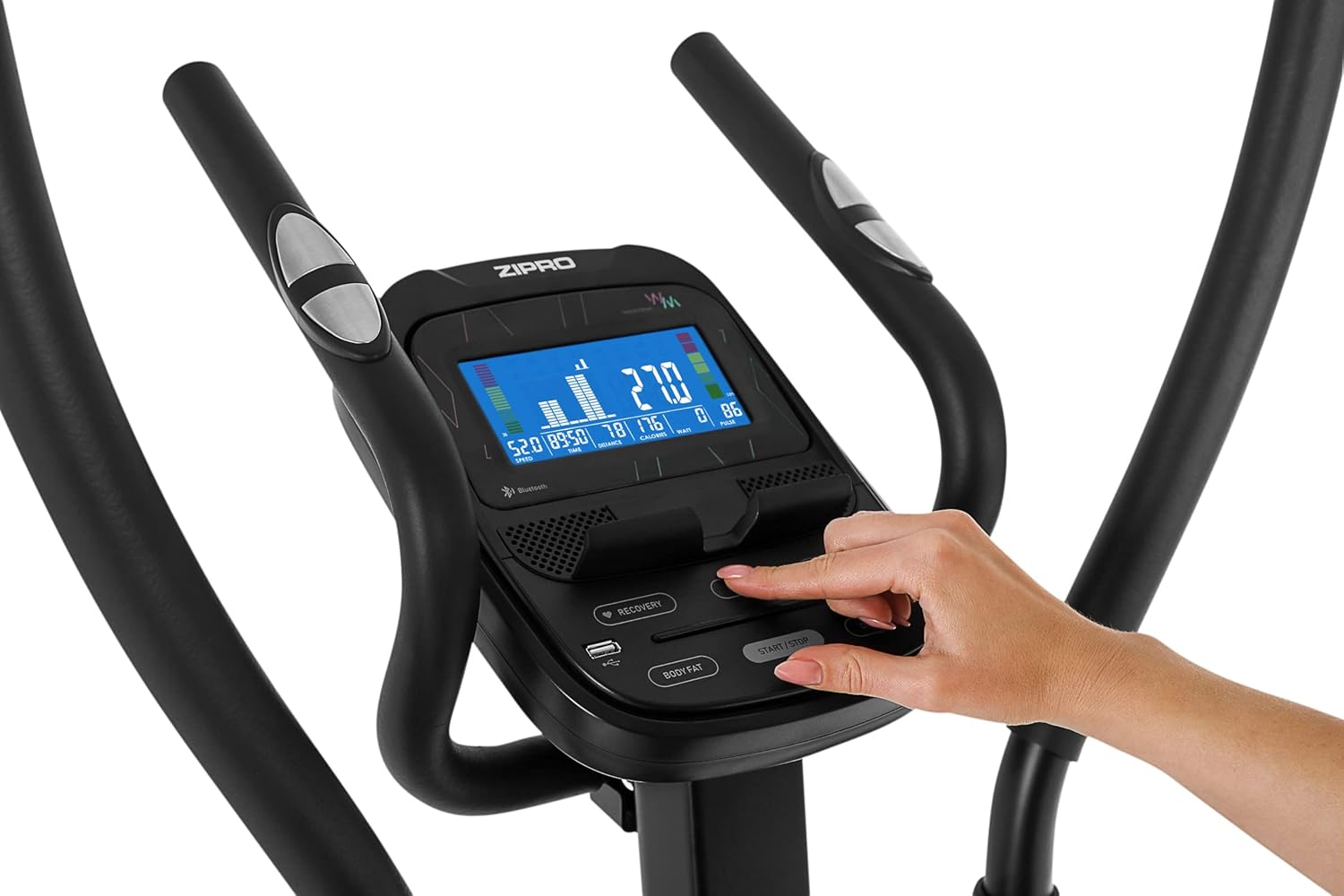
Figure 4: Interacting with the Console
This image shows a hand pressing a button on the elliptical's console, demonstrating how users can interact with the controls to adjust settings or navigate menus.
App Connectivity (iConsole+ & Kinomap)
The elliptical trainer is equipped with Bluetooth connectivity, allowing synchronization with iConsole+ and Kinomap applications for an enhanced training experience.
- Telechaje Aplikasyon yo: Download the iConsole+ and/or Kinomap applications from your device's app store.
- Pèmèt Bluetooth: Asire w ke Bluetooth aktive sou telefòn entelijan oswa tablèt ou.
- Konekte aparèy: Open the chosen app and follow the in-app instructions to connect to your Zipro elliptical trainer via Bluetooth.
- Utilize Features: Once connected, you can access training programs, virtual routes, track progress, and compete with other users through the applications.

Figure 5: App Integration During Workout
This image depicts a user on the elliptical trainer, with a smartphone placed on the console's holder, displaying a fitness application. This illustrates the seamless integration of the elliptical with mobile apps for interactive training.

Figure 6: Tablet Compatibility
This image shows a tablet securely placed on the console's integrated holder, demonstrating the elliptical's compatibility with larger mobile devices for an immersive workout experience with fitness apps.
Antretyen
Antretyen regilye asire lonjevite ak pèfòmans optimal antrenè eliptik ou a.
- Netwayaj: Siye ekipman an avèk piblisiteamp Siye twal la apre chak itilizasyon pou retire swe ak pousyè. Evite pwodui netwayaj abrazif.
- Lubrifikasyon: Periodically check moving parts, especially joints and bearings, for signs of wear or noise. Apply a silicone-based lubricant as needed to ensure smooth and quiet operation. Pay attention to areas where plastic bushings meet metal shafts.
- Sere boulon: Regularly inspect all bolts and nuts, especially those connecting the main frame, handlebars, and pedals. Tighten any loose fasteners to prevent wobbling and noise.
- Depo: When not in use, store the elliptical in a dry, clean environment away from direct sunlight and extreme temperatures. The transport wheels facilitate easy relocation.

Figure 7: Transport Wheels and Stabilizer
Imaj sa a bay yon gwo plan view of the elliptical's base, highlighting the integrated transport wheels on the front stabilizer bar. These wheels allow for easy movement and storage of the equipment.
Depanaj
| Pwoblèm | Kòz posib | Solisyon |
|---|---|---|
| Squeaking or Creaking Noises | Loose bolts or lack of lubrication in moving joints (e.g., pedal arms, handlebars). | Inspect and tighten all assembly bolts. Apply silicone-based lubricant to all pivot points and areas where plastic bushings meet metal. |
| Inaccurate Console Readings | Loose sensor connections, battery issues, or interference. | Check all cable connections to the console. Ensure batteries (if applicable) are fresh. Minimize electronic interference. Consider updating app firmware if connected. |
| Resistance Not Changing | Issue with the resistance motor or console connection. | Check the power connection to the elliptical. Ensure the console cable is securely connected. If the problem persists, contact customer support. |
| Pwoblèm Koneksyon Aplikasyon | Bluetooth interference, app version outdated, or incorrect pairing procedure. | Ensure Bluetooth is enabled on your device and the elliptical is powered on. Restart both the app and your device. Try re-pairing the device. Update the app to the latest version. |
Espesifikasyon
| Karakteristik | Detay |
|---|---|
| Non modèl | Heat WM |
| Nimewo Modèl | 6299210 |
| Mak | ZIPRO |
| Koulè | Nwa ak gri |
| Materyèl | Kabòn Steel |
| Mekanis rezistans | Mayetik |
| Kantite Nivo Rezistans | 32 |
| Rekòmandasyon pwa maksimòm | 150 kilogram (330 liv) |
| Dimansyon pwodwi (L x W x H) | 128 cm x 66.5 cm x 128 cm (apeprè 50.4 x 26.2 x 50.4 pous) |
| Pwa atik | 39.7 kilogram (apeprè 87.5 liv) |
| Kalite pouvwa | Kab elektrik |
| Konpozan ki enkli | Antrenè eliptik |
| Karakteristik konsole | Time, Calories, Speed, Pulse, Body Fat, Recovery, Bluetooth connectivity for iConsole+ and Kinomap apps. |
Garanti ak sipò
For warranty information, service, or technical support, please contact the manufacturer or your point of purchase. Keep your purchase receipt and model number (6299210) readily available when contacting support.
The product is designed for home use and features a magnetic system with 16 iConsole+ training programs.
For further assistance, you may visit the official ZIPRO websit la oubyen gade enfòmasyon kontak ki vini ak anbalaj pwodwi a.


