1. Entwodiksyon
Thank you for choosing the HOMCOM Mobile Printer Stand with Drawers. This versatile storage unit is designed to enhance your office or home workspace, providing ample space for your printer, documents, and other essentials. Featuring a minimalist design, lockable drawers for security, and smooth-rolling wheels for easy mobility, this cabinet offers both functionality and style. Please read this manual carefully before assembly and use to ensure proper installation and safe operation.
2. Enfòmasyon sou Sekirite
Avètisman sekirite: To prevent injury or damage, please adhere to the following guidelines:
- Pa depase kapasite chaj maksimòm 55 kg pou tout inite a.
- Ensure the stability of the cabinet during use. Place it on a flat, level surface.
- Exercise caution around moving parts, such as drawers and wheels, to avoid pinching.
- Fè atansyon ak kwen byen file yo pandan asanblaj ak manyen.
- Kenbe ti pyès ak pyès asanblaj yo lwen timoun yo.
3. Enstalasyon ak Asanble
This unit requires assembly. Please follow the instructions carefully. It is recommended to assemble the unit on a soft, clean surface to prevent scratches.
3.1 Kontni pake a
Verify that all components and hardware listed in the assembly diagram are present before beginning. Each piece is typically numbered or lettered for easy identification.
3.2 Etap Asanble
- Depake epi idantifye: Carefully unpack all parts and lay them out. Refer to the assembly diagram to identify each component and hardware piece.
- Rasanble ankadreman: Begin by connecting the main frame panels according to the diagram. Use the provided screws and fasteners. Do not overtighten screws, as this can damage the engineered wood material.
- Enstale etajè ak divizè yo: Insert shelves and internal dividers into their designated slots or attach them with the appropriate hardware.
- Rasanble tiwa yo: Construct the drawers, ensuring the drawer slides are correctly oriented. Install the lock mechanism on the designated drawer.
- Tache pòt kabinè a: Mount the cabinet door using the provided hinges.
- Enstale wou yo: Attach the four wheels to the bottom of the unit. Ensure the two lockable wheels are positioned at the front for easy access to the brakes.
- Sere final la: Once fully assembled, gently tighten all screws to ensure stability, being careful not to strip the wood.

Image: The fully assembled HOMCOM Mobile Printer Stand, showcasing konsepsyon li yo ak konpatiman depo li yo.
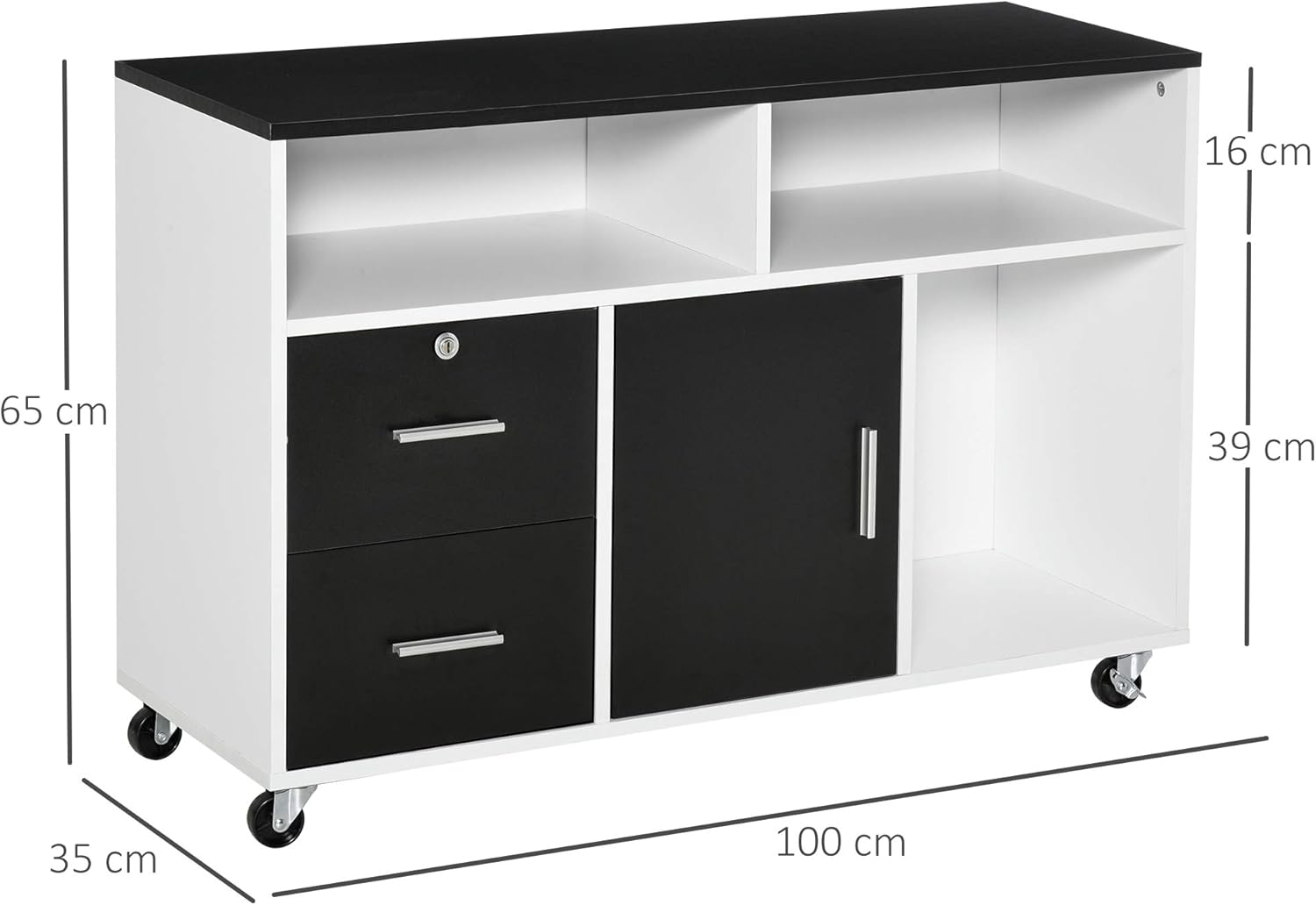
Image: Diagram illustrating the overall dimensions of the printer stand: 100 cm (length) x 35 cm (depth) x 65 cm (height).
4. Operasyon Enstriksyon
4.1 Depo ak Òganizasyon
The unit features multiple storage options:
- Sifas tèt: Ideal for placing a printer, scanner, or other office equipment.
- Louvri etajè: Use for easy access to frequently used items, books, or decorative elements.
- Tiwa: Store smaller office supplies, stationery, or personal items. The top drawer is lockable for secure storage of important documents.
- Cabinet with Door: Provides concealed storage for binders, files, or other larger items. Note: This cabinet is designed for flat storage of documents, not for hanging file dosye.

Imaj: Detaye view of the storage compartments, including sliding drawers, open shelves, and a cabinet with a door.
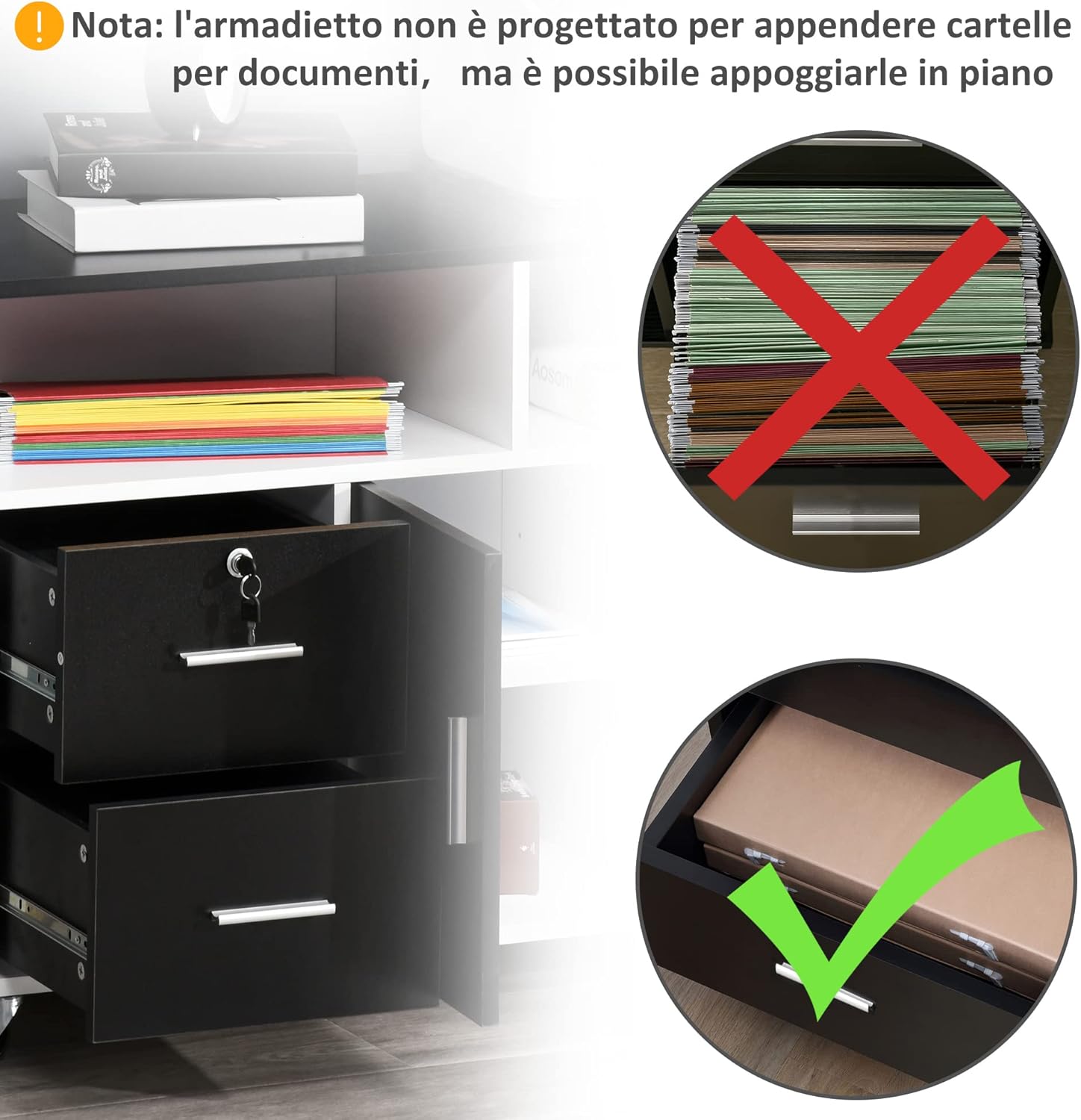
Image: Close-up of the lockable drawer with keys, demonstrating its security feature. Also shows the correct way to store documents flat, not hanging.
4.2 Mobilite ak Estabilite
The unit is equipped with four wheels for easy movement, two of which have brakes for stability.
- Deplase Inite a: To move the stand, ensure the brakes on the two front wheels are disengaged. Gently push or pull the unit to its desired location.
- Mete an sekirite inite a: Once the stand is in position, engage the brakes on the two front wheels to prevent accidental movement and ensure stability.

Image: Close-up of one of the wheels, highlighting the brake mechanism for securing the stand in place.
5. Antretyen
Regular maintenance will help prolong the life of your HOMCOM printer stand.
- Netwayaj: Siye sifas yo ak yon mou, damp twal. Evite pwodui netwayaj abrazif oswa pwodui chimik ki ka domaje fini an.
- Tcheke Fastener: Periodically check all screws and fasteners to ensure they are tight. Retighten if necessary, but be careful not to overtighten, especially with engineered wood.
- Glisad pou tiwa: If drawers become stiff, clean the slides and apply a small amount of silicone lubricant if needed.
- Swen wou: Keep wheels free of debris. If wheels become difficult to roll, clean them and ensure the axles are clear.
NAN. Depanaj
If you encounter issues with your printer stand, refer to the following common problems and solutions:
| Pwoblèm | Kòz posib | Solisyon |
|---|---|---|
| Inite a ap tranble oswa li pa estab. | Screws are loose; uneven floor; weight not evenly distributed. | Ensure all screws are tightened (do not overtighten). Move to a level surface. Redistribute items inside the unit. Engage wheel brakes. |
| Tiwa yo pa glise fasil. | Drawer slides are misaligned or dirty; obstruction in the slide mechanism. | Check drawer slide alignment. Clean slides and remove any debris. Apply a small amount of silicone lubricant if necessary. |
| Difikilte pandan asanblaj la (pa egzanp, twou yo pa aliyen). | Incorrect part orientation; manufacturing variation. | Double-check the assembly diagram for correct part orientation. If parts are genuinely misaligned, contact customer support. Do not force components. |
| Wood material appears damaged during assembly. | Screws overtightened; excessive force applied. | Engineered wood can be delicate. Avoid overtightening screws. Use hand tools rather than power tools for final tightening. |
7. Espesifikasyon
| Mak | HOMCOM |
| Modèl | IT836-269BK0631 |
| Koulè | Nwa ak blan |
| Materyèl | Enjenieri bwa |
| Dimansyon jeneral (L x W x H) | 100 cm x 35 cm x 65 cm |
| Pwa pwodwi | 27 kg |
| Kapasite Chaj Maksimòm (Total) | 55 kg |
| Maximum Load Capacity (Per Drawer) | 3 kg |
| Maximum Load Capacity (Per Compartment) | 8 kg |
| Karakteristik espesyal | 4 wheels (2 with brakes), Lockable drawers |
Image: Technical drawing showing the precise measurements of the printer stand, including length, depth, and height.
8. Garanti ak sipò
For any questions, concerns, or issues regarding your HOMCOM Mobile Printer Stand, please contact HOMCOM customer support. Refer to your purchase documentation for specific warranty details and contact information.
You can also visit the official HOMCOM store for more information and products: Magazen HOMCOM


