Entwodiksyon
This manual provides essential information for the proper installation, operation, and maintenance of your Zebronics Zeb-D370S DVD Player. Please read this manual thoroughly before using the device to ensure safe and efficient operation. Keep this manual for future reference.
Enfòmasyon enpòtan sou sekirite
- Pa ekspoze aparèy la anba lapli oswa imidite pou evite dife oswa chòk elektrik.
- Pa ouvri c laasing. Konfye tout antretyen bay pèsonèl kalifye.
- Asire bon vantilasyon toutotou aparèy la. Pa bloke ouvèti vantilasyon yo.
- Use only the power adapter supplied with the unit or specified by the manufacturer.
- Evite mete aparèy la sou sifas ki pa estab.
- Dekonekte kòd kouran an pandan tanpèt zèklè oswa lè ou pa itilize li pou yon bon bout tan.
Kontni pake
Verifye ke tout atik yo prezan nan pakè a:
- Zebronics Zeb-D370S DVD Player Unit
- Kontwòl Remote
- AV Kab
- Pouvwa kab
- Manyèl Enstriksyon
Pwodwi souview
The Zebronics Zeb-D370S is a versatile DVD player featuring a built-in stereo speaker and amplifier, HDMI, USB, and SD card support, and dual karaoke microphone inputs. It supports multiple formats and offers 5.1 channel, coaxial, and optical audio outputs.
Front Panel Controls and Ports
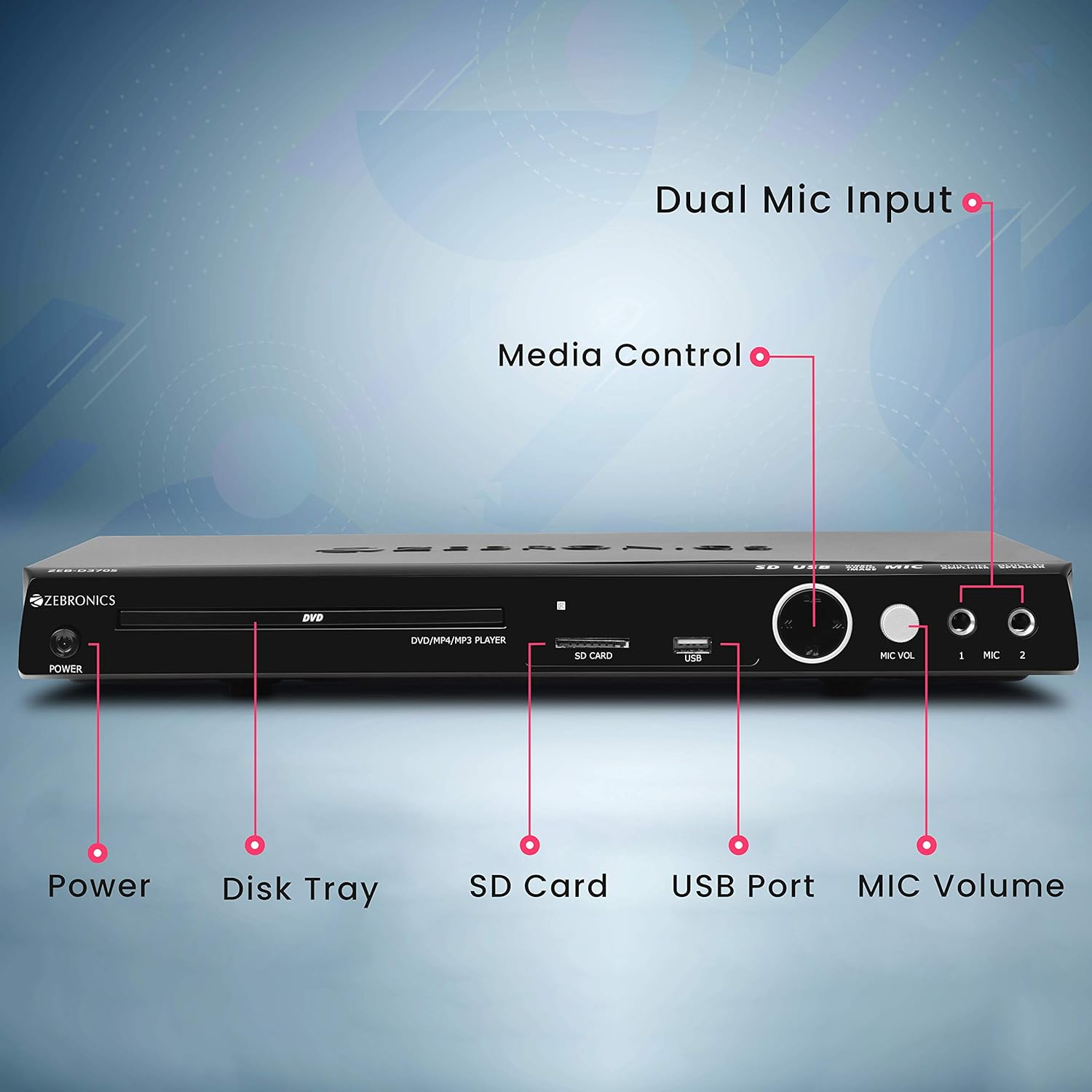
Front panel of the Zebronics Zeb-D370S DVD Player, showing the Power button, Disk Tray, SD Card slot, USB Port, MIC Volume control, and two Microphone inputs (MIC 1, MIC 2).
- Bouton pouvwa: Limen oswa etenn inite a.
- Disk Tray: For inserting DVDs, CDs, VCDs, and SVCDs.
- Plas kat SD: Pou jwe medya files soti nan yon kat SD.
- Pò USB: Pou jwe medya files soti nan yon kondwi USB.
- Volim MIC: Ajiste volim mikwofòn ki konekte yo.
- MIC 1 & MIC 2: Inputs for connecting microphones for karaoke.
- Bouton kontwòl medya yo: Play/Pause, Stop, Skip, etc.
Koneksyon Panèl Dèyè

Rear panel of the Zebronics Zeb-D370S DVD Player, detailing the Coaxial Output, Optical Output, 5.1 Channel Output, HDMI port, Composite video output, Component video output, S-Video output, and Ext-Audio Output.
- Sòti HDMI: For high-definition video and audio connection to a TV or display.
- Sòti videyo konpoze: Standard definition video output.
- Sòti Videyo Konpozan: Higher quality analog video output (YPbPr).
- Sòti S-Videyo: Improved analog video output.
- Digital Audio Output (Optical & Coaxial): For connecting to external audio receivers or sound systems.
- Analog 5.1 Channel Output: For connecting to a 5.1 channel speaker system.
- Ext-Audio Output: Additional audio output connections.
- Sòti Oratè: Terminals for connecting external speakers, utilizing the built-in amplifier.

Dèyè view of the Zebronics Zeb-D370S DVD Player highlighting the built-in amplifier, built-in speaker, and speaker output terminals.
Enstriksyon Enstalasyon
1. Koneksyon pouvwa
- Ensure the DVD player is placed on a stable, flat surface with adequate ventilation.
- Connect the power cable to the AC input on the rear of the DVD player.
- Plug the other end of the power cable into a standard electrical outlet (110V - 260V AC).
2. Video Connection to TV/Display
Chwazi youn nan metòd koneksyon sa yo:
- HDMI (Recommended for best quality): Connect an HDMI cable from the HDMI output on the DVD player to an HDMI input on your TV.
- Konpozan Videyo: Connect component video cables (Red, Green, Blue) from the DVD player's component outputs to the corresponding inputs on your TV.
- Videyo konpoze: Connect a composite video cable (Yellow) from the DVD player's composite output to the yellow video input on your TV.
- S-Videyo: Connect an S-Video cable from the DVD player's S-Video output to the S-Video input on your TV.
3. Koneksyon odyo
Chwazi youn nan metòd koneksyon odyo sa yo:
- HDMI: If using HDMI for video, audio will also be transmitted via the HDMI cable.
- 5.1 Channel Analog Output: Connect RCA cables from the 5.1 channel outputs (Front Left, Front Right, Center, Subwoofer, Surround Left, Surround Right) on the DVD player to a compatible 5.1 channel amplifier oswa sistèm oratè.
- Odyo Dijital (Optik/Koaksyal): Connect an optical or coaxial cable from the respective output on the DVD player to a digital audio input on your amplifier or home theater system for surround sound.
- Built-in Speaker Output: If using the built-in speakers, ensure no external speakers are connected to the 5.1 channel outputs unless desired.
4. Microphone Connection (Optional)
- Plug your microphones into the MIC 1 and/or MIC 2 inputs on the front panel.
- Adjust the MIC Volume knob to control microphone audio levels.
Enstriksyon Operasyon

Zebronics Zeb-D370S DVD Player with a disc inserted, remote control, and a visual representation of content playing on a screen, illustrating its multimedia capabilities.
1. Lekti Disk
- Peze a Pouvwa button to turn on the DVD player.
- Peze a Louvri/Fèmen button (usually on the remote or front panel) to open the disc tray.
- Place a compatible disc (DVD Video, DVD+RW/-RW/+R/-R, Dual Layer Disc, CD Audio, CD-R/-RW, VCD, SVCD) onto the disc tray with the label side facing up.
- Peze a Louvri/Fèmen Peze bouton an ankò pou fèmen plato a. Jwè a ap kòmanse lekti otomatikman oubyen ap montre yon meni.
- Use the remote control for playback functions such as Play, Pause, Stop, Fast Forward, Rewind, and Chapter Skip.
2. USB/SD Media Playback
- Insert a USB drive into the USB port or an SD card into the SD card slot on the front panel.
- The player should automatically detect the media and display a menu to browse files. If not, select the USB or SD source using the remote control's Sous or Antre bouton.
- Navige nan ou files (VOB, MP4, DIVX, AVI, MPEG-1, MPEG-2, 3GP, MP3, WMA, AAC, JPEG, TXT) using the remote control and press Jwe pou kòmanse lecture.
3. Fonksyon Karaoke
- Connect one or two microphones to the MIC 1 and MIC 2 inputs.
- Play a karaoke disc or a media file with instrumental tracks.
- Adjust the MIC Volume knob on the front panel to control the microphone audio level.
4. Fonksyon avanse
- CD Ripping: Convert audio CDs to digital formats (refer to on-screen menu for options).
- Picture Slideshow: View JPEG images from disc, USB, or SD card as a slideshow.
- Eskanè pwogresif: Provides a smoother, flicker-free image on compatible displays.
- Zoom IN/OUT: Magnify or reduce the displayed image during playback.
- High Speed Search: Quickly scan through disc or media content.
- Lock paran: Restrict playback of certain content based on ratings.
- Lektur enstantane: Jump back a few seconds during playback.
- Disc Resume: Resume playback from where it was last stopped on a disc.
Antretyen
- Netwaye inite a: Use a soft, dry cloth to clean the exterior of the DVD player. Do not use liquid cleaners or abrasive materials.
- Swen Disk: Manyen disk yo nan kwen yo. Kenbe yo pwòp epi san reyur. Sèvi ak yon twal mou ki pa gen pousyè pou siye disk yo soti nan sant la pou ale deyò.
- Vantilasyon: Asire ouvèti vantilasyon yo pa bloke pou anpeche surchof.
Depanaj
If you encounter issues with your DVD player, refer to the table below for common problems and solutions:
| Pwoblèm | Kòz posib | Solisyon |
|---|---|---|
| Pa gen pouvwa | Kab kouran an pa konekte; Priz kouran an pa fonksyone | Tcheke koneksyon kab kouran an; Eseye yon lòt priz kouran |
| Pa gen pwodiksyon videyo | Incorrect video cable connection; Incorrect input selected on TV | Ensure video cables are securely connected; Select the correct input source on your TV (e.g., HDMI 1, AV) |
| Pa gen pwodiksyon odyo | Incorrect audio cable connection; TV/amplifier volume too low; Mute activated | Check audio cable connections; Increase volume; Deactivate mute function |
| Disk pa jwe | Disc is dirty or scratched; Disc format not supported; Disc inserted incorrectly | Clean the disc; Ensure disc is compatible; Insert disc with label side up |
| USB/SD media not detected | USB drive/SD card not inserted correctly; Incompatible file format; Corrupted media | Reinsert USB/SD; Check supported file formats; Try a different USB/SD device |
Espesifikasyon

Dimensions of the Zebronics Zeb-D370S DVD Player: 360mm (width), 220mm (depth), and 50mm (height).
| Karakteristik | Detay |
|---|---|
| Non modèl | Zeb D370S |
| Mak | ZEBRONIK |
| Dimansyon pwodwi | 28 x 39 x 82 mm (1.4 kg) |
| Rezolisyon | 1920 x 1080 (Supported resolutions: 480i/576i/480p/576p/720p/1080i/1080p) |
| Karakteristik espesyal | Surround Sound, Built-in Amplifier, Built-in Stereo Speaker, Karaoke Mic Input |
| Audio Sòti Mode | Stereo, Surround (2CH / 5.1CH / Virtual Surround Sound) |
| Konfigirasyon Chanèl Son Antoure Oratè a | 5.1 |
| Fòma odyo sipòte | Dolby Digital, MP3, WMA, AAC |
| Video Playback System | NTSC / PAL / AUTO |
| Kalite Connector | HDMI, USB, SD Slot, MIC 1 & MIC 2, Composite, Component, S-Video, Digital Audio Output (Optical & Coaxial), Analog 5.1Ch Output, Ext-Audio Output x 2 |
| Media Type (Playback Disc) | DVD Video, DVD+RW/-RW/+R/-R, Dual Layer Disc, CD Audio, CD-R/-RW, VCD, SVCD |
| Medya Files Sipòte | VOB, MP4, DIVX, AVI, MPEG-1, MPEG-2, 3GP, MP3, WMA, AAC, JPEG, TXT |
| Opere Voltage | 110V - 260V AC |
| Fonksyon | CD Ripping, Picture SlideShow, Progressive scan, Zoom IN/OUT, High speed search, Parental lock, Instant replay, Disc resume |
Garanti ak sipò
For warranty information, technical support, or service inquiries, please refer to the warranty card included with your product or visit the official Zebronics websit la. Pa eseye repare aparèy la tèt ou.


