Entwodiksyon
The Risebass Portable Karaoke Machine is a versatile and compact audio system designed for entertainment. It features Bluetooth connectivity, FM radio, and support for various media inputs, along with integrated LED party lights and a wired microphone for an immersive karaoke experience. Its portable design makes it suitable for use in various settings.
Ki sa ki nan bwat la
Tanpri verifye sa ki nan pake a pou asire w ke tout atik yo la:
- Risebass Portable Karaoke Machine (Bluetooth Speaker)
- Mikwofòn branche
- braslè zepòl
- Kab Mikwofòn
- Chaje kab

Enstriksyon Enstalasyon
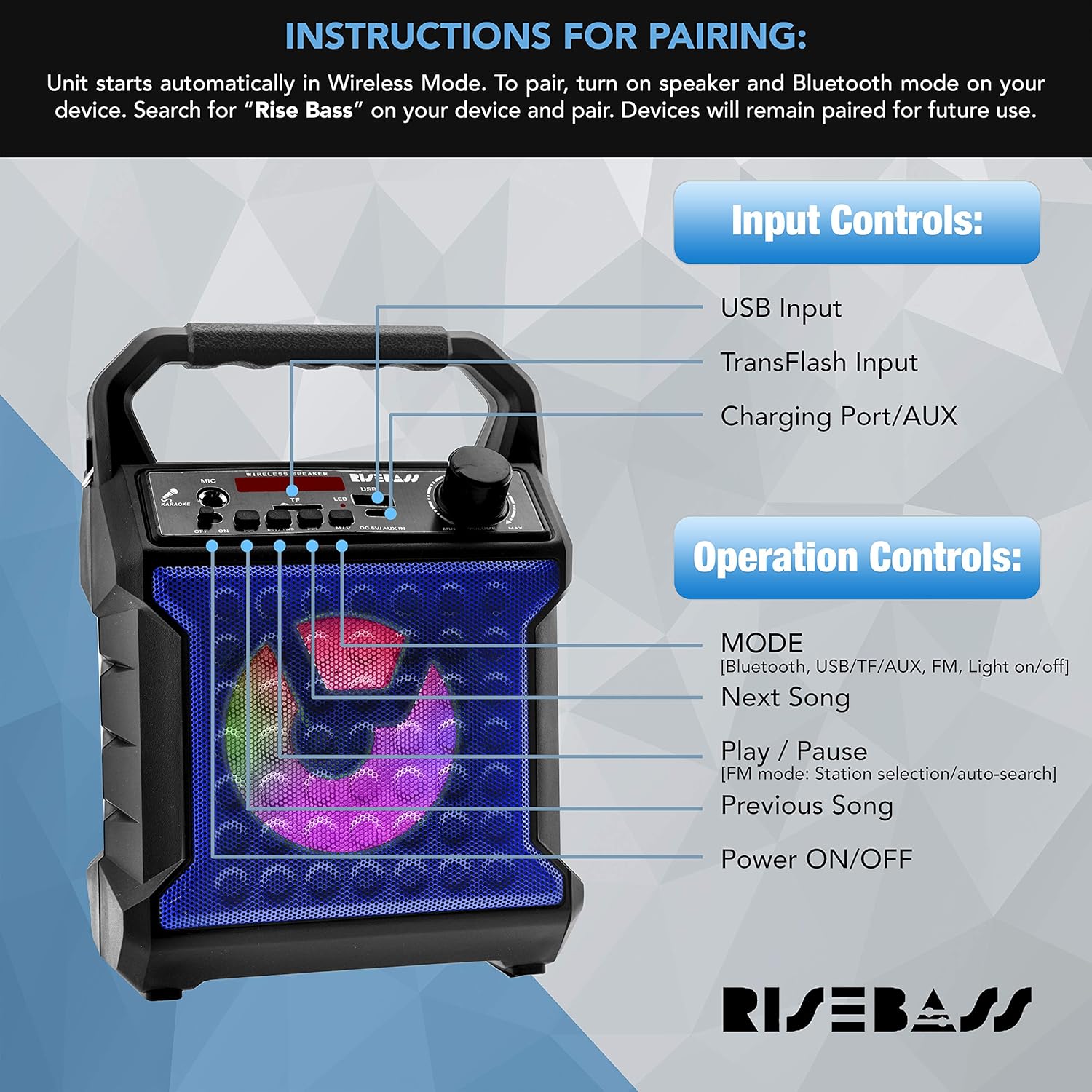
- Chaje inite a: Before first use, fully charge the karaoke machine using the provided charging cable. Connect the small end of the charging cable to the 'DC 5V/AUX-in' port on the unit and the USB end to a compatible USB power adapter (not included). The charging indicator light will show charging status.
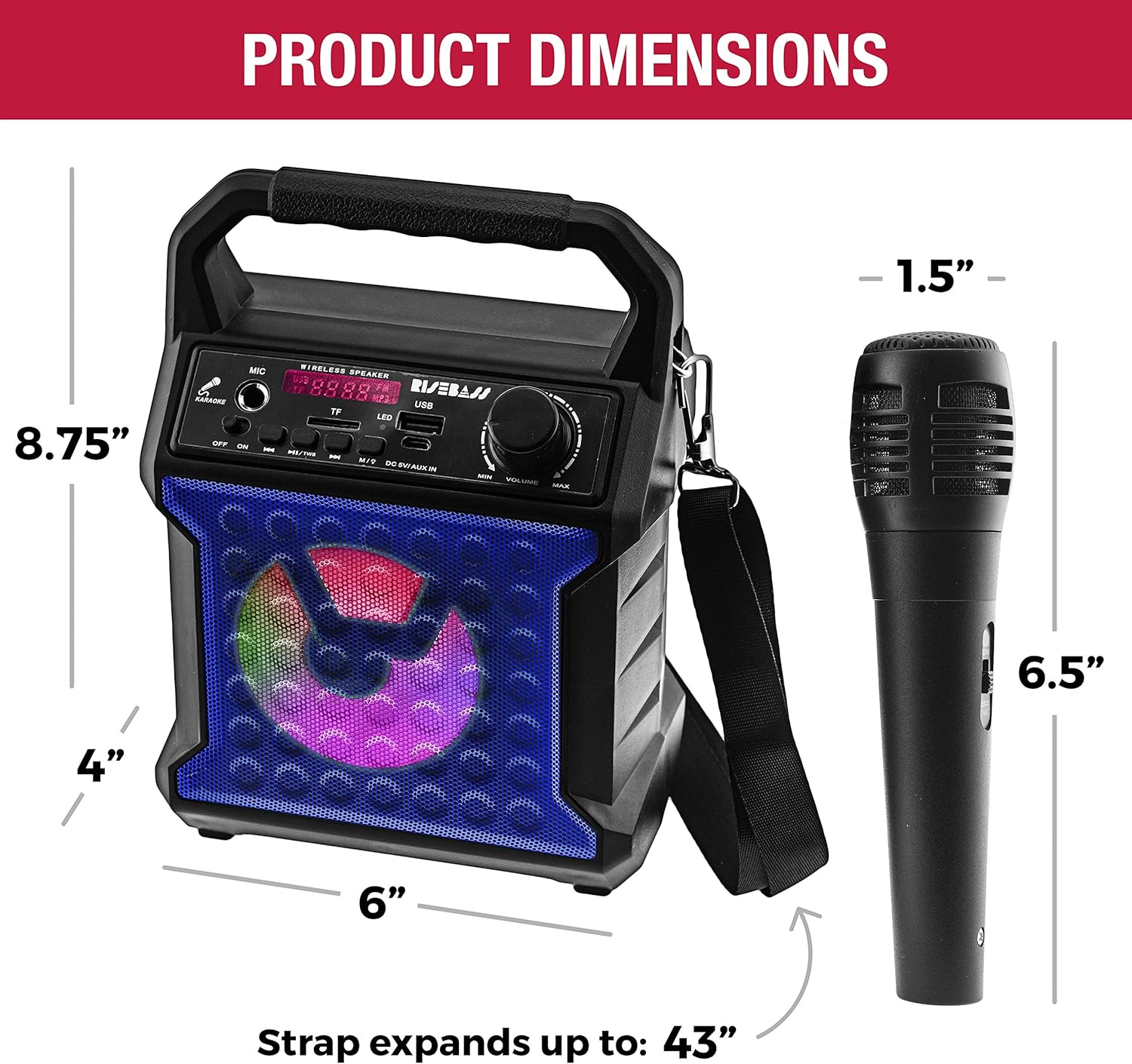
- Tache braslè zepòl la: Locate the two attachment points on the sides of the karaoke machine. Securely clip each end of the shoulder strap to these points for easy portability.
- Konekte mikwofòn la: Insert the microphone cable's XLR end (the larger, round end) into the microphone's input port. Then, insert the 6.35mm (1/4 inch) jack end of the microphone cable into the 'MIC' input port on the karaoke machine.
Enstriksyon Operasyon
Power On/Off
Pou limen aparèy la, peze epi kenbe bouton an Pouvwa ON/OFF button. Press and hold again to power off.
Seleksyon mòd
Peze a MÒD button to cycle through available modes: Bluetooth, USB, TF Card, FM Radio, and AUX input.
Pè Bluetooth
- Turn on the karaoke machine. It will automatically enter Wireless (Bluetooth) Mode.
- Sou aparèy ou an (telefòn entelijan, tablèt, elatriye), aktive Bluetooth epi chèche aparèy ki disponib yo.
- Select "Rise Bass" from the list of devices to pair. Once paired, the unit will confirm the connection. Devices will remain paired for future use.
Operasyon radyo FM
- Chanje nan mòd Radyo FM lè l sèvi avèk la MÒD bouton.
- Peze a Jwe/Poz button to initiate an automatic station search. The unit will scan and save available FM stations.
- Sèvi ak la Next Song epi Previous Song bouton navige nan estasyon sove.
Lektur kat USB/TF
- Insert a USB drive or TF (microSD) card with audio files nan pò respektif la.
- The unit will automatically switch to USB or TF Card mode and begin playback. If not, use the MÒD bouton an pou chwazi antre ki kòrèk la.
- Sèvi ak la Next Song epi Previous Song bouton pou sote tras.
- Peze a Jwe/Poz bouton pou fè yon poz oswa rezime lekti.
AUX Antre
Connect an external audio device (e.g., smartphone, MP3 player) to the 'DC 5V/AUX-in' port using a 3.5mm audio cable (not included). Switch to AUX mode using the MÒD button. Audio will play through the karaoke machine's speaker.
Itilizasyon Mikwofòn
Ensure the microphone is properly connected to the 'MIC' input. Adjust the microphone volume using the dedicated knob on the unit. Sing or speak into the microphone for ampson lifye.
Dirije Efè ekleraj
The unit features multicolor LED lights that activate automatically when powered on. There is a dedicated button to turn the lights on or off.
Antretyen
- Netwaye aparèy la avèk yon twal mou epi sèk. Pa sèvi ak pwodui netwayaj abrazif oswa solvan.
- Kenbe aparèy la lwen dlo, imidite, ak limyè solèy dirèk.
- Sere nan yon kote ki fre, sèk lè yo pa itilize pou peryòd pwolonje.
- Asire w ke tout pò yo pa gen pousyè ak debri.
Depanaj
| Pwoblèm | Solisyon posib |
|---|---|
| Aparèy pa limen. | Ensure the unit is fully charged. Connect to a power source and allow it to charge for a few hours. |
| Pa gen son ki soti nan oratè a. | Check the volume level on both the karaoke machine and the connected device. Ensure the correct input mode is selected (Bluetooth, USB, TF, AUX). |
| Mikwofòn pa mache. | Ensure the microphone cable is securely connected to both the microphone and the 'MIC' input on the unit. Check the microphone's volume knob. |
| Bluetooth appariement echwe. | Make sure the karaoke machine is in Bluetooth mode. Ensure your device's Bluetooth is enabled and within range. Try unpairing and re-pairing the device. |
| Resepsyon radyo FM ki fèb. | Adjust the unit's position to improve signal reception. Ensure no strong interference sources are nearby. |
Espesifikasyon
| Karakteristik | Detay |
|---|---|
| Mak | RISEBASS |
| Nimewo Modèl | 0 |
| Pwa atik | 1.92 liv |
| Dimansyon pwodwi | 4 x 6 x 8.75 pous |
| Koneksyon | Bluetooth, USB, SD/TF Card, AUX-in, FM Radio |
| Konte Oratè | 1 |
| Kalite batri | Lithium (included) |
| Karakteristik espesyal | Portable, Rechargeable, Wireless, Built-in Microphone, LED Lighting Effects, All-in-One Sound System |
Garanti ak sipò
For warranty information or technical support, please refer to the contact details provided with your product packaging or visit the official RISEBASS websit. Kenbe resi acha ou pou reklamasyon garanti.


