1. Entwodiksyon
The MARS HYDRO FC-E6500 is a high-efficiency, full-spectrum LED grow light designed for both personal and commercial horticulture. Featuring 3144 BridgeLux Diodes, a 2.8 µmol/J PPE, and a 730-watt output, this foldable light provides uniform illumination for optimal plant growth across all stages. Its smart control capabilities allow for precise light management via an application, enhancing cultivation efficiency and yield quality.
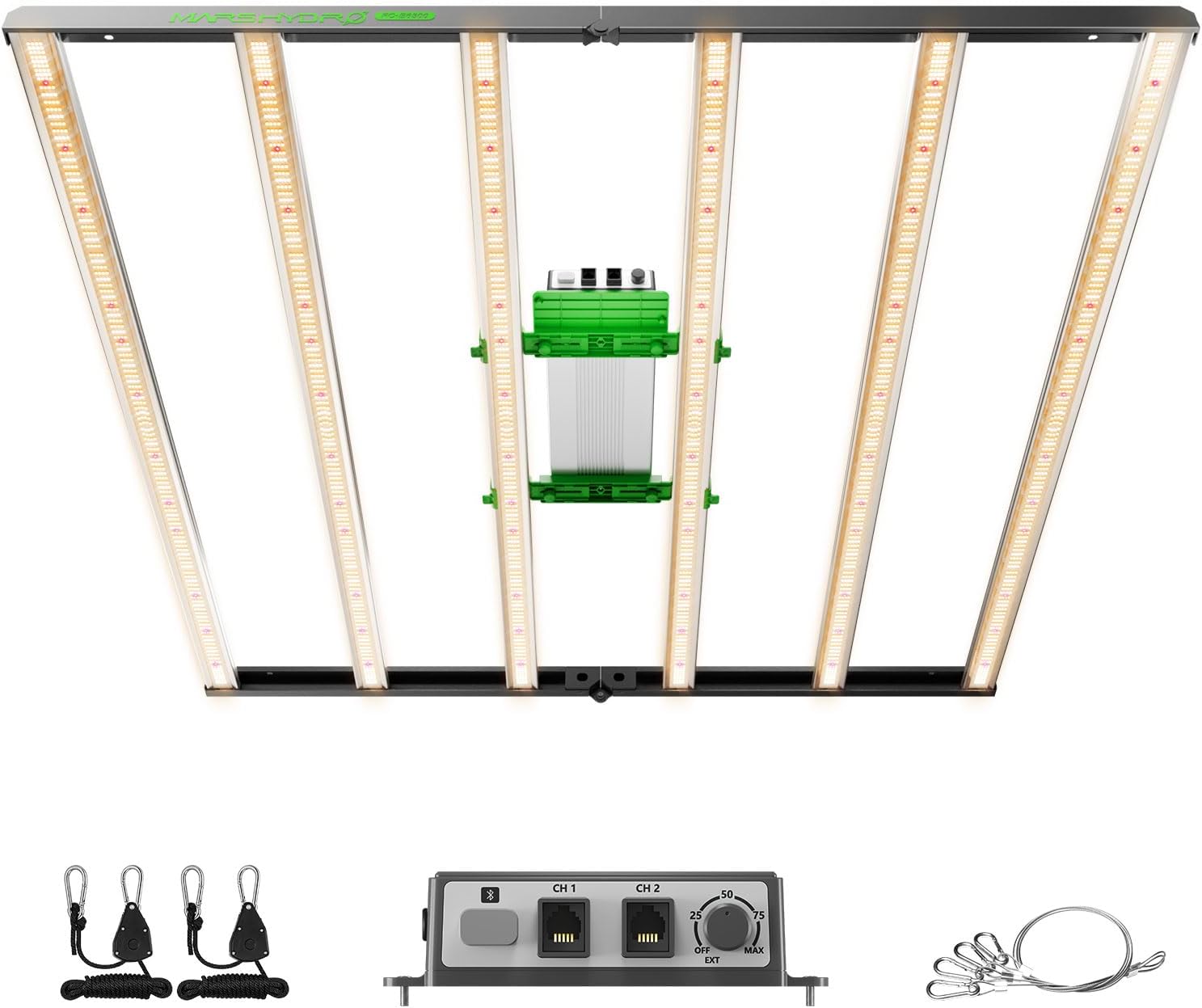
Image: The MARS HYDRO FC-E6500 LED Grow Light, showing the main light fixture, detachable driver, and included hanging accessories.
2. Enfòmasyon sou Sekirite
- Sekirite elektrik: Always ensure the power supply is disconnected before installation, cleaning, or maintenance. Use only with the provided power supply.
- Dlo ak Imidite: The light is IP65 waterproof, but avoid direct water spray on the driver. Ensure proper ventilation to prevent excessive humidity buildup.
- Jesyon Chalè: While designed for superior heat dissipation, ensure adequate airflow around the fixture to maintain optimal operating temperatures.
- Pwoteksyon je: Do not look directly at the illuminated LED diodes. Wear appropriate eye protection when the light is operating.
- Enstalasyon: Install the fixture securely using the provided hanging kits. Ensure the mounting surface can support the weight of the light.
- Timoun ak bèt kay: Kenbe aparèy la lwen timoun ak bèt kay.
3. Pake kontni
Verifye ke tout konpozan yo prezan nan pake a:
- 1x FC-E6500 LED Grow Light Fixture
- 1x chofè ki ap dirije
- 1x manyèl itilizatè
- 1x Hanging Kits (ropes, carabiners)
- Kòd pouvwa
Image: An illustration of the FC-E6500 package contents, including the light fixture, LED driver, user manual, and hanging kits.
4. Enstalasyon ak Enstalasyon
4.1. Asanble
The FC-E6500 features a foldable design for easy setup. No complex assembly is required for the main light bars. Simply unfold the fixture.
Video: Demonstrates the foldable design and ease of setup for the FC-E Series lights, including the FC-E6500.
4.2. Monte
Use the provided hanging kits to suspend the light fixture. Ensure the fixture is level and at the appropriate height above your plants for optimal light distribution.
Video: Provides a step-by-step guide on how to install the MARS HYDRO FC-E Series grow lights.
4.3. Konekte ekipman pou pouvwa a
Connect the LED driver to the main light fixture. Ensure all connections are secure before plugging the power cord into an electrical outlet.

Image: Close-up of the detachable driver unit, highlighting its design for heat dissipation and flexible placement.
5. Operasyon Enstriksyon
5.1. Manyèl kontwòl gradyasyon
The FC-E6500 features a manual dimming knob on the driver unit. Rotate the knob to adjust the light intensity from 10% to 100% to suit your plants' needs at different growth stages.

Image: A close-up of the dimming knob on the FC-E6500 driver, showing settings from OFF to MAX.
5.2. App Control (iConnectu Controller)
For advanced control, the FC-E6500 can be managed via the MARS HYDRO App using an iConnectu Controller (purchased separately). This allows for remote monitoring and control of brightness, timers, and scene settings.
Video: A user guide for the MARS HYDRO Smart Grow Light APP, demonstrating remote control features.
Video: Demonstrates the WiFi/Bluetooth APP control features of the Mars Hydro FC-E6500 Smart Light.
5.2.1. Konekte ak App a
- Ensure your iConnectu controller is connected to the light and powered on.
- Download the MARS HYDRO App from your device's app store.
- Open the app and follow the on-screen instructions to add your device. This typically involves scanning for Bluetooth devices and then configuring WiFi settings.
- For remote control, connect the dimming box via a 2.4G WiFi network. 5G WiFi networks are not supported.
5.2.2. Brightness and Timer Settings
- Ajiste klète: Use the slider in the app to set the light intensity from 10% to 100%.
- Mete revèy: Access the timer function to set specific start and end times for the light cycle. This cycle will repeat daily.
- Sunrise/Sunset Mode: This feature simulates natural light intensity changes, gradually increasing brightness from sunrise to daylight and decreasing it towards sunset. This helps plants experience a more natural growth cycle.
5.2.3. Anviwònman sèn
The app allows you to create and manage different lighting scenes (e.g., seeding, vegetative, flowering) with pre-configured light periods and intensities. You can add lights to groups and apply specific scenes to those groups.
5.3. Ekleraj Espèk Konplè
The FC-E6500 provides a full spectrum of light (2800k-5000k, 660nm enhanced Deep Red) to support all plant growth stages, from seedling to flowering. This spectrum is designed to mimic natural sunlight for optimal development.

Image: A graph illustrating the full spectrum output of the FC-E6500, showing peaks in blue, green, yellow, orange, and red wavelengths.
5.4. Supplemental Light Integration (ADLITE)
The FC-E6500 supports integration with ADLITE supplemental lights (UV/IR/Deep Red, purchased separately) to further customize the light spectrum. These can be used to enhance specific aspects of plant growth, such as THC/CBD production (UV), flowering (IR), and fruit development (Deep Red).

Image: A diagram showing suggested timings for UV and IR supplemental light usage during different plant growth stages.
6. Antretyen
- Netwayaj: Regularly wipe the light bars with a dry, soft cloth to remove dust and debris. Ensure the light is off and cooled before cleaning.
- Enspeksyon: Periodically check all cables and connections for any signs of wear or damage. Replace any damaged components immediately.
- Vantilasyon: Ensure that the grow space has adequate ventilation to prevent heat buildup and maintain optimal environmental conditions for your plants and the light fixture.
NAN. Depanaj
7.1. Smart Grow Devices Not Connecting to WiFi
- Verify WiFi Credentials: Double-check the WiFi network name and password for accuracy.
- Evite karaktè espesyal: Ensure your WiFi name or password does not contain special characters, spaces, or unsupported symbols.
- Gwoup Frekans: Confirm your WiFi network is operating on a 2.4G frequency. 5G WiFi networks are not supported by the device.
- Reyajiste aparèy: If the above steps fail, try resetting your smart grow device and attempt reconnection.
- Hotspot mobil: If the device still cannot connect, try using a mobile hotspot (excluding 5G) to rule out router issues.
- Mizajou mikrolojisyèl: Smart grow lights and fans may require a mandatory upgrade through the APP system. If prompted during WiFi connection, wait for 2-3 minutes for the upgrade to complete before attempting reconnection.
Video: This segment of the Smart Grow Light APP User Guide addresses common WiFi connection issues and solutions.
7.2. Smart Grow Devices Not Connecting to Bluetooth
- Bluetooth limen: Ensure Bluetooth is enabled on your mobile phone or tablet.
- Reyajiste aparèy: Try resetting your smart grow device and then attempting to reconnect to Bluetooth.
- Different Device: Try connecting the Bluetooth on a different mobile phone to your smart grow devices to see if it can establish a connection.
- BLE Protocol: If your devices can be found by Bluetooth on your own mobile phone, but the Mars Hydro APP cannot scan and connect to them, verify if your mobile phone/tablet supports the BLE (Bluetooth Low Energy) protocol. Only mobile devices that support BLE can reliably scan and connect to the smart grow devices.
Video: This segment of the Smart Grow Light APP User Guide addresses common Bluetooth connection issues and solutions.
7.3. Smart Grow Devices Not Operating According to Preset Time
- Check Time Zone: Confirm the actual execution time zone in your location (you can refer to tan.se).
- App Time Zone: Open the Mars Hydro APP, navigate to "Me" -> "Time Zone", and check if the time zone set by the APP system is consistent with your local execution time zone.
- Reyajiste revèy: If the time zone is not consistent, please select the time zone that matches your current execution time zone and reset the timer.
Nòt: When using the Mars Hydro APP to control your smart grow devices, please avoid manual operation (adc mode) as it may override the APP operation (cmd mode).
Lè varè: The date when daylight saving time is generally implemented varies by region: April to September (Northern Hemisphere) and October to March (Southern Hemisphere).
Video: This segment of the Smart Grow Light APP User Guide explains how to troubleshoot timing issues.
8. Espesifikasyon
| Karakteristik | Detay |
|---|---|
| Modèl | FC-E6500 |
| Sous pouvwa | Fil elektrik |
| Wattage | 730 Watts |
| Voltage | 120 Volts |
| Klète | 109667 Lumen |
| Kalite sous limyè | LED (BridgeLux Diodes) |
| PPE | 2.8 µmol/J |
| Coverage (Personal) | 5x5 pye |
| Coverage (Commercial) | 4x4 pye |
| Materyèl | Detachable Aluminum + Metal |
| Dimansyon | 45.1"L x 44"L x 3.1"H |
| Pwa atik | 25 liv (11.39 kilogram) |
| Karakteristik | Dimmable, Foldable, Full Spectrum, IP65 Waterproof, Smart Control (via iConnectu controller) |
| Sètifikasyon | CE, ETL |
9. Garanti ak sipò
For warranty information, technical support, or any inquiries regarding your MARS HYDRO FC-E6500 LED Grow Light, please visit the official MARS HYDRO websit la oubyen kontakte sèvis kliyan yo dirèkteman. Kenbe resi acha w la pou reklamasyon garanti.
Ofisyèl Websit: www.mars-hydro.com


