Entwodiksyon
This manual provides essential information for the safe and effective operation, maintenance, and troubleshooting of your DEWALT XR 18V 5.0Ah Hammer Drill Driver, model DCD796P3. Please read these instructions carefully before using the tool and keep them for future reference.
The DCD796P3 is a versatile cordless hammer drill driver designed for drilling into wood, metal, and masonry, as well as for screwdriving applications. It features a brushless motor for extended runtime and durability, and comes equipped with 5.0Ah XR Lithium-Ion batteries.
Enstriksyon Sekirite
Toujou swiv prekosyon sekirite debaz yo pou diminye risk dife, chòk elektrik, ak aksidan pèsonèl. Kenbe zòn travay ou pwòp epi byen limen. Pa sèvi ak zouti elektrik nan atmosfè eksplozif, tankou nan prezans likid, gaz, oswa pousyè ki ka pran dife.
- Wear appropriate personal protective equipment (PPE) including eye protection, hearing protection, and gloves.
- Tache pyès travay la. Sèvi ak clamps oswa yon eten pou kenbe pyès la byen fèm.
- Ensure the drill bit or accessory is correctly installed and tightened in the chuck before operation.
- Avoid accidental starting. Ensure the switch is in the off-position before connecting to a battery pack, picking up or carrying the tool.
- Do not force the tool. Let the tool do the work at the correct speed.
- Dekonekte pake batri a anvan ou fè nenpòt ajisteman, chanje akseswa, oswa sere zouti a.
- Use only DEWALT recommended accessories and battery packs.
- Kenbe zouti avèk swen. Kenbe zouti pou koupe byen file ak pwòp.
Eleman souview
Familiarize yourself with the main components of your DEWALT DCD796P3 Hammer Drill Driver.

Figi 1: An jeneral view of the DEWALT DCD796P3 Hammer Drill Driver with an attached 5.0Ah battery pack. This image displays the main body, chuck, clutch settings, mode selector, trigger, and battery interface.
- Chuck: Keyless chuck for quick bit changes.
- Kolye Ajisteman Koupl: Adjusts the torque setting for screwdriving applications.
- Selektè mòd: Switches between screwdriving, drilling, and hammer drilling modes.
- Seleksyon vitès: Two-speed gearbox for high-speed drilling or high-torque screwdriving.
- Chanjman deklanche: Kontwòl vitès varyab.
- Bouton Avant/Anvers: Chanje direksyon wotasyon an.
- Limyè travay ki ap dirije: Eklere zòn travay la.
- Bouton pou libere pil la: For detaching the battery pack.
- Clip senti: Pou pote pratik.
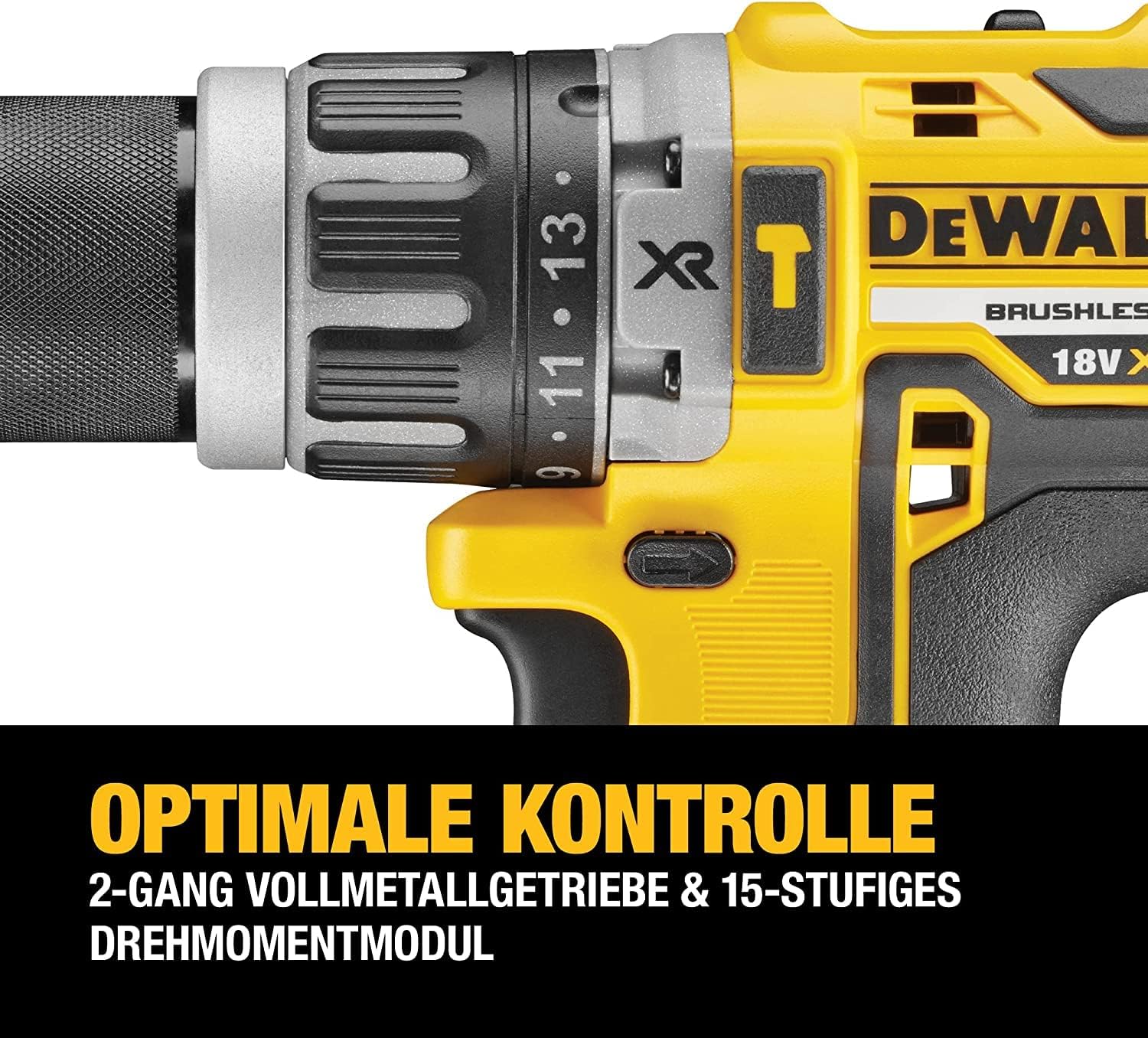
Figi 2: Yon detaye view of the drill's chuck, torque adjustment collar, and mode selector. The numbers on the collar indicate different torque settings, and the icons represent screwdriving, drilling, and hammer drilling modes.
Enstalasyon
Enstalasyon batri ak chaje
The DCD796P3 uses DEWALT 18V XR Lithium-Ion battery packs. Ensure the battery is fully charged before first use.
- To install the battery: Align the battery pack with the tool's handle and slide it in until it clicks securely into place.
- To remove the battery: Press the battery release button and pull the battery pack out of the tool.
- To charge the battery: Insert the battery pack into the DEWALT charger (included). Refer to the charger's instruction manual for specific charging procedures and indicators.
Installing and Removing Drill Bits/Accessories
The drill features a keyless chuck for easy accessory changes.
- Rotate the front collar of the chuck counter-clockwise until the chuck jaws are open wide enough to accept the bit.
- Mete mèch perçage a oswa akseswa a nèt nan mandrin lan.
- Rotate the front collar clockwise to tighten the chuck jaws securely around the bit. Ensure the bit is centered and firmly gripped.
- Pou retire bit la, fè pwosedi sere boulon an nan sans ranvèse.
Enstriksyon Operasyon
Chwazi Mode Operasyon
The mode selector allows you to choose between three operating modes:
- Mòd Vissage (⚙ icon): For driving screws. Use the torque adjustment collar to set the desired clutch setting. The clutch will disengage once the set torque is reached, preventing overtightening or stripping.
- Mòd Forage (★ icon): For drilling into wood and metal. The clutch is bypassed in this mode, providing maximum torque.
- Mòd Perçage Mato (⚒ icon): For drilling into masonry and concrete. This mode combines rotary action with a hammering action.
Rotate the mode selector collar to align the desired icon with the indicator mark on the drill body.
Setting Torque (Screwdriving Mode Only)
The torque adjustment collar has settings from 1 to 15, plus a drill icon. Select a lower number for smaller screws or softer materials, and a higher number for larger screws or harder materials. Experiment on scrap material to find the appropriate setting.
Chwazi vitès
The speed selector switch is located on top of the drill. It has two settings:
- Vitès 1 (Vitès ba): Provides higher torque for heavy-duty screwdriving and large diameter drilling. (0-550 RPM)
- Vitès 2 (Gwo Vitès): Provides higher speed for fast drilling with smaller bits. (0-2000 RPM)
Ensure the tool is stopped before changing speed settings.
Operating the Trigger Switch and Forward/Reverse Control
- Chanjman deklanche: Squeeze the trigger to start the tool. The speed is variable; press further for higher speed.
- Bouton Avant/Anvers: Push the button from the left side for forward rotation (drilling/driving). Push from the right side for reverse rotation (removing screws/bits). Center position locks the trigger to prevent accidental starting.

Figi 3: The DEWALT DCD796P3 Hammer Drill Driver being used to drive a screw into a wooden beam, demonstrating a typical application. The user is holding the tool firmly, and a magnetic bit holder is visible.
Antretyen
Antretyen regilye asire pèfòmans optimal epi pwolonje lavi zouti ou a.
- Netwayaj: Keep the ventilation slots clear of dust and debris. Use a soft brush or compressed air to clean the tool. Do not use water or chemical cleaners.
- Antretyen Mandren: Netwaye machwè mandrin yo detanzantan pou asire ke moso yo byen kenbe.
- Swen batri: Sere pil yo nan yon kote ki fre epi sèk, lwen limyè solèy dirèk. Pa sere pil ki fin dechaje nèt pou yon bon bout tan.
- Enspeksyon: Regularly inspect the power tool, battery pack, and charger for any damage. Do not use damaged components.
- Lubrifikasyon: Zouti sa a grese nan faktori epi li pa bezwen okenn lòt grebaj.
Depanaj
If your DEWALT DCD796P3 is not operating correctly, refer to the following common issues and solutions:
| Pwoblèm | Kòz posib | Solisyon |
|---|---|---|
| Zouti pa kòmanse. | Batri a pa chaje oswa li pa byen enstale. Blokaj deklanchè a angaje. | Charge battery and ensure it is fully seated. Disengage trigger lock by pushing the forward/reverse button to either side. |
| Rediksyon nan puisans oswa vitès. | Low battery charge. Tool overheating. | Recharge battery. Allow tool to cool down. |
| Bit la glise nan mandrin lan. | Mandren an pa byen sere. Tij bit la sal oswa domaje. | Sere byen sere mandrin lan. Netwaye oswa ranplase bit la. |
| Hammer action not engaging. | Mode selector not set to hammer drilling. | Rotate mode selector to the hammer drilling icon. |
For issues not covered here, contact DEWALT customer service or an authorized service center.
Espesifikasyon
| Karakteristik | Spesifikasyon |
|---|---|
| Nimewo Modèl | DCD796P3 |
| Voltage | 18 V |
| Kalite batri | XR Lithium-Ion |
| Kapasite batri | 5.0 Ah |
| Max Torque | 70 Nm |
| Maksimòm pwodiksyon pouvwa | 460 W |
| No Load Speed (Speed 1) | 0-550 RPM |
| No Load Speed (Speed 2) | 0-2000 RPM |
| Kapasite Chuck | 1.5 - 13 milimèt |
| Kapasite Maksimòm Perçage (Bwa) | 40 mm |
| Kapasite Maksimòm Perçage (Metal) | 13 mm |
| Kapasite Maksimòm Perçage (Masonri) | 13 mm |
| Pwa (zouti sèlman) | Approximately 1.7 kg (without battery) |
| Dimansyon (longè x wotè x lajè) | 190 mm x 203 mm x 67 mm |
Remak: Espesifikasyon yo ka chanje san avètisman.
Garanti ak sipò
DEWALT provides a limited warranty for its products. For detailed warranty information, including terms and conditions, please refer to the warranty card included with your product or visit the official DEWALT websit la. Kenbe prèv acha ou pou reklamasyon garanti.
For technical assistance, service, or to locate an authorized service center, please contact DEWALT customer support. Contact information can typically be found on the DEWALT websit la oubyen nan dokimantasyon ki vini ak zouti w la.
Resous sou entènèt: For additional support, product registration, and access to the latest manuals and parts diagrams, visit www.dewalt.com.


