1. Entwodiksyon
This manual provides comprehensive instructions for the setup, operation, and maintenance of your Acctim Karminski Digital Crescendo Alarm Clock. Please read this manual thoroughly before using the device to ensure proper function and longevity.
2. Pwodwi Features
- Luminous reflection display for reduced glare.
- Crescendo alarm with adjustable volume.
- Touch-activated snooze and backlight function.
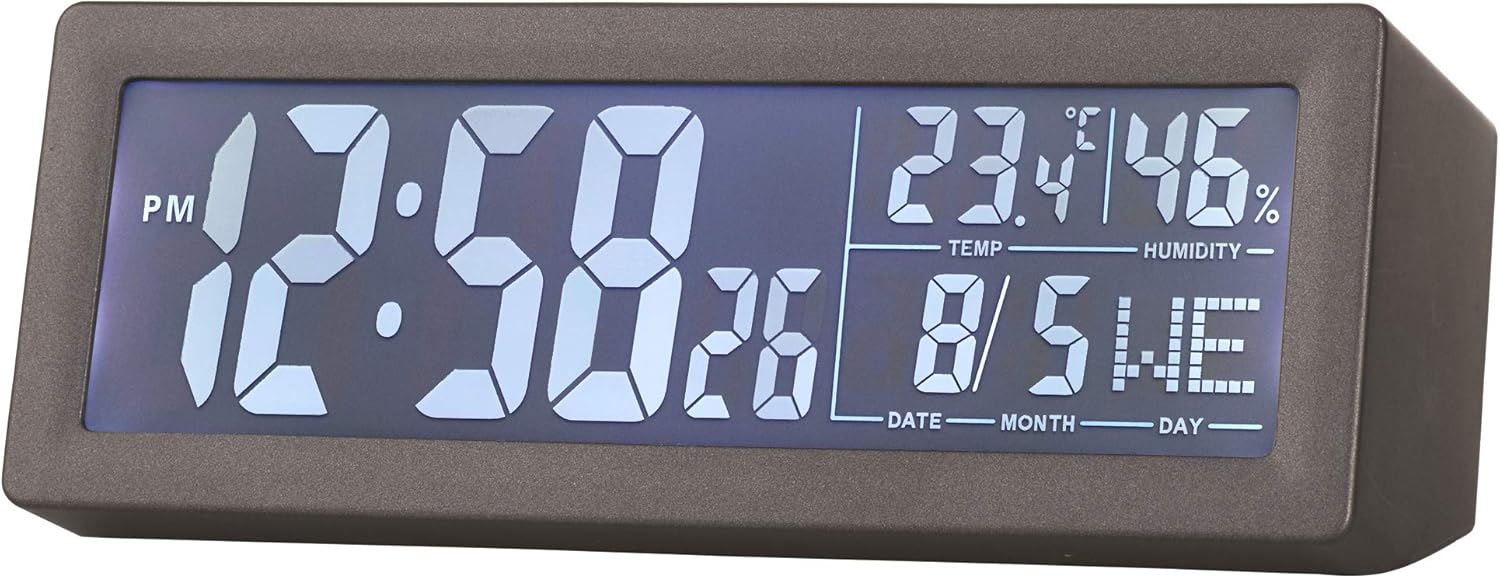
- LCD screen displaying time, date, day, temperature, and humidity.
- Konsepsyon kontra enfòmèl ant ak modèn.
3. Pake kontni
- Acctim Karminski Digital Crescendo Alarm Clock (Model 16007)
- Manyèl Itilizatè (dokiman sa a)
Nòt: 2 x AA batteries are required for operation and are not included in the package.
4. Kontwòl ak Ekspozisyon
4.1 Ekspozisyon devan
The front LCD screen displays the current time, AM/PM indicator, seconds, temperature, humidity, date, and day of the week.

4.2 Rear Controls
The rear panel houses all control buttons and the battery compartment.

- SET bouton: Used to enter and confirm settings for time, date, and alarm.
- Alarm Button (Bell Icon): Used to set and activate/deactivate the alarm.
- DOWN Button (V): Used to decrease values during setting.
- UP Button (^): Itilize pou ogmante valè yo pandan konfigirasyon an.
- SNZ Button: Snooze function, also activates the backlight.
- Bouton VOLIM: Ajiste volim alam lan.
5. Enstalasyon batri
- Locate the battery compartment cover on the rear of the clock.
- Glise kouvèti a louvri.
- Insert 2 new AA batteries, ensuring correct polarity (+ and -) as indicated inside the compartment.
- Ranplase kouvèti lòj batri a byen.
The clock will power on and display default settings or the last saved settings.
6. Premye Enstalasyon: Mete Lè ak Dat
- Peze epi kenbe la SET button for approximately 3 seconds until the time display starts flashing.
- Sèvi ak la UP (^) or DOWN (V) bouton pou ajiste lè a.
- Peze a SET button to confirm the hour and move to minute setting.
- Sèvi ak la UP (^) or DOWN (V) bouton pou ajiste minit yo.
- Peze a SET button to confirm minutes and proceed to year setting.
- Repete pwosesis la lè l sèvi avèk UP (^) or DOWN (V) epi SET pou mete ane a, mwa a ak jou a.
- Apre ou fin mete jou a, peze SET yon dènye fwa pou sòti nan mòd konfigirasyon an.
7. Mete alam la
- Peze epi kenbe la Alarm Button (Bell Icon) for approximately 3 seconds until the alarm time display starts flashing.
- Sèvi ak la UP (^) or DOWN (V) bouton pou ajiste lè alam la.
- Peze a Bouton Alam to confirm the hour and move to minute setting.
- Sèvi ak la UP (^) or DOWN (V) bouton pou ajiste minit alam lan.
- Peze a Bouton Alam one last time to confirm the alarm time and exit the setting mode.
- Pou aktive oswa dezaktive alam lan, peze yon ti tan sou bouton an. Bouton Alam. An alarm icon will appear on the display when the alarm is active.
8. Using the Alarm and Snooze Function
- When the alarm sounds, it will begin with a soft tone and gradually increase in volume (Crescendo alarm).
- To activate the snooze function, briefly touch the top of the clock or press the SNZ button. The alarm will pause for a few minutes and then sound again.
- Pou etenn alam lan nèt, peze nenpòt bouton apa de bouton an. SNZ bouton an. Alam lan ap re-mete pou jou kap vini an.
9. Ajiste Volim Alam lan
The alarm volume can be adjusted using the VOLIM knob located on the rear of the clock. Rotate the knob clockwise to increase volume and counter-clockwise to decrease volume.
10. Display Backlight
To temporarily illuminate the display, briefly touch the top of the clock or press the SNZ button. The blue backlight will activate for a few seconds.
11. Antretyen
- Netwayaj: Siye revèy la ak yon twal mou epi sèk. Pa sèvi ak pwodui netwayaj abrazif oswa solvan.
- Ranplasman batri: Replace batteries when the display becomes dim or functions become erratic. Always replace both batteries at the same time with new AA batteries.
- Depo: Si w ap sere revèy la pou yon peryòd tan pwolonje, retire pil yo pou anpeche likid koule.
NAN. Depanaj
- Ekran an vid oswa li pa klere byen: Check battery installation. Replace with new AA batteries.
- Alam lan pa sonnen: Ensure the alarm is activated (alarm icon visible on display). Check alarm time setting. Adjust alarm volume.
- Lè/dat ki pa kòrèk: Re-enter time and date settings as per Section 6.
- Inaccurate temperature/humidity: Ensure the clock is placed in a location with good air circulation, away from direct heat sources or extreme cold. Allow time for readings to stabilize after initial setup or relocation.
13. Espesifikasyon
| Mak | Acctim |
| Nimewo Modèl | 16007 |
| Dimansyon (L x W x H) | 14.7 x 3.81 x 5.5 cm |
| Pwa | 500 g |
| Kalite ekspozisyon | Digital LCD |
| Sous pouvwa | 2 x AA pil (pa enkli) |
| Karakteristik espesyal | Crescendo Alarm, Snooze, Backlight, Date, Day, Temperature, Humidity |
14. Garanti ak sipò
Information regarding specific warranty terms and customer support contacts for the Acctim Karminski Digital Crescendo Alarm Clock is not provided in the product details. Please refer to the retailer or manufacturer's official websit la pou plis detay sou garanti a ak opsyon sipò yo.


