Entwodiksyon
This manual provides detailed instructions for the safe and effective use of your Dolphin SP-807RBT Bluetooth Karaoke Speaker. Please read this manual thoroughly before operating the device and retain it for future reference.

Imaj: Devan view of the Dolphin SP-807RBT Bluetooth Karaoke Speaker, showing the main speaker unit with a blue illuminated ring and an included microphone resting in front.
Ki sa ki nan bwat la
Lè w ap debale l, tanpri verifye si tout atik sa yo ladan l:
- Dolphin SP-807RBT Bluetooth Karaoke Speaker
- Mikwofòn
- Kontwòl Remote
- 9V pouvwa adaptè
- Manyèl Itilizatè (dokiman sa a)

Image: The Dolphin SP-807RBT speaker shown with its included remote control and microphone, illustrating the main components of the package.
Karakteristik pwodwi
- PA Functionality: This portable PA system allows simultaneous karaoke and music playback. Connect a microphone and play music from a mobile device, AUX, or USB drive.
- Limyè ki ap dirije dinamik: The integrated lights on the speaker synchronize with the music's beat, changing colors to create a visual display.
- Odyo kalite siperyè: Equipped with an 8-inch woofer and a horn tweeter for clear sound and strong bass.
- Wavesync Technology: Enables wireless pairing of two SP-807RBT speakers for a stereo setup (additional speaker sold separately).
- Konfigirasyon miltip: Can be used as a standalone floor speaker or mounted on a speaker stand (stand sold separately).
- Batri ki dire lontan: Features a built-in 7200 mAh battery providing over 7 hours of music playback. Full charge achieved in approximately 4 hours.

Image: Close-up of the Dolphin SP-807RBT speaker's front grille, highlighting the sound-activated LED lights in blue, with smaller insets showing red, blue, and yellow light variations.
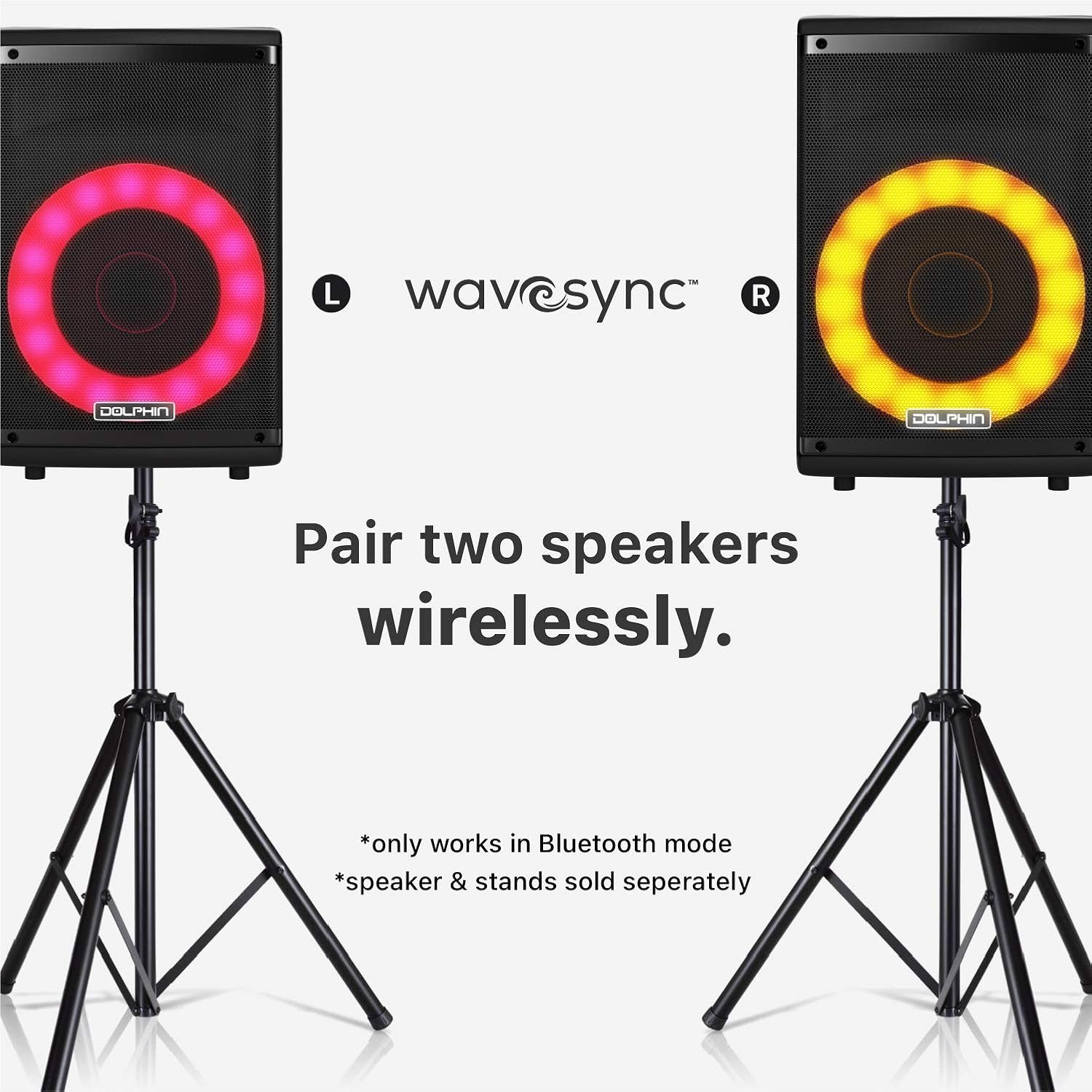
Image: Two Dolphin SP-807RBT speakers, each on a separate stand, illustrating the wireless pairing capability using Wavesync Technology for a stereo sound experience.
Enstalasyon
1. Chaje Oratè a
Before first use, fully charge the speaker. Connect the included 9V power adapter to the DC IN port on the speaker and plug it into a power outlet. The charging indicator light will illuminate. A full charge takes approximately 4 hours.
2. Powering On / Off
Jwenn la POUVWA switch on the control panel. Flip the switch to the ON position to power on the speaker. Flip it to OFF pou koupe pouvwa.
3. Plasman Inisyal
The speaker can be placed on a flat surface or mounted on a compatible speaker stand (sold separately). Ensure stable placement to prevent tipping.

Image: The Dolphin SP-807RBT speaker mounted on a stand, positioned next to a human silhouette to illustrate its approximate height and scale when in use.
Enstriksyon Operasyon
1. Kontwòl Panel Overview
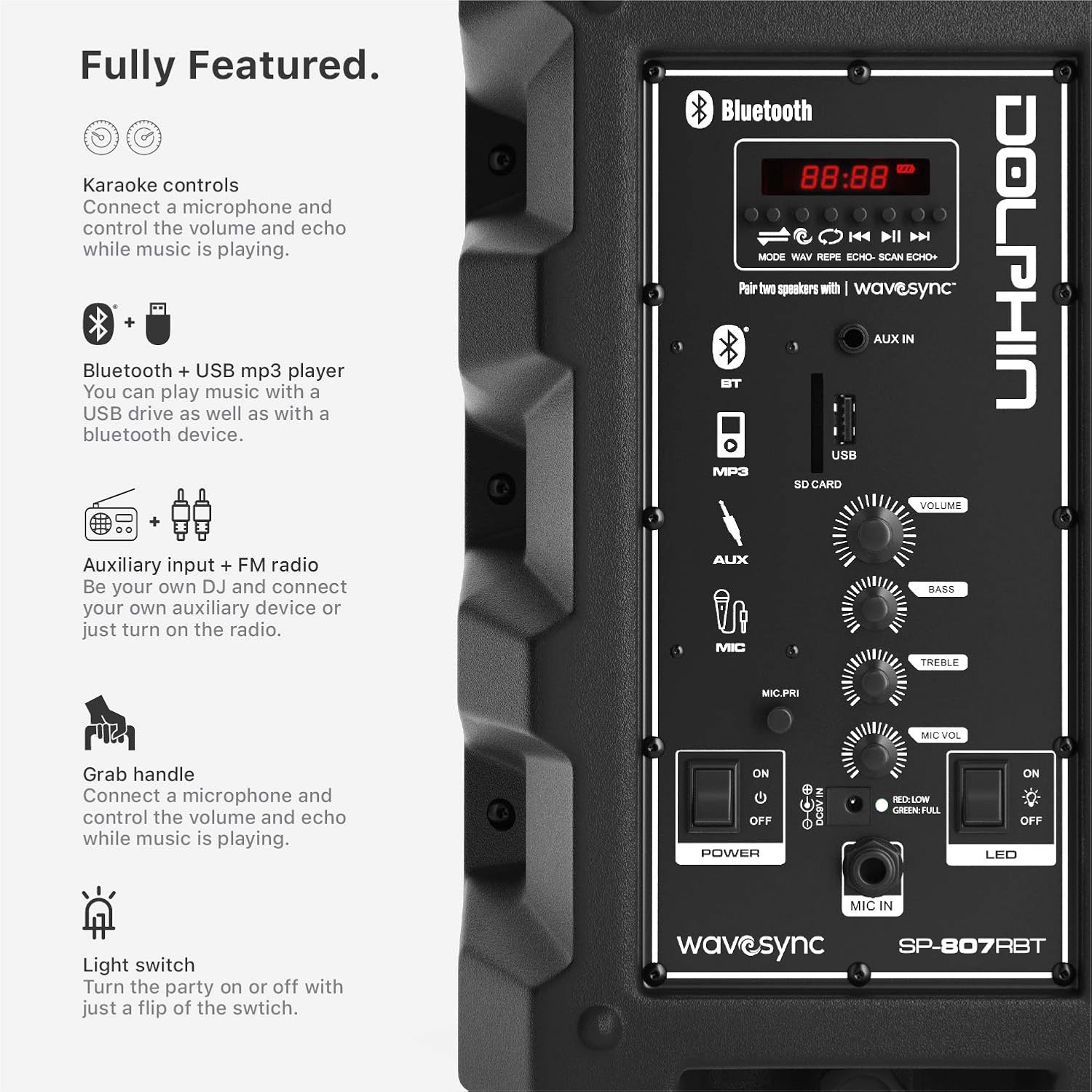
Imaj: Detaye view of the Dolphin SP-807RBT speaker's control panel, showing various inputs (Bluetooth, AUX, USB, SD Card), volume, bass, treble controls, and power/LED switches.
- Ekspozisyon ekran: Montre mòd aktyèl la, nimewo tras la, ak lòt enfòmasyon.
- bouton mòd: Chanje ant mòd antre yo (Bluetooth, AUX, USB, Radyo FM).
- Bouton jwe/poz: Kontwole lèktur medya yo.
- Bouton Anvan/Apre: Navige nan mizik oswa estasyon radyo.
- Volim bouton: Adjusts overall speaker volume.
- Bouton bas/treble: Adjusts audio equalization.
- Bouton Volim Mikwofòn: Ajiste volim antre mikwofòn nan.
- Mic Echo Knob: Adjusts echo effect for microphone.
- Dirije switch: Turns the dynamic LED lights on or off.
2. Bluetooth Koneksyon
- Pouvwa sou oratè a.
- Peze a MÒD button until "Bluetooth" or "BT" appears on the display. The speaker will enter pairing mode, indicated by a flashing Bluetooth icon.
- Sou aparèy mobil ou, aktive Bluetooth epi chèche aparèy ki disponib.
- Select "Dolphin SP-807RBT" from the list.
- Once connected, the Bluetooth icon on the speaker's display will stop flashing, and a confirmation tone may sound.
3. AUX Antre
Konekte yon aparèy odyo ekstèn (pa egzanp, yon telefòn entelijan, yon lektè MP3) nan AUX IN port using a 3.5mm audio cable. Press the MÒD bouton an jiskaske ou chwazi "AUX".
4. USB Drive Playback
Mete yon kle USB ki gen odyo MP3 ladan l files nan USB port. The speaker will automatically switch to USB mode and begin playing. If not, press the MÒD bouton an pou chwazi USB.
5. Microphone Usage (Karaoke Function)
Connect the included microphone to the MIC IN pò a. Ajiste la MIC VOL knob to control the microphone's volume and the MIC ECHO knob for echo effects. You can sing along to music playing via Bluetooth, AUX, or USB.
6. Dynamic LED Lights
To activate or deactivate the sound-activated LED lights, use the dirije switch on the control panel.
7. Wavesync Technology (Wireless Stereo Pairing)
To pair two Dolphin SP-807RBT speakers wirelessly for a stereo experience (only in Bluetooth mode):
- Asire w ke tou de oratè yo limen epi yo an mòd Bluetooth.
- Sou yon oratè (sa a pral oratè prensipal la), peze epi kenbe bouton an WAVESYNC button (if available, or refer to specific pairing instructions on the control panel image). The speakers will attempt to connect to each other.
- Once successfully paired, a confirmation sound will be heard, and the primary speaker will control both units.
- Connect your mobile device to the primary speaker via Bluetooth as described in step 2.
Note: Wavesync pairing is only supported in Bluetooth mode. Additional speakers and stands are sold separately.
Antretyen
- Netwayaj: Sèvi ak yon twal mou epi sèk pou netwaye deyò oratè a. Pa sèvi ak pwodui netwayaj abrazif, sir, oswa solvan.
- Depo: Lè w pa itilize oratè a pou yon bon bout tan, sere l nan yon kote ki fre epi sèk, lwen limyè solèy dirèk ak tanperati ekstrèm.
- Swen batri: To prolong battery life, avoid fully discharging the battery frequently. Recharge the speaker regularly, even if not in use, to maintain battery health. If storing for a long time, charge it to about 50% every few months.
- Vantilasyon: Asire w ouvèti vantilasyon oratè a pa bloke pou anpeche li chofe twòp.
Depanaj
| Pwoblèm | Kòz posib | Solisyon |
|---|---|---|
| Oratè a pa limen. | Batri a fini; Entèriptè a etenn. | Charge the speaker using the provided adapter. Ensure the POWER switch is in the ON position. |
| Pa gen son ki soti nan oratè a. | Volume is too low; Incorrect input mode selected; Device not connected properly. | Increase the speaker's volume. Press the MODE button to select the correct input. Reconnect your device (Bluetooth, AUX, USB). |
| Aparèy Bluetooth la pa ka konekte. | Oratè a pa an mòd koneksyon; Aparèy la twò lwen; Entèferans. | Ensure speaker is in Bluetooth pairing mode. Move device closer to speaker. Avoid strong electromagnetic interference. Try forgetting the device on your phone and re-pairing. |
| Mikwofòn pa mache. | Microphone not connected; Mic volume too low. | Ensure microphone is securely plugged into the MIC IN port. Increase the MIC VOL knob. |
| Wavesync pairing fails. | Speakers not in Bluetooth mode; Incorrect pairing procedure. | Ensure both speakers are in Bluetooth mode. Follow the Wavesync pairing instructions carefully, ensuring one speaker is designated as primary. |
Espesifikasyon
| Karakteristik | Detay |
|---|---|
| Nimewo Modèl | SP-807RBT |
| Mak | Dolphin |
| Kalite aliye | Kanpe etaj |
| Sous pouvwa | Batri Powered |
| Kalite Connector | Aux |
| Pwa atik | 9.68 liv (4.4 kilogram) |
| Kantite Chanèl | 2 |
| Antre odyo | Bluetooth, AUX, USB drive, Microphone |
| Itilizasyon Rekòmande | Mizik |
| Enpedans | 4 Ohm |
| UPC | 850006218554 |
| Dimansyon pwodwi (L x W x H) | 9.7 x 11 x 17.9 pous |
| Kalite batri | 1 batri ityòm Ion (enkli) |
| Batri Playtime | Plis pase 7 èdtan |
| Tan chaj batri | Apeprè. 4 èdtan |
| Koneksyon Teknoloji | Bluetooth, USB |
| Koulè | Nwa oswa Gri |
| Aparèy konpatib | iPhone, Android, Bluetooth, AUX, iPod, Zune |
Garanti ak sipò
Enfòmasyon sou Garanti
Dolphin products are designed for reliability and performance. For specific warranty terms and conditions, please refer to the warranty card included with your product or visit the official Dolphin websit la. Kenbe prèv acha ou pou reklamasyon garanti.
Sipò pou Kliyan
If you encounter any issues not covered in the troubleshooting section or require further assistance, please contact Dolphin customer support. Contact information can typically be found on the product packaging, the official Dolphin websit entènèt la, oubyen atravè revandè ou a.
Pou jwenn resous sipò ki pi ajou yo, tanpri vizite Dolphin Brand Store on Amazon.
Enfòmasyon enpòtan sou sekirite
- Pa ekspoze oratè a nan dlo oswa imidite twòp.
- Pa eseye demonte oswa repare oratè a tèt ou. Konfye tout antretyen bay pèsonèl kalifye.
- Kenbe oratè a lwen sous chalè, limyè solèy dirèk, ak materyèl ki ka pran dife.
- Sèvi sèlman ak adaptè kouran ki vini ak pwodwi a.
- Evite koute mizik pandan lontan ak gwo volim pou anpeche domaj nan zòrèy ou.


