1. Entwodiksyon
This manual provides detailed instructions for the KOSPET Max S Android Smart Watch. Please read this manual thoroughly before using the device to ensure proper operation and to maximize its features. Keep this manual for future reference.
2. Enfòmasyon sou Sekirite
- Pa eseye demonte, repare, oswa modifye aparèy la. Modifikasyon san otorizasyon ka anile garanti a epi lakòz domaj.
- Kenbe aparèy la lwen tanperati ekstrèm, limyè solèy dirèk, ak sibstans koroziv.
- Use only the provided charging cable and adapter. Using incompatible accessories may cause damage or fire.
- The device is IP67 waterproof. Avoid prolonged immersion in water or exposure to high-pressure water jets. Ensure the SIM card tray is properly sealed to maintain water resistance.
- Consult a medical professional before using the device if you have a pacemaker or other medical implants.
3. Pake kontni
Verifye ke tout atik yo prezan nan pake pwodwi ou a:
- KOSPET Max S Smart Watch
- Charging Cable/Dock
- Watch Band/Strap
- Manyèl Itilizatè (dokiman sa a)
- SIM Card Tray Ejector Tool (or small screwdriver)
4. Pwodwi souview
Familiarize yourself with the components of your KOSPET Max S Smart Watch.

Figure 4.1: KOSPET Max S Smart Watch front view showing the display with time, date, network, battery status, and app icons.

Figure 4.2: Close-up of the KOSPET Max S 2.4-inch Super Retina Display, showcasing its clarity and vibrant colors.
Figi 4.3: Side view of the KOSPET Max S Smart Watch, highlighting the integrated side camera and physical buttons.
Konpozan kle:
- Ekspozisyon: 2.4-inch high-definition touchscreen.
- Kamera bò: 8-megapixel camera for photos and video.
- Kamera devan: 2-megapixel camera for video calls and face unlock.
- Fant kat SIM: Supports Nano SIM for 4G LTE connectivity.
- Mikwofòn ak Oratè: Pou apèl ak kòmandman vokal.
- Capteur batman kè: Located on the back for fitness tracking.
5. Enstalasyon
5.1. Chaje Aparèy la
Before initial use, fully charge your KOSPET Max S Smart Watch. Connect the charging cable to the watch's charging port and plug the other end into a USB power adapter (not included) or a computer's USB port. The screen will indicate charging status.

Figure 5.1: Diagram illustrating the KOSPET Max S battery life under typical usage (40 hours) and light usage (60 hours) with its 2000mAh battery.
5.2. Enstalasyon Kat SIM
The KOSPET Max S supports 4G LTE connectivity via a Nano SIM card. To install:
- Etenn mont lan.
- Locate the SIM card tray on the side of the watch.
- Use the provided ejector tool (or a small screwdriver) to open the SIM card tray.
- Carefully place the Nano SIM card into the tray with the gold contacts facing down.
- Insert the tray back into the watch until it clicks into place. Ensure it is flush with the watch body to maintain water resistance.
Note: Some users have reported difficulty with the provided screwdriver. If necessary, use a suitable alternative tool for SIM tray access.
5.3. Premye Limen
Press and hold the power button (usually on the side) until the KOSPET logo appears. Follow the on-screen prompts to complete the initial setup, including language selection, time zone, and Wi-Fi connection.
5.4. Konekte ak yon telefòn entelijan
To fully utilize all features, pair your KOSPET Max S with a compatible smartphone. The recommended application is WiiWatch 2. Download it from the Google Play Store or Apple App Store.
- Enable Bluetooth on your smartphone and the KOSPET Max S.
- Open the WiiWatch 2 app on your smartphone and follow the instructions to search for and connect to your watch.
Note: Some users have experienced unstable Bluetooth connections with WiiWatch 2. Alternatives like "Watch Droid Phone" (for smartphone) and "Watch Droid Assistant" (for watch) may offer a more stable connection.
6. Operasyon Enstriksyon
6.1. Navigasyon debaz
- Ekran tactile: Glise agoch/adwat, monte/anba pou navige nan meni ak ekran yo. Tape pou chwazi.
- Bouton pouvwa: Peze pou reveye/dòmi ekran an. Peze epi kenbe pou limen/etenn oswa rekòmanse.
- Bouton tounen: (If present) Returns to the previous screen.
6.2. 4G LTE Network and Calls
With a Nano SIM card installed, your KOSPET Max S can function as a standalone phone. It supports 5 network modes and global 4G/3G/2G bands.
- Fè apèl: Use the dialer app on the watch to make calls directly.
- Resevwa apèl: Answer or decline incoming calls directly from the watch.
- Mesaj: Voye epi resevwa mesaj SMS.
6.3. Applications and Google Play Store
Running on Android 10.1, the KOSPET Max S allows you to download and install applications from the Google Play Store. This includes social media, navigation, and productivity apps.
6.4. Fonksyonalite Kamera a
The watch features dual cameras:

Figi 6.1: Eksploze view illustrating the KOSPET Max S dual camera setup, featuring an 8MP side camera and a 2MP front camera for versatile photography and video calls.
- Side Camera (8MP): Ideal for capturing photos and videos in a traditional camera orientation.
- Kamera Devan (2MP): Primarily used for video calls and the Face Unlock feature.
Access the camera app from the main menu to take pictures or record videos.
6.5. Navigasyon GPS
The KOSPET Max S integrates multi-satellite positioning, supporting GPS, GLONASS, and A-GPS signals for accurate location tracking and navigation.
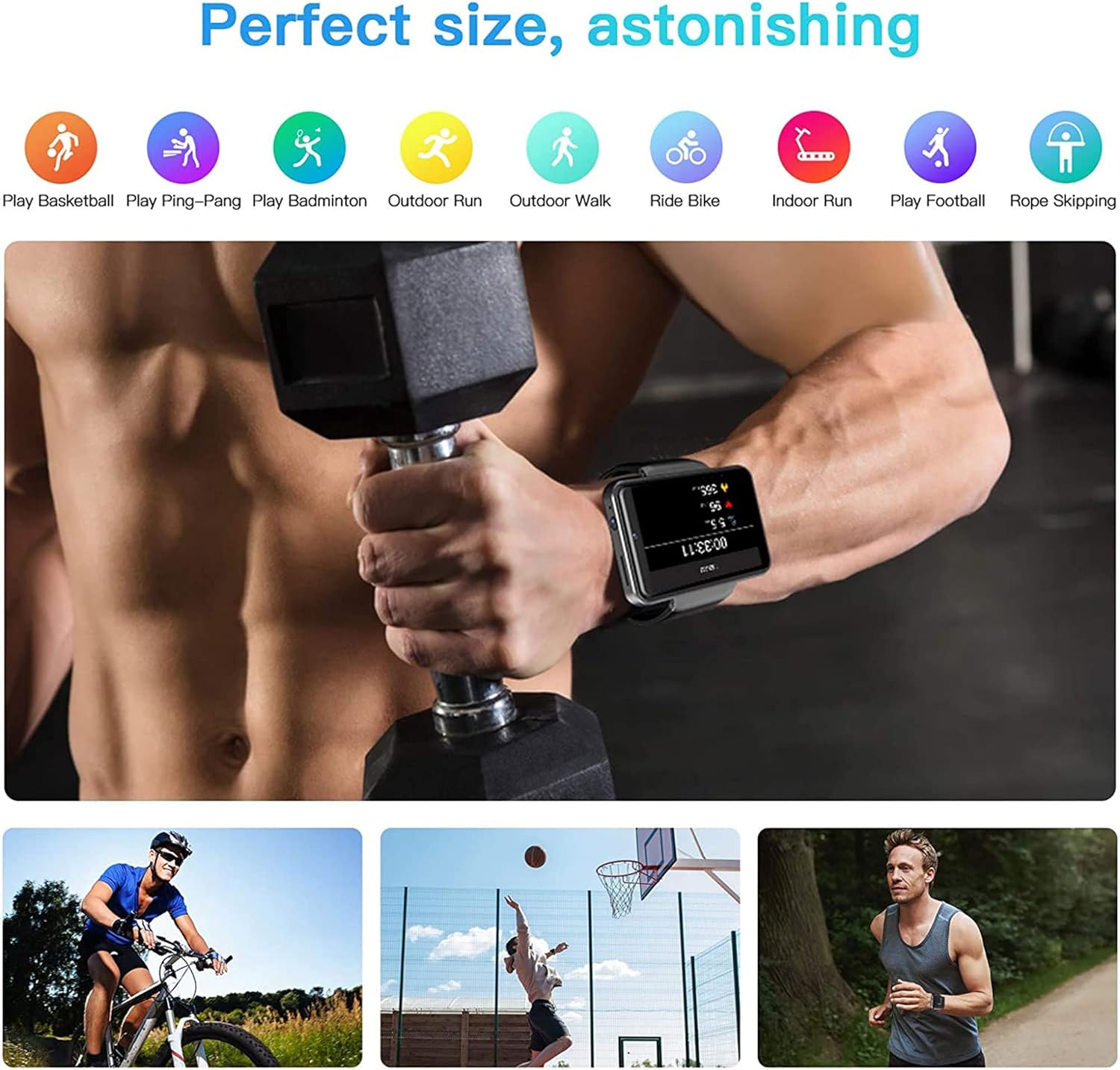
Figure 6.2: KOSPET Max S Smart Watch displaying a map with GPS navigation, indicating multi-satellite positioning support (GPS, A-GPS, GLONASS) for precise location tracking.
Use pre-installed map applications or download your preferred navigation app from the Google Play Store.
6.6. Face Unlock and Security
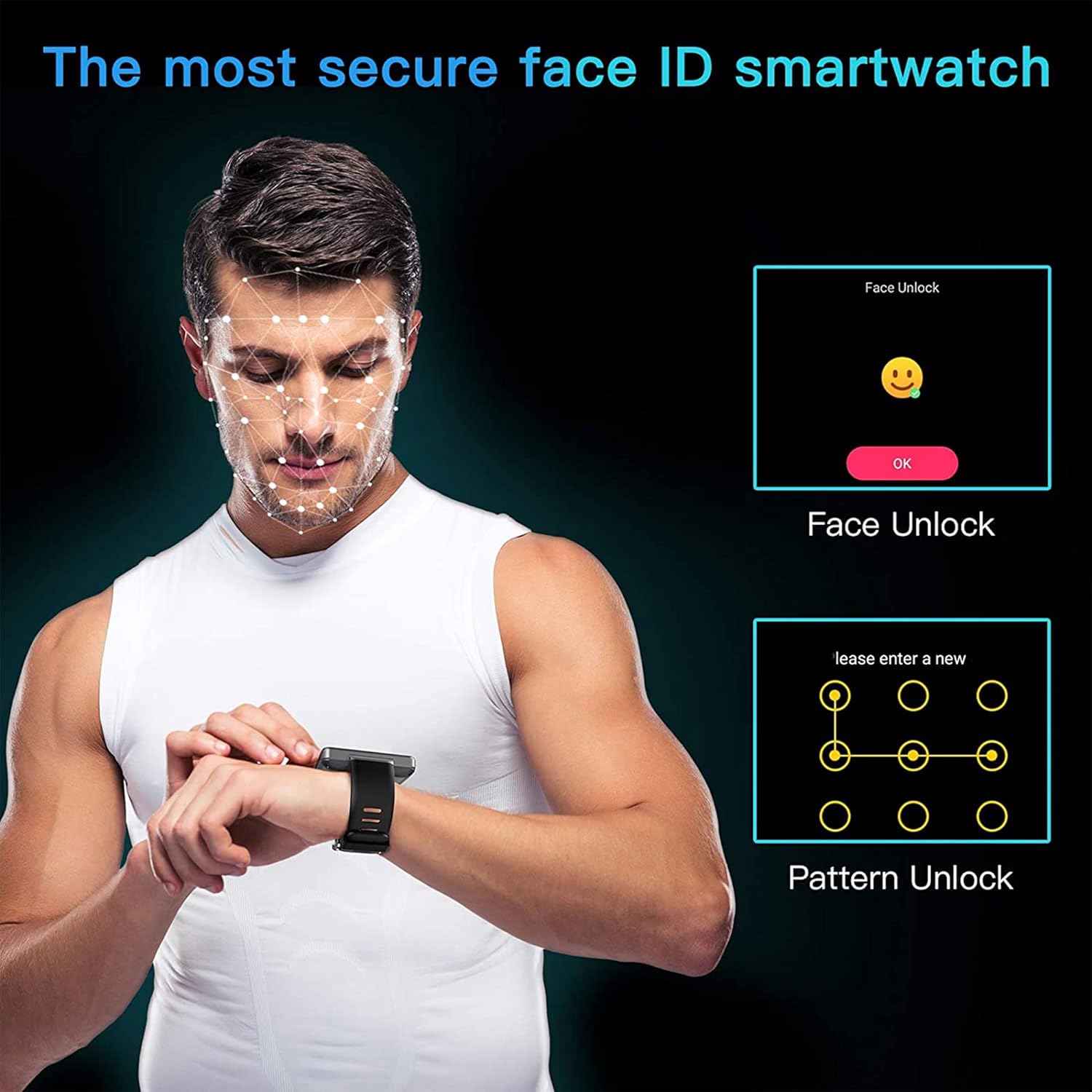
Enhance the security of your watch with Face Unlock. This feature uses the front camera to recognize your face for quick and secure access.

Figure 6.3: Illustration of the KOSPET Max S Face Unlock feature, showing facial recognition in action, alongside the option for pattern unlock.
To set up Face Unlock, navigate to the security settings in your watch and follow the on-screen instructions to register your face. You can also set up a pattern or PIN as a backup.
6.7. Suivi Fòm
The KOSPET Max S includes features for tracking your physical activity.

Figure 6.4: KOSPET Max S Smart Watch displaying various fitness tracking modes, including basketball, ping-pong, badminton, outdoor run, outdoor walk, ride bike, indoor run, play football, and rope skipping.
- Counter etap: Automatically tracks your daily steps.
- Monitè batman kè: Mezire batman kè ou pandan tout jounen an.
- Mòd espò: Select from various sports modes (e.g., running, cycling) for more accurate tracking of specific activities.
Access fitness data through the dedicated fitness app on your watch.
7. Antretyen
7.1. Netwayaj
Siye mont lan ak braslè a regilyèman avèk yon twal mou,amp twal. Evite itilize pwodui chimik ki agresif oswa materyèl abrazif, ki ka domaje fini an.
7.2. Rezistans dlo (IP67)
The KOSPET Max S is rated IP67 waterproof, meaning it is resistant to dust and can withstand immersion in water up to 1 meter for 30 minutes. However, it is not suitable for swimming, diving, or exposure to high-pressure water. Always ensure the SIM card tray is securely closed to maintain water resistance.
NAN. Depanaj
- Watch does not power on: Ensure the watch is fully charged. If the issue persists, try a hard reset by holding the power button for an extended period (e.g., 15-20 seconds).
- SIM card not detected or no network:
- Verify the SIM card is correctly inserted and the tray is fully closed.
- Asire w kat SIM ou a aktif epi li gen yon plan done ki valab.
- Check network settings on the watch to ensure mobile data is enabled.
- Confirm compatibility with your network provider's bands.
- Koneksyon Bluetooth la pa estab:
- Rekòmanse tou de mont lan ak smartphone ou.
- Ensure both devices are within Bluetooth range.
- Consider using alternative pairing applications like "Watch Droid Phone" and "Watch Droid Assistant" if WiiWatch 2 is problematic.
- Apps are slow or unresponsive:
- Close background applications to free up memory.
- Efase kach aplikasyon ki gen pwoblèm nan.
- Ensure the watch's software is up to date.
- GPS la pa resevwa siyal:
- Asire w ou nan yon zòn ouvè ki klè view nan syèl la.
- Check that location services are enabled in the watch settings.
9. Espesifikasyon
| Karakteristik | Spesifikasyon |
|---|---|
| Mak | KOSPET |
| Modèl | Max S |
| Sistèm operasyon | Android 10.1 |
| Ekspozisyon | 2.4 Inches LCD, 400 x 400 resolution |
| Processeur | MediaTek MT6739 (1.25GHz max clock speed, 570MHz graphics processor) |
| Kapasite Depo memwa | 3 GB RAM (implied from 3GB+32GB feature bullet) |
| Depo Entèn | 32 GB (implied from 3GB+32GB feature bullet) |
| Koneksyon | 4G LTE (Cellular), GPS (Built-in GPS, GLONASS, A-GPS), 802.11ac Wireless |
| Kamera | 8MP Side Camera, 2MP Front Camera |
| Kapasite batri | 2000 mAh |
| Rezistans dlo | IP67 |
| Pwa atik | 259 g |
| Fòm atik | Kare |
10. Garanti ak sipò
Warranty information for the KOSPET Max S Smart Watch is typically provided with your purchase documentation or can be found on the official KOSPET websit la. Tanpri gade resous sa yo pou plis detay konsènan pwoteksyon garanti a, tèm ak kondisyon yo.
For technical support, troubleshooting assistance beyond this manual, or warranty claims, please contact KOSPET customer service through their official websit la oswa enfòmasyon kontak yo bay ak pwodwi ou a.


