Entwodiksyon
Thank you for choosing the Yaheetech Multi-Functional Drafting Table. This product is designed to provide a versatile and comfortable workspace for various activities, including drawing, crafting, reading, and general office tasks. Its adjustable tabletop and sturdy construction make it an ideal addition to any home or office environment. Please read this manual thoroughly before assembly and use to ensure proper setup and safe operation.

Yon souview of the Yaheetech drafting table, showcasing its adjustable tabletop feature with artwork.
Enfòmasyon sou Sekirite
- Li tout enstriksyon yo ak anpil atansyon anvan asanble ak itilize.
- Kenbe tout materyèl anbalaj lwen timoun yo.
- Asire w tout pyès yo la epi yo pa domaje anvan w kòmanse asanblaj la. Pa sèvi ak li si gen pyès ki manke oswa ki kase.
- Rasanble pwodwi a sou yon sifas mou epi pwòp pou evite reyur.
- Tighten all screws and bolts securely, but do not overtighten. Periodically check and retighten fasteners.
- Do not stand or sit on the table surface, except for the designated stool.
- Keep hands and fingers clear of moving parts, especially when adjusting the tabletop angle.
- Mete tab la sou yon sifas ki plat pou asire estabilite.
- Maximum weight capacity for the tabletop is approximately 50 lbs (22.7 kg). Do not exceed this limit.
Kontni pake
Tanpri verifye ke tout konpozan ki nan lis anba a yo enkli nan pake ou a:
- Drafting Table Frame Components
- Tabletop Panels (Fixed and Adjustable)
- Stool Components (Seat, Legs, Crossbars)
- Hardware Pack (Screws, Bolts, Washers, Allen Wrench)
- Movable Pencil Ledge
- Assembly Instructions Manual (This document)
Enstalasyon ak Asanble
Assembly is required for this product. It is recommended to have two people for easier and safer assembly. Please refer to the detailed assembly instructions provided in the included PDF manual for step-by-step guidance. A general overview of the process is provided below.
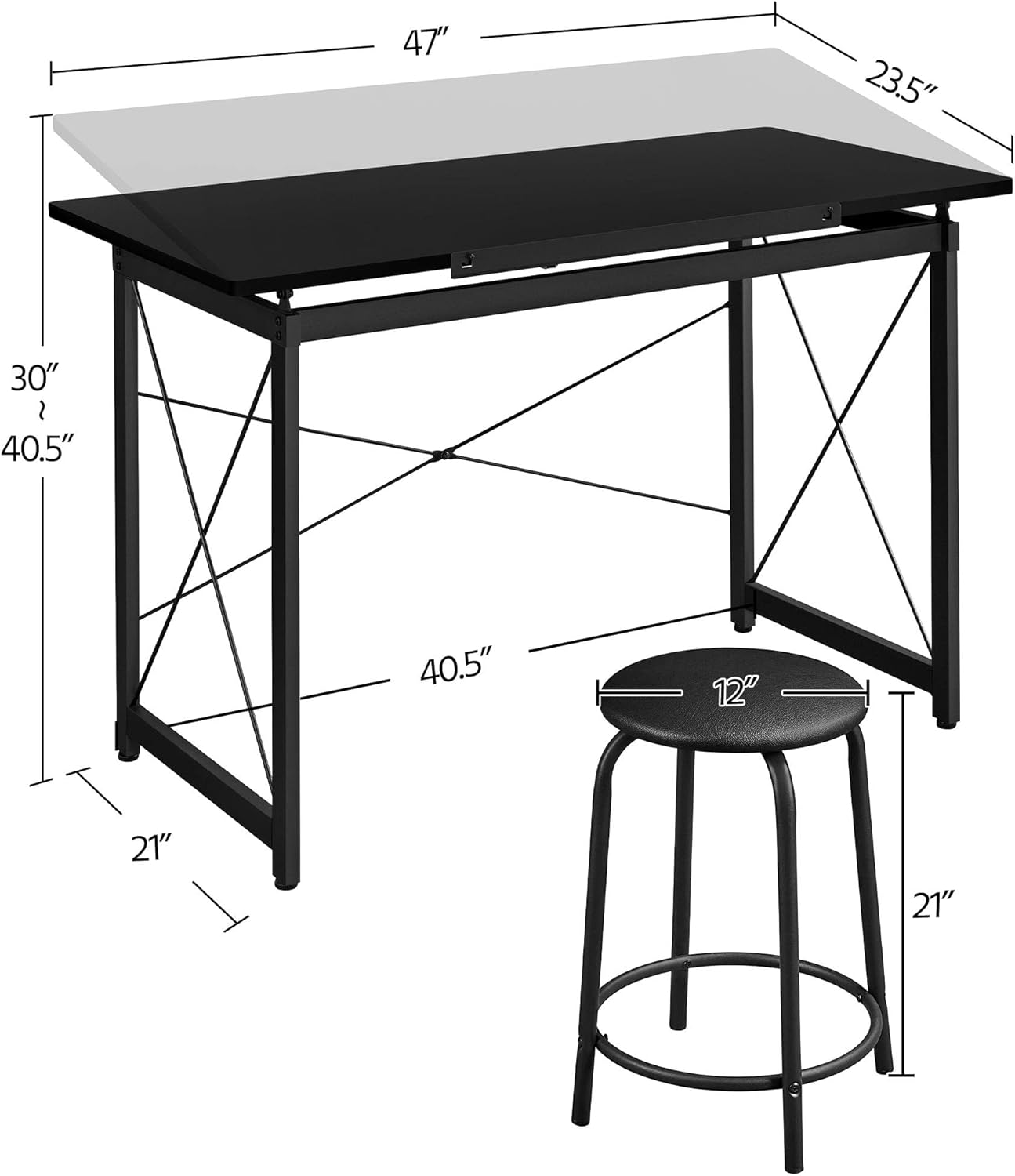
A diagram illustrating the key measurements of the drafting table and stool, including length, width, height, and adjustable range.
Etap Asanble Jeneral la:
- Depake epi idantifye pyès yo: Carefully remove all components from the packaging and lay them out. Compare them with the parts list in the detailed manual to ensure everything is present.
- Asanble ankadreman tab la: Attach the crossbars and support beams to the main leg frames using the provided hardware. Ensure all connections are secure.
- Kole panno tab yo: Secure the fixed and adjustable tabletop panels to the assembled frame. Pay attention to the hinge mechanism for the adjustable section.
- Rasanble tabourè a: Connect the stool legs to the seat and secure the crossbars for stability.
- Enstale Pwodwi pou Telefòn: Attach the movable pencil ledge to the front edge of the adjustable tabletop.
- Tcheke final la: Once assembled, gently shake the table and stool to ensure stability. Tighten any loose fasteners.
Pou enstriksyon vizyèl detaye, tanpri al gade dokiman ofisyèl la. Manyèl Enstalasyon (PDF).
Enstriksyon Operasyon
Adjusting the Tabletop Angle:
The Yaheetech Drafting Table features an adjustable tabletop, allowing you to tilt the surface to your preferred angle for various tasks. To adjust:
- Lift the Tabletop: Gently lift the front edge of the adjustable tabletop.
- Chwazi Ang: As you lift, you will notice a support mechanism with multiple notches. Select the desired angle by resting the tabletop support bar into one of these notches.
- Pozisyon an sekirite: Ensure the support bar is firmly seated in the notch before applying pressure to the tabletop.
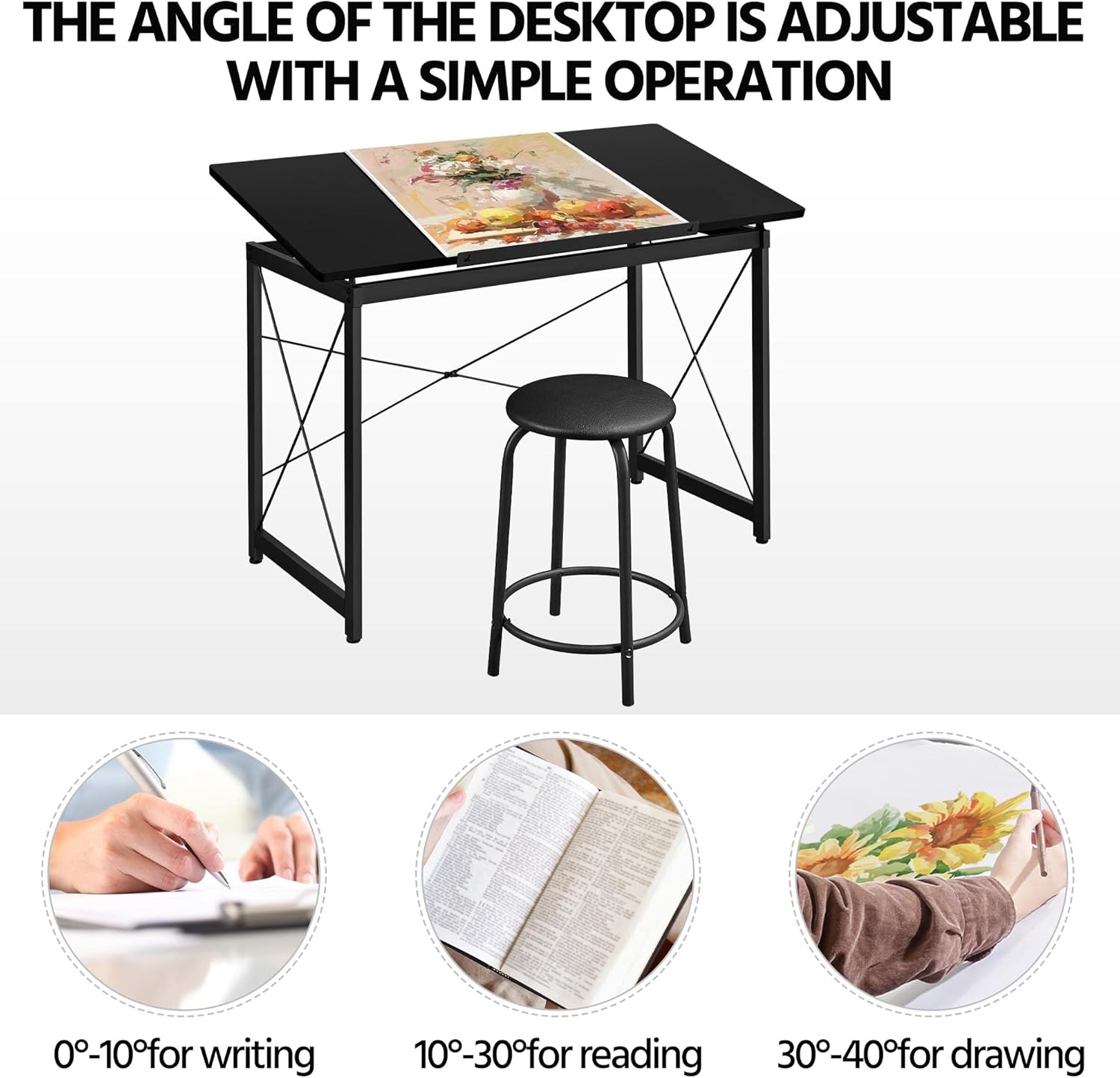
This image highlights the adjustable tabletop feature, indicating optimal angles for different activities: 0-10 degrees for writing, 10-30 degrees for reading, and 30-40 degrees for drawing.
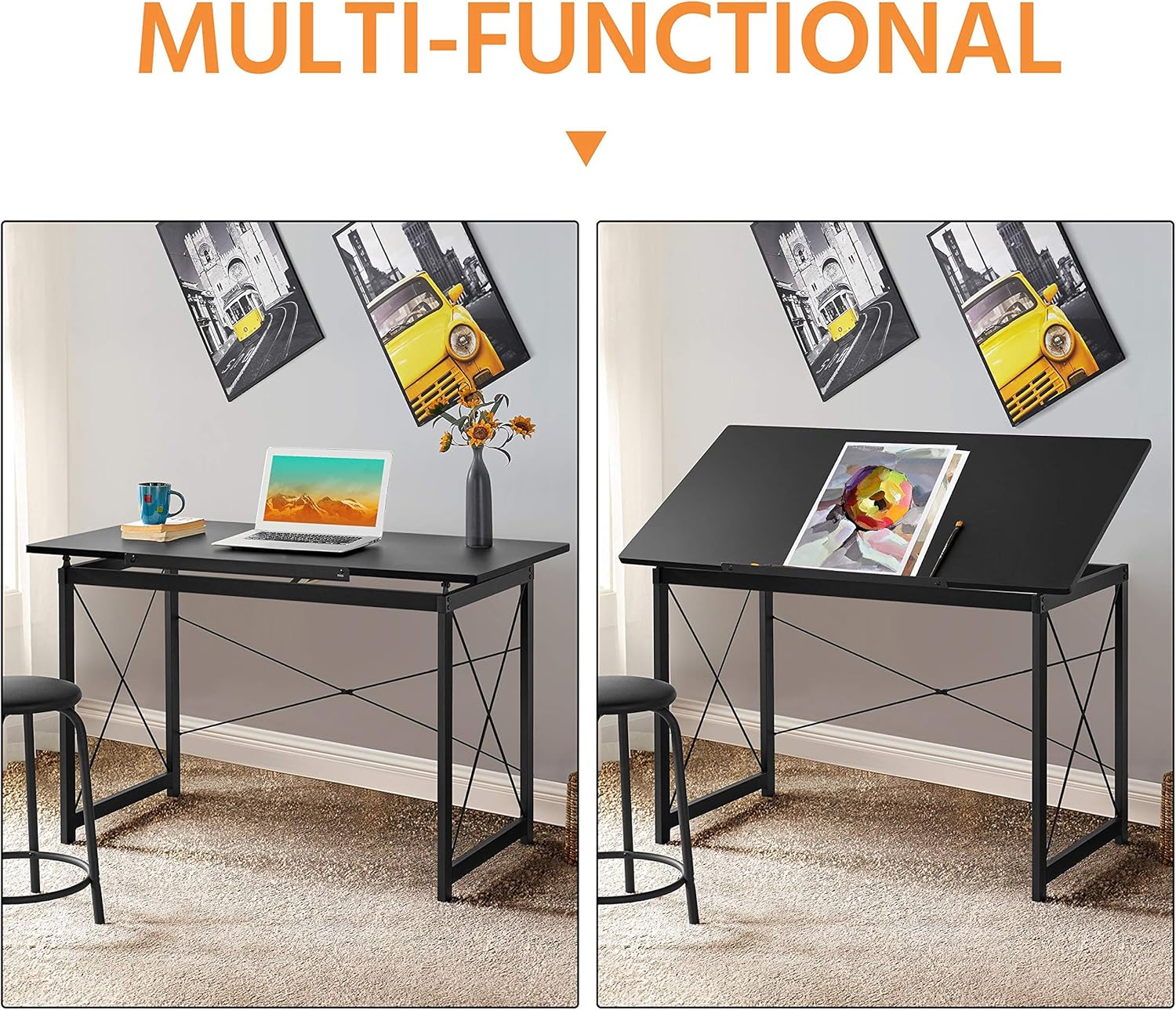
De views of the table side-by-side, illustrating its transformation from a flat desk suitable for laptop use to a tilted drafting table for creative work.
Using the Movable Pencil Ledge:
The movable pencil ledge can be attached to the front edge of the adjustable tabletop to prevent items like pencils, pens, or papers from sliding off when the table is tilted. Simply slide it into the designated slots on the front edge of the tabletop.

Detaye views of the table's construction and features, including the smooth rounded edges for safety, a movable pencil ledge to prevent items from sliding, the robust steel frame for stability, and adjustable screw-in protective pads for floor protection and leveling.
Itilizasyon jeneral:
The table can be used flat for general desk work, such as using a laptop, or tilted for drawing, drafting, or reading. The included stool provides comfortable seating for extended periods of use.
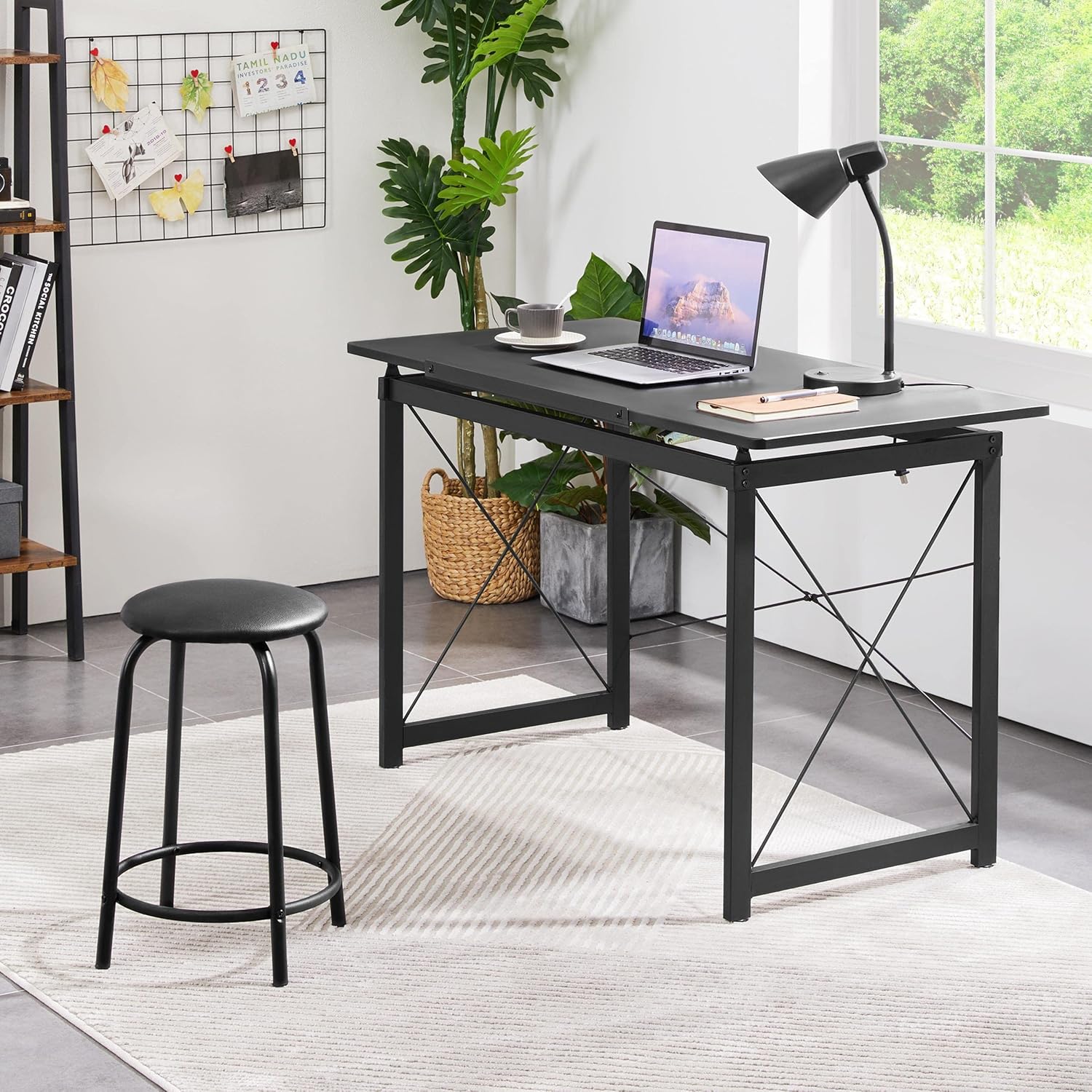
The drafting table configured as a standard desk, demonstrating its versatility for general office or home use, alongside the stool.

A person actively using the drafting table with the tabletop tilted, engaged in drawing, showcasing the ergonomic benefits of the adjustable design.
Antretyen
- Netwayaj: Siye tèt tab la ak ankadreman an avèk yon twal mou.amp twal. Evite itilize pwodui chimik ki agresif oswa pwodui netwayaj abrazif, paske yo ka domaje fini an.
- Tèks regilye: Periodically inspect all screws and bolts to ensure they remain tight. Retighten as necessary to maintain stability and safety.
- Evite twòp imidite: Do not expose the table to excessive moisture or direct sunlight for prolonged periods, as this may cause warping or discoloration.
- Lubrifikasyon: If the tabletop adjustment mechanism becomes stiff, a small amount of silicone-based lubricant can be applied to the moving parts.
Depanaj
| Pwoblèm | Kòz posib | Solisyon |
|---|---|---|
| Table is wobbly/unstable | Fich ki lach; Planche inegal | Ensure all screws and bolts are tightened. Adjust the screw-in protective pads on the feet to level the table on uneven surfaces. |
| Tabletop adjustment is stiff | Lack of lubrication; Dust/debris in mechanism | Clean the adjustment mechanism. Apply a small amount of silicone-based lubricant to the moving parts. |
| Pyès ki manke pandan asanblaj la | Erè anbalaj | Contact Yaheetech customer support with your purchase details and the specific missing parts. |
| Rayures sou sifas | Improper handling; Sharp objects | Use a soft cloth for cleaning. Avoid placing sharp or abrasive objects directly on the tabletop. Consider using a desk mat. |
Espesifikasyon
| Karakteristik | Detay |
|---|---|
| Mak | Yaheetech |
| Dimansyon pwodwi (LxWxH) | 47.2'' x 23.6'' x (30-40.6)'' (approx. 55.51"D x 23.62"W x 35.83"H) |
| Materyèl de baz | Alloy Steel |
| Kalite Materyèl Top | Plastik |
| Fini Kalite | Poud kouvwi |
| Karakteristik espesyal | Adjustable Tabletop |
| Kalite chanm | Biwo, Kay, Lekòl |
| Asanble obligatwa | Wi |
| Kantite tiwa | 2 (implied from product details, though not explicitly visible as drawers in images, often refers to side storage) |
Sipò pou Kliyan
For any questions, concerns, or assistance with your Yaheetech Multi-Functional Drafting Table, please contact our customer support team. Refer to your purchase documentation or the Yaheetech official websit pou enfòmasyon kontak.
Please have your product model number (B08NFY86ZG) and purchase date ready when contacting support.


