1. Entwodiksyon
The DELUX M618DB is an ergonomic wireless vertical mouse designed to provide a more natural and comfortable hand position, reducing wrist and arm strain during prolonged use. This mouse offers dual connectivity modes (2.4G USB receiver and Bluetooth) and features a rechargeable battery for convenience. This manual provides detailed instructions for setting up, operating, maintaining, and troubleshooting your DELUX M618DB mouse.
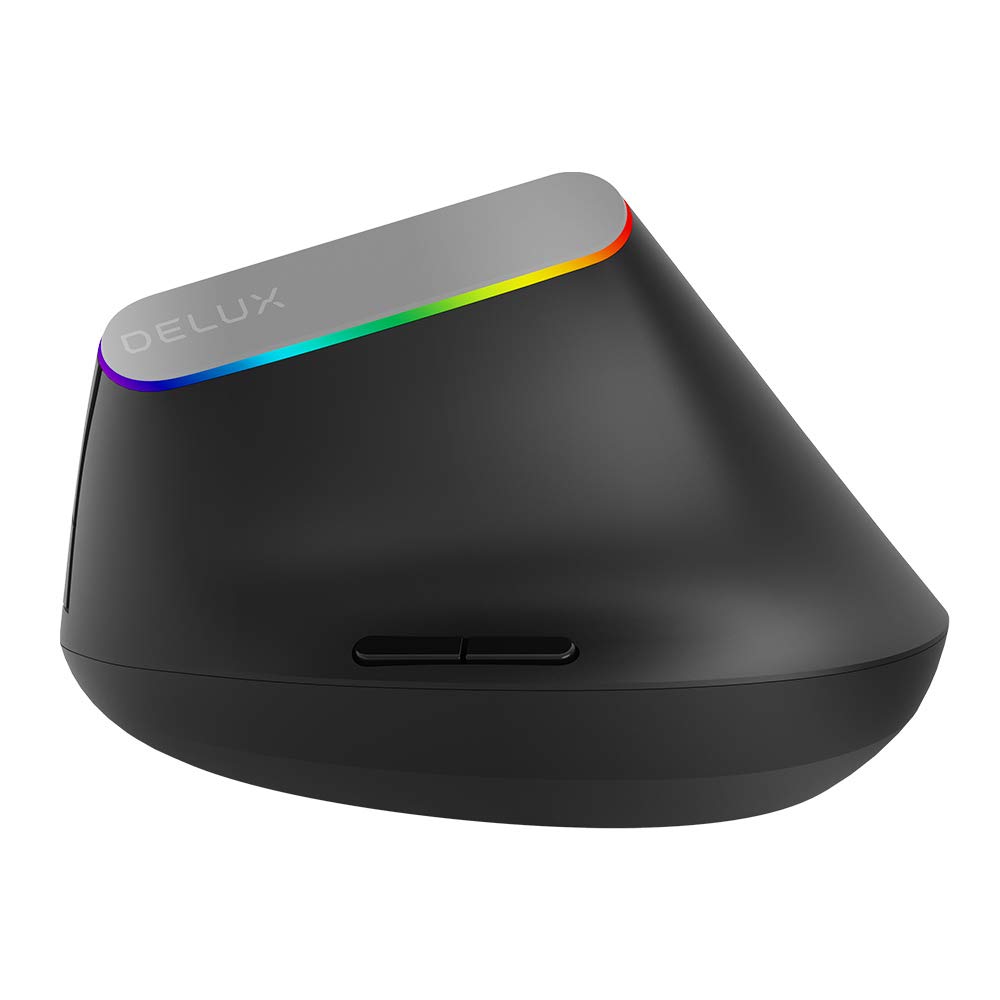
Imaj 1.1: Devan view of the DELUX M618DB Wireless Vertical Mouse.
2. Pwodwi Features
- Konsepsyon vètikal ergonomik: Promotes a natural handshake position to alleviate wrist and arm discomfort.
- Doub Koneksyon: Supports both 2.4G wireless (via USB receiver) and Bluetooth connections.
- Batri rechargeable: Equipped with a built-in 500mA Lithium Polymer battery.
- Sis bouton: Includes Left Click, Right Click, Scroll Wheel, DPI Cycle Button, Forward, and Backward buttons for enhanced productivity.
- DPI reglabl: Allows for customization of cursor sensitivity.
- Endikatè ki ap dirije: Multicolor LED lighting indicates power status and connectivity.

Image 2.1: Illustration demonstrating the ergonomic vertical design for comfortable hand posture.
3. Pake kontni
Tanpri verifye sa ki nan pake a pou asire w tout atik yo la:
- 1 x DELUX M618DB Wireless Vertical Mouse
- 1 x USB Nano Receiver (stored in the mouse base)
- 1 x USB-A pou USB-C chaje kab
- 1 x Manyèl Itilizatè (dokiman sa a)
4. Enstriksyon Enstalasyon
4.1 Chaje Sourit la
Before first use, it is recommended to fully charge the mouse. Connect the provided USB-A to USB-C charging cable to the USB-C port on the front of the mouse and plug the USB-A end into a computer's USB port or a USB wall charger (not included). The charging indicator light (a small pinhole light) will illuminate during charging and turn off when fully charged.

Imaj 4.1: Kote view of the mouse, highlighting the USB-C charging port and the storage compartment for the USB receiver.
4.2 Power On/Off
Locate the power switch on the bottom of the mouse. Slide it to the 'ON' position to power on the mouse. Slide it to 'OFF' when not in use to conserve battery life.
4.3 Konekte Sourit la
The M618DB offers two connection methods:
4.3.1 2.4G Wireless Connection (USB Receiver)
- Remove the USB Nano receiver from its storage slot on the bottom of the mouse.
- Plug the USB Nano receiver into an available USB port on your computer.
- Turn on the mouse using the power switch. The mouse should automatically connect to your computer. No additional drivers are typically required.
4.3.2 Bluetooth Koneksyon
- Asire w sourit la mache.
- Sou òdinatè w la, ale nan paramèt Bluetooth yo.
- Initiate the pairing process on your computer to search for new Bluetooth devices.
- Select 'DELUX M618DB' (or similar name) from the list of available devices and follow any on-screen prompts to complete the pairing.
5. Operasyon Enstriksyon
The DELUX M618DB mouse features six programmable buttons and a scroll wheel for various functions:

Image 5.1: Diagram illustrating the button layout of the DELUX M618DB mouse.
- Bouton Klike Goch: Fonksyon klike prensipal estanda.
- Bouton Klike Dwat: Fonksyon klike segondè estanda.
- wou woulo liv: Used for vertical scrolling. Can also be pressed for middle-click functionality.
- Bouton Sik DPI: Located behind the scroll wheel, this button allows you to cycle through different DPI (Dots Per Inch) settings to adjust cursor sensitivity.
- Bouton Avant: Navige pi devan nan web navigatè oswa file eksploratè.
- Bouton dèyè: Navige bak nan web navigatè oswa file eksploratè.
5.1 LED Indicator Behavior
The multicolor LED light around the DELUX logo provides visual feedback:
- When the mouse is turned on or a button is pressed without a connected receiver, the LED will illuminate.
- When the USB Nano receiver is connected and the mouse is moved, the multicolor LED will stay on.
- The light will turn off after a few seconds of inactivity to conserve power.
6. Antretyen
6.1 Jesyon batri
The 500mA rechargeable battery provides extended usage. Battery life varies depending on usage patterns and whether the mouse is turned off when not in use. Recharge the mouse when the cursor becomes erratic or the LED indicator shows signs of low power.
6.2 Netwayaj
Pou netwaye sourit la, sèvi ak yon twal mou epi sèk. Pou pousyè tè ki difisil pou netwaye, sèvi ak yon ti twal mouye.amp cloth can be used, ensuring no moisture enters the device. Avoid using harsh chemicals or abrasive materials.
NAN. Depanaj
| Pwoblèm | Kòz posib | Solisyon |
|---|---|---|
| Mouse not responding or erratic cursor movement | Low battery; connectivity issue; USB receiver not properly connected. | 1. Charge the mouse fully. 2. Ensure the USB receiver is securely plugged into a working USB port. 3. For Bluetooth, ensure the mouse is paired and selected in your device's Bluetooth settings. 4. Try a different USB port or restart your computer. |
| Pa ka konekte via Bluetooth | Mouse not in pairing mode; Bluetooth on computer is off; interference. | 1. Ensure the mouse is powered on. 2. Verify Bluetooth is enabled on your computer. 3. Remove any previous pairings and attempt to re-pair. 4. Move closer to the computer to reduce interference. |
| Endikatè ki ap dirije pa limen | Mouse is off; low battery. | 1. Ensure the mouse is powered on. 2. Charge the mouse. |
8. Espesifikasyon
| Karakteristik | Detay |
|---|---|
| Modèl | M618DB |
| Mak | DELUX |
| Koneksyon Teknoloji | 2.4G Wireless (USB Receiver), Bluetooth |
| Kantite bouton | 6 (Agoch, Adwat, Motè woulo, DPI, Avanse, Aryè) |
| Kalite batri | Lityòm Polymère |
| Kapasite batri | 500mA |
| Port chaje | USB-C |
| ASIN | B08NB9KXTK |
| Premye Dat ki disponib | 12 novanm 2020 |
9. Garanti ak sipò
Specific warranty information is not available in the provided product details. For warranty claims, technical support, or further assistance, please refer to the official DELUX websit la oubyen kontakte machann kote ou te achte pwodwi a. Kenbe resi acha ou kòm prèv acha.


