1. Entwodiksyon
This manual provides essential information for the safe and efficient operation of your iFFALCON 40F2A 40-inch Full HD Android Smart LED TV. Please read these instructions thoroughly before using the television and retain them for future reference.
The iFFALCON 40F2A is a 40-inch Full High Definition (1920x1080) Smart LED TV powered by Android, offering a rich entertainment experience with built-in Google Assistant, HDR10 support, and integrated streaming services.

Imaj: Devan view of the iFFALCON 40F2A 40-inch Full HD Android Smart LED TV.
2. Enstalasyon
2.1 Debale ak Kontni Pakè a
Retire televizyon an nan anbalaj li avèk prekosyon. Asire w ke tout konpozan yo la:
- 1 x iFFALCON 40F2A LED TV
- 1 x Sipò pou Tablo
- 1 x Manyèl Itilizatè (dokiman sa a)
- 1 x kat garanti
- 1 x kontwòl remote
- 2 x AAA pil
2.2 Enstalasyon kanpe
If using the table-top stand:
- Mete ekran televizyon an anba sou yon sifas ki plat e mou pou evite li domaje.
- Aliyen sipò yo ak twou vis yo anba televizyon an.
- Sekirize kanpe la lè l sèvi avèk vis yo bay yo.
- Leve televizyon an ak anpil atansyon pou l kanpe dwat sou yon sifas ki estab e plat.
2.3 Montaj sou miray (opsyonèl)
For wall mounting, consult a professional installer and refer to the wall mount kit's instructions. Ensure the wall mount is compatible with the TV's VESA mounting pattern.
2.4 Konekte Aparèy Ekstèn yo
Connect your external devices (e.g., set-top box, gaming console, Blu-ray player) to the TV's ports. The TV features HDMI, USB, VGA, and Headphone ports.
- HDMI: Pou odyo ak videyo an wo definisyon.
- USB: Pou konekte aparèy depo USB yo.
- Ethernet: Pou koneksyon entènèt filaire.
- Ekoutè: For audio output to headphones.
2.5 Koneksyon kouran ak premye konfigirasyon
- Mete pil AAA yo bay yo nan kontwòl remote la.
- Konekte kòd kouran an nan televizyon an epi answit nan yon priz kouran.
- Peze bouton pouvwa a sou kontwòl remote la pou limen televizyon an.
- Swiv enstriksyon ki sou ekran an pou w konplete konfigirasyon inisyal la, tankou seleksyon lang lan, koneksyon rezo a (Wi-Fi oswa Ethernet), epi koneksyon ak kont Google la.
3. Itilizasyon televizyon an
3.1 Fonksyon kontwòl Remote
The remote control provides access to all TV functions. It includes dedicated buttons for popular streaming services like Netflix, Amazon Prime Video, and Zee5, as well as a Google Assistant button for voice commands.

Image: The iFFALCON 40F2A Smart Remote Control, highlighting the Google Assistant and Netflix hotkey buttons.
3.2 Entèfas televizyon Android
Navigate the Android TV interface using the remote's directional pad and OK button. The home screen displays recommended content, installed applications, and settings.

Image: The Android TV home screen on the iFFALCON 40F2A, showing various apps and features.
3.3 Asistan Google
Press the Google Assistant button on your remote and speak into the microphone to control your TV, search for content, get answers, and manage smart home devices.
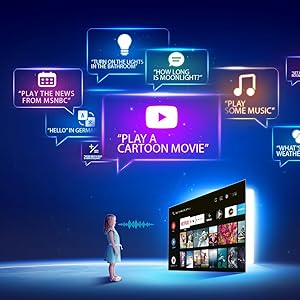
Image: Illustration of using Google Assistant voice commands with the TV.
3.4 Aplikasyon pou difizyon an dirèk
Access a wide range of pre-installed streaming applications such as Netflix, Amazon Prime Video, YouTube, Disney+Hotstar, Zee5, and more. Additional apps can be downloaded from the Google Play Store.

Image: The iFFALCON 40F2A displaying various streaming application logos.
3.5 Chromecast entegre
Use the built-in Chromecast feature to cast content from your compatible smartphone, tablet, or computer directly to your TV screen.

Image: A smartphone casting content to the iFFALCON 40F2A TV via Chromecast.
4. Karakteristik
4.1 Full HD Display with HDR10
Experience clear and vibrant visuals with Full HD (1920x1080) resolution. HDR10 support enhances contrast and color accuracy, providing a more dynamic picture.

Image: A side-by-side comparison of a scene without HDR10 and with HDR10, showing enhanced detail and color.
4.2 Micro Dimming
Micro Dimming analyzes video content in hundreds of separate zones to adjust brightness and darkness independently, improving contrast and picture quality.

Image: A comparison showing a city skyline without Micro Dimming and with Micro Dimming, highlighting improved contrast.
4.3 iPQ Engine
The iPQ Engine intelligently processes image quality, optimizing brightness, color range, and other visual parameters for a superior vieweksperyans nan.

Image: Visual representation of the iPQ Engine's high brightness precision and intelligent color range control technologies.
4.4 Dolby Audio
Enjoy immersive sound with Dolby Audio. The TV features 20 Watts speakers (10W + 10W) for clear and powerful audio output.

Image: Graphic illustrating the 10W + 10W Dolby Audio speakers for enhanced sound.
4.5 Konsepsyon mens
The iFFALCON 40F2A features a sleek and slim design, allowing it to blend seamlessly into any living space.

Image: A hand demonstrating the slim profile of the iFFALCON TV.
5. Antretyen
5.1 Netwaye ekran an
Siye ekran an dousman avèk yon twal mou ki pa gen pousyè. Pou mak ki difisil pou retire, siye l yon ti kras.ampLave twal la avèk dlo oswa yon pwodui netwayaj ekran espesyalize. Evite itilize pwodui chimik ki agresif oswa materyèl abrazif.
5.2 Netwaye kò televizyon an
Wipe the TV's frame and stand with a soft, dry cloth. Do not use liquid cleaners directly on the TV.
5.3 Swen Jeneral
- Evite ekspoze televizyon an anba limyè solèy dirèk oswa tanperati ekstrèm.
- Asire w ke gen ase vantilasyon toutotou televizyon an pou anpeche l chofe twòp.
- Dekonekte televizyon an pandan tanpèt zèklè oswa lè li pap itilize pou yon bon bout tan.
NAN. Depanaj
Si w rankontre pwoblèm ak televizyon w lan, gade pwoblèm ak solisyon komen sa yo:
| Pwoblèm | Kòz posib | Solisyon |
|---|---|---|
| Pa gen pouvwa | Kòd kouran an dekonekte; Pwoblèm priz kouran | Check power cord connection; Try a different outlet; Press power button on TV/remote |
| Pa gen imaj, men gen son | Sous antre ki pa kòrèk; Kab HDMI/AV ki lach | Select correct input source; Reconnect cables securely |
| Pa gen son, men imaj la la | Volume muted or too low; Audio cable issue | Unmute or increase volume; Check audio settings; Reconnect audio cables |
| Remote kontwòl pa travay | Pil mouri; Obstriksyon; Telekòmand pa konekte | Replace batteries; Remove obstructions; Re-pair remote if necessary |
| Pa ka konekte ak Wi-Fi | Modpas ki pa kòrèk; Pwoblèm routeur; Televizyon an twò lwen routeur la | Verify password; Restart router; Move TV closer or use Ethernet |
| Aplikasyon yo ralanti oswa yo bloke | Insufficient memory; Network issue; App malfunction | Close unused apps; Check internet connection; Clear app cache/data or reinstall app |
Si pwoblèm nan pèsiste apre ou fin eseye solisyon sa yo, tanpri kontakte sèvis kliyan.
7. Espesifikasyon
Detailed technical specifications for the iFFALCON 40F2A Smart LED TV:

Image: Diagram showing the dimensions of the iFFALCON 40F2A TV.
| Karakteristik | Spesifikasyon |
|---|---|
| Mak | iFFALCON |
| Modèl | 40F2A |
| Gwosè ekran | 40 pous (102 cm) |
| Teknoloji ekspozisyon | LED, Panèl Klas A+ |
| Rezolisyon | Full HD (1920 x 1080 Piksèl) |
| Rafrechisman pousantaj | 60 Hz |
| Tan repons | 8.5 Milisegond |
| Viewing Ang | 178 Degre |
| Rapò aspè imaj | 16:09 |
| Pwopòsyon Imaj Kontrèman | 5000:1 |
| Sistèm operasyon | Android |
| Gwosè memwa RAM enstale | 1 GB |
| Kapasite depo dijital | 8 GB |
| Koprosesè grafik | Mali470x2 |
| Sòti odyo | 20 Watts (Dolby Audio) |
| Koneksyon Teknoloji | Ethernet, HDMI, USB, Wi-Fi, Bluetooth |
| Entèfas Materyèl | HDMI, Headphone, USB, VGA |
| Total pò USB | 1 |
| Sous pouvwa | AC |
| Wattage | 75 Watts (On-mode power consumption) |
| Dimansyon pwodwi (LxWxH) | 90.5 x 18.5 x 57.7 cm (ak sipò a) |
| Pwa atik | 6.1 kg |
| Batri | 2 pil AAA (enkli pou kontwòl remote la) |
8. Garanti ak sipò
8.1 Enfòmasyon sou Garanti
Your iFFALCON 40F2A TV comes with a 1 ane garanti from the date of purchase. Please refer to the included Warranty Card for detailed terms and conditions. Retain your purchase receipt as proof of purchase for warranty claims.
8.2 Sipò pou Kliyan
For technical assistance, service requests, or any inquiries regarding your iFFALCON TV, please contact the manufacturer's customer support. Contact details can typically be found on the warranty card or the official iFFALCON websit.


