Entwodiksyon
This manual provides detailed instructions for the setup, operation, maintenance, and troubleshooting of your HUO JI E-Yooso K-620 Mechanical Gaming Keyboard. Please read this manual thoroughly before using the product to ensure proper functionality and longevity.

Imaj: Anwo-anba view of the HUO JI E-Yooso K-620 Mechanical Gaming Keyboard, showcasing its 87-key layout and pink color.
Kontni pake
- 1x HUO JI E-Yooso K-620 Mechanical Gaming Keyboard
- 1x Manyèl Itilizatè Anglè
- 1x Keycap Puller
- 5x Spare Mechanical Switches
- 1x Chanjman Puller
Enstalasyon
Konekte klavye a
- Jwenn yon pò USB ki disponib sou òdinatè w lan.
- Branche konektè USB klavye a nan pò USB a.
- The keyboard is plug-and-play and does not require additional drivers for basic functionality.
Ajiste wotè klavye a
The keyboard features adjustable legs on the underside to customize the typing angle for improved ergonomics.
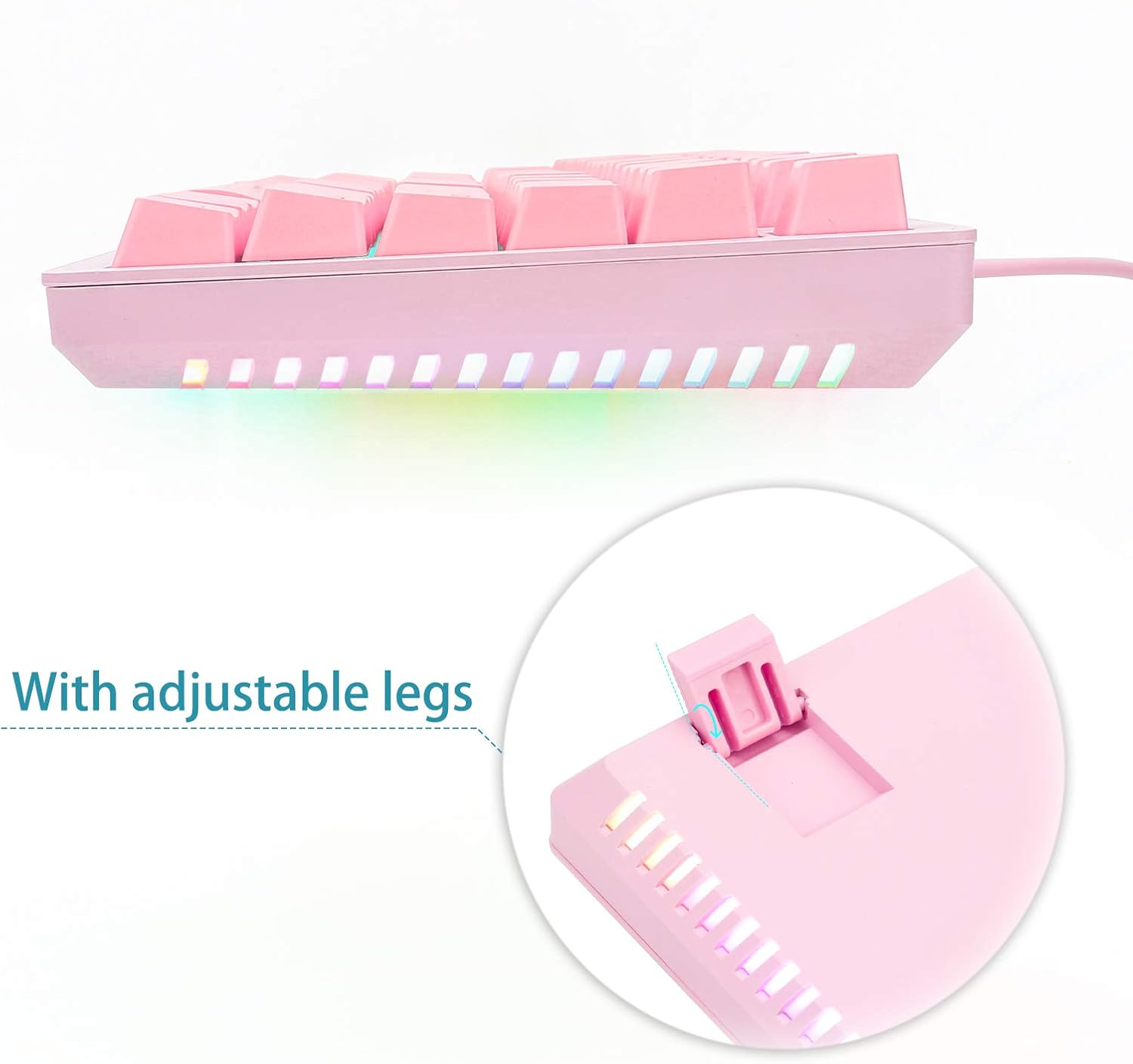
Image: The underside of the keyboard, highlighting the adjustable legs that can be flipped out to change the typing angle.
Enstriksyon Operasyon
Karakteristik kle
- Anti-Ghosting: The keyboard supports 87-key N-key rollover, allowing multiple keys to be pressed simultaneously without conflict.
- Switch ki ka ranplase a cho: Equipped with blue mechanical switches, which can be replaced without soldering. Five spare switches are included.
Backlight Modes and Control
The keyboard features both key backlighting (white) and RGB side lighting. Use the following key combinations to control the lighting effects:
- Fn + Ins: Cycles through 9 different key backlight modes.
- Fn + (1-8): Activates 8 different gaming backlight modes.
- Fn + 9 or Fn + 0: Enters custom backlight mode selection.
- Fn + Home (after Fn+9/0): Starts recording for custom backlight mode. Press desired keys to light them up (press again to turn off).
- Fn + End (after recording): Saves and exits custom backlight mode recording.
- Fn + Pause: Adjusts the RGB side lighting effects.
- Fn + Up Arrow: Increases the brightness of the key backlighting.
- Fn + Down Arrow: Decreases the brightness of the key backlighting.
- Fn + Left Arrow: Decreases the speed of looped lighting effects.
- Fn + Right Arrow: Increases the speed of looped lighting effects.

Imaj: Yon gwo plan view of the keyboard keys, showing the white backlighting and the vibrant RGB lighting emanating from the sides.
Rakoursi kle fonksyon
Konbine Fn key with the F1-F12 keys for quick access to various functions:
- Fn + F1-F12: Accesses multimedia controls, calculator, web browser, volume adjustments, and other system functions.
Fonksyon kle espesyal
- Fn + W: Swaps the functionality of the WASD keys with the arrow keys.
- Fn + Windows Key: Locks or unlocks the Windows key to prevent accidental presses during gaming.
- Fn+F12: Locks the entire keyboard.
Antretyen
Netwayaj
To clean your keyboard, disconnect it from your computer. Use a soft, dry cloth to wipe down the keycaps and chassis. For deeper cleaning, a can of compressed air can be used to remove debris from between the keys. The keyboard is water-resistant with three drain holes, but direct exposure to large amounts of liquid should be avoided.
Chanje Ranplasman
The K-620 keyboard features hot-swappable mechanical switches. To replace a switch:
- Use the included keycap puller to carefully remove the keycap from the desired switch.
- Use the included switch puller to gently grasp and pull the switch upwards until it detaches from the PCB.
- Align the pins of the new switch with the holes on the PCB and press down firmly until it clicks into place.
- Retache kouvèti kle a.
Depanaj
- Klavye a pa reponn: Asire w kab USB a byen konekte ak klavye a ak òdinatè a. Eseye yon lòt pò USB.
- Limyè yo pa mache: Check if the keyboard is locked (Fn+F12). Ensure brightness is not set to minimum (Fn+Up/Down Arrow).
- Kle yo pa anrejistre: If a specific key is not working, consider replacing its mechanical switch using the provided spare switches and tools.
- Konpòtman inatandi: Disconnect and reconnect the keyboard. Restart your computer.
Espesifikasyon
| Modèl | E-Yooso K-620 |
| Layout kle | 87-Key Tenkeyless |
| Chanje Kalite | Hot-Swappable Blue Mechanical Switches |
| Durabilite Touche | Jiska 50 milyon klik |
| Keystroke Travel | 4.0 ± 0.2mm |
| Koneksyon | USB |
| Ekleraj | White Key Backlighting, RGB Side Lighting |
| Materyèl | Top-graded ABS and Metal |
| Dimansyon (L x W x H) | 14.5 x 6.5 x 1.2 pous (370 x 180 x 30 mm) |
| Pwa | 1.76 liv (1050g) |
| Konpatibilite | Windows 98/ME/NT/XP/Vista/7/8/10, Mac OS X, Linux |
Garanti
Specific warranty details are not provided in this manual. Please refer to the product packaging or contact customer support for warranty information.
Sipò
Should you encounter any quality problems with your HUO JI E-Yooso K-620 Mechanical Gaming Keyboard, please contact our customer support. We are committed to resolving any issues you may experience.


