Entwodiksyon
This manual provides detailed instructions for the setup, operation, and maintenance of your BUFFBEE Glow Alarm Clock HRS-BLACK. Please read this manual thoroughly before using the product to ensure proper function and longevity.
Pwodwi souview
The BUFFBEE Glow Alarm Clock is a versatile device combining a digital alarm clock, FM radio, and a 7-color night light. It is designed to enhance your sleep and wake-up experience with customizable features.
Karakteristik kle:
- Fonksyonalite 3-an-1: Digital alarm clock, FM radio, and night light.
- 7-Koulè lannwit limyè: Adjustable with 5 brightness levels.
- Doub Alam: Set two independent alarms with choice of FM radio, built-in beep, or bird sounds.
- Adjustable Display Dimmer: 0-100% brightness control for the time display.
- Bouton ki eklere: For easy operation in low light conditions.
- Kontwolè pou dòmi: Quick nap setting from 10 to 120 minutes.
- Minutè pou dòmi otomatik: Automatically turns off night light and FM radio after a set duration.
- USB chaje Port: For charging external electronic devices.
- Opsyon pouvwa: AC powered with AAA battery backup (batteries not included).
Kontni pake:
- 1 x BUFFBEE Glow Alarm Clock
- 1 x pouvwa adaptè
- 1 x manyèl itilizatè
Idantifikasyon konpozan:
Refer to the image below for an overview of the alarm clock's buttons and display.

Imaj: Devan view of the BUFFBEE Glow Alarm Clock, showing the digital time display, alarm indicators, and control buttons on the top panel. The top edge features a light strip.
Enstalasyon
1. Koneksyon pouvwa:
- Konekte adaptè kouran ki vini ak revèy la nan pò antre DC ki sou dèyè revèy la.
- Ploge adaptè a nan yon priz miray estanda.
2. Battery Backup (Optional):
For uninterrupted operation during power outages, install 3 AAA batteries (not included) into the battery compartment on the bottom of the unit. The clock will maintain time and alarm settings, and the alarm will still function, but the display and night light may be limited to conserve power.

Imaj: Dèyè view of the alarm clock showing the power input and battery compartment, alongside a power adapter and three AAA batteries (not included).
3. Anviwònman Tan Inisyal:
- When first powered on, the display will show a default time.
- Peze epi kenbe la TAN SET button (usually located on the top panel) until the hour digits flash.
- Sèvi ak la +/- buttons (or similar navigation buttons) to adjust the hour.
- Peze TAN SET ankò pou konfime lè a epi ale nan ajisteman minit la.
- Sèvi ak la +/- bouton pou ajiste minit yo.
- Peze TAN SET one more time to confirm and exit time setting mode.
- Pou chanje ant fòma 12 èdtan ak 24 èdtan, peze bouton an 12/24H button (if available, often combined with time set or a dedicated button).
Enstriksyon Operasyon
1. Mete Alam yo (Alam 1 ak Alam 2):
Revèy la sipòte de alam endepandan.
- Peze a ALAM 1 bouton (oswa ALAM 2) once to display the current alarm time.
- Peze epi kenbe la ALAM 1 (oswa ALAM 2) button until the hour digits flash.
- Sèvi ak la +/- bouton pou ajiste lè a.
- Peze a ALAM Peze bouton an ankò pou konfime lè a epi ale nan ajisteman minit la.
- Sèvi ak la +/- bouton pou ajiste minit yo.
- Peze a ALAM button again to select the alarm sound: FM radio, built-in beep, or bird sounds. Use +/- pou chanje opsyon yo.
- Peze a ALAM Peze bouton an yon lòt fwa ankò pou konfime epi aktive alam lan. Yon ikòn alam ap parèt sou ekran an.
- To turn off an active alarm, press the corresponding ALAM button. The alarm icon will disappear.
2. Fonksyon repetisyon:
Lè yon alam sonnen, peze gwo bouton an SNOOZE / limyè button on top to temporarily silence the alarm for 9 minutes. The alarm will sound again after the snooze period.
3. Night Light Operation:
The alarm clock features a 7-color night light with adjustable brightness.

Image: The alarm clock shown with its top light strip illuminated in various colors, demonstrating the 7-color night light feature.
- Peze a LIMYÈ button (often combined with SNOOZE or a dedicated button) to turn the night light on/off.
- When the night light is on, press the LIMYÈ button repeatedly to cycle through the 7 available colors.
- To adjust the brightness, use the +/- buttons while the night light is active. There are 5 brightness levels.
4. FM Radyo:
The built-in FM radio allows you to listen to your favorite stations.
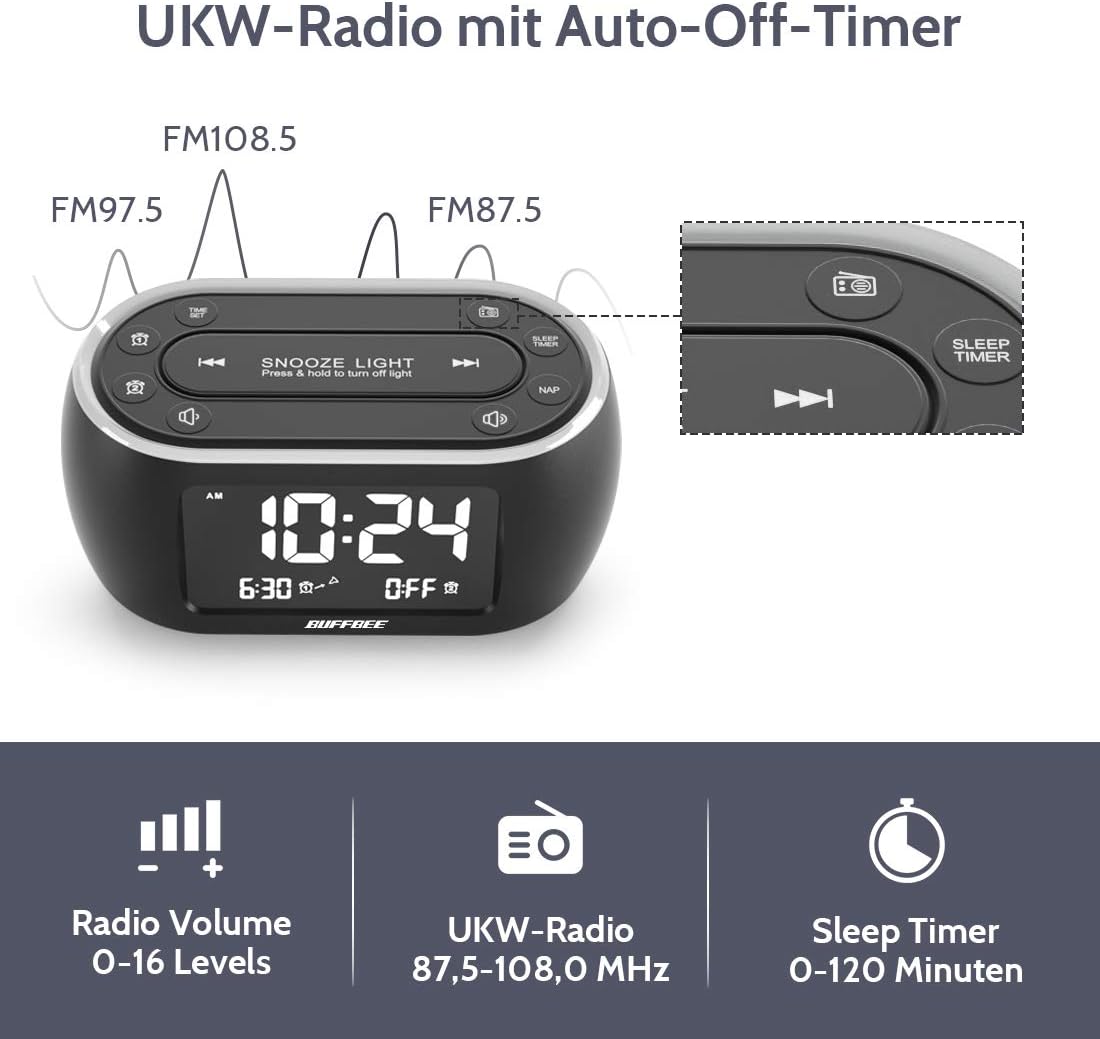
Image: The alarm clock display showing FM radio frequencies (FM108.5, FM97.5, FM87.5) and icons for radio volume and sleep timer.
- Peze a RADYO button to turn the FM radio on/off.
- Peze a ESKANYE button (or similar) to automatically scan and save available FM stations.
- Sèvi ak la PREV / PWOCHÈN buttons to navigate through saved stations or manually tune.
- Ajiste volim nan lè l sèvi avèk la VOLIM +/- buttons. The volume can be set from 0 to 16 levels.
5. Nap Timer:
The nap timer allows for quick, short sleep periods without affecting regular alarm settings.
- Peze a NAP button. The display will show the default nap time (e.g., 10 minutes).
- Peze a NAP button repeatedly to cycle through preset nap durations (e.g., 10, 20, 30, 60, 90, 120 minutes).
- The nap timer will start automatically after selection.
- To cancel the nap timer, press the NAP button until "OFF" is displayed.
6. Auto-Off Sleep Timer:
Set a timer for the night light and/or FM radio to automatically turn off after a specified duration.
- While the night light or FM radio is active, press the TIMER DÒM bouton.
- Peze a TIMER DÒM button repeatedly to cycle through available durations (e.g., 15, 30, 60, 90, 120 minutes, or OFF).
- The selected duration will be displayed, and the timer will begin. The night light and/or FM radio will turn off automatically when the timer expires.
7. Display Dimmer:
Adjust the brightness of the main time display from 0% to 100%.

Image: Six different views of the alarm clock display, illustrating the range of brightness from very dim to fully bright, and also showing the night light dimmer.
Sèvi ak sa ki dedye a DIMMER dial or DIMMER +/- buttons (if available) to adjust the display brightness to your preference. This allows for comfortable viewnan nenpòt kondisyon ekleraj.
8. Pò chaje USB:
A USB port is located on the back of the unit for charging small electronic devices.

Image: The alarm clock with a smartphone plugged into its side USB port, indicating the charging function.
Connect your device's USB charging cable to the port. The clock must be powered by the AC adapter for the USB charging function to work.
Antretyen
To ensure the longevity and optimal performance of your BUFFBEE Glow Alarm Clock, follow these maintenance guidelines:
- Netwayaj: Wipe the unit with a soft, dry cloth. Do not use abrasive cleaners, waxes, or solvents as they may damage the surface.
- Pouvwa: Always disconnect the power adapter from the wall outlet before cleaning or if the unit will be unused for an extended period.
- Anviwònman: Keep the alarm clock away from direct sunlight, heat sources, and excessive moisture.
- Ranplasman batri: If using battery backup, replace AAA batteries annually or when the battery indicator suggests low power. Ensure correct polarity when inserting new batteries.
Depanaj
If you encounter issues with your BUFFBEE Glow Alarm Clock, refer to the following common problems and solutions:
| Pwoblèm | Kòz posib | Solisyon |
|---|---|---|
| Clock display is blank or flickering. | No power or loose connection. Low battery backup. | Ensure the power adapter is securely plugged into the clock and the wall outlet. Check if AAA batteries are installed correctly and have sufficient charge. |
| Alam lan pa sonnen. | Alam lan pa aktive. Volim alam lan twò ba. | Verify that the alarm icon is displayed. Check the alarm volume setting. Ensure the correct alarm time is set. |
| Resepsyon radyo FM lan pa bon. | Weak signal. Antenna not extended. Interference. | Extend the FM antenna fully. Try repositioning the clock. Perform an auto-scan for stations again. |
| Night light is not working. | Light function turned off. | Press the LIGHT button to turn it on. Check if the brightness is set to 0%. |
| Chaje USB a pa fonksyone. | Clock not connected to AC power. Device not compatible. | Ensure the clock is powered by the AC adapter. Check if your device is compatible with standard USB charging. |
Espesifikasyon
| Karakteristik | Detay |
|---|---|
| Mak | BUFFBEE |
| Nimewo Modèl | HRS-BLACK |
| Dimansyon (L x W x H) | 12 x 3.81 x 6 cm (4.72 x 1.5 x 2.36 pous) |
| Pwa | 330 gram (0.73 liv) |
| Antre pouvwa | AC 100-240V, 50/60Hz |
| Sovgad batri | 3 x AAA pil (pa enkli) |
| Kalite ekspozisyon | Digital |
| Ekspozisyon klète | 0-100% reglabl |
| Koulè limyè lannwit | 7 koulè |
| Klète Limyè Lannwit | 5 nivo reglabl |
| Frekans Radyo FM | 87.5-108.0 MHz |
| Volim Alam | 0-16 nivo reglabl |
| Karakteristik espesyal | Ambient light, Dual Alarm, Nap Timer, Sleep Timer, USB Charging Port |
Garanti ak sipò
BUFFBEE products are designed for reliability and performance. For specific warranty information, please refer to the documentation included with your purchase or contact BUFFBEE customer support.
If you require technical assistance or have questions regarding your BUFFBEE Glow Alarm Clock, please visit the official BUFFBEE websit entènèt la oubyen kontakte depatman sèvis kliyan yo. Anjeneral, ou ka jwenn enfòmasyon kontak yo sou anbalaj pwodwi a oubyen sou dokiman manifakti a. websit.


