Entwodiksyon
Thank you for choosing the SBS Music Hero Wireless Bluetooth Earphones. This manual provides essential information for the proper setup, operation, and maintenance of your device. Please read it carefully before use.

Image: The SBS Music Hero Wireless Bluetooth Earphones, shown in their light blue charging case. The earbuds are partially visible, indicating their in-ear design.
Kontni pake
- SBS Music Hero Wireless Bluetooth Earphones
- Ka chaje
- Ear tips/earpads
- USB Chaje Kab
- Manyèl itilizatè

Imaj: Yon gwo plan view of the two individual SBS Music Hero wireless earphones, highlighting their design and earbud shape.
Gid Enstalasyon
1. Chaje ekoutè yo ak bwat la
Anvan premye itilizasyon an, chaje ekoutè yo ak bwat chaje a nèt.
- Connect the Micro-USB charging cable to the charging port on the bottom of the case.
- Konekte lòt bout kab la nan yon sous pouvwa USB (pa egzanp, òdinatè, adaptè miray la).
- The LED indicator on the case will illuminate during charging and turn off when fully charged.
- Place the earphones into the charging case. The earphones will begin charging automatically.

Image: The bottom of the earphone charging case, showing the Micro-USB charging port and an LED indicator light.
A full charge for the case and earphones typically takes approximately 1 hour. The earphones provide about 2-3 hours of play time on a single charge, with the case offering additional charges for up to 24 hours of standby time.

Image: The open charging case, illustrating the estimated battery life: 2-3 hours play time, 24 hours standby time, and 1 hour charge time.
2. Pairing ak yon Aparèy Bluetooth
The earphones use Bluetooth technology for wireless connection.
- Asire ekoutè yo chaje.
- Open the charging case and remove both earphones. They will automatically enter pairing mode. The LED on one earphone will flash, indicating it's ready to pair.
- Sou aparèy ou an (telefòn entelijan, tablèt, òdinatè pòtab), aktive Bluetooth epi chèche nouvo aparèy.
- Select "SBS Music Hero" or a similar name from the list of available devices.
- Once connected, the LED indicator on the earphone will stop flashing and remain solid or turn off, depending on the model.
If pairing fails, place the earphones back into the case, close it, and then repeat the steps.
Enstriksyon Operasyon
The earphones feature a multifunction button for controlling various functions.
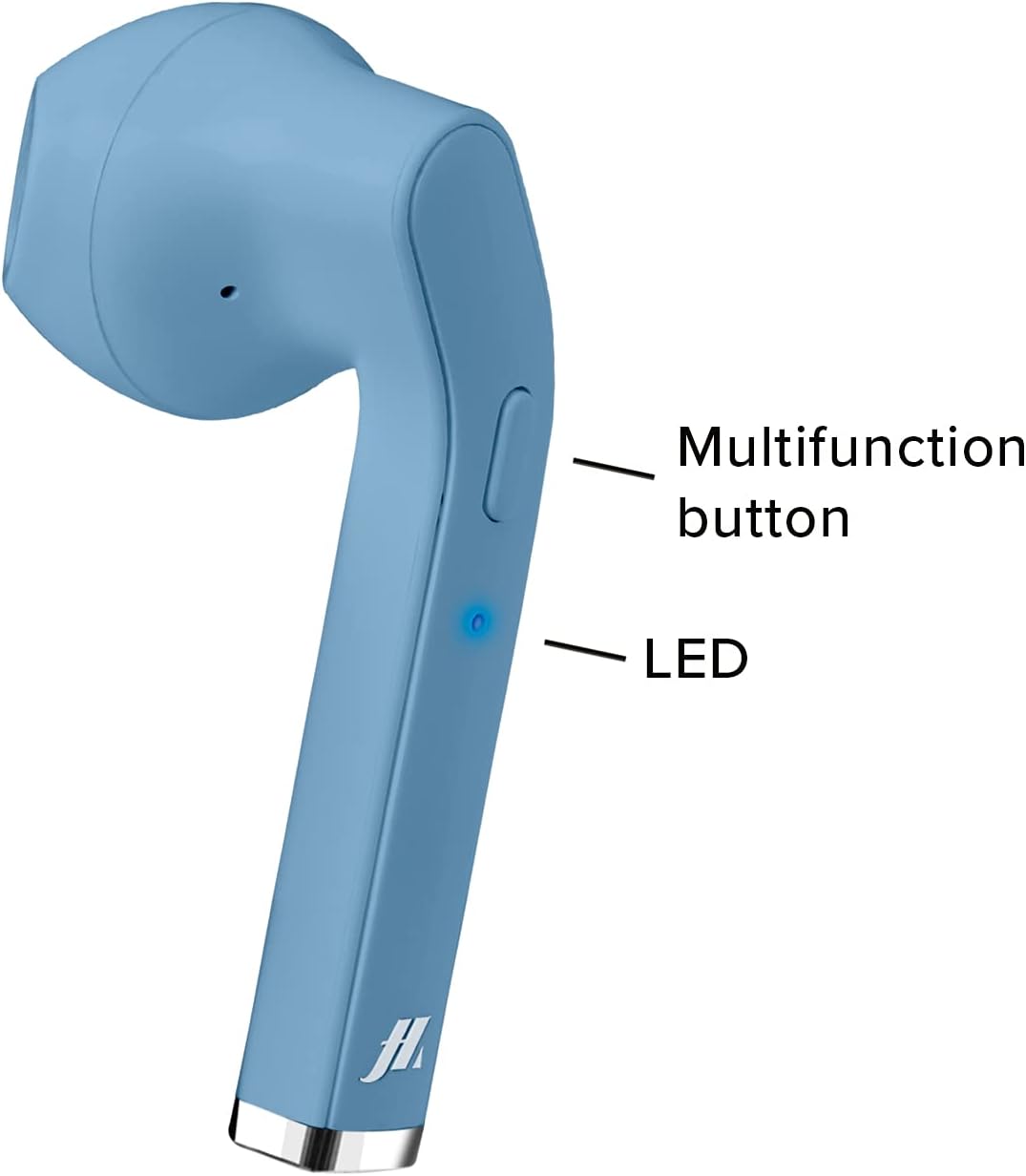
Image: A close-up of one earphone, pointing out the location of the multifunction button and the LED indicator light.
Lèktur Klas Mizik
- Jwe/Poz: Peze bouton multifonksyon an yon fwa.
- Pwochen Track: Double-press the right earphone's multifunction button.
- Track Previous: Double-press the left earphone's multifunction button.
Jesyon Rele
- Reponn/Fen Apèl: Press the multifunction button once during an incoming call or during an active call.
- Rejte apèl fèk ap rantre: Press and hold the multifunction button for approximately 2 seconds during an incoming call.
- Recomposition Dènye Nimewo: Triple-press the multifunction button.

Image: An earphone accompanied by icons illustrating its control functions: play/pause, answer/end call, reject incoming call, and redial last number.
Power On/Off
- Pouvwa sou: The earphones power on automatically when removed from the charging case. Alternatively, press and hold the multifunction button for 3 seconds.
- Pouvwa Off: Place the earphones back into the charging case. They will power off automatically. Alternatively, press and hold the multifunction button for 5 seconds.
Antretyen ak Swen
- Netwaye ekoutè yo ak bwat chaje a regilyèman avèk yon twal mou epi sèk.
- Pa sèvi ak pwodui netwayaj abrazif oswa solvang.
- Keep the charging contacts on the earphones and inside the case clean to ensure proper charging.
- Avoid exposing the device to extreme temperatures, humidity, or liquids, as it is not water-resistant.
- Sere ekoutè yo nan bwat chaje yo lè w pa ap itilize yo pou pwoteje yo epi kenbe yo chaje.
Depanaj
| Pwoblèm | Kòz posib | Solisyon |
|---|---|---|
| Ekoutè yo pa limen. | Batri ki ba. | Chaje ekoutè yo ak bwat chaje a nèt. |
| Pa ka konekte ak aparèy la. | Bluetooth la etenn sou aparèy la; kas ekoutè yo pa an mòd koneksyon; li twò lwen aparèy la. | Ensure Bluetooth is enabled. Place earphones back in case, then remove to re-enter pairing mode. Move closer to the device. |
| Pa gen son oswa son an gen move kalite. | Volume too low; earphones not properly connected; ear tips not sealed. | Increase volume on your device. Reconnect earphones. Adjust ear tips for a better fit. |
| Only one earphone works. | Yon kas ekoutè pa chaje; pwoblèm koneksyon. | Ensure both earphones are charged. Place both earphones back in the case, then remove them together to re-establish stereo pairing. |
Espesifikasyon pwodwi
| Karakteristik | Detay |
|---|---|
| Nimewo Modèl | MHTWSSTYLEBTB |
| Koneksyon | Teknoloji san fil Bluetooth |
| Earphone Style | Nan-zòrèy |
| Materyèl | Plastik |
| Gamme frekans | 20 Hz - 20,000 Hz |
| Sansiblite | 90 dB |
| Kalite batri | Lityòm Polymè (3 obligatwa, enkli) |
| Average Battery Life (Play Time) | 2 èdtan |
| Tan pou chaje | Approx. 1 Hour (Fast Charging) |
| Dimansyon | 4 x 18 x 9 cm |
| Pwa | 90 g |
| Rezistans dlo | Non (Pa reziste dlo) |
| Aparèy konpatib | Smartphones, Tablets, Laptops, Desktop Computers |
| Kontwòl bri | Anile aktif bri |
Enfòmasyon sou Garanti
Specific warranty details are not provided in the product data. Please refer to the retailer's return policy or contact the manufacturer directly for warranty information.
Sipò pou Kliyan
For technical support or further assistance, please contact the manufacturer or your point of purchase. Keep your product model number (MHTWSSTYLEBTB) and purchase details ready when contacting support.


