1. Entwodiksyon
This manual provides detailed instructions for the Delton 10X Bluetooth Computer Headset. This wireless headset is designed for clear communication and extended use, featuring Bluetooth 5.0 connectivity, a noise-canceling microphone, and a USB dongle for versatile compatibility. Please read this manual thoroughly to ensure proper setup and operation of your device.

Imaj 1.1: The Delton 10X Bluetooth Computer Headset and its accompanying USB dongle. This image displays the headset's over-the-head design, single ear cup, adjustable microphone boom, and the compact USB dongle.
2. Pake kontni
Verifye ke tout atik yo prezan nan pakè ou a:
- Delton 10X Bluetooth Headset
- Dongle USB
- Chaje kab
- Manyèl Itilizatè (dokiman sa a)
3. Pwodwi Features
The Delton 10X headset offers a range of features designed for optimal performance and user comfort:
- Koneksyon Bluetooth 5.0: Ensures stable and efficient wireless connection up to 30 feet.
- Mikwofòn ki anile bri: Reduces background noise for clear voice transmission.
- Mikwofòn ki ka vire 270°: Allows for flexible positioning and use on either ear.
- Pwolonje lavi batri: Up to 15 hours talk time, 18 hours play time, and 160 hours standby time.
- Chaje rapid: Chaj totalman nan apeprè 1.5 èdtan.
- Adjustable Headband & Plush Ear Cushion: Provides comfort for prolonged wear.
- Ear Gripper T-Pad: Ensures secure fit during movement.
- Inivèsèl konpatibilite: Works with smartphones, tablets, desktop PCs, laptops, and supports iOS and Windows platforms.

Imaj 3.1: A visual summary of the Delton 10X headset's key features, including 15 hours talk time, Bluetooth 5.0, adjustable headband, high fidelity sound, noise-canceling mic, rotatable mic, long battery backup, voice assistant support, and plush cushions.
3.1 Pèfòmans batri
The Delton 10X headset is equipped with a long-lasting battery to support your daily communication needs.
- Tan pou pale: Jiska 15 èdtan
- Tan jwe: Jiska 18 èdtan
- Tan sibstiti: Jiska 160 èdtan
- Tan pou chaje: Apeprè 1.5 èdtan
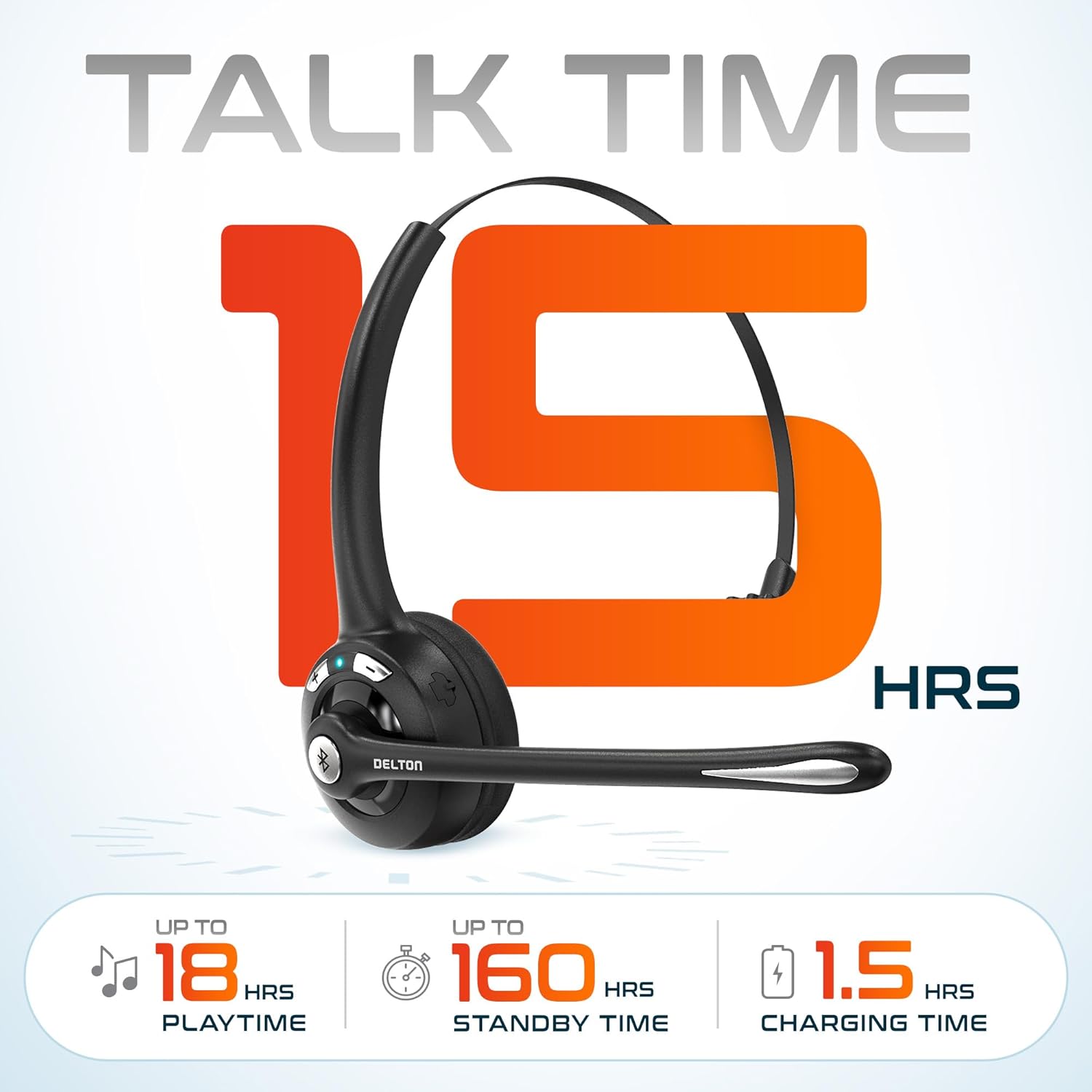
Imaj 3.2: An infographic detailing the battery performance of the Delton 10X headset, highlighting 15 hours of talk time, 18 hours of play time, 160 hours of standby time, and a 1.5-hour charging time.
3.2 Teknoloji Avanse
The headset incorporates an advanced chipset for seamless connectivity and improved power efficiency.

Imaj 3.3: Yon fèmen view of the headset's internal components, illustrating the advanced Bluetooth 5.0 chipset. This image emphasizes the technology that reduces outside noise, improves power efficiency, and provides seamless connectivity up to 30 feet.
4. Enstalasyon
4.1 Chaje kas ekoutè a
- Connect the provided charging cable to the charging port on the headset.
- Branche lòt bout kab la nan yon sous kouran USB (pa egzanp, yon pò USB òdinatè, yon adaptè miray).
- Endikatè LED la ap montre eta chaj la. Yon chaj konplè pran apeprè 1.5 èdtan.
4.2 Power On/Off
- Pou limen: Press and hold the Multi-Function Button (MFB) until the LED indicator flashes blue.
- Pou etenn: Press and hold the MFB until the LED indicator flashes red and then turns off.
4.3 Bluetooth Pairing (Direct)
To connect the headset directly to a Bluetooth-enabled device (e.g., smartphone, tablet):
- Asire ekoutè a koupe.
- Peze epi kenbe MFB a pou apeprè 5-7 segonn jiskaske endikatè LED la flache wouj ak ble altènativman, pou endike mòd koneksyon.
- Sou aparèy ou an, aktive Bluetooth epi chèche aparèy ki disponib.
- Select "Delton 10X" from the list of found devices.
- Once connected, the LED indicator on the headset will flash blue slowly.
4.4 USB Dongle Connection
For computers without native Bluetooth or for a more stable connection, use the included USB dongle. The dongle provides instant auto-pairing.
- Plug the USB dongle into an available USB port on your computer. The dongle's LED will blink.
- Power on your Delton 10X headset.
- The headset and dongle will automatically pair. The dongle's LED will turn solid blue, and the headset's LED will flash blue slowly once connected.
- Ensure the Delton 10X is selected as the audio input and output device in your computer's sound settings.

Imaj 4.1: A visual representation of the USB dongle being inserted into a laptop's USB port. The image highlights the 'Auto-Pair USB Dongle' feature and 'Plug & Play' functionality, indicating no driver installation is required.
4.5 Konpatibilite
The Delton 10X headset is designed for broad compatibility:
- Aparèy: Smartphones, Tablets, Desktop PCs, Laptops.
- Sistèm operasyon: iOS, Windows, Linux, Mac.
- Aplikasyon: MS Teams, Zoom, Google Meet, Slack, Skype.

Imaj 4.2: Yon ilistrasyon ki montreasing the wide compatibility of the Delton 10X headset with various devices, including phones, tablets, iOS & Windows laptops, and desktop computers/iMacs. This emphasizes its versatility across different platforms.
5. Operasyon Enstriksyon
5.1 Kontwòl kas ekoutè
The headset features intuitive controls for managing calls and audio playback:
- Bouton milti-fonksyon (MFB):
- Peze yon fwa pou reponn/fini apèl la.
- Press and hold for 2 seconds to Redial.
- Peze yon fwa pou jwe/mete mizik la sou poz.
- Bouton pou monte volim (+):
- Peze yon fwa pou ogmante volim.
- Press and hold for 2 seconds for Next Track.
- Bouton Diminye Volim (-):
- Peze yon fwa pou diminye volim.
- Press and hold for 2 seconds for Previous Track.

Imaj 5.1: A detailed diagram of the Delton 10X headset's controls, showing the Volume Down (-), Volume Up (+), and Multi-Function Button (MFB) with their respective functions for call management, track control, and power.
5.2 Itilizasyon Mikwofòn
The microphone is designed for clear voice pickup and can be adjusted for optimal positioning.
- Ajiste mikwofòn la: The microphone boom can rotate 270 degrees. Position the microphone approximately 1-2 inches from your mouth for best voice clarity.
- Anile bri: The integrated noise-canceling technology helps filter out ambient sounds, ensuring your voice is heard clearly by others.
5.3 Mete kas ekoutè a
The Delton 10X headset is designed for comfort and can be worn on either ear.
- Bando reglabl: Extend or retract the headband to fit your head size comfortably.
- Ear Gripper T-Pad: This feature helps secure the headset in place.
- Left or Right Ear: Rotate the microphone boom to position the ear cup on your preferred ear.

Imaj 5.2: An image illustrating the comfort and adjustability features of the Delton 10X headset. It shows the adjustable headband, the Ear Gripper T-Pad, the plush ear cushion, and the 270° rotation of the flexible microphone, demonstrating its usability on both left and right ears.
6. Antretyen
Bon antretyen asire lonjevite ak pèfòmans optimal kas ekoutè ou a.
- Netwayaj: Sèvi ak yon twal mou epi sèk pou netwaye kas ekoutè a. Pou kousen zòrèy yo, yon ti kras damp Ou ka itilize twal, men asire w ke yo byen sèk anvan w itilize yo. Evite pwodui chimik ki agresif oswa materyèl abrazif.
- Depo: Sere kas ekoutè a nan yon kote ki fre epi sèk, lwen limyè solèy dirèk ak tanperati ekstrèm.
- Swen batri: Pou pwolonje lavi batri a, evite dechaje kas ekoutè a nèt souvan. Chaje l regilyèman, menm si w pa itilize l pandan yon bon bout tan.
- Evite dlo: Kas ekoutè a pa reziste dlo. Evite kontak ak likid.
NAN. Depanaj
If you encounter issues with your Delton 10X headset, refer to the following common solutions:
| Pwoblèm | Kòz posib | Solisyon |
|---|---|---|
| Kas ekoutè a pa limen. | Batri a ba oswa pa gen chaj ditou. | Charge the headset for at least 1.5 hours. |
| Pa ka konekte ak aparèy la. | Kas ekoutè a pa nan mòd koneksyon; Bluetooth la etenn sou aparèy la; aparèy la twò lwen. | Ensure headset is in pairing mode (flashing red/blue). Turn on device Bluetooth. Move headset closer to device (within 30 feet). Try using the USB dongle. |
| Poor microphone audio quality (others cannot hear me clearly). | Microphone position; computer audio settings; environmental noise. | Adjust the microphone closer to your mouth (1-2 inches). Check your computer's sound settings to ensure the Delton 10X is selected as the input device and microphone volume is adequate. Ensure the noise-canceling mic is facing the correct direction. |
| No sound or low sound from headset. | Headset volume too low; device volume too low; incorrect audio output device. | Increase headset volume using the '+' button. Increase volume on your connected device. Verify that the Delton 10X is selected as the audio output device in your computer's sound settings. |
| Koneksyon an koupe souvan. | Out of range; interference. | Ensure you are within 30 feet of the connected device or USB dongle. Minimize obstacles between the headset and device. |
8. Espesifikasyon
Detailed technical specifications for the Delton 10X Bluetooth Computer Headset:
| Karakteristik | Spesifikasyon |
|---|---|
| Non modèl | 10X Monoaural Headset + Dongle |
| Koneksyon Teknoloji | San fil (Bluetooth 5.0) |
| Gamme Bluetooth | Jiska 30 pye |
| Kontwòl bri | Sound Isolation (Noise-Canceling Mic) |
| Repons Frekans | 20 Hz - 20,000 Hz |
| Dire batri (tan pou pale) | Jiska 15 èdtan |
| Battery Life (Play Time) | Jiska 18 èdtan |
| Lavi batri (standby) | Jiska 160 èdtan |
| Tan pou chaje | 1.5 èdtan |
| Ekoutè Jack | USB (pou chaje) |
| Kalite kontwòl | Call Control, Volume Control, Track Control |
| Pwa atik | 1.5 ons |
| Dimansyon pwodwi | 6 x 6 x 2 pous |
| Materyèl | Plastik |
| Plasman Zòrèy | Over Ear (Monoaural) |
9. Garanti ak sipò
For warranty information or technical assistance, please contact Delton customer support. Details can typically be found on the official Delton website or through your purchase documentation. Please retain your proof of purchase for warranty claims.


