1. Entwodiksyon
This user manual provides comprehensive instructions for the installation, operation, and maintenance of your ABSOSO Double Din Car Stereo System. This 7-inch HD touchscreen MP5 car player features Bluetooth connectivity, PhoneLink compatibility (CarPlay/Android Auto), support for rear and front view cameras, AM/FM radio, and various media input options including USB, SD, and AUX. Please read this manual thoroughly before using the product to ensure proper functionality and safety.
2. Enfòmasyon enpòtan sou sekirite
Toujou obsève prekosyon sekirite sa yo pou evite aksidan oswa domaj nan aparèy la:
- Enstalasyon pwofesyonèl rekòmande: Due to the complexity of car electrical systems, professional installation is highly recommended. Incorrect wiring can cause damage to the unit or vehicle.
- Pwovizyon pou pouvwa: Ensure the unit is connected to a 12V DC power supply with negative grounding.
- Evite dlo ak imidite: Pa ekspoze aparèy la nan dlo oswa imidite twòp.
- Tanperati: Operate the unit within the specified temperature range.
- Sekirite Kondwi: Pa sèvi ak aparèy la yon fason ki distrè w pandan w ap kondui. Toujou bay sekirite wout priyorite.
- Netwayaj ekran: Use a soft, dry cloth to clean the touchscreen. Avoid abrasive cleaners.
- Vantilasyon: Asire w ke gen ase vantilasyon toutotou aparèy la pou anpeche l chofe twòp.
3. Sa ki enkli
Verifye ke tout konpozan ki nan lis anba a yo prezan nan pake ou a:
- 1 x 7-inch Double Din Bluetooth CarPlay Radio
- 1 x kamera sovgad
- 1 x Backup Camera Cable
- 1 x IR Remote Control
- 1 x Steering Wheel Control Remote
- 1 x Wires Harness
- 1 x Twous Mounting
- 1 x Manyèl Itilizatè (dokiman sa a)

Figi 3.1: All components included in the ABSOSO Double Din Car Stereo System package. This image displays the main head unit, backup camera, two remote controls (IR and steering wheel), wiring harnesses, mounting brackets, and the user manual.
4. Enstalasyon ak Enstalasyon
4.1. Chèk Pre-Enstalasyon
- Ensure your vehicle has a double din opening (approximately 7 x 4 inches).
- Dekonekte tèminal negatif batri machin nan anvan ou kòmanse enstalasyon an pou evite kous kout.
- Gather necessary tools: wire strippers, crimpers, electrical tape, screwdrivers.
4.2. Wiring Diagram and Dimensions
Refer to the following diagrams for proper wiring connections and unit dimensions. Incorrect wiring can damage the unit or vehicle's electrical system.
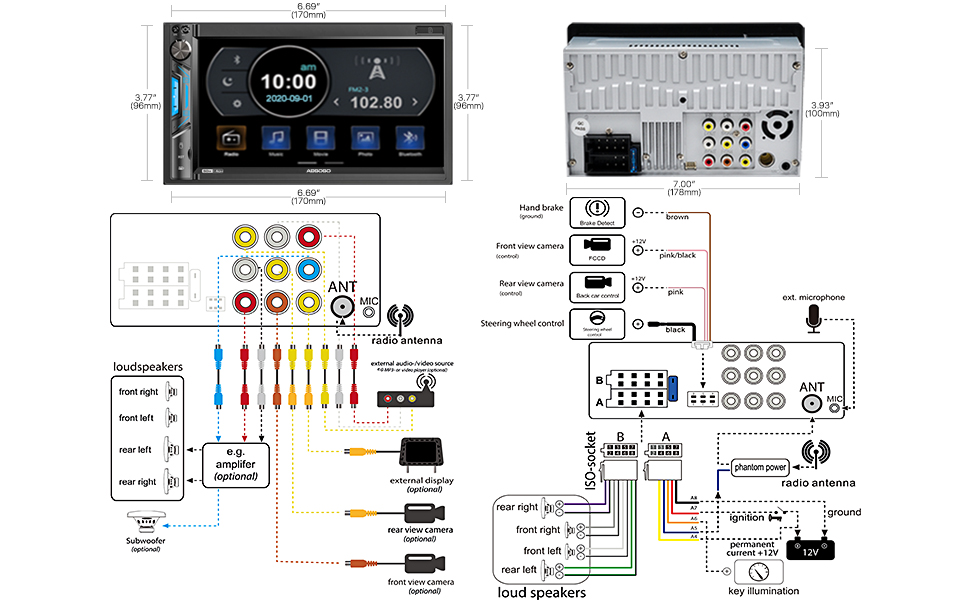
Figi 4.1: Detailed wiring diagram and physical dimensions of the ABSOSO Double Din Car Stereo. This diagram illustrates connections for power, speakers, camera inputs, steering wheel controls, and auxiliary inputs/outputs. Dimensions are provided in both inches and millimeters for precise fitting.
- Koneksyon pouvwa:
- Yellow wire: Constant 12V (Battery)
- Red wire: ACC (Ignition Switched 12V)
- Fil nwa: Tè
- Koneksyon oratè: Connect speaker wires according to the diagram, ensuring correct polarity for each speaker (Front Left, Front Right, Rear Left, Rear Right).
- Antre kamera: Connect the backup camera to the "Rear View Camera Input" (usually a yellow RCA jack). The reverse trigger wire (often pink/brown) should be connected to the vehicle's reverse light circuit.
- Kontwòl volan: Connect the steering wheel control wires (Key1, Key2) to your vehicle's steering wheel control interface, if applicable.
- Antèn: Connect the vehicle's radio antenna to the unit's antenna input.
4.3. Monte inite a
Once wiring is complete, carefully slide the unit into the double din opening in your dashboard. Secure it using the provided mounting brackets and screws. Ensure the unit is firmly seated and does not obstruct any vehicle controls.
5. Operasyon Enstriksyon
5.1. Kontwòl debaz ak koòdone

Figi 5.1: The main interface of the ABSOSO Double Din Car Stereo, showing the 7-inch HD touchscreen with various application icons, physical buttons, and a rotary knob. This image also displays the included remote controls and backup camera.
- Power Button/Volume Knob: Peze pou limen/etenn. Vire pou ajiste volim nan.
- Bouton Kay: Retounen nan meni prensipal la.
- Ikòn Anviwònman: Access system settings (audio, display, general).
- Ekran tactile: Navigate menus and select options by touching the screen.
- Multicolor Buttons: The unit features 7 customizable multicolor buttons for enhanced aesthetics.
5.2. Bluetooth Koneksyon
Bluetooth entegre a pèmèt ou fè apèl men lib ak difizyon odyo san fil.

Figi 5.2: Illustration of the Bluetooth features, including hands-free calling with a dial pad, music streaming interface, and voice navigation prompts displayed on the stereo screen.
- On the stereo, go to the Bluetooth menu.
- Aktive Bluetooth sou aparèy mobil ou epi chèche aparèy ki disponib.
- Select "ABSOSO" (or similar name) from the list on your phone.
- Konfime kòd koneksyon an si yo mande w.
- Yon fwa konekte, ou ka fè/resevwa apèl epi difize odyo san fil.
5.3. PhoneLink (CarPlay / Android Auto / MirrorLink)
Connect your smartphone for integrated navigation, music, and other apps. Note: Only compatible with Android 11.0 or below, and iPhone XR, iPhone 8 Plus or below via original charging cable. This unit is not a GPS unit itself.

Figi 5.3: Displays the CarPlay, Android Auto, and MirrorLink interfaces on the stereo screen, showing navigation, music playback, and voice assistant interaction (Siri, Google Assistant). A user is shown interacting with the system while driving.
- Connect your smartphone to the unit's USB port using a high-quality USB cable (preferably the original charging cable for iPhones).
- The unit should automatically detect and launch CarPlay or Android Auto.
- Follow any on-screen prompts on both the stereo and your phone to complete the connection.
- For MirrorLink, ensure your phone supports the feature and follow the specific instructions provided by your phone manufacturer.
5.4. Media Playback (USB/SD/AUX)
Enjoy your favorite audio and video files soti nan divès sous.
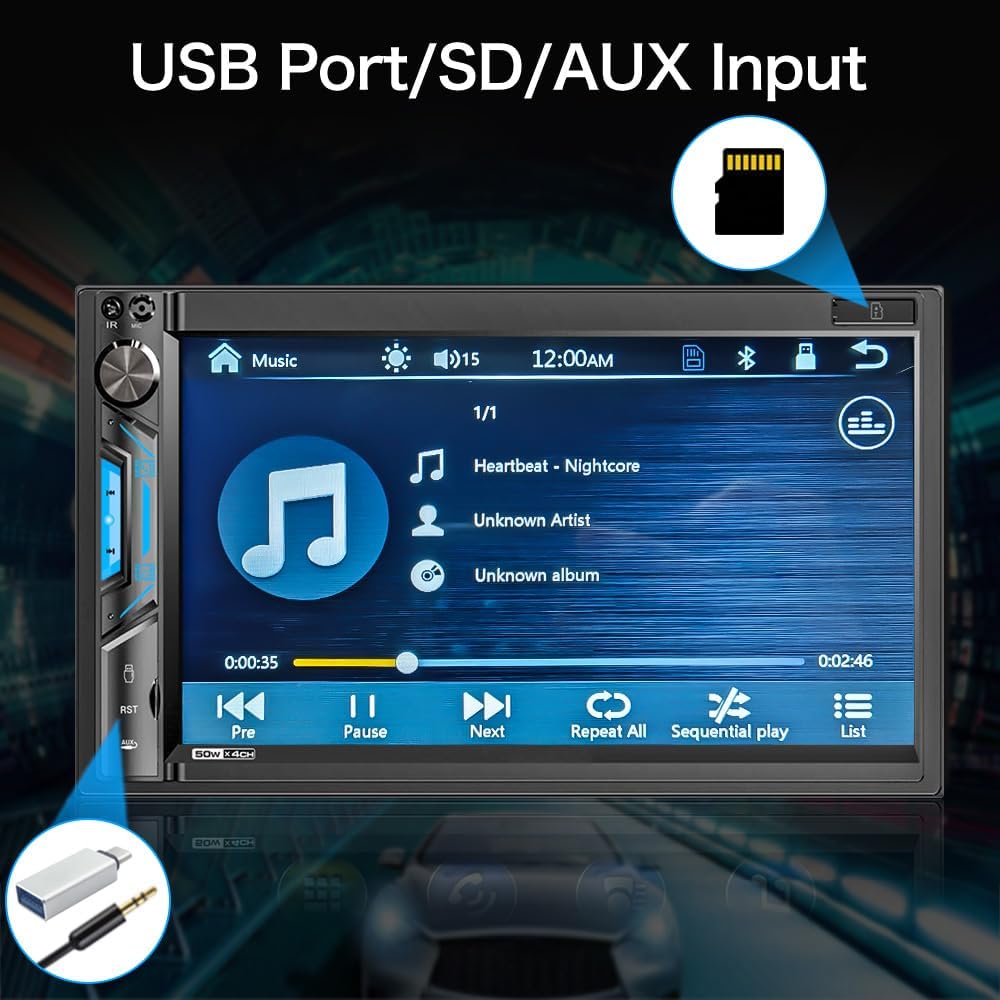
Figi 5.4: Fèmen view of the stereo screen showing a music playback interface, with visual cues pointing to the USB port and SD card slot. This highlights the unit's capability to play media from external storage.
- USB: Insert a USB drive into the USB port. The unit will automatically detect and display playable media files.
- Kat SD: Insert an SD card into the SD card slot. The unit will access media fileyo estoke sou kat la.
- Antre AUX: Connect an external audio device (e.g., MP3 player) to the 3.5mm AUX input jack using an audio cable. Select "AUX" as the source on the stereo.
- Fòma sipòte:
- Audio: MP3, WMA, AVI, MKV, MP4, WMV, RMVB, MPEG
- Video: RM, RMVB, DVD(VOB), VCD(DAT), MP1, MP2, DIVX, XVID, MP4, H263, H264, FLV, 3GP, SWF, AVI, ASF, MJPEG
5.5. AM/FM Radio
Konekte sou estasyon radyo ou pi renmen yo.

Figi 5.5: The AM/FM radio interface on the stereo screen, showing frequency display, station presets, and tuning controls. The image emphasizes the unit's ability to support both AM and FM bands with 30 total station presets.
- Select the "Radio" icon from the main menu.
- Sèvi ak kontwòl ki sou ekran an pou chèche estasyon, sintonize manyèlman, oswa chwazi nan estasyon prereglaj yo.
- The unit supports 30 total station presets.
5.6. Dèyè ak Devan View Kamera
The unit supports automatic display of camera feeds when reversing or manually selecting the front camera.

Figi 5.6: Depicts the stereo screen displaying a rear view camera feed, showing parking lines and a clear view behind the vehicle. An image of a car with a backup camera is also shown, illustrating the camera's function.
- When the vehicle is shifted into reverse, the unit will automatically display the rear camera feed.
- Ensure the backup camera is properly installed and connected to the "Rear View Camera Input" and the reverse trigger wire.
- If a front camera is installed, it can typically be accessed through a dedicated icon on the main menu or settings.
5.7. Kontwòl volan (SWC)
Program your vehicle's steering wheel controls to operate the stereo.
- Go to the "Settings" menu on the stereo.
- Navigate to "Steering Wheel Control" or "SWC Learning".
- Follow the on-screen instructions to assign functions (e.g., volume up/down, track next/previous) to your steering wheel buttons.
- Press and hold each button on your steering wheel while selecting the corresponding function on the stereo's screen to program it.
6. Antretyen
- Netwaye ekran an: Sèvi ak yon twal mou ki pa gen pousyè pou siye ekran tactile a dousman. Pou tach ki difisil pou retire, siye yon ti kras.ampen the cloth with water or a screen-safe cleaner. Do not spray cleaner directly onto the screen.
- Netwayaj jeneral: Use a dry, soft cloth to wipe the unit's body. Avoid using harsh chemicals or abrasive materials.
- Mizajou lojisyèl: Check the ABSOSO official webVizite sit la detanzantan pou nenpòt mizajou firmwèr ki disponib pou asire pèfòmans ak konpatibilite optimal.
NAN. Depanaj
If you encounter issues with your stereo, refer to the following common problems and solutions:
| Pwoblèm | Kòz posib | Solisyon |
|---|---|---|
| Pa gen pouvwa | Fil elektrik ki pa kòrèk; Fuzib ki boule; Koneksyon ki lach. | Check power (Yellow, Red, Black) wires. Verify fuse. Ensure all connections are secure. |
| Pa gen Son | Incorrect speaker wiring; Volume too low; Mute enabled; Incorrect audio source. | Check speaker connections and polarity. Increase volume. Disable mute. Select correct audio source. |
| Bluetooth pa konekte | Bluetooth not enabled on device; Device not in pairing mode; Interference. | Ensure Bluetooth is on and discoverable. Restart both devices. Clear previous pairings. |
| CarPlay/Android Auto Not Working | Incorrect USB cable; Phone OS version incompatible; App issues. | Use original USB cable. Check phone OS compatibility (Android 11.0 or below, iPhone XR/8 Plus or below). Restart phone and stereo. |
| Rear Camera Not Displaying | Camera not powered; Incorrect video input; Reverse trigger wire not connected. | Check camera power supply. Verify RCA video connection. Ensure reverse trigger wire is connected to reverse light. |
| Move Resepsyon Radyo | Antèn pa konekte; Zòn siyal fèb; Antèn domaje. | Ensure antenna is securely connected. Try tuning in a different location. Inspect antenna for damage. |
If the problem persists after attempting these solutions, please contact ABSOSO customer support for assistance.
8. Espesifikasyon
| Karakteristik | Detay |
|---|---|
| Nimewo Modèl | CA71BT |
| Gwosè ekran | 7 pous HD Touchscreen |
| Rezolisyon ekspozisyon | 1080P Video Playback Support |
| Koneksyon | Bluetooth, PhoneLink (CarPlay/Android Auto/MirrorLink), USB, SD, AUX |
| Bluetooth vèsyon | Built-in Bluetooth for hands-free calling and audio streaming |
| PhoneLink Compatibility | Android 11.0 or below, iPhone XR, iPhone 8 Plus or below (via original charging cable) |
| Sipò pou kamera | Dèyè ak devan View Camera Input (Waterproof HD rear camera included) |
| Radio Tuner | AM/FM Radio with 30 Presets |
| Fòma Audio Sipòte | MP3, WMA, AVI, MKV, MP4, WMV, RMVB, MPEG |
| Fòma videyo sipòte | RM, RMVB, DVD(VOB), VCD(DAT), MP1, MP2, DIVX, XVID, MP4, H263, H264, FLV, 3GP, SWF, AVI, ASF, MJPEG |
| Sorti pouvwa | 200 Watt (pik) |
| pre-amp Sòti yo | Wi |
| Sòti Subwoofer | Wi |
| Kontwòl Volan | Sipòte |
| Dimansyon (pwodwi) | 7 x 3 x 4 pous |
| Pwa | 2.56 liv |
| Pwovizyon pou pouvwa | 12V DC (tè negatif) |
9. Garanti & Sipò
ABSOSO is committed to providing excellent customer service. Your ABSOSO Bluetooth car stereo comes with professional technical support.
- Sèvis Kliyan: For any questions, issues, or technical assistance, please contact ABSOSO customer service.
- User Manual & FAQ: This professional user manual and a comprehensive FAQ section are available to assist you.
- Sipò teknik 24 èdtan: 24-hour technical support is available before and after sales for purchases made through Amazon.com.
- Enfòmasyon sou garanti: Please refer to your purchase documentation or contact customer support for specific warranty terms and conditions.
For the most up-to-date support information, please visit the official ABSOSO store on Amazon or contact them directly.
ABSOSO Store Link: Visit the ABSOSO Store on Amazon