1. Plis paseview
The YESKAMO Outdoor WiFi Battery Security Camera with Solar Panel (Model JP-AM-01) is a versatile surveillance solution designed for both indoor and outdoor use. Featuring 1080P resolution, IP65 waterproofing, PIR motion detection, two-way audio, and night vision, this camera offers comprehensive monitoring capabilities. Its battery-powered design, complemented by a high-efficiency solar panel, ensures long-term operation without constant recharging. Remote monitoring and control are available via a smartphone application.
2. Pwodwi konpozan
Pake a gen ladan atik sa yo:
- Security Camera Body
- Kanpe mayetik
- Outdoor Screw-Mount Bracket
- Panèl solè
- Support panèl solè
- USB Chaje Kab
- Pwodui pou monte (vis, lank)
- Security Camera User Manual
- Manyèl Itilizatè Panèl Solè
3. Enstalasyon
3.1 Premye chaj
Before first use, fully charge the camera battery using the provided USB cable. Connect the USB cable to the camera's charging port and a 5V USB power adapter (not included).
3.2 Enstalasyon Aplikasyon an ak Koneksyon Kamera a
- Telechaje epi enstale Cloudedge aplikasyon an nan magazen aplikasyon telefòn entelijan ou an (iOS oswa Android).
- Louvri aplikasyon an epi kreye yon kont oubyen konekte.
- Power on the camera. If it's a new camera or has been reset, the LED indicator will flash red.
- In the Cloudedge app, tap the "+" icon to add a new device. Select "Battery Camera".
- Follow the on-screen instructions to connect the camera to your 2.4GHz Wi-Fi network. Ensure your smartphone is also connected to the same 2.4GHz Wi-Fi network.
- The app will display a QR code. Hold your smartphone approximately 15-25 cm (6-10 inches) in front of the camera lens. The camera will scan the QR code and emit a prompt sound upon successful connection.
- Once connected, the camera's LED indicator will turn solid blue, and the camera will appear in your app's device list.
Pou yon gid vizyèl sou pwosesis koneksyon an, tanpri gade videyo ki anba a:
Video: Demonstrates the camera connection process using the Cloudedge app, including QR code scanning and network setup.
3.3 Opsyon Enstalasyon
Kamera a ofri opsyon enstalasyon fleksib:
- Mòn mayetik: For indoor use or sheltered outdoor areas, the magnetic stand allows for easy attachment and adjustment without drilling. Simply attach the camera to the magnetic stand and place it on a suitable metal surface or use the included 3M tape for non-metal surfaces.
- Screw Mount: For secure outdoor installation, use the provided screw-mount bracket. This method ensures stability and weather resistance.

Image: The YESKAMO camera shown with both magnetic and screw-mount options, illustrating its versatility for various installation environments.

Imaj: Detaye view of the YESKAMO camera showcasing both magnetic and screw-mount installation methods, highlighting strong magnetic force and easy removal for the magnetic option, and secure screw fixing for outdoor use.
Konsèy enstalasyon: For optimal performance, install the battery camera at a height of 2.5-3 meters (8-10 feet) and angle it 15-30 degrees from vertical. Avoid direct sunlight on the lens and do not place it behind glass.
4. Operasyon Enstriksyon
4.1 Viv View ak Lektur
Access the Cloudedge app to view viv footage from your camera. You can switch between SD (standard definition) and HD (high definition) quality for real-time viewing. Recorded footage can be played back from the app's timeline.

Image: The Cloudedge app interface demonstrating multi-camera live viewing, playback, and various settings, including image enlargement and quality adjustment.
4.2 Odyo De-fason
The camera supports two-way audio communication. Through the app, you can listen to the camera's surroundings and speak through the camera's speaker. This feature is useful for communicating with visitors or deterring intruders.
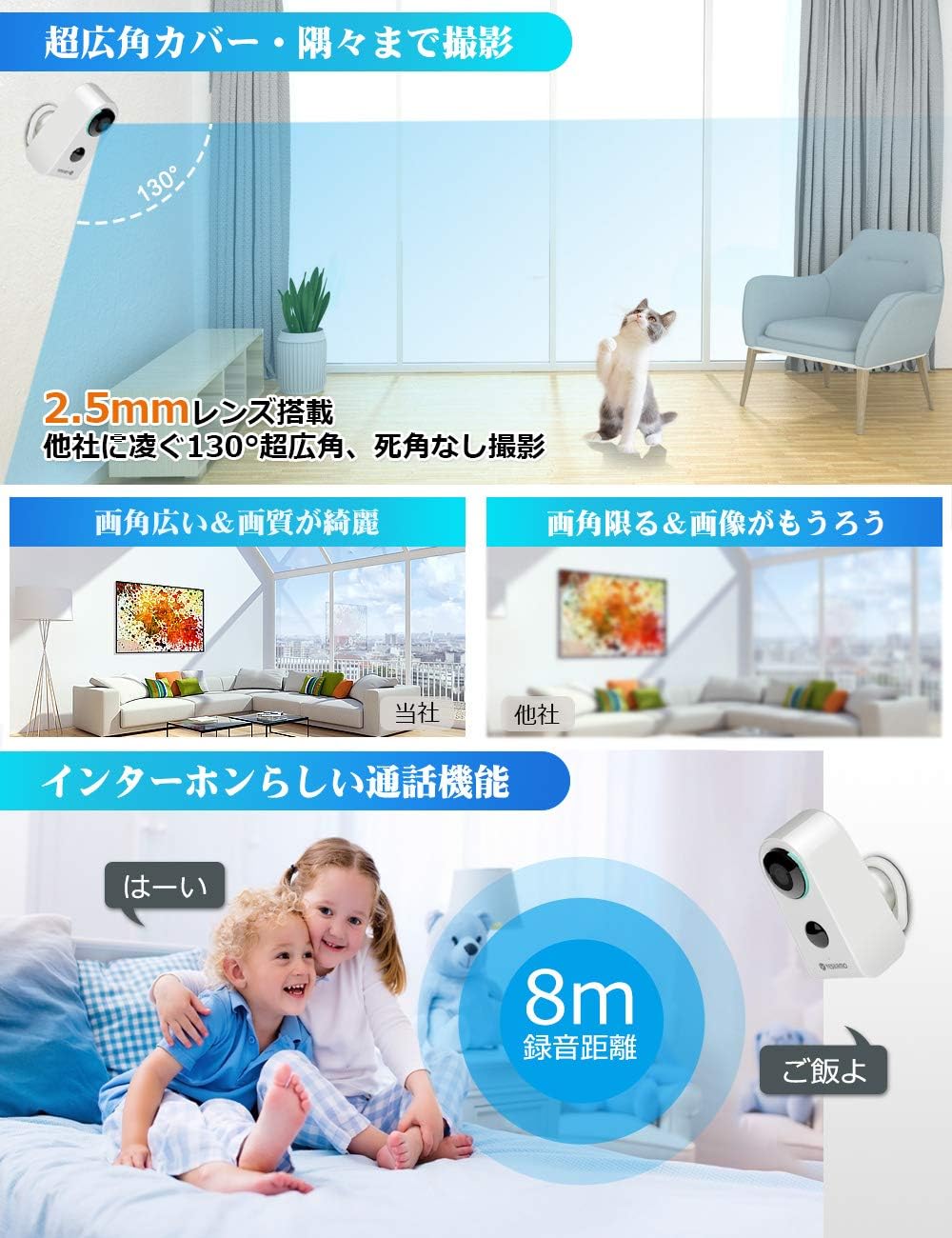
Image: The YESKAMO camera highlighting its 130-degree super wide-angle lens and two-way audio capabilities, showing an 8m recording range.
4.3 Deteksyon Mouvman PIR
The camera is equipped with a PIR (Passive Infrared) motion sensor. It detects heat signatures from people or animals, triggering recording and sending instant alerts to your smartphone. This low-power consumption technology helps conserve battery life and storage space by only recording relevant events.
- Sansiblite reglabl: Motion detection sensitivity can be set to high or low via the app.
- Dire Anrejistreman: The recording time after detection is configurable (default 10 seconds, also 20 or 30 seconds).

Image: The YESKAMO camera illustrating its PIR motion sensor, showing how it detects movement and triggers recording, with options for Micro SD card or Cloud storage.
4.4 Vizyon lannwit
The camera features advanced IR-CUT technology, providing clear night vision. It automatically switches to night mode in low-light conditions, ensuring visibility even in complete darkness.
4.5 Anrejistreman ak Depo
Anrejistre footage ka estoke nan de fason:
- Kat mikwo SD: Supports up to 128GB Micro SD cards (not included). The camera will automatically overwrite older footage lè kat la plen.
- Depo nwaj: A paid cloud server option is available for storing your recordings securely.

Image: Illustrates the two storage options: Micro SD card (up to 128GB, auto-overwrite) and Cloud server (paid service).
4.6 Multi-Camera Management
The Cloudedge app allows you to add and manage multiple YESKAMO cameras. You can view up to four cameras simultaneously in a split-screen view, share camera access with family members, and remotely adjust settings or playback recordings from anywhere.
5. Antretyen
5.1 Batri Chaje
The camera's large-capacity battery is designed for long operation. The included solar panel provides continuous charging during daylight hours, reducing the need for manual recharging. You can also charge the camera via the USB port using a 5V USB adapter.
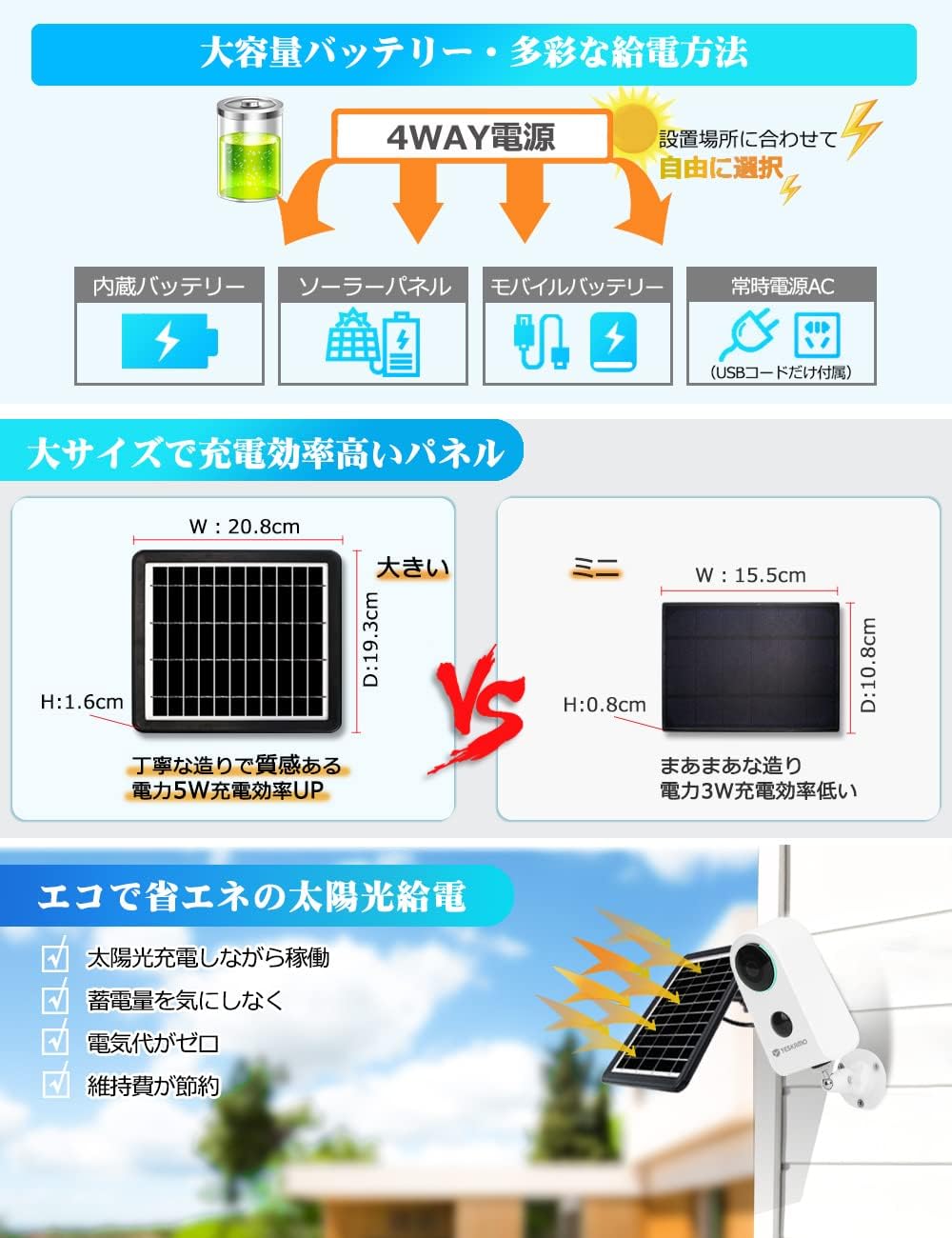
Image: Shows the camera's large-capacity battery and the solar panel, emphasizing efficient solar charging and multiple power options.

Image: The YESKAMO camera connected to its solar panel, illustrating continuous solar charging for extended outdoor use.
5.2 Netwayaj
Netwaye lantiy kamera a ak panèl solè a regilyèman avèk yon twal mou.amp cloth to ensure optimal image quality and charging efficiency. Avoid using harsh chemicals.
5.3 Mizajou Firmware
Periodically check the Cloudedge app for available firmware updates. Keeping your camera's firmware up-to-date ensures optimal performance, security, and access to new features.
NAN. Depanaj
- Kamera a pa konekte ak Wi-Fi a: Ensure your Wi-Fi network is 2.4GHz. Verify the Wi-Fi password. Make sure the camera is within range of your router. Try resetting the camera by pressing the reset button for 5 seconds.
- Move kalite imaj: Check if the lens is clean. Ensure the camera is not placed behind glass or in direct sunlight. Adjust the image quality setting in the app to HD if needed.
- Deteksyon mouvman an pa fonksyone: Adjust the PIR sensitivity settings in the app. Ensure there are no obstructions blocking the sensor.
- Kout lavi batri: Ensure the solar panel is receiving adequate sunlight. Check the battery level in the app. Reduce motion detection frequency or recording duration if necessary. The app will notify you when the battery level drops below 20%.
- No audio or two-way talk issues: Tcheke paramèt mikwofòn ak oratè yo nan aplikasyon an. Asire w volim telefòn ou an wo.
7. Espesifikasyon
| Mak | YESKAMO |
| Nimewo Modèl | JP-AM-01 |
| Koneksyon Teknoloji | San fil (Wi-Fi 2.4GHz) |
| Rezolisyon Capture Videyo | 1080p |
| Karakteristik | Motion Sensor, Night Vision, Two-Way Audio |
| Andedan kay la / Deyò Itilizasyon | Andedan kay la, deyò |
| Evalyasyon ki enpèmeyab | IP65 |
| Sous pouvwa | Battery Powered (Lithium-ion), Solar Panel, USB Charging |
| Batri enkli | Wi |
| Aparèy konpatib | Smartphone |
| Pwa pwodwi | 1.68 Kilogram |
| Dimansyon pake | 27 x 22.6 x 9.4 cm |
| Koulè | Blan |
8. Garanti ak sipò
8.1 Garanti
Pwodwi sa a vini ak yon 1-ane garanti from the date of purchase. In case of any malfunction within this period, a free replacement will be provided.
8.2 Sipò pou Kliyan
For any inquiries or technical assistance, please contact YESKAMO customer support via email or phone during weekdays. Refer to the product packaging or the official YESKAMO websit pou detay kontak.


