Entwodiksyon
This manual provides essential information for setting up, operating, maintaining, and troubleshooting your HP 240 G7 Laptop, Model 1S5F1PA#ACJ. Please read this guide thoroughly to ensure proper use and to maximize the lifespan of your device.

Imaj: Devan view of the HP 240 G7 Laptop with the screen displaying the Windows operating system desktop.
Kontni pake
Verifye ke atik sa yo enkli nan pake pwodwi ou a:
- HP 240 G7 Laptop (Model 1S5F1PA#ACJ)
- Adaptè kouran AC ak kòd kouran
- Dokimantasyon (Gid Demaraj Rapid, Enfòmasyon sou Garanti)
Pwodwi souview
Familiarize yourself with the physical features and ports of your HP 240 G7 Laptop.
Eleman bò gòch

Image: Left side of the laptop, illustrating the various ports and connectors.
- AC Power Connector: Pou konekte adaptè pouvwa a.
- RJ-45 (Ethernet) Port: Pou koneksyon rezo filaire.
- Pò HDMI 1.4b: Pou konekte ak ekran ekstèn oswa pwojektè.
- Pò USB 3.1 Jen 1 (x2): Pou konekte aparèy USB gwo vitès.
- Jack konbine pou kas ekoutè/mikwofòn: For connecting a headset or external audio devices.
Konpozan bò dwat yo
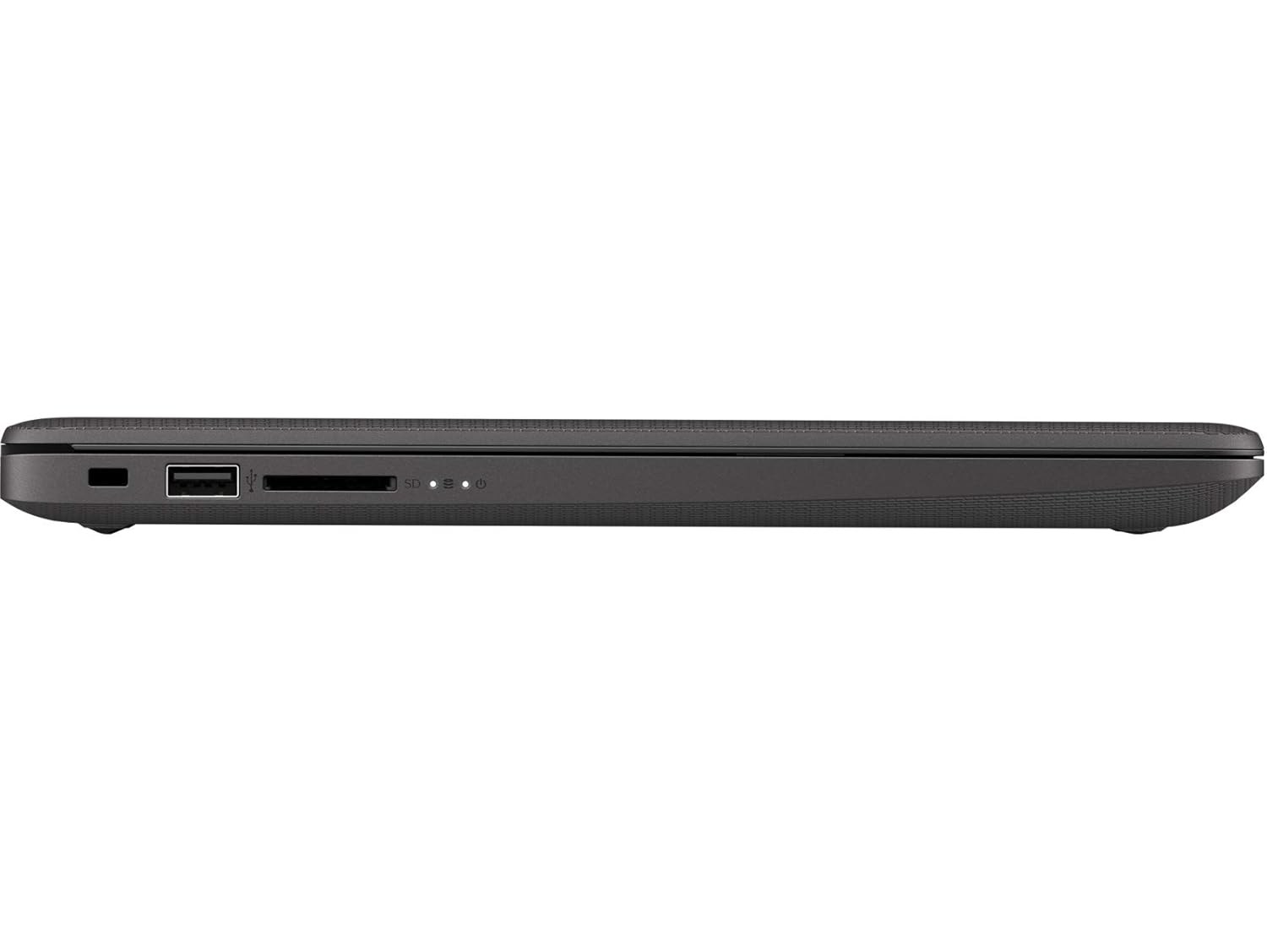
Image: Right side of the laptop, illustrating the USB port and media card reader.
- Security Lock Slot: Pou tache yon kab sekirite.
- USB 2.0 pò: Pou konekte aparèy USB estanda.
- Multi-Format Digital Media Reader: Sipòte kat memwa SD, SDHC, ak SDXC.
Anlè ak dèyè Views

Imaj: Anwo-anba view of the laptop with the lid closed, showing the HP logo.

Imaj: Angle view of the laptop's back, highlighting the textured finish and HP logo.
The top cover features the HP logo. The back of the laptop is designed for durability and aesthetics.
Enstalasyon
- Konekte pouvwa: Plug the AC power adapter into the laptop's AC power connector and then into a wall outlet.
- Premye pouvwa sou: Open the laptop lid and press the power button. The laptop will begin its initial boot sequence.
- Enstalasyon Sistèm Operasyon an: Swiv enstriksyon ki sou ekran an pou w konplete konfigirasyon Windows 10 Pro a, ki gen ladan seleksyon lang, koneksyon rezo a, ak kreyasyon kont itilizatè.
Opere
Jesyon pouvwa
- Pouvwa sou: Peze bouton pouvwa a ki sitiye sou platfòm klavye a.
- Fèmen: Klike sou bouton Kòmanse a, answit sou Pouvwa > Fèmen.
- Mòd dòmi: Click the Start button, then Power > Sleep, or close the laptop lid.
Klavye ak Touchpad
- Klavye: Use the integrated keyboard for typing. Function keys (F1-F12) provide shortcuts for various system functions when pressed with the Fn key.
- Touchpad: Touchpad la sipòte jès milti-touch pou navigasyon, defile, ak zoom. Gade paramèt Windows yo pou pèsonalizasyon.
Koneksyon
- Wi-Fi: Connect to wireless networks via the Realtek RTL8822CE 802.11a/b/g/n/ac (2x2) Wi-Fi adapter. Access Wi-Fi settings through the Windows taskbar.
- Bluetooth: Pair Bluetooth 5 compatible devices such as headphones or mice. Manage Bluetooth devices in Windows settings.
- Ekspozisyon ekstèn: Connect an external monitor or projector using the HDMI 1.4b port. Press Kle Windows + P to manage display modes.
Antretyen
- Netwayaj: Sèvi ak yon ti moso twal mou, ki san pèl dampened with water or a screen cleaner to clean the display and exterior surfaces. Avoid harsh chemicals.
- Swen batri: To prolong battery life, avoid extreme temperatures. Periodically allow the battery to discharge partially before recharging.
- Mizajou lojisyèl: Regularly check for and install Windows updates and HP driver updates to ensure optimal performance and security.
- Sovgad done: Fè kopi done enpòtan yo regilyèman sou yon disk ekstèn oswa yon depo nwaj pou evite pèt done.
Depanaj
This section addresses common issues you might encounter with your HP 240 G7 Laptop.
System Performance Issues
- Pèfòmans Ralanti: If the system feels slow, check for background applications consuming resources. Ensure sufficient free space on the hard drive. Consider upgrading RAM if performance remains an issue for your usage.
- Laptop Not Booting: Ensure the power adapter is securely connected and the battery has sufficient charge. Try performing a hard reset by holding the power button for 15 seconds. If the issue persists, contact HP Support.
Ekspozisyon ak grafik
- Whitish/Dull Screen: Adjust display brightness and contrast settings in Windows. Ensure display drivers are up to date. Note that the display resolution is 1366 x 768, which may appear less sharp compared to higher-resolution screens.
- Pa gen ekspozisyon: If the screen is black, try connecting an external monitor to verify if the issue is with the laptop's internal display. Restart the laptop.
Surchof
- Twòp Chalè: Ensure the laptop's vents are not obstructed. Use the laptop on a hard, flat surface to allow for proper airflow. Avoid operating in direct sunlight or hot environments. If a specific area, like the palm rest, feels excessively hot, this could indicate internal component heat. Ensure all system drivers and BIOS are updated.
Pou plis asistans, gade sipò HP a. websit oswa kontakte sèvis kliyan yo.
Espesifikasyon
| Karakteristik | Detay |
|---|---|
| Non modèl | HP 240 G7 |
| Nimewo Modèl Atik | 1S5F1PA#ACJ |
| Processeur | Intel Core i3-1005G1 (1.2 GHz base, up to 3.4 GHz with Intel Turbo Boost, 4 MB L3 Cache, 2 Cores) |
| RAM | 4 GB DDR4-2666 SDRAM (1 x 4 GB) |
| Depo | Disk difisil SATA 1 TB 5400 RPM |
| Ekspozisyon | 14-inch Diagonal, HD (1366 x 768), Anti-glare, 220 Nits, 45% NTSC |
| Grafik | Intel UHD Graphics |
| Sistèm operasyon | Windows 10 Pro |
| Koneksyon san fil | Realtek RTL8822CE 802.11a/b/g/n/ac (2x2) Wi-Fi and Bluetooth 5 Combo |
| Pò | 2x USB 3.1 Gen 1, 1x USB 2.0, 1x HDMI 1.4b, 1x RJ-45, 1x Headphone/Microphone Combo, 1x AC Power, 1x Multi-Format Digital Media Reader |
| Dimansyon (W x P x H) | 33.5 x 23.4 x 1.99 cm |
| Pwa | 1.52 kg |
| Batri | Lithium Battery, 4.9 Watt Hours |
Garanti ak sipò
Your HP 240 G7 Laptop comes with a standard manufacturer's warranty. Please refer to the warranty documentation included in your package for specific terms and conditions.
Pou sipò teknik, telechaje chofè, oswa kesyon sèvis, tanpri vizite sit sipò ofisyèl HP la. website or contact HP customer service. You can find more information and resources on the Magazen HP sou Amazon or the main HP websit.