1. Entwodiksyon
Thank you for choosing Senso Wireless Earbuds. These True Wireless Stereo (TWS) earphones are designed for an active lifestyle, featuring a secure fit, high-quality audio, and sweatproof construction. This manual will guide you through the setup, operation, and maintenance of your new earbuds.
2. Ki sa ki nan bwat la
- Senso Wireless Earbuds (Left and Right)
- Ka chaje pòtab
- USB Chaje Kab
- Gid itilizatè
- Plizyè gwosè nan pwent zòrèy
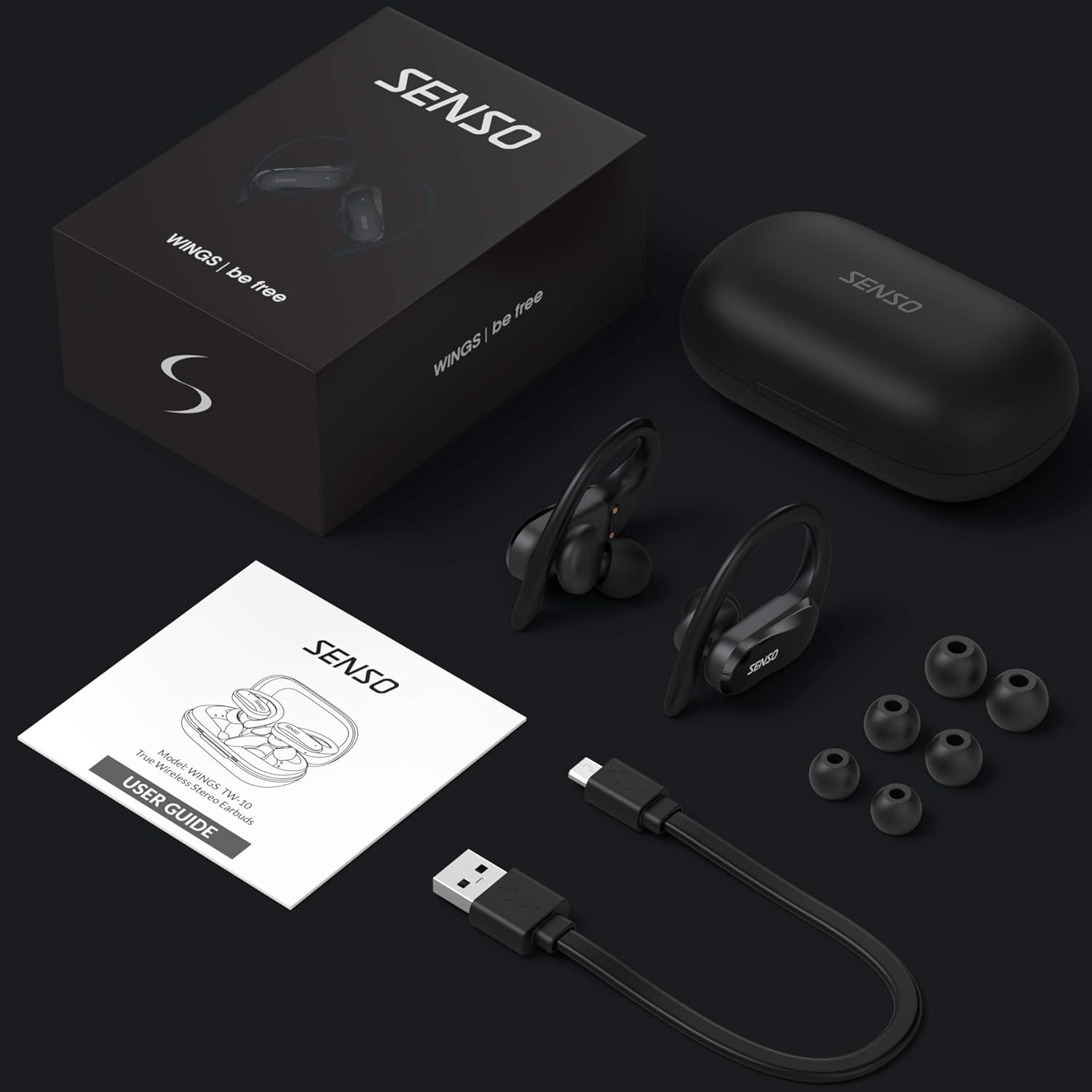
Image: The Senso Wireless Earbuds packaging, displaying the earbuds, charging case, user guide, USB charging cable, and various ear tip sizes.
3. Pwodwi souview
The Senso Wings TW10 earbuds are designed for comfort and performance, featuring advanced audio technology and a durable build.

Imaj: Yon eksplozyon view of the earbud, illustrating the 13mm dynamic driver responsible for delivering premium sound quality with intense bass and dynamic range.

Imaj: Yon imaj detaye view of the earbud's internal circuitry, emphasizing the Bluetooth 5.0 chipset and CVC 8.0 Noise Cancellation Technology for stable connection and clear audio.

Image: Two scenarios demonstrating the earbuds' versatility: one earbud in use for mono mode (e.g., driving) and both earbuds for dual mode (e.g., binaural calls).

Image: The earbuds are shown resisting water splashes, indicating their IPX6 waterproof rating, suitable for sweat, water, and rain.
4. Enstalasyon
4.1 Chaje ekoutè yo ak bwat la
Before first use, fully charge the earbuds and the charging case. Place the earbuds into the charging case. Connect the USB charging cable to the case and a power source. The indicator lights on the case will show the charging status.
4.2 Premye koneksyon
- Asire w ke ekoutè ou yo chaje.
- Louvri bwat chaje a. Ekoutè yo ap limen otomatikman epi antre nan mòd koneksyon.
- Sou aparèy ou an (telefòn entelijan, tablèt, elatriye), aktive Bluetooth.
- Chèche pou available Bluetooth devices and select "SENSO Wings TW10" from the list.
- Yon fwa konekte, w ap tande yon enstriksyon odyo, epi limyè endikatè ekoutè yo ap chanje.

Image: The earbuds are shown connecting to a smartphone, demonstrating the simple and fast pairing process upon removal from the charging case.
Video: An official product video demonstrating the features and setup of the Senso WINGS Ultra Durable Premium Audio Wireless Earbuds.
5. Operasyon Enstriksyon
5.1 Mete ekoutè yo
Place the earbuds in your ears and adjust the ear hooks for a secure and comfortable fit. The 60-degree twist lock system ensures they stay in place during physical activity.

Image: A user demonstrating the secure fit of the earbuds with the 60-degree twist lock system, ideal for sports and exercise.
5.2 Kontwòl debaz yo
The earbuds feature touch-sensitive controls for media playback and call management. Refer to the detailed user guide included in the box for specific touch commands for functions such as play/pause, skip track, answer/end call, and voice assistant activation.
5.3 Mono or Dual Mode
You can use either earbud independently (mono mode) or both together (dual mode) for a stereo audio experience. This flexibility allows for awareness of your surroundings when needed.
5.4 Fonksyon Rele
Each earbud is equipped with a microphone, enabling binaural calls for clear communication. Use the touch controls to answer, end, or reject calls.
6. Antretyen
6.1 Netwayaj
- Netwaye ekoutè yo ak bwat chaje a regilyèman avèk yon twal mou, sèk, epi ki pa gen pousyè.
- Retire bout zòrèy yo epi netwaye yo avèk savon dou ak dlo, apresa seche yo byen anvan ou mete yo ankò.
- Evite itilize pwodui netwayaj abrazif oswa solvang.
6.2 Depo
- Sere ekoutè yo nan ka chaje yo lè yo pa itilize pou pwoteje yo epi kenbe yo chaje.
- Kenbe aparèy la nan yon kote ki fre epi sèk, lwen tanperati ekstrèm ak limyè solèy dirèk.
NAN. Depanaj
7.1 Pwoblèm koneksyon
- Asire w ke tou de ekoutè yo byen chaje.
- Etenn Bluetooth sou aparèy ou an, epi aktive l ankò.
- Bliye aparèy la nan lis Bluetooth ou a epi eseye konekte li ankò.
- If only one earbud connects, try resetting the earbuds (refer to the full user guide for specific reset instructions).
7.2 Pa gen son oswa volim ki ba
- Tcheke nivo volim yo sou aparèy ou an ak ekoutè yo.
- Asire w ke ekoutè yo byen chita nan zòrèy ou yo.
- Netwaye tout debri ki sou oratè ekoutè yo ak bout zòrèy yo.
7.3 Pwoblèm chaje
- Verifye ke kab chaje a byen konekte ak tou de bwat la ak sous kouran an.
- Asire w ke kontak chaje yo sou ekoutè yo ak anndan bwat la pwòp epi pa gen okenn obstak.
- Eseye yon lòt kab chaje oswa adaptè kouran.
8. Espesifikasyon
| Karakteristik | Detay |
|---|---|
| Non modèl | Wings TW10 |
| Koneksyon Teknoloji | Bluetooth 5.0, San fil |
| Teknoloji kominikasyon san fil | Bluetooth |
| Kontwòl bri | Anile aktif bri |
| Nivo rezistans dlo | Enpèmeyab (IPX6) |
| Dire batri (ekoutè) | 8 èdtan |
| Tan total pou jwe (ak bwat) | Jiska 30 èdtan |
| Gwosè Chofè Audio | 10 Milimèt |
| Enpedans | 32 Ohms |
| Kalite kontwòl | Kontwòl Medya |
| Metòd kontwòl | Remote |
| Plasman Zòrèy | Nan Zòrèy |
| Faktè fòm | Nan Zòrèy |
| Materyèl | Silicone |
| Pwa atik | 7 ons |

Image: The earbuds and charging case illustrating the extended playtime: 6 hours for the earbuds and up to 30 hours total with the portable charging case.
9. Garanti ak sipò
Senso offers a standard warranty for its products. Additionally, you may be eligible for an extended warranty.
9.1 Garanti pwolonje
To convert to a two-year extended warranty, visit www.sensoshop.com/warranty. This must be claimed within 7 days of receiving your product.
9.2 Sipò pou Kliyan
For any product-related issues or inquiries, please contact Senso customer support. Details can be found on the warranty card included in your product packaging or on the official Senso websit.


