1. Entwodiksyon
Welcome to the Surfans Kids Tablet T57 user manual. This guide provides detailed instructions on how to set up, operate, maintain, and troubleshoot your new 7-inch Android tablet. Designed specifically for children, this tablet features a durable kid-proof case, parental control functions, and pre-installed educational and entertainment applications.
2. Ki sa ki nan bwat la
Tanpri verifye sa ki nan pake a pou asire w ke tout atik yo la:
- 1x Surfans Kids Tablet
- 1x Tablet Stand
- 1x USB kab
- 1x Kids Tablet User Manual (this document)
3. Pwodwi souview ak Karakteristik
The Surfans Kids Tablet T57 is built with a robust design and features tailored for young users. Below is an overview of its components and key functionalities.
3.1 Konpozan Tablèt
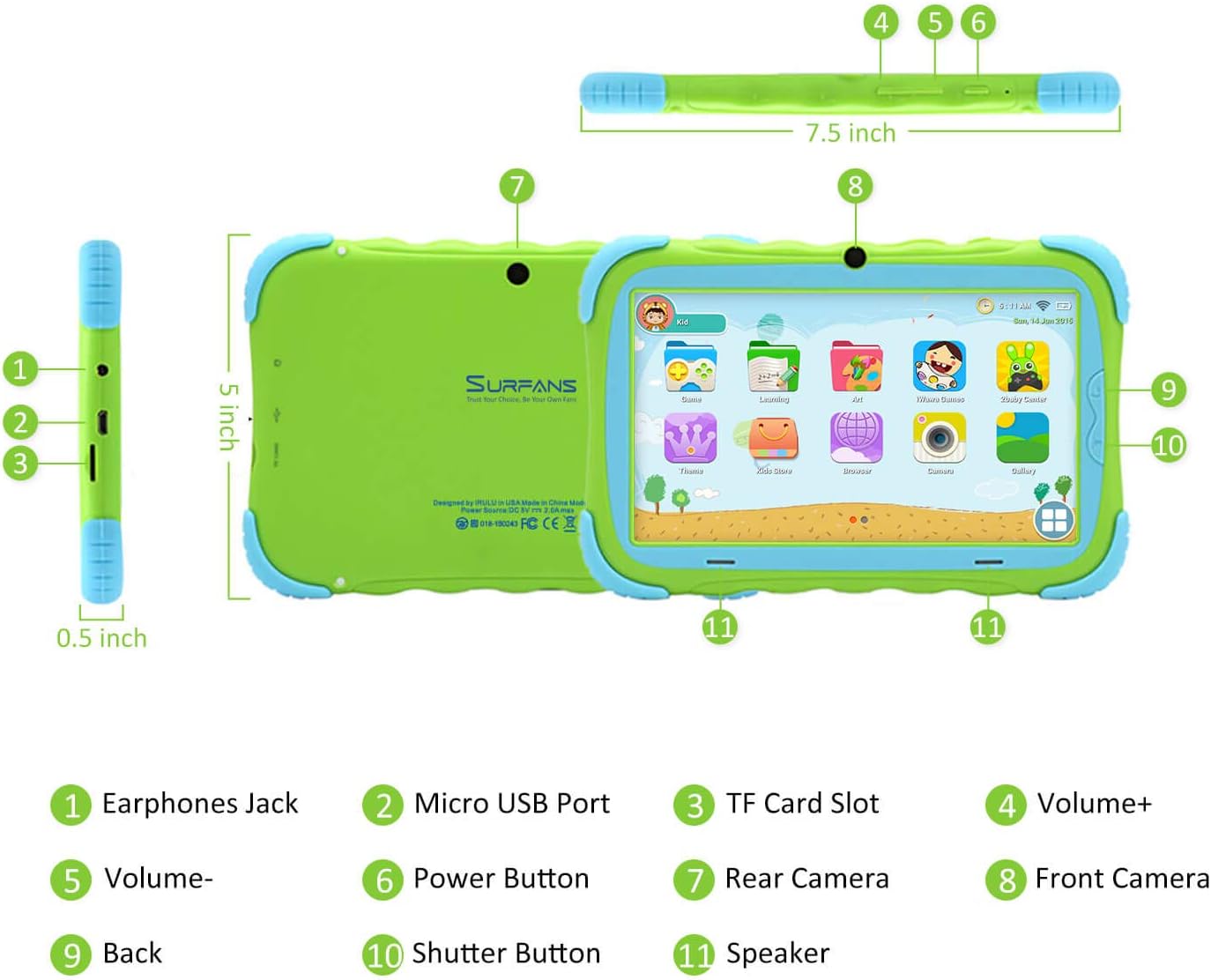
- Jack ekoutè: Pou konekte kas ekoutè oswa aparèy odyo ekstèn.
- Mikwo USB Port: Used for charging the tablet and connecting to a computer for data transfer.
- TF Kat plas: For inserting a Micro SD card to expand storage capacity (up to 32GB).
- Volim +: Increases the tablet's audio volume.
- Volim-: Decreases the tablet's audio volume.
- Bouton pouvwa: Press and hold to turn the tablet on/off or restart. Press briefly to turn the screen on/off.
- Kamera dèyè: The primary camera located on the back of the tablet.
- Kamera devan: The camera located on the front, typically used for video calls or selfies.
- Bouton tounen: Navigates back to the previous screen or closes the current application.
- Bouton vole: Used to capture photos or start/stop video recording in the camera application.
- Oratè: Provides audio output from the tablet.
3.2 Karakteristik kle
- Kid-Proof Design: Comes with a durable, lightweight, and skin-friendly case designed to protect against drops and bumps.
- 7-inch IPS HD Eye Protection Display: Provides clear visuals while minimizing eye strain.
- Android 9.0 OS: Runs on the latest Google Android 9.0 Pie operating system for smooth performance.
- Quad-Core Processor: Ensures responsive performance for apps, games, and videos.
- 1GB RAM & 16GB ROM: Sufficient memory for basic operations and storage, expandable up to 32GB via Micro SD card.
- Parental Control Mode: Allows parents to manage content, set time limits, and configure user settings for a safe digital environment.
- Pre-installed Kids Apps: Includes a variety of educational and entertaining apps, with access to the Google Play Store for more content.
- Koneksyon Wi-Fi: Supports 802.11g for fast browsing, streaming, and video calls.
- Long lavi batri: 3000mAh Li-ion Battery provides 3-5 hours of working time, or up to 8 hours of mixed use on a single charge.


4. Gid Enstalasyon
Follow these steps to set up your Surfans Kids Tablet for the first time.
4.1 Premye chaj
Before first use, fully charge the tablet. Connect the included USB cable to the Micro USB Port (2) on the tablet and plug the other end into a compatible USB power adapter (not included) or a computer USB port. The charging indicator will show the charging status.
4.2 Power On/Off
- Pou limen: Press and hold the Power Button (6) until the screen lights up.
- Pou etenn: Press and hold the Power Button (6) until a power-off menu appears. Select "Power off" and confirm.
- Pou rekòmanse: Press and hold the Power Button (6) until the power-off menu appears. Select "Restart" and confirm.
- Ekran On/Off: Briefly press the Power Button (6) to turn the screen on or off without powering down the tablet.
4.3 Koneksyon Wi-Fi
To access online content and download apps, connect your tablet to a Wi-Fi network:
- Sou ekran prensipal la, glise anba soti anwo pou ouvri panèl Anviwònman rapid la.
- Tap and hold the Wi-Fi icon to go to Wi-Fi settings.
- Aktive Wi-Fi a si li etenn.
- Chwazi rezo Wi-Fi ou vle a nan lis la.
- Enter the network password if prompted, then tap "Connect".
4.4 Setting Up Parental Control
The Parental Control mode is a key feature for managing your child's tablet usage. This allows you to filter website content, set time limits, and control app access.

Specific steps for setting up parental controls will be available within the tablet's pre-installed Kids app or settings menu. Look for an icon or section labeled "Parental Control" or "Kids Mode" to configure user profiles, allowed applications, and usage schedules.
5. Itilizasyon Tablèt la
This section covers basic operations and how to use the tablet's features.
5.1 Navigasyon debaz
- Touch and Tap: To open apps, select items, or type.
- Glise: To scroll through screens, menus, or web paj.
- Zoom-pou-Zoom: Pou agrandi oswa diminye imaj yo oubyen web paj.
- Ekran Kay: Ekran prensipal la kote ou ka jwenn aksè a aplikasyon ak widjèt yo.
- Ba Navigasyon: Located at the bottom of the screen, typically includes Back, Home, and Recent Apps buttons.
5.2 Using Kids Mode and Apps
The tablet comes with a dedicated Kids Mode interface, providing a safe and engaging environment for children. This mode typically features a simplified layout and access to pre-approved content.

- Accessing Kids Mode: Usually, there's a specific app icon or a setting to switch to Kids Mode.
- Aplikasyon pre-enstale: Explore the various educational games, books, music, and art learning applications.
- Google Play Store: For additional apps, exit Kids Mode (if applicable) and access the Google Play Store. Ensure parental supervision for downloads.


5.3 Media Playback and Camera
- Videos and Music: Use pre-installed media players or download others from the Play Store to enjoy videos and music.
- Kamera: Open the Camera app to use the Front (8) or Rear (7) cameras. Tap the Shutter Button (10) to take photos or record videos.
5.4 Expandable Storage
To expand the tablet's storage, insert a Micro SD card (up to 32GB, not included) into the TF Card Slot (3). This allows for more space for photos, music, movies, and apps.
6. Antretyen
Proper maintenance ensures the longevity and optimal performance of your tablet.
- Netwayaj: Sèvi ak yon twal mou ki pa gen pousyè pou netwaye ekran an ak kò tablèt la. Evite pwodui netwayaj abrazif oswa solvan.
- Swen batri:
- Evite dechaje batri a nèt souvan.
- Pa ekspoze tablèt la nan tanperati ekstrèm.
- Sèvi ak sèlman kab USB yo bay la pou chaje.
- Mizajou lojisyèl: Periodically check for system updates in the tablet's settings to ensure you have the latest features and security patches.
- Jesyon Depo: Netwaye regilyèman sa ki pa nesesè files and uninstall unused apps to free up storage space and maintain performance.
NAN. Depanaj
If you encounter issues with your tablet, refer to the following common problems and solutions.
| Pwoblèm | Solisyon posib |
|---|---|
| Tablèt la pa limen. | Ensure the battery is charged. Connect the charger and wait a few minutes before attempting to power on again. If unresponsive, press and hold the Power Button for 10-15 seconds to force a restart. |
| Pwoblèm koneksyon Wi-Fi. | Tcheke si Wi-Fi a aktive nan paramèt yo. Rekòmanse routeur Wi-Fi ou a. Bliye rezo a epi rekonekte. Asire w ke ou nan zòn siyal Wi-Fi a. |
| Pèfòmans ralanti oswa aplikasyon yo ap plante. | Fèmen aplikasyon ou pa itilize yo. Vide kach aplikasyon yo. Libere espas depo lè w efase aplikasyon ki pa nesesè yo. files or uninstalling unused apps. Restart the tablet. |
| Ekran an pa reponn. | Restart the tablet by holding the Power Button. Ensure the screen is clean and dry. |
| Cannot download apps from Google Play Store. | Check your Wi-Fi connection. Ensure sufficient storage space. Verify parental control settings are not blocking downloads. Clear cache and data for Google Play Store app. |
| Tablèt la pa chaje. | Check the USB cable and charger for damage. Try a different USB port or power adapter. Ensure the Micro USB Port is clean and free of debris. |
If the problem persists after trying these solutions, please contact Surfans customer support for further assistance.
8. Espesifikasyon
Detailed technical specifications for the Surfans Kids Tablet T57:
| Karakteristik | Detay |
|---|---|
| Non modèl | T57 |
| Sistèm operasyon | Android 9 Tat |
| Gwosè ekran | 7 pous |
| Rezolisyon ekran | 1024x600 IPS HD |
| Processeur | 1.5 GHz Quad-core Cortex-X7 (ARM) |
| RAM | 1GB |
| Depo Entèn (ROM) | 16GB |
| Depo dilatabl | Sipòte kat Micro SD jiska 32GB |
| Kalite san fil | Wi-Fi 802.11g |
| Kamera | Front Camera, Rear Camera (2 MP) |
| Batri | 3000mAh Li-ion batri |
| Mwayèn lavi batri | 3-5 hours (working time), 8 hours (mixed use) |
| Dimansyon (LxWxH) | 7.5 x 5 x 0.5 pous |
| Pwa atik | 1.22 liv |
| Koulè | Vèt |
9. Garanti ak sipò
For warranty information, technical support, or any inquiries regarding your Surfans Kids Tablet T57, please refer to the contact details provided on the product packaging or the official Surfans website. Surfans is committed to providing fast response and technical assistance for any issues encountered during use.


