1. Entwodiksyon ak souview
The WORKPRO 20V Cordless Angle Grinder Kit is a versatile and portable power tool designed for grinding, cutting, and polishing various materials. Its cordless design offers freedom of movement for both indoor and outdoor applications. Equipped with a powerful 20V 4.0Ah Lithium-Ion battery and a fast charger, this tool ensures stable and long-lasting performance. This manual provides essential information for safe and effective operation, maintenance, and troubleshooting to help you achieve optimal results.

Figure 1.1: Complete WORKPRO 20V Cordless Angle Grinder Kit.
2. Enfòmasyon enpòtan sou sekirite
Toujou li epi konprann tout avètisman ak enstriksyon sekirite yo anvan ou itilize zouti elektrik sa a. Si ou pa swiv avètisman ak enstriksyon yo, sa ka lakòz chòk elektrik, dife, ak/oswa blesi grav.
2.1 Sekirite zouti elektrik jeneral
- Sekirite Zòn Travay: Kenbe zòn travay ou pwòp epi byen limen. Zòn ki dezòdone oswa ki fè nwa yo ka lakòz aksidan. Pa sèvi ak zouti elektrik nan atmosfè eksplozif, tankou lè gen likid, gaz oswa pousyè ki ka pran dife.
- Sekirite elektrik: Evite kontak kò w ak sifas ki konekte ak tè a (pa egzanp, tiyo, radyatè, recho, frijidè). Gen yon risk ogmante pou w pran chòk elektrik si kò w konekte ak tè a.
- Sekirite Pèsonèl: Always wear eye protection. Use hearing protection when operating the tool for extended periods. Wear appropriate clothing; avoid loose clothing or jewelry. Keep hair, clothing, and gloves away from moving parts.
- Itilizasyon zouti ak swen: Pa fòse zouti elektrik la. Sèvi ak zouti elektrik ki kòrèk la pou aplikasyon w lan. Li pral fè travay la pi byen epi pi an sekirite nan vitès li te fèt pou li a. Dekonekte pake batri a nan zouti elektrik la anvan ou fè nenpòt ajisteman, chanje akseswa, oswa sere zouti elektrik yo.
2.2 Specific Angle Grinder Safety
- Toujou sèvi ak pwoteksyon ki vini ak zouti a. Asire w pwoteksyon an byen tache epi byen plase pou yon maksimòm sekirite.
- Use only grinding wheels and cutting discs that are specifically designed for an angle grinder and are rated for the tool's maximum RPM.
- Tache pyès travay la. Sèvi ak clamps or a vise to hold the workpiece firmly. This frees both hands to operate the tool safely.
- Kenbe zouti a byen fèm ak tou de men pandan w ap itilize li.
- Be aware of kickback. Kickback is a sudden reaction to a pinched or snagged rotating wheel. Always maintain proper footing and balance.
3. Pake kontni
Your WORKPRO 20V Cordless Angle Grinder Kit includes the following components:
- 1 x Cordless Angle Grinder
- 1 x 4.0Ah Batri Lityòm-Ion
- 1 x Chargeur rapid
- 1 x Rubberized 3-Position Anti-Slip Auxiliary Handle
- 1 x Grinding Wheel Protector
- 1 x Cutting Wheel Protector
- 5 x Metal Cutting Wheels (4-1/2”)
- 5 x Grinding Wheels (4-1/2”)
- 1 x kle

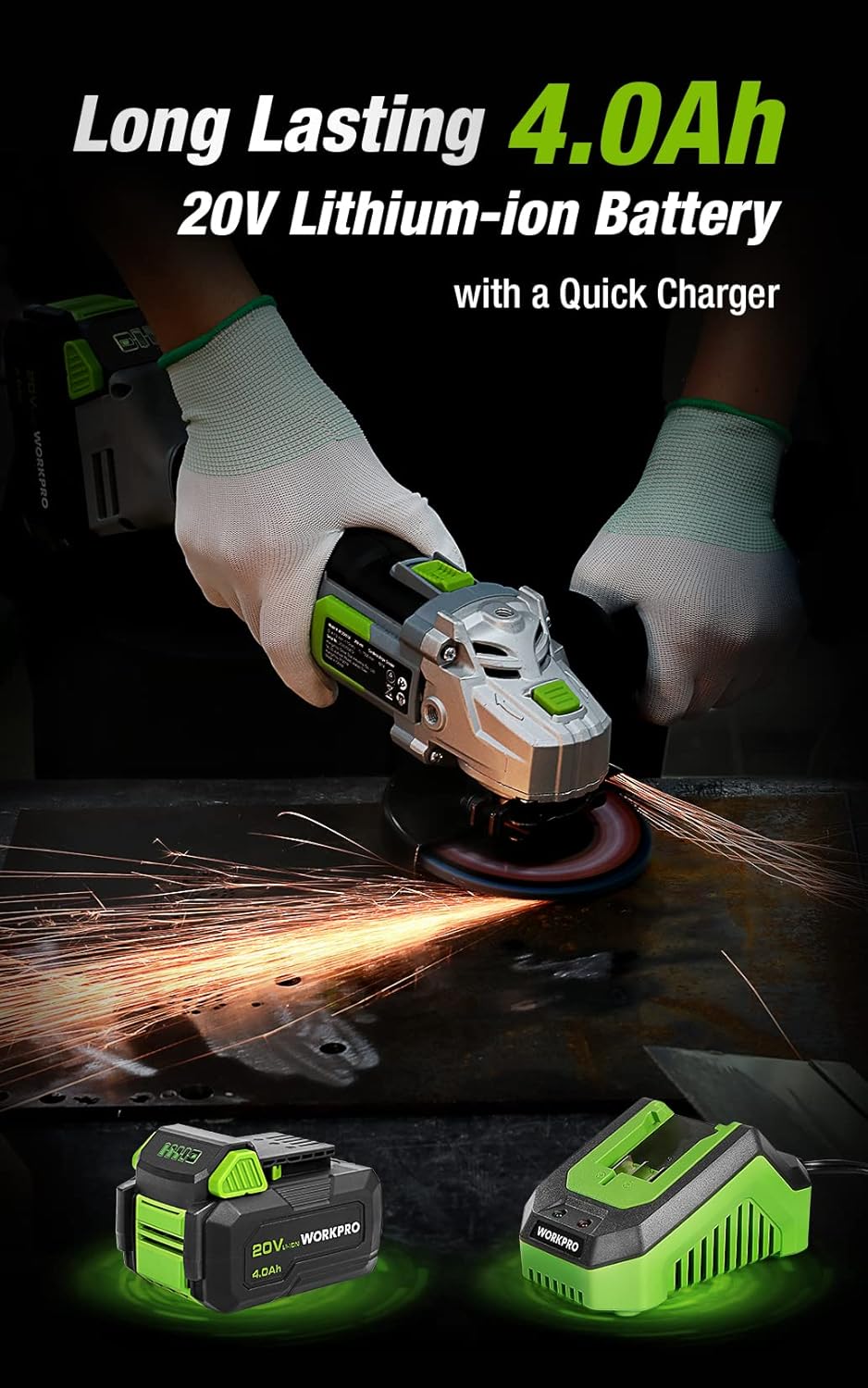
Figure 3.1: Included discs, guards, and spanner. Figure 3.2: 4.0Ah Lithium-Ion Battery and Fast Charger.
Videyo 3.1: Yon overview of the WORKPRO 20V Cordless Angle Grinder Kit and its components.
4. Enstalasyon
4.1 Mete manch oksilyè a
The auxiliary handle can be installed in three different positions (left, right, or top) to provide optimal comfort and control for various tasks and user preferences. Simply screw the handle into the desired threaded opening on the grinder head.

Figure 4.1: The 3-position anti-slip auxiliary handle for enhanced ergonomics.
4.2 Installing Wheel Guards
Select the appropriate wheel guard (grinding or cutting) for your task. The guards feature a quick-installation mechanism that does not require additional tools. Align the guard with the grinder head and snap it into place, ensuring it is securely fastened and positioned to deflect sparks and debris away from you.
4.3 Installing Grinding/Cutting Discs
- Ensure the battery is removed from the grinder.
- Press and hold the spindle lock button located on the grinder head.
- Mete flanj enteryè a sou aks la.
- Position the desired grinding or cutting disc onto the spindle, ensuring it sits flush against the inner flange.
- Place the outer flange onto the spindle, on top of the disc.
- Use the provided spanner to tighten the outer flange clockwise until the disc is securely fastened. Release the spindle lock.
4.4 Chaje batri a
Before first use, fully charge the 4.0Ah Lithium-Ion battery. Connect the fast charger to a standard power outlet. Slide the battery pack onto the charger until it clicks into place. The charger's indicator light will show the charging status (e.g., red for charging, green for fully charged). Once fully charged, remove the battery from the charger.
Video 4.1: Demonstrates the quick installation of the guard and disc, and battery charging process.
5. Operasyon Enstriksyon
5.1 Limen/Etenyen
The angle grinder features an ergonomic two-step operational switch located in the center of the top for convenient access by both left- and right-handed users. To turn the tool ON, push the switch forward and then up. To turn the tool OFF, simply push the switch down.

Figure 5.1: The two-step operational switch for safe and convenient use.
5.2 Grinding Operations
For grinding tasks, ensure the grinding wheel protector is installed and a grinding disc is securely attached. Hold the grinder firmly with both hands, maintaining a stable stance. Apply light, even pressure to the workpiece, allowing the 7500 RPM speed to do the work. Move the grinder smoothly across the surface to achieve desired results. The tool's lightweight design (3.5 pounds without battery) helps reduce hand pressure during extended use.


Figure 5.2: Grinding metal with the WORKPRO Angle Grinder, demonstrating sparks and stable operation.
5.3 Cutting Operations
When cutting, use the cutting wheel protector and a suitable cutting disc. Position the workpiece securely. Start the grinder before making contact with the material. Guide the disc through the material with steady, controlled movements. Avoid twisting or binding the disc, which can cause kickback. The tool's ergonomic design and rubberized grip provide a better user experience during cutting tasks.
Video 5.1: Demonstrates metal grinding and cutting, as well as PVC cutting, highlighting flexible use.
6. Antretyen
Regular maintenance ensures the longevity and optimal performance of your WORKPRO Angle Grinder.
6.1 Netwayaj
- After each use, clean the tool with a soft, dry cloth.
- Periodically clear dust and debris from the ventilation openings to ensure proper heat dissipation. The grinder features a stereo circulating heat dissipation system with multiple vents for more uniform heat dissipation.
- Pa sèvi ak dlo oswa pwodui chimik pou netwaye.

Figure 6.1: Stereo Circulating Heat Dissipation through multiple vents.
6.2 Swen Batri
- Sere pil yo nan yon kote ki fre, sèk, lwen limyè solèy la dirèk ak tanperati ekstrèm.
- Do not store fully discharged batteries for long periods. Recharge them periodically.
- Avoid exposing the battery to moisture or water.
6.3 Enspeksyon ak Ranplasman Disk
- Inspect grinding and cutting discs before each use for cracks, chips, or excessive wear. Replace damaged or worn discs immediately.
- Always use the correct type and size of disc for your application.
NAN. Depanaj
Seksyon sa a adrese pwoblèm komen ou ka rankontre ak moulen ang ou a.
| Pwoblèm | Kòz posib | Solisyon |
|---|---|---|
| Zouti pa kòmanse | Batri pa chaje Batri a pa byen mete Chanjman pa konplètman angaje | Chaje batri konplètman Asire w ke batri a byen klike nan plas li Push switch fully forward and up |
| Pèfòmans/vitès redwi | Ba chaj batri Surchof Worn or incorrect disc | Rechaje batri Allow tool to cool down; clear vents Replace disc with appropriate type |
| Twòp Vibration | Disk domaje oswa dezekilib Improperly installed disc/flanges | Ranplase disk Reinstall disc and flanges correctly, ensuring spindle lock is released |
8. Espesifikasyon
Technical details for the WORKPRO 20V Cordless Angle Grinder Kit:
- Mak: WORKPRO
- Nimewo Modèl: W125051A
- Sous pouvwa: Batri Powered
- Kalite batri: 20V 4.0Ah Lityòm-Ion
- Maksimòm vitès wotasyon: 7500 RPM
- Dyamèt disk: 4-1/2 pous
- Materyèl: Aluminum (housing)
- Koulè: Vèt
- Pwa Atik la (san pil): 3.5 liv (apeprè 1.59 kg)
- Dimansyon pwodwi: 13.58"L x 5.91"L x 7.48"H
- Manifakti: HANZGHOU GREATSTAR INDUSTRIEL CO.LTD
- UPC: 820909764120
9. Garanti ak sipò
For detailed warranty information or technical support, please refer to the official user guide PDF provided with your product or visit the WORKPRO website. You can access the user guide isit la.


