Entwodiksyon
This document provides essential instructions for the proper handling, installation, operation, and maintenance of the BUNN 38721.1002 Control Board Assembly. This component is a genuine Original Equipment Manufacturer (OEM) replacement part designed for specific BUNN equipment. Adherence to these instructions is crucial for ensuring the safety, reliability, and optimal performance of your equipment.
Enfòmasyon sou Sekirite
Always prioritize safety when working with electrical components. Improper installation or handling can result in electric shock, equipment damage, or personal injury. Observe the following precautions:
- Dekonekte pouvwa: Always ensure the equipment is completely disconnected from its power source before attempting any installation, maintenance, or repair.
- Pèsonèl ki kalifye: Installation and service should only be performed by qualified and authorized service technicians.
- Egzeyat estatik: Electronic components are sensitive to electrostatic discharge (ESD). Use appropriate ESD precautions (e.g., anti-static wrist strap) when handling the control board.
- Enspekte pou domaj: Before installation, visually inspect the control board for any signs of damage. Do not install damaged components.
Enstalasyon ak Enstalasyon
The BUNN 38721.1002 Control Board Assembly is a direct replacement part. The following steps outline a general installation procedure. Refer to your specific equipment's service manual for detailed, model-specific instructions.
- Prepare Ekipman: Ensure the equipment is turned off and completely disconnected from the main power supply.
- Komisyon Kontwòl Aksè: Carefully open the equipment's housing to gain access to the existing control board.
- Koneksyon Dokiman: Before removal, clearly label or photograph all wire connections to the old control board. This will aid in correct re-connection.
- Retire ansyen tablo a: Disconnect all wires and mounting hardware securing the old control board. Carefully remove it.
- Enstale nouvo tablo a: Position the new BUNN 38721.1002 Control Board Assembly in place. Secure it with the appropriate mounting hardware.
- Rekonekte fil yo: Reconnect all wires to the new control board according to your documentation. Double-check all connections for security and correctness.
- Close Equipment: Carefully close and secure the equipment's housing.
- Fonksyonalite tès: Reconnect power to the equipment and perform a functional test to ensure the new control board is operating correctly.
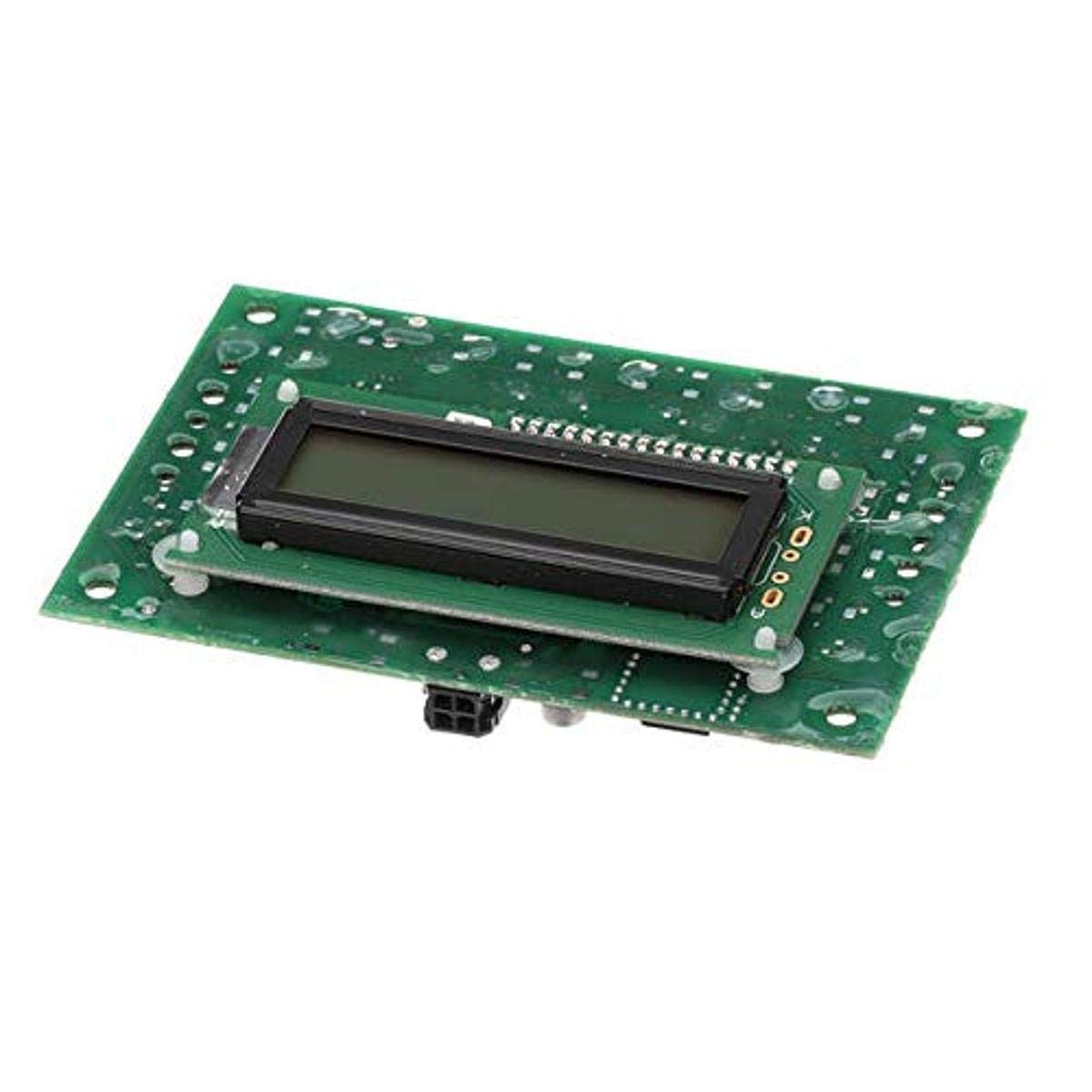
This image displays the BUNN 38721.1002 Control Board Assembly. It features a green circuit board with a rectangular blue display module mounted on top, along with various electronic components and connection points. The display is designed to show operational information, and external LEDs provide additional status indicators.
Enstriksyon Operasyon
The BUNN 38721.1002 Control Board Assembly functions as the central processing unit for managing various operations within the compatible BUNN equipment. It utilizes a blue display and external LEDs to provide operational status and feedback.
- Ekspozisyon enfòmasyon: The integrated blue display will show relevant operational data, such as temperature, cycle status, or error codes, depending on the equipment's programming.
- Endikatè ki ap dirije: External LEDs provide quick visual cues for various functions or states, such as power on, heating status, or fault conditions. Refer to your equipment's user manual for specific LED interpretations.
- Entèfas itilizatè: Any user interaction, such as setting parameters or initiating cycles, is typically done through the equipment's external control panel, which communicates with this control board.
Antretyen
Proper maintenance ensures the longevity and reliable operation of the control board. As an internal electronic component, direct user maintenance is minimal.
- Kenbe sèk: Ensure the control board and surrounding area remain dry. Moisture can cause short circuits and damage.
- Lapwòpte: Periodically, during professional servicing, ensure the area around the control board is free from dust, debris, or liquid spills. Use a soft, dry brush or compressed air for cleaning, ensuring power is disconnected.
- Enspekte Koneksyon: During routine equipment maintenance, a qualified technician should inspect all electrical connections to the control board for tightness and corrosion.
Depanaj
If the equipment experiences issues after control board installation, consider the following general troubleshooting steps. For complex issues, always contact qualified service personnel.
- Pa gen kouran/ekspozisyon: Verify that the equipment is properly connected to a power source and that all internal power connections to the control board are secure. Check for tripped circuit breakers.
- Fonksyonalite ki pa kòrèk: If the equipment is not operating as expected, re-check all wire connections to ensure they match the original configuration.
- Kòd erè: If the blue display shows an error code, consult your equipment's specific service manual for the meaning of the code and recommended corrective actions.
- Operasyon tanzantan: Ensure all connectors are firmly seated and free from corrosion.
If troubleshooting steps do not resolve the issue, contact BUNN customer support or a certified service technician.
Espesifikasyon
| Nimewo Pati | 38721.1002 |
| Manifakti | BUNN |
| Dimansyon pwodwi | 8 x 6 x 5 pous |
| Pwa atik | 6.08 ons |
| Kalite ekspozisyon | Blue Display with External LEDs |
| Peyi orijin | Etazini |
Garanti ak sipò
As a genuine OEM (Original Equipment Manufacturer) part, the BUNN 38721.1002 Control Board Assembly is manufactured to high standards of quality and reliability. For specific warranty information pertaining to this replacement part or the equipment it is installed in, please refer to the original equipment's warranty documentation or contact BUNN customer support directly.
BUNN is committed to providing outstanding post-purchase support. For technical assistance, service inquiries, or to locate authorized service providers, please visit the official BUNN websit oswa kontakte depatman sèvis kliyan yo.


