1. Entwodiksyon
This manual provides detailed instructions for the setup, operation, maintenance, and troubleshooting of your MYPIN Infrared Remote Control. This remote is specifically designed to work with MYPIN 4K Media Players, including models B07WPY8VKL and B07PGFCPTV.
Tanpri li manyèl sa a avèk atansyon anvan ou itilize kontwòl remote la pou asire bon fonksyonalite epi pou maksimize eksperyans itilizatè ou.
2. Pake kontni
- 1 x MYPIN Infrared Remote Control
Remak: Pil AAA yo pa enkli epi yo dwe achte separeman.
3. Enstalasyon
3.1 Enstalasyon batri
- Jwenn lòj batri a sou do a nan kontwòl remote la.
- Glise kouvèti konpatiman batri a anba pou ouvri li.
- Mete de (2) pil AAA, asire w ke tèminal pozitif (+) ak negatif (-) yo byen aliyen ak mak ki anndan konpatiman an.
- Glise kouvèti konpatiman batri a tounen nan plas li jiskaske li fè yon klik byen fèm.
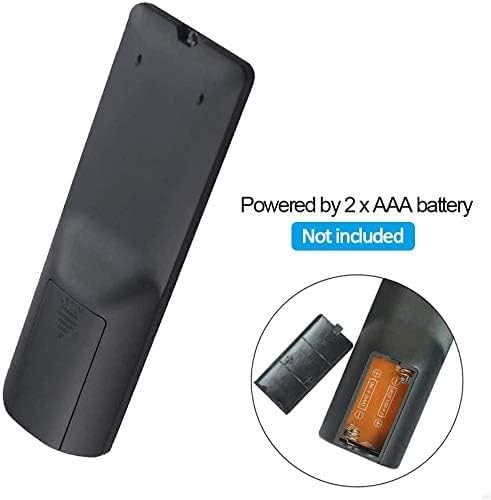
Figi 3.1: Battery installation for the MYPIN Infrared Remote Control. Ensure correct polarity when inserting two AAA batteries.
3.2 Konpatibilite
This remote control is designed exclusively for MYPIN 4K Media Players. It is compatible with models such as B07WPY8VKL and B07PGFCPTV. It may not function correctly with other brands or models of media players.
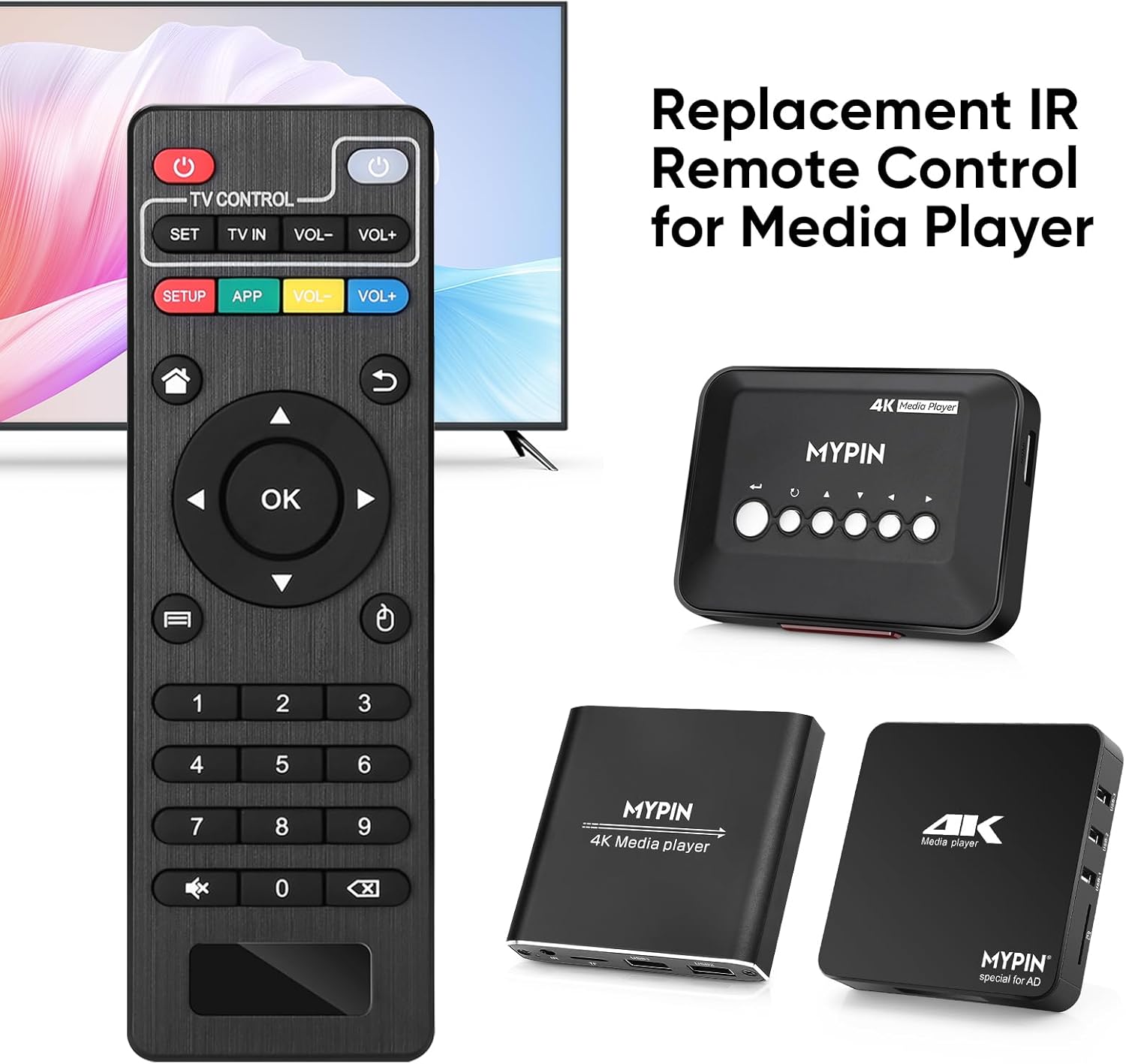
Figi 3.2: The MYPIN remote control shown with compatible MYPIN 4K Media Players.
3.3 Koneksyon Inisyal
The MYPIN Infrared Remote Control operates via infrared (IR) signals. No pairing process is required. Simply point the remote control directly at the IR receiver of your MYPIN 4K Media Player. Ensure there are no obstructions between the remote and the media player.

Figi 3.3: Using the MYPIN remote control with an optional IR cable for discreet placement of the media player.
4. Operasyon Enstriksyon
The MYPIN Infrared Remote Control features a standard layout for intuitive control of your media player. Below is a guide to its primary functions:

Figi 4.1: Key functional areas of the MYPIN Remote Control.
4.1 Fonksyon bouton
- Power Button (Red, Top Left): Turns the media player on or off.
- TV Control Section (Top Row):
- TV Learning Button (1): Used to program basic TV functions (e.g., TV Power, Volume). Refer to your TV's manual for learning remote functions.
- Mete: Used for TV learning mode.
- TV IN: Switches TV input source.
- VOLIM- / VOLIM+: Ajiste volim televizyon.
- SETUP / APP / VOL- / VOL+ (Colored Buttons): These buttons provide quick access to specific media player functions or applications. Their exact function may vary depending on the media player's software.
- Bouton Akèy (Ikòn Kay): Returns to the main menu or home screen of the media player.
- Return/Back Button (Arrow Icon): Navige tounen nan ekran anvan an oswa nan meni anvan an.
- Direction Keys (2 - Up, Down, Left, Right): Navigates through menus and content. When playing videos or music, Up/Down typically selects previous/next track, and Left/Right performs fast backward/forward.
- OK Button (Center): Confirms selections or plays content.
- Menu Key (3 - Three Horizontal Lines Icon): Accesses context-sensitive menus or playback options.
- Pav Nimerik (0-9): Used for direct input of numbers, such as channel selection or specific menu options.
- Mute Button (Crossed Speaker Icon): Mutes or unmutes the media player's audio.
- Context Menu Button (Box with Arrow Icon): Opens additional options or settings.

Figi 4.2: Accessing playback options using the Menu key on the MYPIN remote control.
5. Antretyen
5.1 Ranplasman batri
When the remote control's performance degrades (e.g., reduced range, unresponsive buttons), it is likely time to replace the batteries. Follow the battery installation steps in Section 3.1 to replace the two AAA batteries.
5.2 Netwayaj
Pou netwaye kontwòl remote la, siye sifas li dousman avèk yon twal mou epi sèk. Pou pousyè tè ki difisil pou netwaye, siye l yon ti kras.ampRense twal la avèk dlo oswa yon pwodui netwayaj dou ki pa abrazif. Evite itilize pwodui chimik ki agresif oswa imidite twòp, paske sa yo ka domaje elektwonik telekòmand lan.
5.3 Depo
Sere kontwòl remote la nan yon kote ki fre epi sèk, lwen limyè solèy dirèk ak tanperati ekstrèm. Si ou pa pral itilize kontwòl remote la pou yon peryòd tan pwolonje, li rekòmande pou retire pil yo pou anpeche flit ak domaj potansyèl.
NAN. Depanaj
- Remote is unresponsive:
- Asire w ke pil AAA nèf yo byen enstale.
- Point the remote directly at the media player's IR receiver.
- Remove any obstructions between the remote and the media player.
- Check the operating distance; the remote has an infrared range of approximately 7 meters.
- If the remote initially seems unresponsive after battery installation, allow a short period for it to initialize, as some users have reported spontaneous functionality after a delay.
- Buttons not performing expected functions:
- Verify that the remote is compatible with your specific MYPIN media player model.
- Some buttons (e.g., SETUP, APP) may have functions determined by the media player's software and may not be universally assigned.
- TV Control buttons not working:
- Ensure you have successfully programmed the TV Learning Button functions according to your TV's instructions.
7. Espesifikasyon
| Karakteristik | Detay |
|---|---|
| Koneksyon Teknoloji | Enfrawouj (IR) |
| Aparèy konpatib | MYPIN media players (e.g., B07WPY8VKL, B07PGFCPTV) |
| Max Kantite Aparèy Sipòte | 1 (for media player control) |
| Karakteristik espesyal | Ergonomik konsepsyon |
| Sous pouvwa | 2 x AAA pil (pa enkli) |
| Enfrawouj Distans | Jiska 7 mèt |
| Enfrawouj Ang | 30 degre |
| Pwa atik | 1.13 ons |
| Dimansyon pake | 5.43 x 1.81 x 0.71 pous |
| Nimewo Modèl | B08CDNZMJG |
8. Enfòmasyon sou Garanti
MYPIN products are manufactured to high-quality standards. For specific warranty details regarding your remote control, please refer to the documentation included with your MYPIN 4K Media Player or visit the official MYPIN websit la. Kenbe resi acha ou kòm prèv acha pou nenpòt reklamasyon garanti.
9. Sipò
If you encounter any issues not covered in this manual or require further assistance, please contact MYPIN customer support through the retailer where you purchased the product or visit the official MYPIN support websit pou enfòmasyon kontak.


