1. Entwodiksyon
The Sandberg USB Office Headset Pro Mono is designed for clear communication in office environments, online meetings, and calls. This manual provides essential instructions for setting up, operating, maintaining, and troubleshooting your headset to ensure optimal performance.
2. Pake kontni
Tanpri verifye ke tout atik yo prezan nan pakè ou a:
- Sandberg USB Office Headset Pro Mono (with integrated USB cable)

Image 1: The Sandberg USB Office Headset Pro Mono packaging, showing the headset and its features.
3. Enstalasyon
Follow these steps to connect your headset to your computer:
- Jwenn yon pò USB-A ki disponib sou òdinatè w lan.
- Plug the USB-A connector of the headset into the USB-A port on your computer.
- Your operating system (Windows, macOS, etc.) should automatically detect and install the necessary drivers. This process typically takes a few moments.
- Once installed, the headset will be ready for use. You may need to select it as the default audio input and output device in your computer's sound settings or within your communication application (e.g., Zoom, Microsoft Teams, Skype).
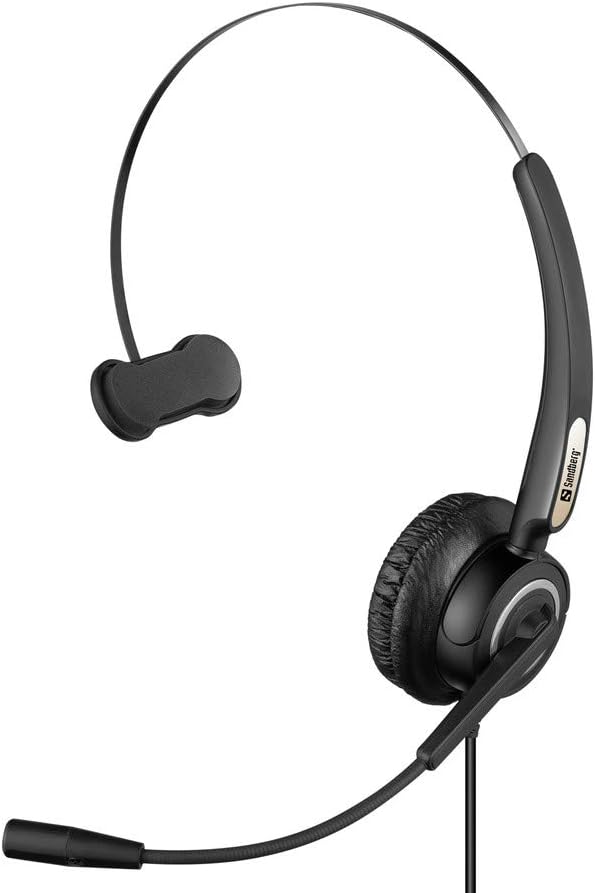
Image 2: The Sandberg USB Office Headset Pro Mono, illustrating its design for single-ear use with an adjustable microphone boom.
4. Operasyon Enstriksyon
4.1 Mete kas ekoutè a
- Place the earcup over one ear and adjust the headband for a comfortable fit.
- Position the microphone boom so that the microphone is approximately 1-2 inches (2.5-5 cm) from your mouth for optimal voice pickup.
4.2 Volume Control and Mute
The headset features an inline control unit on the USB cable for easy access to audio functions:
- Volim moute: Press the '+' button to increase the listening volume.
- Volim desann: Press the '-' button to decrease the listening volume.
- Mikwofòn bèbè: Press the microphone button to mute or unmute your microphone. An indicator light on the control unit typically shows the mute status.
4.3 Making Calls and Using Applications
Once connected and selected as the default audio device, your headset will function with most communication applications. Ensure the headset is selected as the audio input (microphone) and output (speaker) device within the settings of your specific application (e.g., video conferencing software, softphone client).
5. Antretyen
5.1 Netwayaj
- Gently wipe the headset with a soft, dry cloth.
- For ear cushions, use a slightly damp cloth with mild soap if necessary, then wipe dry immediately.
- Pa sèvi ak pwodui chimik ki fò, solvang, oswa pwodui netwayaj abrazif.
- Avoid getting moisture into the earcup or microphone openings.
5.2 Depo
- Sere kas ekoutè a nan yon kote ki pwòp epi sèk, lwen tanperati ekstrèm ak limyè solèy dirèk.
- Evite mele kab la pou anpeche li domaje.
NAN. Depanaj
6.1 Pa gen son nan kas ekoutè a
- Asire w ke konektè USB a byen konekte nan pò USB òdinatè a.
- Check the volume level on the inline control unit and on your computer's operating system.
- Verify that the Sandberg USB Office Headset Pro Mono is selected as the default playback device in your computer's sound settings.
- Try connecting the headset to a different USB port on your computer.
6.2 Mikwofòn nan pa fonksyone
- Ensure the microphone is not muted via the inline control unit.
- Check that the Sandberg USB Office Headset Pro Mono is selected as the default recording device in your computer's sound settings.
- Adjust the microphone input level in your computer's sound settings.
- Confirm that the microphone boom is positioned correctly near your mouth.
6.3 Headset Not Detected by Computer
- Unplug the headset and plug it back into a different USB port.
- Rekòmanse òdinatè w lan.
- Check your computer's Device Manager (Windows) or System Information (macOS) to see if the USB device is listed.
7. Espesifikasyon
| Karakteristik | Detay |
|---|---|
| Non modèl | Pro Mono |
| Nimewo Modèl | 126-14 |
| Konektè | 1 x USB A Male Plug |
| Longè kab | 6.6 pye (2.0 m) |
| Kalite kontwòl | Volume Control (Inline) |
| Karakteristik espesyal | Mikwofòn enkli |
| Materyèl | Plastik |
| Pwa atik | 0.035 ounces (approx. 1 gram) |
| Dimansyon pwodwi | 6.3 x 4.72 x 6.69 pous |
8. Garanti ak sipò
For warranty information, please refer to the documentation provided with your purchase or visit the official Sandberg website. For technical support or further assistance, please contact Sandberg customer service or your retailer.
Ou ka jwenn plis enfòmasyon ak resous sipò sou Sandberg websit.


