1. Entwodiksyon
This manual provides detailed instructions for the HXSJ J600 Mechanical Gaming Mouse. Please read this guide thoroughly to understand the features, setup, and operation of your new gaming mouse. Proper use and maintenance will ensure optimal performance and longevity of the product.
2. Pwodwi souview
The HXSJ J600 is a high-performance mechanical gaming mouse designed for precision and customization. It features a human body engineering design for comfortable use, 9 programmable keys, adjustable DPI settings up to 6400, and cool LED lighting effects.
Karakteristik kle:
- Full-key 9 customizable macro programming.
- Six-level adjustable DPI (800-1600-2400-3200-4800-6400).
- Integrated aluminum alloy sandblasted metal floor design.
- Electroplated apron wheel with 3D carving for enhanced grip.
- 16 million color backlight with multiple mode changes.
- Durable switches with a 20 million click cycle life.
Kontni pake:
- 1 x HXSJ J600 Gaming Mouse
- 1 x manyèl itilizatè angle
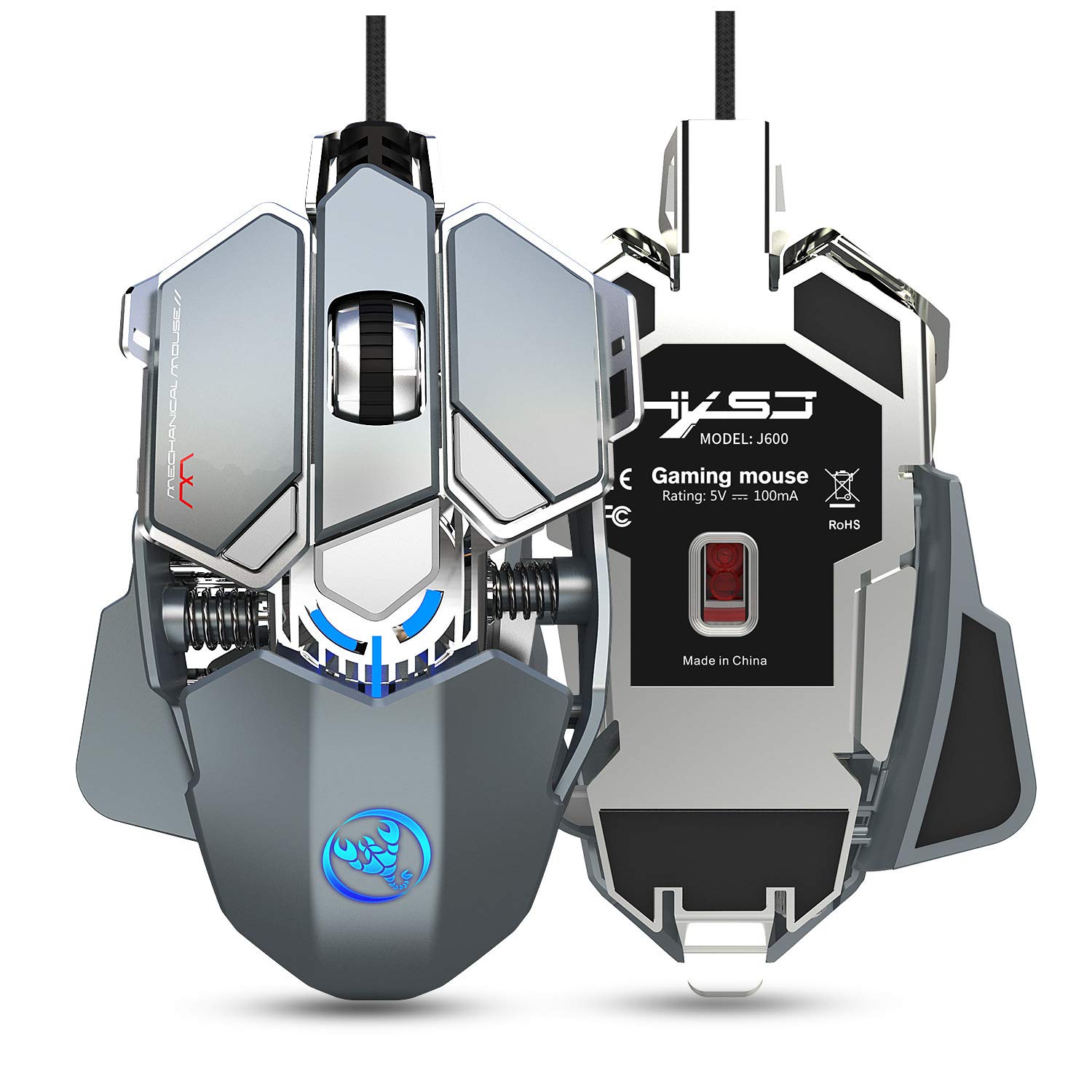
Figure 2.1: HXSJ J600 Mechanical Gaming Mouse. This image shows the overall design of the mouse, highlighting its mechanical aesthetic and wired connection.
3. Enstriksyon Enstalasyon
Follow these steps to set up your HXSJ J600 Mechanical Gaming Mouse:
- Konekte sourit la: Plug the USB connector of the HXSJ J600 mouse into an available USB port on your computer. The mouse is plug-and-play, and your operating system should automatically detect and install the necessary basic drivers.
- Install Macro Programming Software: For full customization of the 9 programmable keys, DPI settings, and LED effects, you need to install the dedicated macro programming software.
- Locate the software download link. This is typically provided on the manufacturer's official website or a designated support page.
- Download the software package (e.g., "setup.exe") to your computer.
- Kouri enstale a epi swiv envit ki sou ekran yo pou konplete enstalasyon an.
- Once installed, a "J600" drive icon should appear on your desktop. Double-click this icon to launch the software.
Nòt: Ensure your mouse is connected and functioning normally before attempting software installation. The software is compatible with Windows 2000 / XP / Win7 / Win8 / Win10 / Vista 32bit / IOS or later operating systems.
4. Operasyon Enstriksyon
The HXSJ J600 mouse offers various customizable features to enhance your gaming experience.
4.1 Button Settings and Macro Programming
The mouse features 9 programmable buttons. These buttons can be customized using the macro programming software to perform specific actions or complex sequences (macros) in games or applications.

Figure 4.1: Button Layout. This diagram illustrates the numbered programmable buttons on the HXSJ J600 mouse, including the left, right, middle, and various side buttons.
To customize buttons:
- Launch the J600 macro programming software.
- Navigate to the "Button Settings" or "Custom Settings" section.
- Select the desired button (1-9) you wish to program.
- Choose an action from the available options (e.g., single key, macro, multimedia function).
- For macro editing, record your desired key presses and delays.
- Click "Applications" to apply the changes, then "Save Configuration" to store your settings.

Figure 4.2: Macro Programming Interface. This image displays the software interface for setting up hardware macros, including examples for various in-game weapon configurations.
4.2 DPI Ajisteman
The mouse supports 6-level adjustable DPI settings, ranging from 800 to 6400 DPI. You can cycle through these settings using the dedicated DPI buttons on the mouse or customize them via the software.

Figure 4.3: DPI Switching and LED Indicators. This image shows the DPI adjustment buttons and the corresponding LED light colors for each DPI level (800 Green, 1600 Purple, 2400 Blue, 3200 Red, 4800 Yellow, 6400 Cyan-blue).
Pou ajiste DPI a:
- Use the DPI+ and DPI- buttons on the mouse to cycle through the preset DPI levels.
- The LED light on the mouse will flash in a specific color to indicate the current DPI setting.
- In the software, you can customize the exact DPI values for each of the six segments.
4.3 Anviwònman ki ap dirije
The HXSJ J600 features customizable LED lighting. You can configure the lighting effects through the software:
- Toujou sou: The LED lights remain constantly illuminated.
- Custom Breath: The lights pulse in a breathing effect with customizable colors.
- Spectral Cycle: The lights cycle through a spectrum of colors.
- Off: Limyè ki ap dirije yo etenn.
4.4 Mouse Parameters
Within the software, you can also fine-tune general mouse parameters:
- Pointer Precision: Adjust the accuracy of the mouse pointer.
- Vitès wou: Control the scrolling speed of the mouse wheel.
- Double Klike sou vitès: Set the required speed for a double-click to register.
5. Antretyen
To ensure the longevity and optimal performance of your HXSJ J600 Mechanical Gaming Mouse, follow these maintenance guidelines:
- Netwayaj: Regularly clean the mouse with a soft, dry cloth. For stubborn dirt, slightly dampRense twal la avèk dlo oswa yon solisyon netwayaj dou. Evite itilize pwodui chimik ki agresif oswa materyèl abrazif.
- Netwayaj Capteur: Occasionally clean the optical sensor on the underside of the mouse with a cotton swab to prevent tracking issues.
- Swen kab: Avoid sharp bends or excessive pulling on the USB cable to prevent internal damage.
- Depo: Lè w pa ap itilize sourit la, sere l nan yon anviwònman pwòp epi sèk, lwen tanperati ekstrèm.

Figure 5.1: Alloy Plating Rubber Roller. This image highlights the durable and sensitive scroll wheel, designed for anti-slip performance and smooth rolling.
NAN. Depanaj
If you encounter issues with your HXSJ J600 mouse, refer to the following troubleshooting tips:
6.1 Sourit la pa reponn
- Tcheke koneksyon USB a: Asire w kab USB a byen branche nan yon pò USB ki fonksyone sou òdinatè w la. Eseye yon lòt pò USB.
- Rekòmanse òdinatè: Yon senp rekòmanse sistèm nan ka souvan rezoud pwoblèm koneksyon.
- Tès sou yon lòt òdinatè: Si posib, teste sourit la sou yon lòt òdinatè pou detèmine si pwoblèm nan se ak sourit la oswa ak sistèm ou an.
6.2 Pwoblèm lojisyèl/chofè
- Download lojisyèl: Ensure you have downloaded the correct and latest version of the macro programming software for the J600 model. Verify the source of the download.
- Reinstall Software: If the software is not functioning correctly, uninstall it from your system, restart your computer, and then perform a fresh installation.
- Administrator Privileges: Run the software installer and the application itself with administrator privileges.
6.3 LED Lights Not Working or Incorrect Colors
- Check Software Settings: Open the macro programming software and verify the LED settings. Ensure they are not set to "Off" or an unintended mode.
- Konfli Lojisyèl: If other lighting control software is running, it might conflict with the mouse's LED settings. Close other lighting applications.
6.4 Buttons Not Responding or Performing Incorrect Actions
- Check Macro Settings: Review your button assignments and macro configurations in the software. Ensure they are saved correctly.
- Aktivasyon lojisyèl: After saving configurations, ensure you restart the driver or software as instructed to activate all customizations.
- Anviwònman Default: If issues persist, try resetting the mouse to its default settings via the software.
7. Espesifikasyon
Detailed technical specifications for the HXSJ J600 Mechanical Gaming Mouse:
| Karakteristik | Spesifikasyon |
|---|---|
| Modèl pwodwi | J600 Mechanical Macros Define the game mouse |
| Kle | 9 kle pwogramasyon |
| Nivo DPI | 800-1600-2400-3200-4800-6400 (adjustable) |
| Voltage / Kouran | DC 5V / 100mA |
| Entèfas | USB (Plug epi Jwe) |
| Chanje lavi | 20 milyon sik |
| Longè kab | 150 cm |
| Pwa atik | 137.5g (apeprè 4.85 oz) |
| Dimansyon atik | 130 x 80 x 35 mm (L x W x H) |
| Sipòte OS | Windows 2000 / XP / Win7 / Win8 / Win10 / Vista 32bit / IOS or latest |
| Oryantasyon men | Anbidextr |
| Karakteristik espesyal | Soundless (referring to click sound) |
8. Garanti ak sipò
For warranty information and technical support, please refer to the documentation included with your purchase or visit the official HXSJ websit la. Kenbe prèv acha ou a pou nenpòt reklamasyon garanti.
If you require further assistance, please contact HXSJ customer support through their official channels.


