1. Entwodiksyon
This manual provides detailed instructions for the proper use and maintenance of your Tronsmart T6 Plus Upgraded Bluetooth Speaker. Please read this manual thoroughly before using the product to ensure safe operation and optimal performance. Keep this manual for future reference.
2. Pake kontni
- Tronsmart T6 Plus Upgraded Bluetooth Speaker
- Chaje kab
- 3.5mm AUX Cable (if included with your specific package)
- Manyèl Itilizatè (dokiman sa a)
3. Pwodwi Features
- 40W Output with SoundPulse™ Technology: Delivers powerful audio with enhanced bass and clear vocals.
- 360° HD Surround Sound: Provides immersive audio experience from all directions.
- IPX6 ki reziste dlo: Designed to resist heavy splashes, rain, and sweat, making it suitable for outdoor use.
- 15 èdtan jwe: Extended battery life for prolonged listening on a single charge (at 50% volume).
- Tri-Bass Effects: Three distinct equalizer audio effects (Balanced, 3D, Deep Bass) to suit various music genres.
- Koneksyon NFC: Quick and easy pairing with NFC-enabled devices.
- Sòti chaj USB: Functions as a power bank to charge your smart devices in emergencies.
- Vrè Stereo Wireless (TWS) Pè: Connect two T6 Plus speakers for a true stereo sound experience.
- Intuitive Control Wheel: Easy-to-use rotary control for volume adjustment and multi-function button for playback and calls.
4. Kontwòl ak Endikatè

Deskripsyon imaj: A black Tronsmart T6 Plus speaker shown vertically, highlighting its cylindrical shape and the control panel on its side. The top features a rotary control wheel with a blue LED ring. Below it are buttons for NFC, previous track, play/pause, next track, EQ, Mode, and Power. At the bottom, there are ports for TF Card, USB, and AUX input.

Deskripsyon imaj: A series of three images demonstrating the intuitive control wheel. The first shows rotating the wheel for volume control. The second shows tapping the center for play/pause and hands-free calls. The third shows pressing and holding the center to activate the voice assistant.
Layout panèl kontwòl:
- Rotary Control Wheel: Vire l nan sans zegwi mont lan pou ogmante volim nan, nan sans kontrè zegwi mont lan pou diminye volim nan.
- Multi-function Button (Center of wheel): Tap to play/pause music or answer/end calls. Press and hold to activate voice assistant.
- NFC Icon: Tap NFC-enabled device here for quick pairing.
- Previous Track Button (◀◀): Peze pou yo ale nan tras la anvan yo.
- Next Track Button (▶▶): Peze pou yo ale nan tras kap vini an.
- EQ bouton: Press to cycle through Tri-Bass Effects (Balanced, 3D, Deep Bass).
- Bouton mòd (M): Peze pou chanje ant mòd Bluetooth, Kat TF, ak AUX.
- Bouton pouvwa (⑂): Peze epi kenbe pou pouvwa sou / koupe.
Endikatè ki ap dirije:
- Endikatè Bluetooth: Blue light flashes when pairing, solid blue when connected.
- Endikatè chaje: Limyè wouj endike chaje, etenn lè konplètman chaje.
- Endikatè batri ki ba: Red light flashes when battery is low.
5. Enstalasyon
5.1 Chaje Oratè a
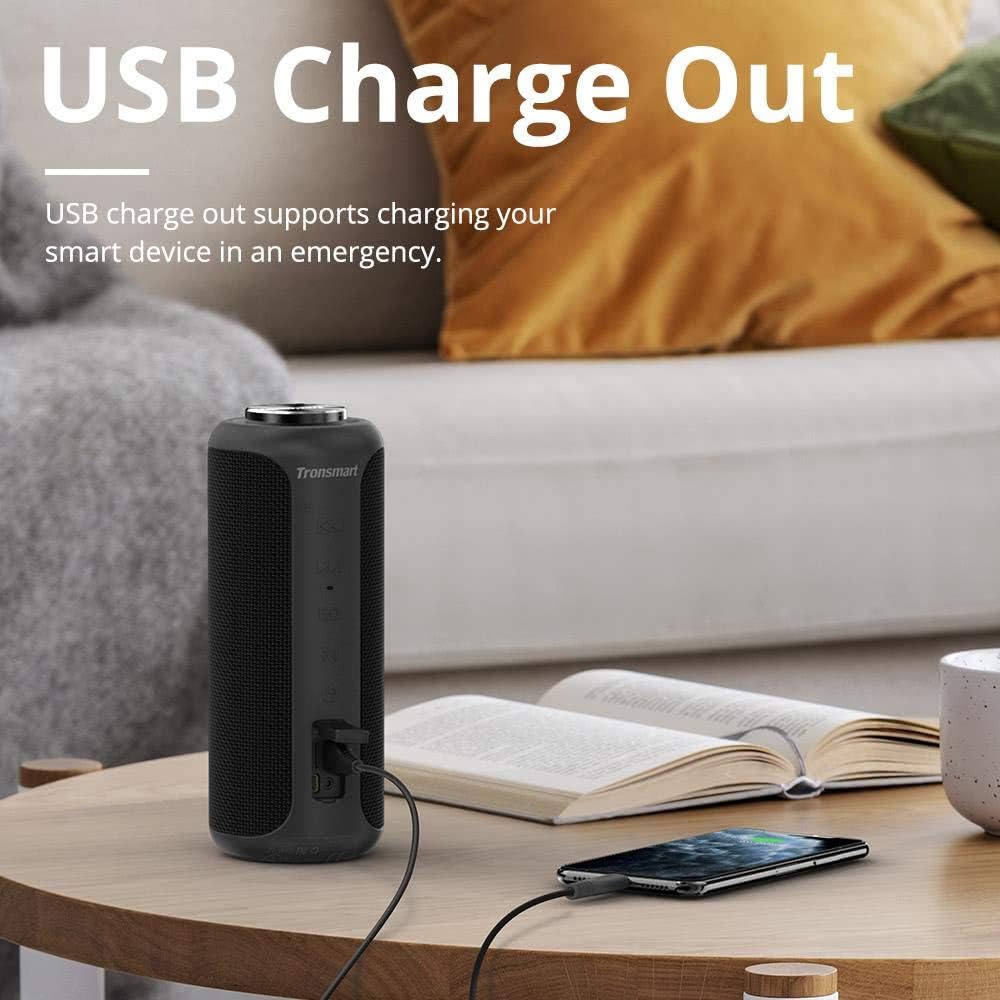
Deskripsyon imaj: The Tronsmart T6 Plus speaker standing on a wooden table, connected via a USB cable to a smartphone that is being charged. This illustrates the USB charge out feature.
- Connect the provided charging cable to the speaker's charging port and a USB power adapter (not included) or a computer's USB port.
- Limyè endikatè chaj la ap limen wouj pandan chaj la.
- The light will turn off once the speaker is fully charged.
- A full charge provides up to 15 hours of playtime at 50% volume.
5.2 Power On/Off
- Pouvwa sou: Press and hold the Power button (⑂) for 2-3 seconds until the indicator light illuminates.
- Pouvwa Off: Press and hold the Power button (⑂) for 2-3 seconds until the indicator light turns off.
5.3 Bluetooth Pairing
- Ensure the speaker is powered on and the Bluetooth indicator is flashing blue, indicating it's in pairing mode.
- Sou aparèy ou an (telefòn entelijan, tablèt, òdinatè pòtab), aktive Bluetooth epi chèche aparèy ki disponib yo.
- Select "Tronsmart T6 Plus" from the list of devices.
- Once connected, the Bluetooth indicator will turn solid blue.
NFC Pairing (Optional):
- Asire w ke NFC aktive sou aparèy ou an epi ke oratè a limen.
- Tap your NFC-enabled device gently against the NFC icon on the speaker.
- Konfime demann koneksyon an sou aparèy ou an.
5.4 Vrèman san fil stereo (TWS) koneksyon

Deskripsyon imaj: Two Tronsmart T6 Plus speakers, one black and one red, are shown on steps with blue circular waves emanating from them, symbolizing their wireless stereo connection. This illustrates the True Wireless Stereo (TWS) pairing feature.
To pair two T6 Plus speakers for a stereo sound experience:
- Asire w ke tou de oratè yo limen epi yo pa konekte ak okenn aparèy Bluetooth.
- On one speaker (this will be the primary speaker), press and hold the Mode button (M) for 3 seconds until you hear a prompt sound.
- The two speakers will automatically connect to each other. Once connected, the primary speaker's Bluetooth indicator will flash blue, and the secondary speaker's indicator will be solid blue.
- Kounye a, konekte aparèy ou a ak oratè prensipal la atravè Bluetooth jan sa dekri nan seksyon 5.3.
6. Operasyon Enstriksyon
6.1 Mizik lèktur
- Jwe/Poz: Tap the Multi-function button (center of the control wheel).
- Pwochen Track: Press the Next Track button (▶▶).
- Track Previous: Press the Previous Track button (◀◀).
- Volim moute: Rotate the control wheel clockwise.
- Volim desann: Rotate the control wheel counter-clockwise.
6.2 Jesyon Apèl
- Reponn/Fen Apèl: Tape bouton Multi-fonksyon an.
- Rejte apèl: Peze epi kenbe bouton Multi-fonksyon an pou 2 segonn.
6.3 Asistan Vwa
- Aktive Asistan Vwa: Peze epi kenbe bouton Multi-fonksyon an pou 2 segonn.
6.4 Tri-Bass Effects

Deskripsyon imaj: A graphic illustrating the three Tri-Bass Effects available on the speaker: Balanced (Default), 3D, and Deep Bass. Each effect is represented by a hexagonal icon with a play button, suggesting different audio profiles for various music genres.
- Peze a EQ button to cycle through the three available sound modes: Balanced (Default), 3D, and Deep Bass.
6.5 Lekti Kat TF
- Mete yon kat TF (microSD) ak mizik files into the TF Card slot. The speaker will automatically switch to TF Card mode and begin playback.
- Use the playback controls (Play/Pause, Next/Previous Track) as described above.
6.6 Antre AUX
- Connect an audio device to the speaker's AUX port using a 3.5mm audio cable.
- Oratè a ap chanje otomatikman nan mòd AUX.
- Kontwole lekti a depi aparèy odyo konekte ou an.
7. Antretyen ak Swen
- Netwaye oratè a ak yon mou, damp twal. Pa sèvi ak pwodwi chimik piman bouk oswa materyèl abrazif.
- The speaker is IPX6 water resistant, meaning it can withstand heavy splashes and rain. Do not submerge the speaker in water. Ensure the port cover is securely closed when exposed to water.
- Sere oratè a nan yon kote ki fre epi sèk, lwen tanperati ekstrèm ak limyè solèy dirèk.
- Evite jete oswa soumèt oratè a nan gwo enpak.
- If the speaker will not be used for an extended period, charge it at least once every three months to preserve battery life.
NAN. Depanaj
| Pwoblèm | Kòz posib | Solisyon |
|---|---|---|
| Oratè a pa limen. | Batri ap vide. | Chaje oratè a nèt. |
| Pa gen son. | Volume is too low; device not connected; incorrect mode. | Increase volume on speaker and device; ensure Bluetooth is connected or correct mode (TF/AUX) is selected. |
| Koneksyon Bluetooth la pa estab oswa li echwe. | Speaker too far from device; interference; device Bluetooth issue. | Move speaker closer to device; avoid obstacles; restart speaker and device's Bluetooth. |
| Koneksyon TWS la echwe. | Oratè yo deja konekte ak lòt aparèy; pwosedi koneksyon an pa kòrèk. | Ensure both speakers are disconnected from other devices; follow TWS pairing steps carefully. |
| Son defòme. | Volume too high; low battery; poor audio source. | Reduce volume; charge speaker; try a different audio source. |
9. Espesifikasyon
| Karakteristik | Detay |
|---|---|
| Non modèl | T6Plus |
| Kalite Oratè | Deyò |
| Karakteristik espesyal | Ki enpèmeyab |
| Oratè maksimòm pwodiksyon pouvwa | 40 Watts |
| Audio Sòti Mode | Antoure |
| Koneksyon Teknoloji | Bluetooth, NFC, USB |
| Teknoloji kominikasyon san fil | Bluetooth |
| Bluetooth vèsyon | 5.0 (Inferred from Surround Sound Channel Configuration) |
| Metòd kontwòl | Manyen |
| Lavi batri | 15 èdtan |
| Sous pouvwa | Batri Powered (1 batri ityòm Polymère enkli) |
| Dimansyon pwodwi | 3.31"D x 3.31"W x 8.27"H |
| Pwa atik | 1.6 liv |
| Koulè | Nwa |
| Manifakti | Tronsmart |
10. Garanti ak sipò
The Tronsmart T6 Plus Upgraded Bluetooth Speaker comes with a limited warranty. For detailed warranty information, technical support, or service inquiries, please visit the official Tronsmart websit la oubyen kontakte sèvis kliyan yo dirèkteman. Kenbe resi acha w la kòm prèv acha pou reklamasyon garanti.
Tronsmart Official Websit: www.tronsmart.com


