Entwodiksyon
This manual provides detailed instructions for the safe and effective operation, setup, and maintenance of your YESWELDER TIG-200P ACDC Aluminum Welder. Please read this manual thoroughly before operating the machine to ensure proper usage and to prevent injury or damage.
Enfòmasyon sou Sekirite
Welding operations involve significant risks. Always adhere to safety precautions to prevent electric shock, fire, burns, and exposure to fumes. Ensure proper ventilation, wear appropriate personal protective equipment (PPE), and keep a fire extinguisher nearby.
- Chòk elektrik: Can kill. Do not touch live electrical parts. Wear dry gloves and protective clothing.
- Lafimen ak gaz: Can be hazardous to your health. Keep your head out of the fumes. Use enough ventilation and/or exhaust at the arc to keep fumes and gases away from the breathing zone.
- Reyon arc: Can injure eyes and burn skin. Wear a welding helmet with a proper shade of filter to protect your face and eyes when welding or watching. Wear approved safety glasses with side shields under your helmet.
- Dife ak eksplozyon: Welding sparks can cause fire or explosion. Keep flammable materials away from the welding area.
- Burns: Hot metal can cause severe burns. Do not touch hot parts with bare hands.

Figure 1: Safety Features of the TIG-200P ACDC Welder, including protection against overheating, overload, and electrostatic discharge, with an IP21 water rating.
Pwodwi souview
The YESWELDER TIG-200P ACDC is a versatile 6-in-1 multi-process welding machine designed for various welding applications. It features a large LED display for clear parameter visibility and intuitive controls for ease of use.

Figure 2: The YESWELDER TIG-200P ACDC Aluminum Welder and its included accessories.
Karakteristik kle:
- Gwo ekspozisyon dirije: Provides clear visibility of welding parameters and settings.
- Versatile 6-an-1: Combines STICK, AC TIG, DC TIG, AC Pulse TIG, DC Pulse TIG, and Spot Welding.
- Doub Voltage: Operates on 110V/220V power.
- High-Frequency (HF) Start: Ensures reliable, non-touch arc ignition.
- Fonksyon Memwa Otomatik: Automatically saves and recovers settings after power-off.
- Konsepsyon pòtab: Weighs approximately 16.47 lbs (7.47 kg) for easy transport.
- Foot Pedal Interface: 5-pin interface for optional foot pedal control.

Figure 3: The compact and portable design of the TIG-200P ACDC Welder, weighing only 16.47 lbs.
Kontwòl Panel Plis paseview
The control panel features a large LED display and intuitive buttons for selecting welding modes and adjusting parameters.
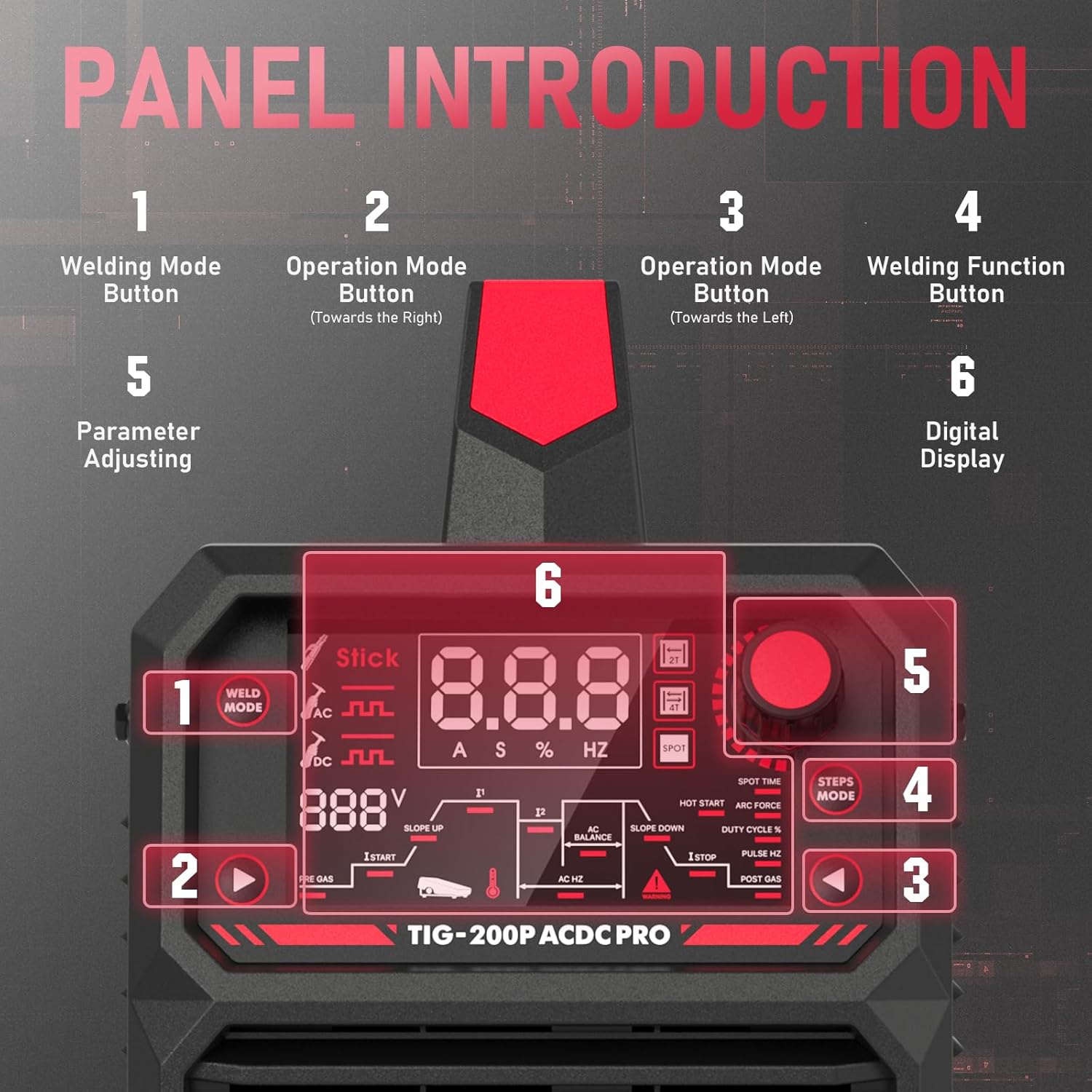
Figi 4: Detaye view of the TIG-200P ACDC control panel.
- Welding Mode Button: Selects the desired welding process (STICK, TIG, Pulse TIG).
- Operation Mode Button (Right): Adjusts parameters related to the right side of the display.
- Operation Mode Button (Left): Adjusts parameters related to the left side of the display.
- Welding Function Button: Selects specific welding functions (e.g., Hot Start, Arc Force, Spot Time).
- Parameter Adjusting Knob: Used to increase or decrease selected parameter values.
- Ekspozisyon dijital: Shows current welding parameters and settings.
Enstalasyon ak Koneksyon
Proper connection of welding accessories is crucial for safe and effective operation. Follow these steps for connecting your TIG-200P ACDC welder.
TIG Mode Connection:
- Connect the control connector of the TIG torch to the machine and tighten it.
- Connect the switch connector of the TIG torch to the machine and tighten it.
- Insert the quick plug on the earth cable into the "+" quick connector on the machine panel, and tighten it. Clamp the workpiece with the work clamp at the other end of the earth cable.
- Open the machine switch, adjust to TIG mode, and you can start to use.
Video 1: Demonstrates the connection process for TIG, STICK, and Foot Pedal modes on the TIG-200P ACDC Welder.
STICK Mode Connection:
- Insert the quick plug on the earth cable into the "-" quick connector on the machine panel, and tighten it. Clamp the workpiece with the work clamp at the other end of the earth cable.
- Insert the quick plug on the electrode holder into the "+" quick connector on the machine panel, and tighten it.
- Open the machine switch, adjust to STICK mode, and you can start to use.
Foot Pedal Mode Connection:
The TIG-200P ACDC features a 5-pin foot pedal interface for enhanced control during welding.

Figure 5: The 5-pin foot pedal interface for optional current control.
- Unplug the switch connector of the TIG torch.
- Connect the switch connector of the foot pedal to the machine, and tighten it.
- When the foot pedal icon appears on the screen, it means that foot mode can be used.
Mòd fonksyònman
The TIG-200P ACDC offers multiple welding modes to suit various materials and applications.

Figure 6: The 6-in-1 multi-process capabilities of the welder.
- STICK Welding (MMA): Suitable for general-purpose welding with coated electrodes.
- Soudi TIG DC: Ideal for stainless steel, carbon steel, copper, and other non-ferrous metals (except aluminum). Features High-Frequency (HF) start.
- AC TIG Welding: Optimized for aluminum and magnesium alloys, providing a cleaning action to remove oxides. Features High-Frequency (HF) start.
- DC Pulse TIG Welding: Offers enhanced control for thinner materials and reduced heat input on DC weldable metals.
- AC Pulse TIG Welding: Provides precise control and improved weld quality for aluminum, especially on thinner sections.
- Soudi pa pwen: For quick, localized welds.

Figure 7: Waveform characteristics for AC Square Wave and AC Pulsed TIG welding.
The Squarewave AC/DC TIG inverter is software-controlled, allowing for precise adjustments to AC balance and frequency, which are critical for aluminum welding. AC mode is specifically optimized for cleaner and easier aluminum welding, while DC mode is used for steel and other metals.
Antretyen
Regular maintenance ensures the longevity and optimal performance of your welding machine. Always disconnect power before performing any maintenance.
- Netwayaj: Periodically clean the machine's exterior and internal components (if accessible) to remove dust and debris. Use compressed air for internal cleaning.
- Enspeksyon kab: Inspect all cables, including welding cables, power cords, and control cables, for cuts, fraying, or damage. Replace damaged cables immediately.
- Koneksyon: Ensure all connections are tight and free from corrosion. Loose connections can lead to overheating and poor performance.
- Refwadisman fanatik: Ensure the cooling fan is free from obstructions and operating correctly to prevent overheating.
- TIG Torch Maintenance: Regularly inspect and replace worn-out consumables such as collets, collet bodies, and ceramic nozzles. Keep the tungsten electrode sharp and clean.
Depanaj
This section addresses common issues you might encounter with your welder. For problems not listed here, contact customer support.
| Pwoblèm | Kòz posib | Solisyon |
|---|---|---|
| No Arc / Difficulty Starting Arc | Loose connections, incorrect gas flow, contaminated tungsten, wrong welding parameters. | Check all cable connections. Verify gas supply and flow rate. Clean or replace tungsten. Adjust welding parameters according to material. |
| Poor Weld Quality (Porosity, Inclusions) | Insufficient shielding gas, contaminated base metal, incorrect travel speed, improper filler rod. | Increase gas flow. Clean workpiece thoroughly. Adjust travel speed. Use appropriate filler rod. |
| Overheating Indicator On | Exceeded duty cycle, blocked ventilation, high ambient temperature. | Allow machine to cool down. Ensure clear airflow to cooling fan. Reduce welding time or current. |
| Machin pa Limen | No power supply, faulty power cord, internal fault. | Check power outlet and circuit breaker. Inspect power cord. Contact customer support if issue persists. |
Espesifikasyon
Detailed technical specifications for the YESWELDER TIG-200P ACDC Welder.
| Karakteristik | Detay |
|---|---|
| Modèl | TIG-200P ACDC |
| Manifakti | WESWELDER |
| Pwa atik | 29 liv (apeprè 13.15 kg) |
| Dimansyon pake | 17.7 x 13.6 x 11.5 pous |
| Sous pouvwa | AC/DC (110V/220V Dual Voltage) |
| Konpozan ki enkli | Soudeur TIG |
| Mòd refwadisman | Refwadisman fanatik |
| Klas izolasyon | F |
| Pwoteksyon Standard | IP21S |
Figure 8: Electrical specifications and duty cycle information.
Garanti ak sipò
The YESWELDER TIG-200P ACDC Welder comes with a 1-ane garanti. For technical assistance, troubleshooting, or warranty claims, please contact YESWELDER customer support.
- Sipò Kliyan: Available 24/7. Refer to the official YESWELDER websit pou detay kontak.
- Resous sou entènèt: Vizite la YESWELDER Store on Amazon pou plis enfòmasyon sou pwodwi a ak akseswa.


