1. Entwodiksyon
This manual provides essential information for the proper installation, operation, and maintenance of your FLIPSKY FSESC 6.7 Pro Electronic Speed Controller. Please read this manual thoroughly before using the product to ensure safe and efficient operation.
2. Pwodwi souview
The FLIPSKY FSESC 6.7 Pro is an advanced Electronic Speed Controller (ESC) designed for various applications, including electric surfboards, multi-axis aircraft, electric vehicles, electric skateboards, golf carts, smart cars, and robots. It is based on the VESC6 hardware and features a robust aluminum case for enhanced durability and heat dissipation. The unit includes an integrated anti-spark switch for safe power connection.
Karakteristik kle:
- Hardware: V 6.7, compatible with Benjamin VESC TOOL.
- Voltage Range: 8V - 60V (safe for 3S to 12S LiPo batteries).
- Current Capacity: Continuous 60A, instantaneous peak 150A (performance depends on temperature and air circulation).
- Integrated Anti-spark Switch: For safe power connection.
- Waterproof Aluminum Case: Provides protection and efficient heat management.
- Auxiliary Power Outputs: 5V 1.5A and 3.3V 1A for external electronics.
- Supported Modes: DC, BLDC, FOC (sinusoidal).
- Supported Sensors: ABI, HALL, AS5047.

Figi 1: Devan view of the FLIPSKY FSESC 6.7 Pro, showcasing its compact design and aluminum casing.

Figi 2: Retounen view of the FLIPSKY FSESC 6.7 Pro, highlighting the heat sink design for thermal management.
3. Espesifikasyon
| Paramèt | Valè |
|---|---|
| Materyèl vèsyon | V 6.7 |
| Firmware | Latest VESC firmware |
| Voltage Range | 8V - 60V (3S to 12S LiPo) |
| Kouran kontinyèl | 60A |
| Kouran Enstantane | 150A |
| 5V Sòti | 1.5A |
| 3.3V Sòti | 1A |
| Mòd kontwòl | DC, BLDC, FOC (sinizoyid) |
| Detèktè sipòte | ABI, HALL, AS5047 |
| Motor Wire Size | 12AWG |
| Materyèl | Aliminyòm |
4. Pake kontni
Lè w ap ouvri pake a, tanpri verifye si tout bagay sa yo ladan l:
- 1x FLIPSKY FSESC 6.7 Pro Electronic Speed Controller with Aluminum Case
- 1x mikwo USB kab
- 1x Fil Capteur VESC
- 1x PPM Cable
- 1x LED Button (for anti-spark switch)
- 1x Manyèl Itilizatè (dokiman sa a)
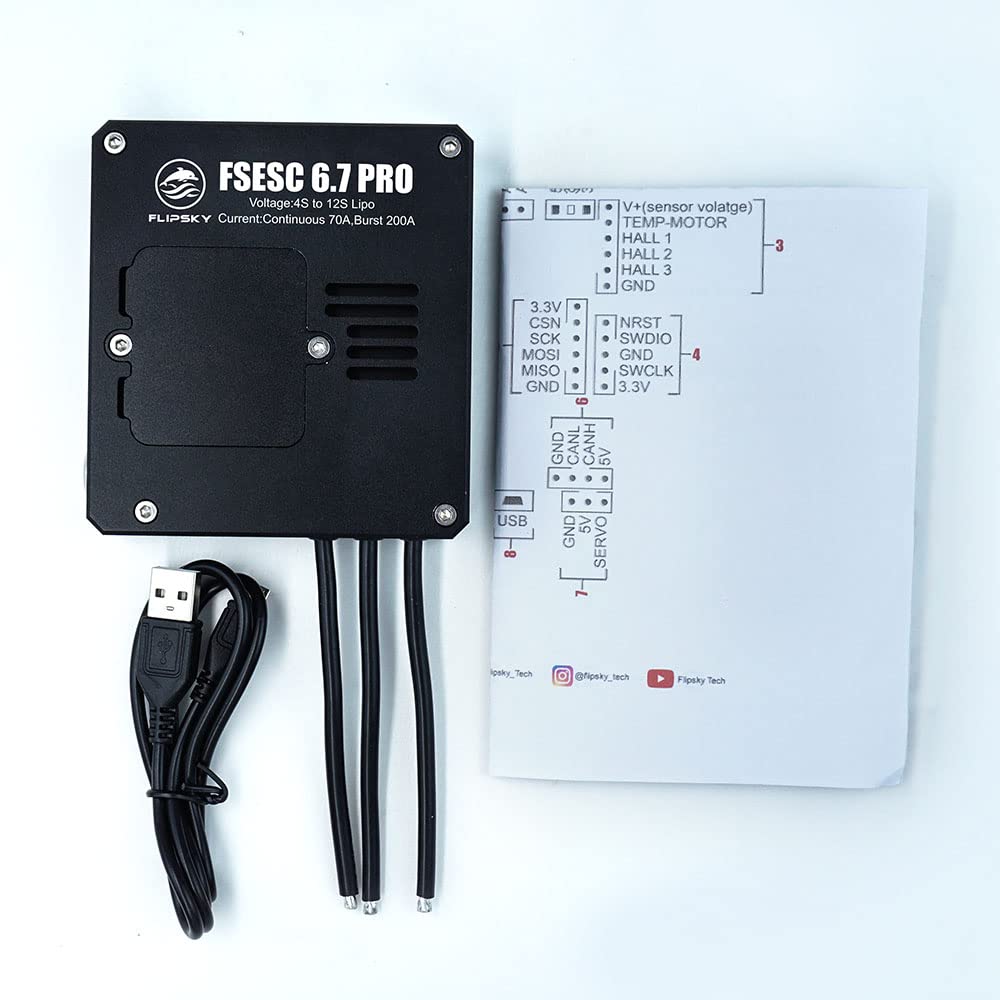
Figure 3: The FSESC 6.7 Pro unit alongside its standard accessories, including the USB cable, sensor wire, PPM cable, and LED button.
5. Enstalasyon ak fil elektrik
Careful wiring is crucial for the safe and correct operation of the FSESC 6.7 Pro. Refer to the diagrams below for proper connections.
Internal Components and Heat Management:

Figi 4: Entèn view of the FSESC 6.7 Pro circuit board with the cover removed, showing the layout of components.

Figi 5: Detaye view of the internal components, including the XT90 wire size, capacitors, MOSFETs, PCB layers, heat transfer pad, and anti-vibration silicon pad, all contributing to efficient operation and heat dissipation.
Entèfas koneksyon:
The FSESC 6.7 Pro features various interfaces for connecting to your motor, battery, and control systems. Ensure all connections are secure and correctly oriented.

Figure 6: Comprehensive wiring diagram for the FSESC 6.7 Pro, illustrating the location and numbering of all connection interfaces.

Figure 7: Magnified view of the pinouts for various interfaces, including CAN, Sensor Voltage, SENSE, SWD, COMM2, COMM1, PPM, and Micro USB, providing clear guidance for connections.
- Koneksyon motè: Konekte twa fil faz motè yo ak pwodiksyon korespondan yo sou ESC la.
- Koneksyon batri: Connect your LiPo battery (3S-12S) to the XT90 female connector. Ensure correct polarity.
- Anti-spark Switch: The LED button for the anti-spark switch must be connected before powering on the unit. Failure to do so can damage the switch.
- Fil Capteur: If using a sensored motor, connect the VESC Sensor Wire to the SENSE port.
- PPM Cable: For remote control input, connect the PPM cable to the PPM port.
- Koneksyon USB: Use the Micro USB cable to connect the ESC to a computer for configuration via VESC TOOL.
- CAN Otobis: The CAN interface (1) allows for communication with other VESC-compatible devices.
- COMM1/COMM2: These ports (5, 6) support IIC, SPI, and UART communication protocols for external modules.
Premye konfigirasyon:
After physical connections, the ESC requires configuration using the VESC TOOL software. This tool allows you to set motor parameters, battery limits, and control modes. Refer to the official VESC TOOL documentation for detailed instructions on software usage and parameter tuning.
Videyo 1: Yon overview of the FLIPSKY FSESC 6.6 (a similar model to the 6.7 Pro) and its components. This video demonstrates the physical aspects and features relevant to the FSESC series.
6. Operasyon Enstriksyon
Once the FSESC 6.7 Pro is properly installed and configured, follow these general operating guidelines:
- Pouvwa sou: Ensure all connections are secure. Press the anti-spark LED button to power on the ESC.
- Tcheke sistèm: Before operating, perform a brief system check to ensure the motor responds correctly to control inputs and there are no unusual noises or vibrations.
- Siveyans: Si posib, kontwole tanperati ESC a ak volim batri a.tage during operation, especially during initial runs or under heavy load.
- Pouvwa Off: Always power off the ESC using the anti-spark LED button when not in use. Disconnect the battery for long-term storage.
Important Safety Note: Do not exceed the specified voltage and current limits. Overloading the ESC can lead to permanent damage and potential safety hazards.
7. Antretyen
Regular maintenance helps ensure the longevity and reliable performance of your FSESC 6.7 Pro.
- Netwayaj: Keep the ESC clean and free from dust, dirt, and moisture. Use a soft, dry cloth for cleaning.
- Enspeksyon: Periodically inspect all wiring and connectors for signs of wear, corrosion, or loose connections.
- Jesyon tèmik: Ensure adequate airflow around the ESC, especially during high-current applications, to prevent overheating. The aluminum case is designed for heat dissipation, but external cooling may be necessary in extreme conditions.
- Mizajou mikrolojisyèl: Check the official FLIPSKY or VESC project websit pou mizajou firmwèr. Mizajou firmwèr ka amelyore pèfòmans epi ajoute nouvo fonksyonalite.
NAN. Depanaj
If you encounter issues with your FSESC 6.7 Pro, consider the following troubleshooting steps:
- Pa gen pouvwa:
- Tcheke koneksyon batri yo epi asire w batri a chaje.
- Verify the anti-spark LED button is correctly connected and pressed.
- Motè a pa vire/Konpòtman iregilye:
- Confirm motor phase wire connections are secure.
- Check sensor wire connections if using a sensored motor.
- Review VESC TOOL configuration for correct motor detection and parameter settings.
- Ensure the PPM cable (or other control input) is correctly connected and calibrated.
- Surchof:
- Diminye chaj la oswa tan fonksyònman an.
- Improve airflow around the ESC.
- Tcheke pou wè si gen kous sikwi nan bobin motè a oswa fil elektrik yo.
- Communication Issues (VESC TOOL):
- Ensure the Micro USB cable is properly connected.
- Eseye yon pò USB diferan oswa yon kab.
- Verify VESC TOOL is the latest version and drivers are installed.
For persistent issues, consult online VESC communities or contact FLIPSKY customer support.
9. Garanti ak sipò
FLIPSKY products are manufactured to high-quality standards. For warranty information and technical support, please refer to the official FLIPSKY websit la oubyen kontakte revandè w la. Kenbe prèv acha w la pou reklamasyon garanti a.


