Entwodiksyon
Mèsi pou acha aasing the Boytone BT-424FN 2.1 Multimedia Bluetooth Speaker System. This powerful shelf stereo system is designed to deliver high-quality audio with versatile connectivity options, including Bluetooth, FM radio, USB, SD card, and auxiliary input. This manual provides detailed instructions for setting up, operating, and maintaining your speaker system to ensure optimal performance and longevity.
Kontni pake
Tanpri verifye pakè a ak anpil atansyon pou asire w tout atik yo la epi yo an bon kondisyon:
- Boytone BT-424FN Main Unit (Subwoofer with built-in amplifier)
- Two Satellite Speakers (3" x 2" Full range)
- Wireless Remote Control
- AUX kab
- USB kab
- SD Card (if included with specific models)
- 2 pil AAA (pou kontwòl remote)

Image: The Boytone BT-424FN 2.1 Multimedia Bluetooth Speaker System, showcasing the main subwoofer unit, two satellite speakers, and the included remote control.
Enfòmasyon sou Sekirite
To prevent fire or shock hazards, do not expose this appliance to rain or moisture. Do not open the cabinet. Refer servicing to qualified personnel only.
- Sous pouvwa: Ensure the power source matches the requirements (AC 110/220V).
- Vantilasyon: Pa bloke okenn ouvèti vantilasyon. Asire w ke gen ase espas ozalantou aparèy la pou yon bon sikilasyon lè.
- Dlo ak imidite: Do not expose the unit to dripping or splashing. Do not place objects filled with liquids, such as vases, on the apparatus.
- Chalè: Kenbe aparèy la lwen sous chalè tankou radyatè, recho, recho, oswa lòt aparèy (ki gen ladan amplifiers) ki pwodui chalè.
- Netwayaj: Debranche aparèy la nan priz miray la anvan ou netwaye li. Sèvi ak yon twal sèk pou netwaye.
- Plasman: Mete aparèy la sou yon sifas ki plat e ki estab pou anpeche l tonbe.
Pwodwi souview ak Karakteristik
The Boytone BT-424FN is a versatile 2.1 multimedia speaker system designed for a rich audio experience. It combines powerful sound output with multiple connectivity options and user-friendly controls.
Karakteristik kle:
- Sòti odyo pwisan: 40 Watts (20W subwoofer + 2x10W satellite speakers) for a wide audio spectrum.
- Koneksyon Bluetooth: Easy wireless connection with a range of up to 33 feet, compatible with all Bluetooth-enabled devices.
- Plizyè Opsyon Lekti: USB port and SD card slot for MP3 file playback, FM tuner for radio, and a 3.5mm auxiliary jack for non-Bluetooth devices.
- Digital Display & Controls: Digital LED display for mode and track information, with digital bass control.
- Limyè RGB: Integrated RGB lighting for enhanced visual appeal.
- Kontwòl Remote: Full-function wireless remote for convenient operation.
- Konsepsyon kontra enfòmèl ant: Tabletop mount design with a black wood finish.

Image: Diagram highlighting key features of the Boytone BT-424FN, including USB/SD port for MP3, wireless sound capability, all-in-one stereo system, and 40 Watts with RGB light.
Idantifikasyon konpozan:
Familiarize yourself with the various ports and controls on your speaker system.

Imaj: Dèyè ak bò view of the Boytone BT-424FN main unit, showing the USB port, SD slot, auxiliary jack, and DVD jack for various input connections.

Image: Close-up of the Boytone BT-424FN's front panel, displaying the LED screen, volume knob, and control buttons for source selection, tone, and tuning.
Enstalasyon
Follow these steps to set up your Boytone BT-424FN speaker system.
1. Koneksyon Oratè:
- Connect the two satellite speakers to the corresponding audio output jacks on the rear of the main subwoofer unit. Ensure a secure connection.
2. Koneksyon pouvwa:
- Plug the AC power cord from the main unit into a standard AC 110/220V wall outlet.
3. Enstalasyon kontwòl Remote:
- Insert the two AAA batteries into the remote control, observing the correct polarity (+/-).
4. Premye limen:
- Press the power button on the main unit or the remote control to turn on the system. The LED display will light up.
Enstriksyon Operasyon
Learn how to use the various functions of your Boytone BT-424FN speaker system.
1. Operasyon Debaz:
- Limen/Etenyen: Press the 'ST-BY/M' button on the main unit or the power button on the remote.
- Kontwòl Volim: Rotate the 'VOLUME' knob on the front panel or use the 'VOL+' and 'VOL-' buttons on the remote control.
- Seleksyon sous: Press the 'SOURCE' button on the main unit or the remote to cycle through input modes: Bluetooth, FM, USB, SD, AUX.
- Kontwòl ton: Use the 'TONE' button on the main unit or remote to adjust bass and treble settings (if available).
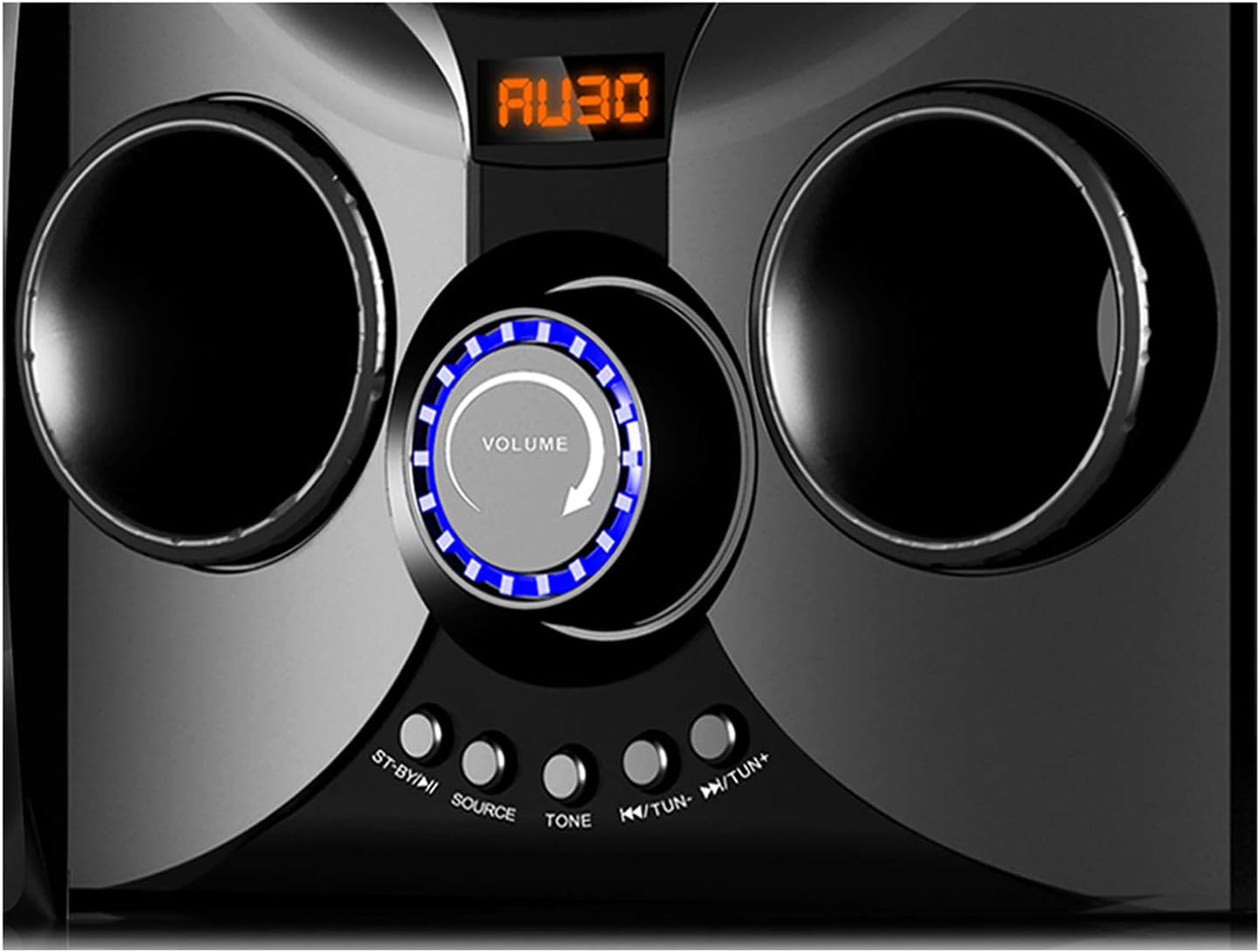
Image: Close-up of the Boytone BT-424FN's central control area, highlighting the illuminated volume knob and the function buttons below it.
2. Bluetooth mòd:
- Select 'Bluetooth' mode using the 'SOURCE' button. The LED display will show 'BT' or a similar indicator.
- Sou aparèy ou ki gen Bluetooth la (telefòn entelijan, tablèt, elatriye), aktive Bluetooth epi chèche aparèy ki disponib yo.
- Select 'BT-424FN' or 'Boytone' from the list of devices.
- Yon fwa li konekte, ou ka jwe odyo ki soti nan aparèy ou an atravè sistèm oratè a.
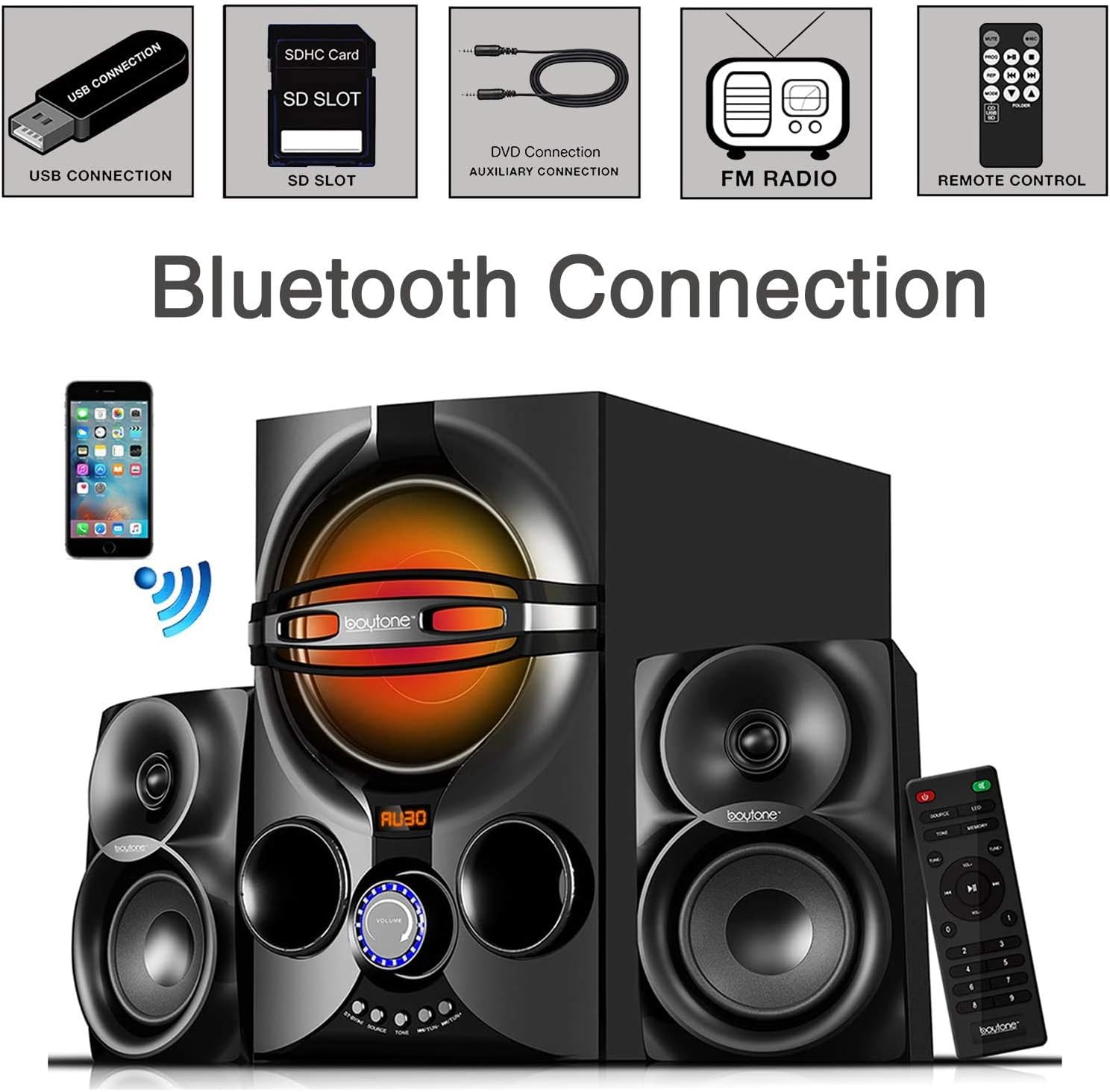
Image: A diagram illustrating the process of connecting a smartphone to the Boytone BT-424FN via Bluetooth, alongside icons representing other connectivity options like USB, SD, AUX, FM radio, and remote control.
3. FM Radio Mode:
- Select 'FM' mode using the 'SOURCE' button.
- Use the 'TUN+/-' buttons on the main unit or the remote to manually tune to a desired radio station.
- To auto-scan and save stations, press and hold the 'PLAY/PAUSE' button (often doubles as auto-scan in FM mode) on the remote or main unit.
4. USB/SD Card Mode:
- Mete yon kle USB oswa yon kat SD ki gen odyo MP3 ladan l. files nan pò respektif la.
- Select 'USB' or 'SD' mode using the 'SOURCE' button. The system will automatically begin playing the first compatible audio file.
- Use the 'PREV/NEXT' buttons on the main unit or remote to skip tracks. Use 'PLAY/PAUSE' to control playback.
5. AUX mòd:
- Connect your external audio device (e.g., MP3 player, TV, computer) to the 'AUX' input jack on the main unit using the provided 3.5mm audio cable.
- Select 'AUX' mode using the 'SOURCE' button.
- Kontwole lekti ak volim dirèkteman nan aparèy ekstèn ki konekte a.
Antretyen
Proper care and maintenance will ensure the longevity of your speaker system.
- Netwayaj: Use a soft, dry cloth to clean the exterior surfaces of the unit. Do not use abrasive cleaners, waxes, or solvents.
- Pousyè: Regularly dust the speaker grilles and vents to prevent accumulation that could affect sound quality and ventilation.
- Depo: Si w ap sere aparèy la pou yon bon bout tan, debranche l nan priz kouran an epi sere l nan yon kote ki fre epi sèk.
- Evite likid: Keep liquids away from the unit to prevent damage to internal components.
Depanaj
If you encounter any issues with your Boytone BT-424FN, refer to the following common problems and solutions.
| Pwoblèm | Kòz posib | Solisyon |
|---|---|---|
| Pa gen pouvwa | Kòd kouran an pa konekte; Priz kouran an pa aktif | Asire w kòd kouran an byen branche; Eseye yon lòt priz kouran |
| Pa gen son | Volume too low; Incorrect source selected; Speakers not connected | Increase volume; Press 'SOURCE' to select correct input; Check speaker connections |
| Aparèy Bluetooth echwe | Device too far; Bluetooth not enabled on device; Speaker not in pairing mode | Move device closer; Enable Bluetooth on your device; Ensure speaker is in Bluetooth mode and discoverable |
| Radyo FM estatik | Weak signal; Antenna not extended | Adjust antenna position; Try auto-scanning for stronger stations |
| USB/SD a pa ap jwe | Pa sipòte file fòma; Pèvèti files; Incorrect mode selected | Asire w files are MP3 format; Try a different USB/SD card; Select 'USB' or 'SD' mode |
| Remote kontwòl pa travay | Batteries drained or incorrectly inserted; Obstruction between remote and unit | Replace batteries and check polarity; Remove any obstructions; Point remote directly at the unit's sensor |
Espesifikasyon
Detailed technical specifications for the Boytone BT-424FN speaker system.
| Karakteristik | Spesifikasyon |
|---|---|
| Non modèl | BT-424FN |
| Kalite Oratè | 2.1 Channel Subwoofer System |
| Oratè maksimòm pwodiksyon pouvwa | 40 Watts (20W Subwoofer + 2x10W Satellites) |
| Subwoofer Dyamèt | 5 pous |
| Satellite Speaker Size | 3" x 2" Full Range |
| Koneksyon Teknoloji | Bluetooth, USB, SD, AUX, Radyo FM |
| Teknoloji kominikasyon san fil | Bluetooth |
| Gamme Bluetooth | Jiska 33 pye |
| Sous pouvwa | Corded Electric (AC 110/220V) |
| Metòd kontwòl | Kontwòl remote, bouton sou inite a |
| Materyèl | Bwa |
| Koulè | Nwa |
| Dimansyon pwodwi (inite prensipal) | 8.5"D x 16.5"W x 13"H |
| Pwa atik | 9.5 liv |
| Konpozan ki enkli | AUX cable, USB cable, SD card, Remote control |
| Batri pou Remote | 2 pil AAA (enkli) |
| Itilizasyon Andedan kay la / Deyò | Andedan kay la |
| UPC | 643307992373 |

Imaj: Dèyè view of the Boytone BT-424FN main unit and one satellite speaker, with dimensions indicated: 10.50 inches (height), 15 inches (depth), and 11 inches (width).
Garanti ak sipò
The Boytone BT-424FN Multimedia Bluetooth Speaker System comes with a Limited Warranty. Please refer to the warranty card included in your package for specific terms and conditions, including coverage duration and claim procedures.
For technical support or service inquiries, please contact Boytone customer service through their official website or the contact information provided with your product documentation. Ensure you have your model number (BT-424FN) and proof of purchase ready when contacting support.


