1. Entwodiksyon
Thank you for choosing the HBN Digital Programmable Timer Socket. This device is designed to automate the switching of electrical appliances, helping you save energy and enhance convenience. It features an LCD display, 8 configurable ON/OFF programs, and a random function for security. Please read this manual carefully before use to ensure proper operation and safety.
2. Enstriksyon Sekirite
- This timer socket is designed for indoor use only. Do not expose it to moisture, water, or extreme temperatures.
- Ensure the connected appliance's power consumption does not exceed the timer's maximum load capacity (16A / 3680W). Overloading can cause damage or fire.
- Pa demonte oswa eseye repare aparèy la. Konfye tout antretyen bay pèsonèl kalifye.
- Kenbe soti nan atenn timoun yo.
- Toujou mete ploge a nèt nan priz la.
- Unplug the timer from the wall socket before cleaning. Clean only with a dry, soft cloth.
3. Pwodwi souview
Familiarize yourself with the components of your HBN Digital Programmable Timer Socket.

Figi 3.1: Devan view of the timer socket, showing the LCD display, control buttons, and power outlet.

Figi 3.2: Retounen view of the timer socket, displaying the model number BND-50/SG3-VC and electrical ratings.
Bouton kontwòl:

Figi 3.3: Detaye view of the control buttons and LCD display.
- LÒT: Used to set the current time and exit programming mode.
- PROG: Enters and cycles through the 8 ON/OFF programming settings.
- R (Random): Activates or deactivates the random switching function.
- Reyajiste: Clears all settings and resets the timer to factory defaults.
- SEMÈN: Selects the day(s) of the week for time and program settings.
- LÈ: Adjusts the hour for time and program settings.
- MIN: Adjusts the minute for time and program settings.
- ON/AUTO/OFF: Manually switches the timer to ON, AUTO (programmed mode), or OFF.
Ekspozisyon LCD:
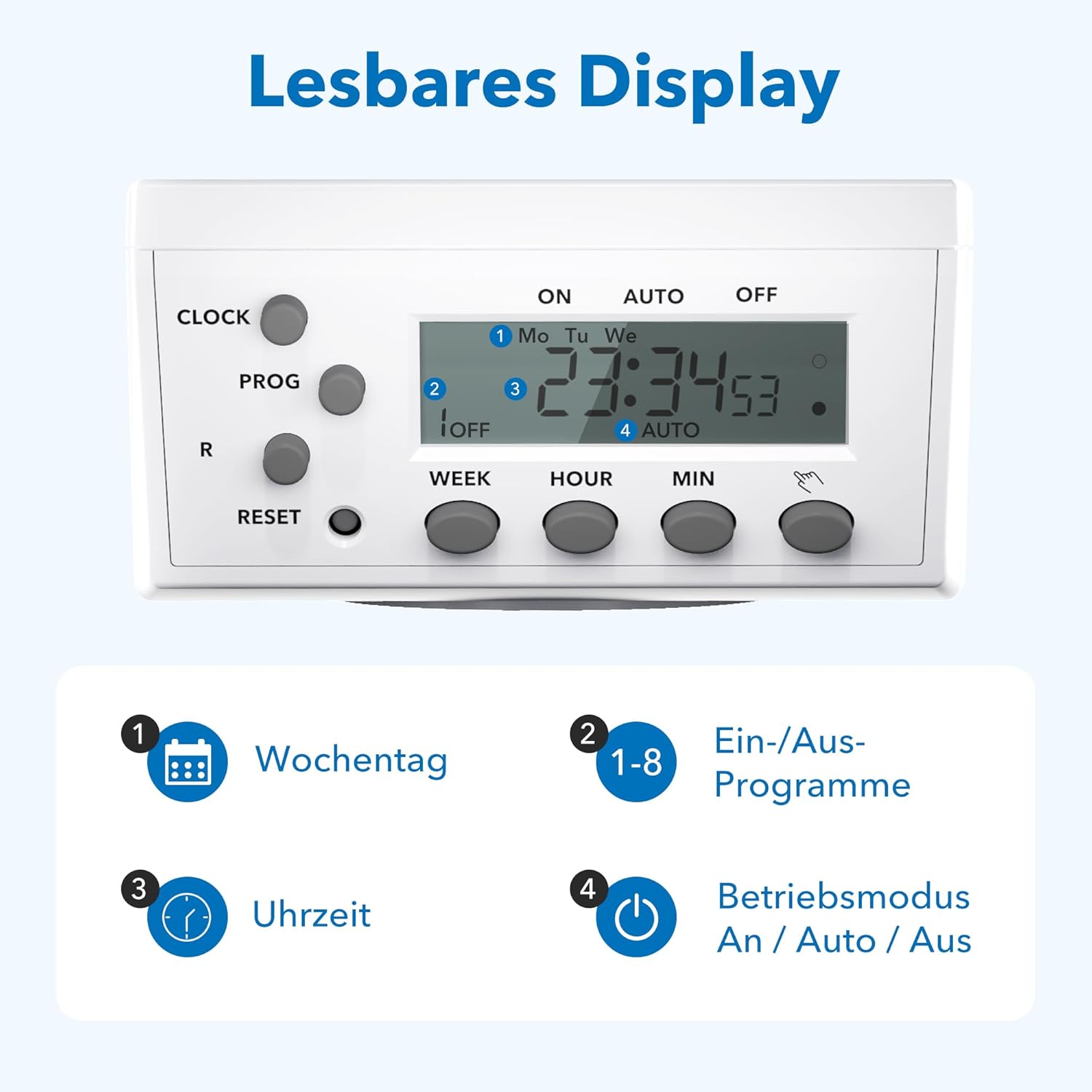
Figure 3.4: The LCD display shows current time, day, program status, and operating mode.
The LCD display provides clear information on the current time, day of the week, active program number, and the current operating mode (ON, AUTO, OFF).
4. Enstalasyon
4.1 Premye Chaje ak Reyajisteman
- Plug the timer socket into a live wall outlet for at least 15-30 minutes to charge its internal battery. This battery retains settings during power outages.
- After charging, use a pointed object (like a pen tip) to press the RESET button. This clears all previous settings and ensures a fresh start. The display will show '0:00'.
4.2 Mete lè aktyèl la
- Peze epi kenbe la LÒJ bouton.
- Pandan w ap kenbe LÒJ, peze la SEMÈN button repeatedly to select the current day of the week (Mo, Tu, We, Th, Fr, Sa, Su).
- Pandan w ap kenbe LÒJ, peze la LÈ Peze bouton an plizyè fwa pou mete lè aktyèl la.
- Pandan w ap kenbe LÒJ, peze la MIN Peze bouton an plizyè fwa pou mete minit aktyèl la.
- Lage a LÒJ bouton. Lè aktyèl la kounye a fikse.
5. Operasyon Enstriksyon
5.1 Pwogramasyon Lè ON/OFF
Minitè a pèmèt jiska 8 pwogram ON/OFF diferan. Chak pwogram gen yon lè ON ak yon lè OFF.
- Peze a PWOG button once. The display will show '1 ON'.
- Peze SEMÈN to select the desired day(s) for this program. Options include individual days, weekdays, weekends, or all days.
- Peze LÈ pou mete lè limen ou vle a.
- Peze MIN pou mete minit ON ou vle a.
- Peze PWOG ankò. Ekran an ap montre '1 OFF'.
- Repeat steps 2-4 to set the desired OFF time for program 1.
- Peze PWOG again to move to '2 ON' and repeat the process for subsequent programs (up to 8).
- Apre ou fin mete tout pwogram ou vle yo, peze bouton an LÒJ button to exit programming mode and return to the current time display.
5.2 Anilasyon Manyèl (ON/OTO/OFF)
Peze a ON/AUTO/OFF bouton pou chanje mòd fonksyònman yo:
- SOU: The connected appliance is continuously ON, overriding all programs.
- OTO: The timer operates according to the programmed ON/OFF times. This is the standard operating mode for automated control.
- OFF: The connected appliance is continuously OFF, overriding all programs.
5.3 Random Function
The random function provides a security feature by switching the connected appliance ON and OFF at irregular intervals (2 to 30 minutes delay) around the programmed times. This can simulate presence when you are away.
- Pou aktive, peze la R button. An 'R' indicator will appear on the display.
- Pou dezaktive, peze bouton an R button again. The 'R' indicator will disappear.

Figi 5.1: Egzamples of versatile applications for the timer socket.
6. Antretyen
- Ensure the timer is unplugged from the power outlet before cleaning.
- Siye deyò a avèk yon twal mou epi sèk. Pa sèvi ak pwodui netwayaj likid oswa materyèl abrazif.
- Sere revèy la nan yon kote ki fre, sèk lè li pa itilize.
NAN. Depanaj
- Ekspozisyon an vid: Ensure the timer is plugged into a live outlet. If it has been unplugged for an extended period, the internal battery may be depleted. Plug it in for 15-30 minutes to recharge.
- Appliance does not switch ON/OFF as programmed:
- Tcheke si revèy la nan OTO mode. If it's in ON or OFF mode, programs are overridden.
- Verifye ke lè ak jou ON/OFF ki pwograme yo kòrèk.
- Ensure the current time is set accurately.
- Confirm the appliance itself is working and properly connected to the timer.
- Programs are lost after a power outage: The internal battery may not be fully charged or is at the end of its life. Ensure the timer is regularly plugged in to maintain battery charge.
- Timer is unresponsive: Peze a RESET button with a pointed object to clear all settings and restart the device. Then, reprogram the time and desired schedules.
8. Espesifikasyon

Figure 8.1: Technical data and dimensions of the timer socket.
| Spesifikasyon | Valè |
|---|---|
| Nimewo Modèl | BND-50/SG3-VC |
| Rated Voltage | 230 V |
| Rated aktyèl | 16 A |
| Chaj maksimòm | 3680 W |
| Minimum Switching Time | 1 minit |
| Kantite Pwogram yo | 8 Pwogram ON/OFF |
| Dimansyon pwodwi | 7.5 x 7.5 x 8 cm |
| Pwa atik | 150 gram |
| Materyèl | Materyèl plastik (Konsiststoff) |
| Koulè | Blan |
| Manifakti | Ergo I&E CO.,LTD |
9. Garanti ak sipò
HBN products are manufactured to high-quality standards. For warranty information or technical support, please refer to the documentation provided with your purchase or contact your retailer. Keep your proof of purchase for warranty claims.


