1. Entwodiksyon
Thank you for choosing the Tronsmart Onyx Ace True Wireless Bluetooth Earbuds. This manual provides detailed instructions on how to set up, operate, and maintain your earbuds to ensure optimal performance and longevity. Please read this manual thoroughly before using the product.
2. Pake kontni
- Tronsmart Onyx Ace True Wireless Earbuds (Left & Right)
- Ka chaje
- USB-C Chaje Kab
- Manyèl itilizatè
3. Pwodwi souview
Familiarize yourself with the components of your Tronsmart Onyx Ace earbuds and charging case.

The Tronsmart Onyx Ace True Wireless Earbuds are shown in their open charging case, highlighting their compact design and white finish.
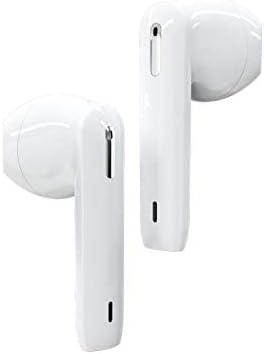
Yon detaye view of the left and right Tronsmart Onyx Ace earbuds, showcasing their ergonomic design and in-ear fit.
Konpozan kle:
- Ekouteur: Ekoutè gòch (G) ak dwat (D) ak zòn kontwòl taktil.
- Ka chaje: Stores and charges the earbuds, with LED indicators for battery status.
- USB-C pò: Pou chaje ka a.
- Mikwofòn: Entegre pou apèl ak asistan vwa.
4. Enstalasyon
4.1 Premye chaj
Before first use, fully charge the charging case and earbuds. Connect the USB-C cable to the charging port on the case and a power source. The LED indicators on the case will show charging status.
4.2 Konekte ak Aparèy ou an
- Louvri kouvèti bwat chaje a. Ekoutè yo ap antre otomatikman nan mòd koneksyon.
- Sou aparèy ou an (telefòn entelijan, tablèt, elatriye), aktive Bluetooth.
- Chèche pou "Tronsmart Onyx Ace" in the list of available Bluetooth devices.
- Select "Tronsmart Onyx Ace" to connect. Once connected, you will hear a confirmation tone.
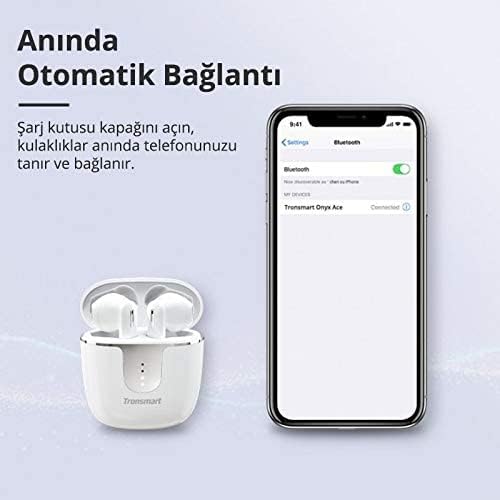
The image demonstrates the instant automatic connection feature: simply open the charging case lid, and the earbuds will automatically connect to your phone, as shown with a phone displaying a Bluetooth connection.
5. Operasyon Enstriksyon
The Tronsmart Onyx Ace earbuds feature intuitive touch controls for various functions.
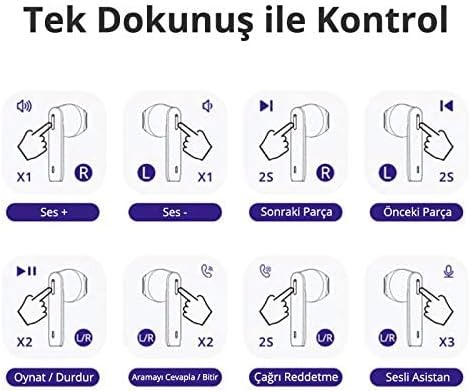
This diagram illustrates the touch controls: Single tap on R for Volume Up, L for Volume Down. Hold R for 2 seconds for Next Track, L for 2 seconds for Previous Track. Double tap U/R for Play/Pause or Answer/End Call. Hold U/R for 2 seconds to Reject Call. Triple tap U/R for Voice Assistant.
5.1 Power On/Off
- Pouvwa sou: Louvri kouvèti bwat chaje a, oubyen retire ekoutè yo nan bwat la. Y ap limen otomatikman.
- Pouvwa Off: Mete ekoutè yo tounen nan bwat chaje a epi fèmen kouvèti a. Y ap etenn otomatikman.
5.2 Kontwòl Lekti Mizik
- Jwe/Poz: Double tap either the Left (L) or Right (R) earbud.
- Volim moute: Single tap the Right (R) earbud.
- Volim desann: Single tap the Left (L) earbud.
- Pwochen Track: Hold the Right (R) earbud for 2 seconds.
- Track Previous: Hold the Left (L) earbud for 2 seconds.
5.3 Jesyon Apèl
- Reponn/Fen Apèl: Double tap either the Left (L) or Right (R) earbud.
- Rejte apèl: Hold either the Left (L) or Right (R) earbud for 2 seconds.
5.4 Aktivasyon Asistan Vwa
- Aktive Asistan Vwa: Triple tap either the Left (L) or Right (R) earbud.
5.5 Mono/Stereo Mode
The earbuds can be used individually (mono mode) or together (stereo mode).
- Mono mòd: Simply take one earbud out of the case. It will automatically connect to your device.
- Mòd stereo: Take both earbuds out of the case. They will automatically pair with each other and then connect to your device.

This image shows the flexibility of using the earbuds in either mono (single earbud) or stereo (both earbuds) mode, allowing users to feel free based on their preference.
6. Features Highlight
6.1 Kalite Odyo Siperyè
Experience stereo Hi-Fi sound with exceptional clarity, powered by Qualcomm aptX technology for CD-like audio and a 13mm driver for rich bass and clear treble.

The image highlights the audio quality features, including Stereo Hi-Fi sound with exceptional clarity, Qualcomm aptX for CD-like audio, AAC for balanced sound on iOS, and a 13mm driver for rich bass and clear treble. Lossless aptX audio is available for compatible devices.
6.2 Apèl ki klè tankou kristal
Equipped with 4 microphones and Environment Noise Cancellation (ENC) technology, the earbuds guarantee crystal-clear and loud call quality by effectively reducing ambient noise.

This image depicts a user making a call, illustrating that the 4 microphones and Environment Noise Cancellation technology ensure crystal-clear and loud call quality by reducing ambient noise.
6.3 IPX5 Sweatproof
The IPX5 rating ensures your earbuds are protected against sweat, splashes, and rain, making them ideal for workouts and outdoor activities.

This image illustrates the IPX5 sweatproof rating, indicating the earbuds are protected against sweat, splashes, and rain, making them suitable for workouts and outdoor activities.
6.4 Pressure-Free Design
The semi-in-ear design provides a comfortable and secure fit, allowing for extended listening sessions without discomfort.
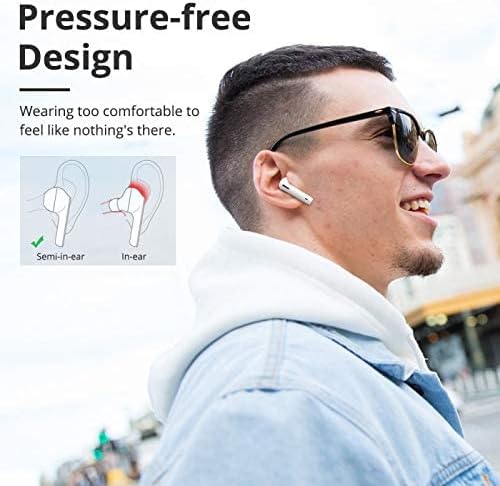
The image compares semi-in-ear and in-ear designs, highlighting the Tronsmart Onyx Ace's semi-in-ear design for a comfortable, pressure-free fit that feels almost imperceptible during wear.
6.5 Genuine Qualcomm Chip
Equipped with a genuine Qualcomm QCC3020 chip, the earbuds offer faster transmission, ultra-low latency, and low-power consumption for the most stable wireless connection.
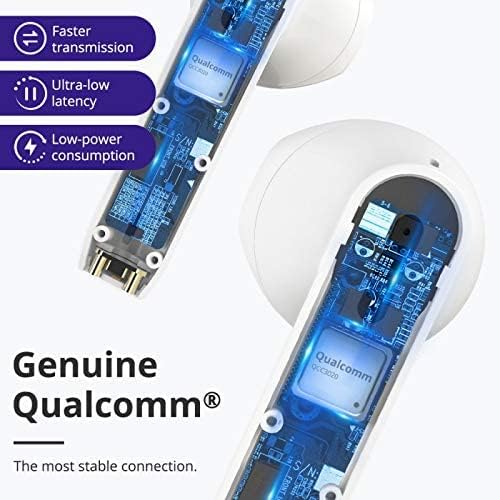
Yon koupe view of the earbud showing the internal Qualcomm QCC3020 chip, emphasizing faster transmission, ultra-low latency, and low-power consumption for a stable connection.
7. Chaje
7.1 Chaje ekoutè yo
Place the earbuds into the charging case. The earbuds will automatically begin charging. The LED indicators on the earbuds will show their charging status.
7.2 Chaje Bwat la
Connect the provided USB-C cable to the charging port on the case and a USB power adapter (not included). The LED indicators on the case will light up to show the charging progress. A full charge provides up to 24 hours of total playtime with the earbuds.

This image displays the battery life capabilities: up to 5 hours on a single charge for the earbuds, and up to 24 hours total playtime with the charging case. Data is based on 50% volume.
8. Antretyen ak Swen
- Netwaye ekoutè yo ak bwat chaje a regilyèman avèk yon twal mou epi sèk.
- Pa sèvi ak pwodui netwayaj abrazif oswa solvang.
- Keep the charging contacts on the earbuds and in the case clean to ensure proper charging.
- Store the earbuds in their charging case when not in use to protect them and conserve battery life.
- Evite ekspoze ekoutè yo nan tanperati ekstrèm, imidite, oswa limyè solèy dirèk.
NAN. Depanaj
Ekoutè 9.1 yo pa konekte/konekte
- Ensure the earbuds are charged and out of the charging case.
- Etenn epi aktive Bluetooth sou aparèy ou an.
- Forget "Tronsmart Onyx Ace" from your device's Bluetooth list and try pairing again.
- Try resetting the earbuds (refer to the next section).
9.2 Pa gen son oswa volim ki ba
- Tcheke nivo volim nan tou de aparèy ou an ak ekoutè yo.
- Asire w ke ekoutè yo byen konekte ak aparèy ou an.
- Netwaye tout debri ki sou oratè ekoutè yo.
9.3 Pwoblèm chaj
- Asire w ke kab chaje a byen konekte ak tou de bwat la ak sous kouran an.
- Check if the charging contacts on the earbuds and in the case are clean and free of obstruction.
- Eseye yon diferan USB-C kab oswa adaptè pouvwa.
9.4 Reyajiste ekoutè yo
If you experience persistent issues, you may need to reset your earbuds. Consult the official Tronsmart support website or contact customer service for specific reset instructions for the Onyx Ace model, as procedures can vary.
10. Espesifikasyon
Detailed technical specifications for the Tronsmart Onyx Ace True Wireless Bluetooth Earbuds.
| Karakteristik | Detay |
|---|---|
| Non mak | Tronsmart |
| Non modèl | Oniks Ace |
| Nimewo Modèl Atik | Oniks Ace |
| Koneksyon Teknoloji | San fil |
| Teknoloji kominikasyon san fil | Bluetooth |
| Ekoutè Plasman Zòrèy | Nan Zòrèy |
| Ekoutè fòm faktè | Nan Zòrèy |
| Koulè | Blan |
| Sansiblite | 95 dB |
| Kontwòl bri | Okenn |
| Ekoutè Jack | None (True Wireless Design) |
| Dimansyon pwodwi | 4 x 9 x 11.8cm; 150g |
| Manifakti | Tronsmart |
| Dat Premye Disponib | 24ye jen 2020 |
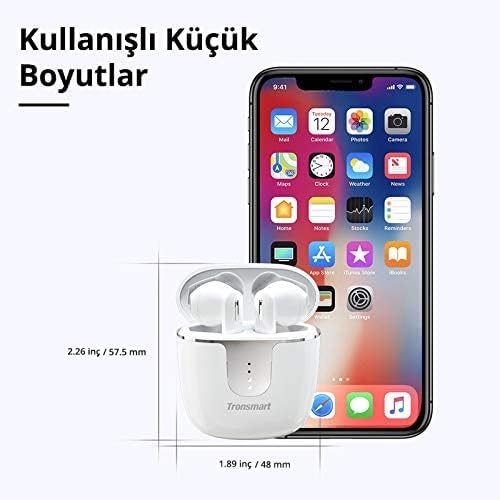
The image provides the compact dimensions of the Tronsmart Onyx Ace charging case: approximately 2.26 inches (57.5 mm) in height and 1.89 inches (48 mm) in width, demonstrating its portability.
11. Garanti ak sipò
Tronsmart products typically come with a standard warranty. For detailed warranty information, product registration, or technical support, please visit the official Tronsmart websit la oubyen kontakte sèvis kliyan yo dirèkteman. Kenbe resi acha w la pou reklamasyon garanti.
Ofisyèl Websit: www.tronsmart.com


