1. Entwodiksyon
Mèsi pou acha aasing the Dolphin SP-17RBT 15 Inch Party Speaker. This portable PA system is designed to deliver powerful audio with its 15-inch woofer and horn tweeter, complemented by an engaging LED light display. Featuring WaveSync Technology for wireless stereo pairing, multiple input options (Bluetooth, AUX, USB), and included accessories like a microphone and tripod stand, the SP-17RBT is ideal for various audio applications. This manual provides essential information for safe operation, setup, and maintenance of your speaker.
2. Enstriksyon Sekirite
- Read all instructions carefully before operating the speaker.
- Kenbe oratè a lwen dlo, imidite, ak tanperati ekstrèm.
- Asire bon vantilasyon; pa bouche okenn ouvèti vantilasyon.
- Sèvi sèlman ak adaptè kouran manifakti a bay la.
- Pa eseye ouvri oswa repare oratè a tèt ou. Konfye tout antretyen bay pèsonèl kalifye.
- Clean the speaker only with a dry, soft cloth.
- Evite ekspoze pwolonje nan nivo volim ki wo pou anpeche domaj tande.
3. Pake kontni
Tanpri verifye ke tout atik ki nan lis anba a yo enkli nan pakè ou a:
- Dolphin SP-17RBT 15 Inch Party Speaker
- Stand tripod
- Mikwofòn
- Kontwòl Remote
- 9V pouvwa adaptè
4. Pwodwi souview

Figi 4.1: Devan view of the Dolphin SP-17RBT speaker with its included tripod stand, showcasing the main woofer, horn tweeter, LED light strips, and control panel at the top. The speaker features a black finish with blue LED accents.
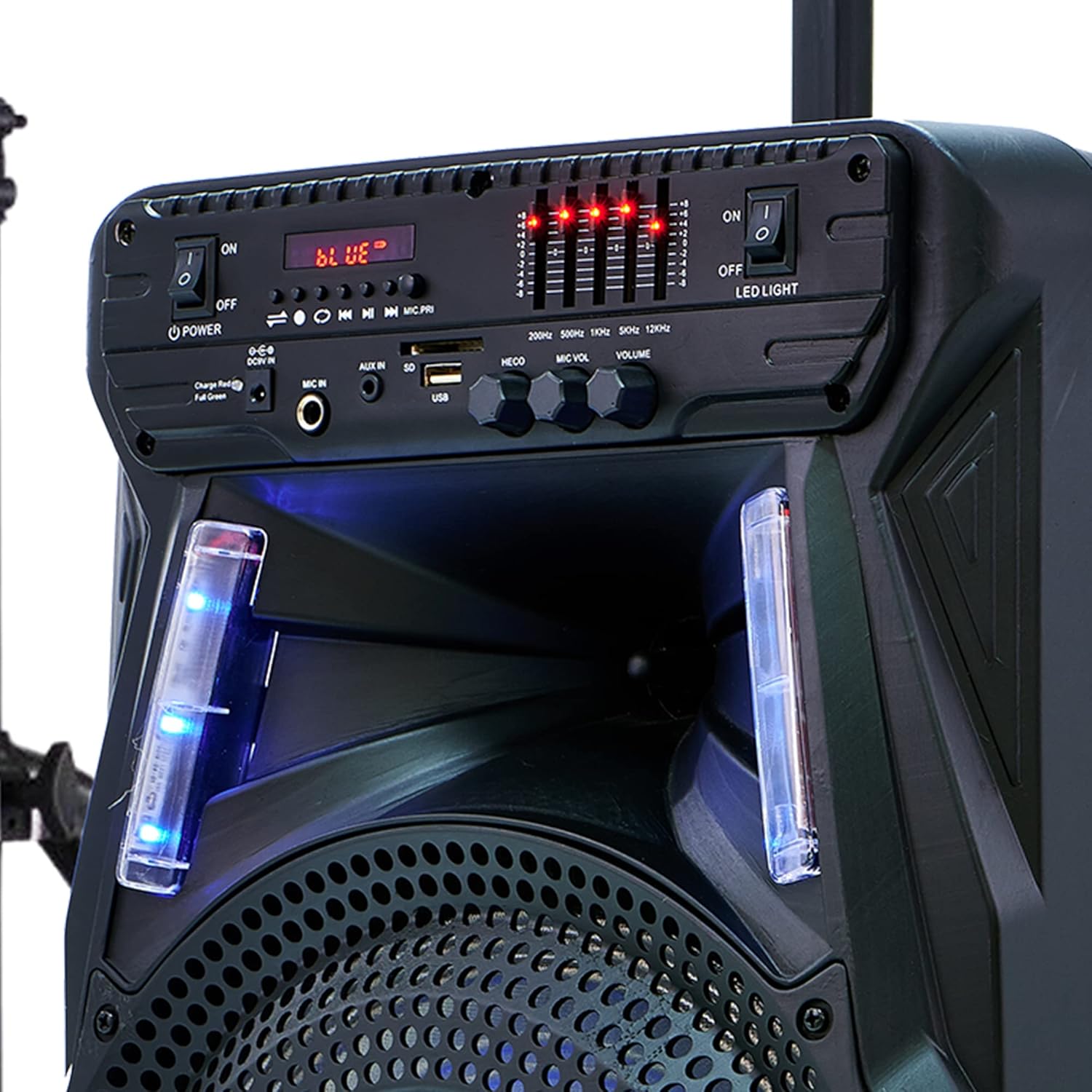
Figi 4.2: Close-up of the speaker's control panel, displaying buttons for power, LED light control, input selection (Bluetooth, AUX, USB), microphone inputs, volume controls, and an equalizer display. The display shows 'BLUE' indicating Bluetooth mode.

Figi 4.3: Detail of the speaker's base, highlighting the integrated wheels for portability and the sturdy feet for stable placement. The wheels facilitate easy transport of the unit.
Fonksyon panèl kontwòl:
- Pouvwa switch: Limen oswa etenn oratè a.
- LED LIGHT Switch: Toggles the LED light display ON or OFF.
- Bouton MODE: Switches between input modes (Bluetooth, AUX, USB).
- Bouton PLAY/PAUSE: Plays or pauses audio playback in Bluetooth/USB mode.
- PREVIOUS/NEXT Buttons: Skips to the previous or next track in Bluetooth/USB mode.
- MIC IN (6.35mm): Input jack for connecting the included microphone.
- ANTRE AUXILIÈ (3.5mm): Input jack for connecting external audio devices via an AUX cable.
- Pò USB: Pou jwe odyo files soti nan yon kondwi flash USB.
- Bouton MIC VOL: Ajiste volim mikwofòn ki konekte a.
- Bouton ECHO: Ajiste efè eko a pou mikwofòn nan.
- Bouton VOLIM: Controls the master volume of the speaker.
- Equalizer Display: Visual representation of audio levels.
- DC 9V Antre: Power input for charging the speaker.
5. Enstalasyon
5.1 Debake
Retire tout konpozan yo nan anbalaj la avèk prekosyon. Kenbe anbalaj la pou transpò oswa depo pita.
Asanblaj Sipò Oratè 5.2
- Unfold the legs of the tripod stand until they are fully extended and stable.
- Ajiste wotè sipò a nan nivo ou vle a, epi asire w ke peny bloke a byen angaje.
- Carefully place the Dolphin SP-17RBT speaker onto the pole of the tripod stand. Ensure it is seated firmly and balanced.
Alternatively, the speaker can be placed directly on a flat, stable surface.
5.3 Limen epi chaje
- Connect the supplied 9V power adapter to the DC 9V input port on the speaker and then to a power outlet.
- For first-time use, it is recommended to fully charge the speaker for approximately 3 hours. The charging indicator light will show the charging status.
- Flip the POWER switch to the 'ON' position to turn on the speaker.
A full charge provides over 5 hours of playback time.
6. Operasyon Enstriksyon
6.1 Power On/Off
To turn the speaker on, flip the POWER switch located on the control panel to the 'ON' position. To turn it off, flip the switch to the 'OFF' position.
6.2 Bluetooth Koneksyon
- Turn on the speaker. The default mode is typically Bluetooth, indicated by 'BLUE' on the display and a blinking Bluetooth icon. If not, press the MODE button until Bluetooth mode is selected.
- Aktive Bluetooth sou aparèy mobil ou a (telefòn entelijan, tablèt, elatriye).
- Chèche pou available Bluetooth devices and select "Dolphin SP-17RBT" from the list.
- Once paired, the speaker will emit a confirmation sound, and the Bluetooth icon will stop blinking. You can now play audio from your device through the speaker.
6.3 Antre AUX
- Konekte yon bout kab odyo 3.5mm (pa enkli) nan pò AUX IN ki sou oratè a.
- Konekte lòt bout kab la nan priz kas ekoutè a oswa nan pwodiksyon odyo aparèy ekstèn ou an.
- Press the MODE button on the speaker until 'AUX' is displayed.
- Jwe odyo ki soti nan aparèy ekstèn ou an.
6.4 Lekti USB
- Mete yon kle USB ki gen odyo MP3 ladan l files nan pò USB ki sou oratè a.
- Oratè a ap chanje otomatikman an mòd USB epi li pral kòmanse jwe odyo a. files. If not, press the MODE button to select USB mode.
- Use the PLAY/PAUSE, PREVIOUS, and NEXT buttons to control playback.
6.5 Itilizasyon Mikwofòn
- Connect the included microphone to the MIC IN (6.35mm) port on the speaker.
- Ajiste bouton MIC VOL la pou kontwole volim mikwofòn nan.
- Turn the ECHO knob to add or reduce the echo effect for vocals.
6.6 WaveSync Technology (TWS Pairing)
WaveSync Technology allows you to wirelessly connect two Dolphin SP-17RBT speakers for a true stereo sound experience.
- Ensure both SP-17RBT speakers are powered on and in Bluetooth mode.
- On one of the speakers (this will be your primary speaker), press and hold the dedicated WaveSync button (if available, or a combination of buttons as per specific model instructions, typically the PLAY/PAUSE button for a few seconds).
- Oratè prensipal la ap chèche oratè segondè a. Yon fwa konekte, tou de oratè yo ap fè yon son konfimasyon.
- Now, connect your mobile device to the primary speaker via Bluetooth as described in section 6.2. Audio will play simultaneously through both speakers in stereo.
6.7 LED Light Display
The speaker features an integrated LED light display that dances and changes color with the music. To turn the LED lights ON or OFF, use the dedicated LED LIGHT switch on the control panel.
6.8 Kontwòl Remote
Kontwòl remote ki enkli a bay aksè pratik a plizyè fonksyon:
- Pouvwa: Limen/Etenn oratè a.
- Mòd: Chanje sous antre.
- Volim +/-: Ajiste volim mèt.
- Jwe/Poz: Kontwole lèktur medya yo.
- Previous/Next: Sote tras yo.
- EQ: Cycles through equalizer presets (if available).
7. Antretyen
7.1 Netwayaj
Wipe the speaker's exterior with a soft, dry cloth. Do not use abrasive cleaners, waxes, or solvents, as they may damage the finish. Avoid spraying liquids directly onto the speaker.
7.2 Depo
When not in use for extended periods, store the speaker in a cool, dry place, away from direct sunlight and extreme temperatures. If possible, use the original packaging for protection.
7.3 Swen Batri
To prolong the life of the built-in Lithium Ion battery, charge it regularly, even if the speaker is not in frequent use. Avoid completely draining the battery before recharging.
NAN. Depanaj
- Pa gen pouvwa:
Ensure the power adapter is securely connected to both the speaker and a working power outlet. Check if the POWER switch is in the 'ON' position. If operating on battery, ensure the battery is charged. - Pa gen son:
Check the master VOLUME knob on the speaker and the volume on your connected audio device. Ensure the correct input MODE (Bluetooth, AUX, USB) is selected. Verify all audio cables are securely connected. - Bluetooth pa konekte:
Make sure the speaker is in Bluetooth mode and discoverable (Bluetooth icon blinking). Ensure Bluetooth is enabled on your device and it's within range (typically 10 meters). Try forgetting "Dolphin SP-17RBT" from your device's Bluetooth list and re-pairing. - Son defòme:
Reduce the volume on both the speaker and the audio source. Check if the audio source itself is of good quality. Ensure no cables are damaged or loosely connected. - Mikwofòn pa travay:
Ensure the microphone is securely plugged into the MIC IN port. Adjust the MIC VOL knob. Check if the microphone itself is functional. - WaveSync Pairing Fails:
Ensure both speakers are SP-17RBT models and are in Bluetooth mode before attempting to pair them via WaveSync. Make sure they are close to each other.
9. Espesifikasyon
- Modèl: SP-17RBT
- Sòti Wattage: 2700 Watt (pik)
- Gwosè woofer: 15 pous
- Koneksyon Teknoloji: AUX, Bluetooth, USB
- Sous pouvwa: Battery Powered (Built-in Lithium Ion)
- Lavi batri: Over 5 Hours (approx.)
- Tan chaj: 3 èdtan (apeprè)
- Pwa atik: 18 liv
- Koulè: Nwa
- Kalite montaj: Pòl Mount
- UPC: 850006218448
10. Garanti ak sipò
For warranty information, technical support, or service inquiries, please refer to the official Dolphin websit la oubyen kontakte sèvis kliyan yo dirèkteman. Kenbe resi acha w la kòm prèv acha pou nenpòt reklamasyon garanti.


