1. Entwodiksyon
Mèsi pou acha aasing the Monster PA X80 Portable Rechargeable Bluetooth LED Speaker. This all-in-one portable PA system is designed to deliver powerful audio with versatile connectivity options. Please read this manual carefully before using the product to ensure proper operation and to maximize its lifespan.

Devan view of the Monster PA X80 Portable Speaker, showcasing its black finish, red accents, speaker grille, and LED display.
2. Enfòmasyon sou Sekirite
- Do not expose the speaker to rain or moisture to prevent fire or electric shock.
- Do not open the speaker enclosure. Refer all servicing to qualified personnel.
- Keep the speaker away from heat sources such as radiators, heat registers, stoves, or other apparatus that produce heat.
- Sèvi ak sèlman atachman/akseswa manifakti a espesifye.
- Unplug the speaker during lightning storms or when unused for long periods.
- Asire bon vantilasyon. Pa bloke okenn ouvèti vantilasyon.
3. Pake kontni
Carefully unpack your Monster PA X80 speaker and ensure all items are present:
- Monster PA X80 Speaker
- DC pouvwa adaptè
- Kontwòl Remote
- Mikwofòn
- Manyèl Itilizatè (dokiman sa a)
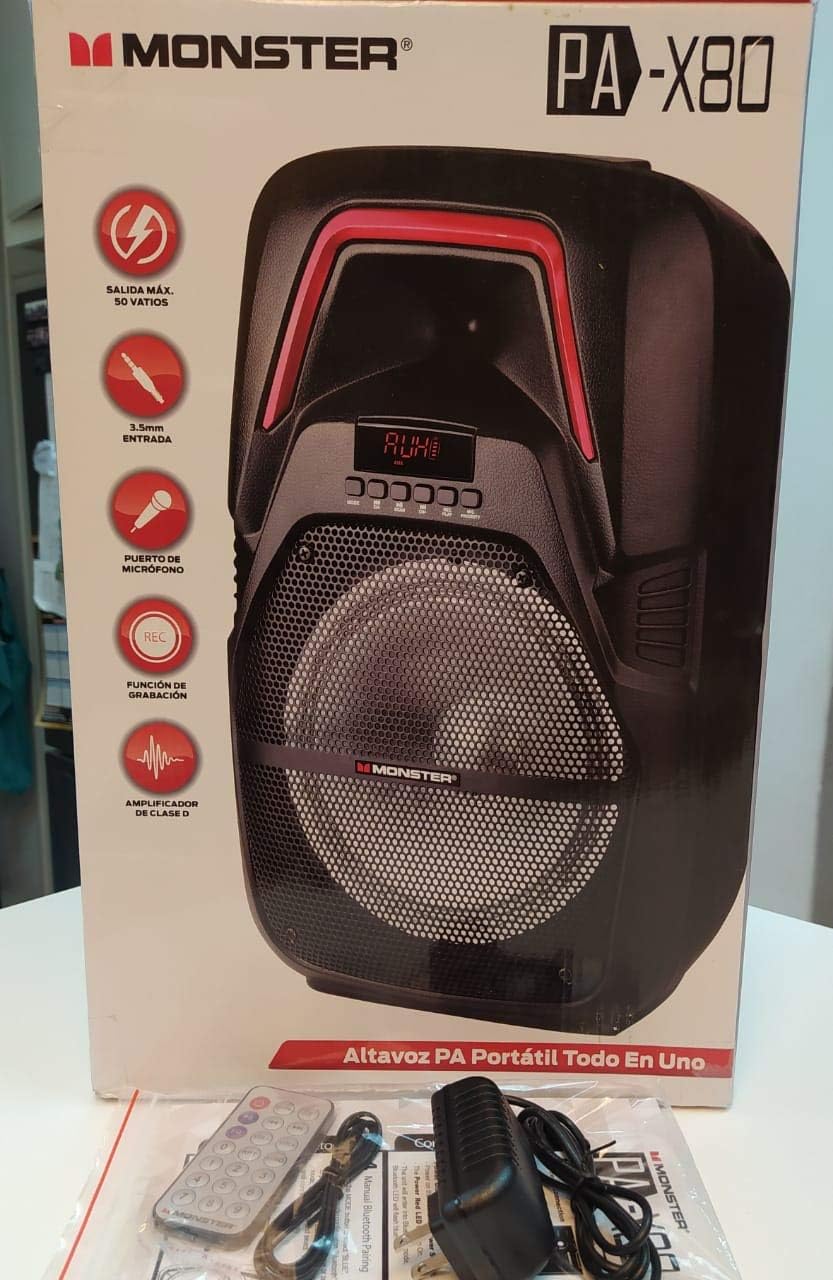
The Monster PA X80 speaker unboxed, displayed with its packaging, remote control, microphone, and power adapter.
4. Kontwòl ak Karakteristik
Familiarize yourself with the various controls and connection ports on your PA X80 speaker.
Front Panel
- Dirije ekspozisyon: Montre mòd aktyèl la, nimewo tras la, oswa frekans FM lan.
- Bouton kontwòl: Play/Pause, Skip Forward/Backward, Mode selection, Record, Priority.
- Oratè Grille: Protects the main speaker driver.
Panèl dèyè
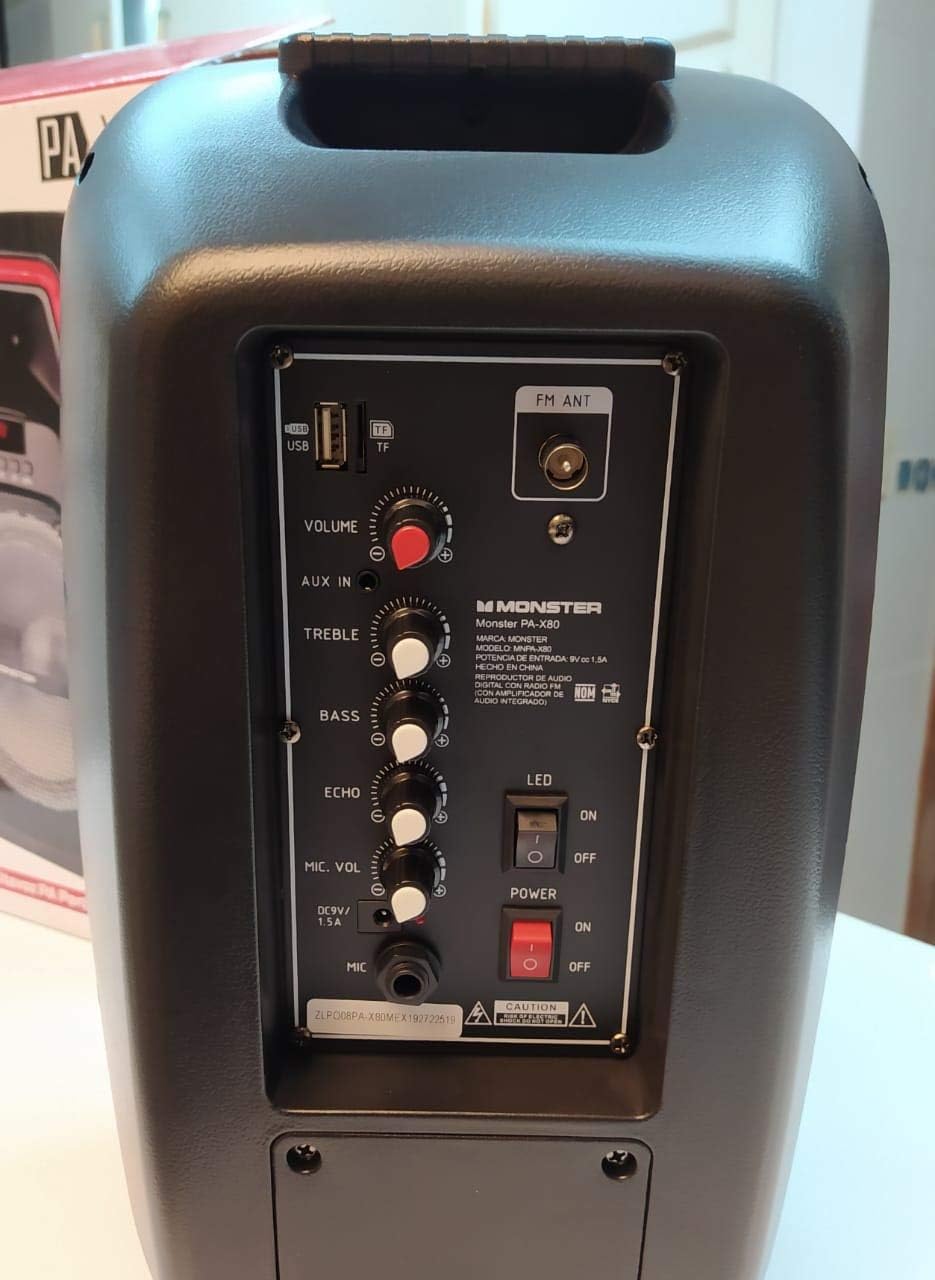
Detaye view of the Monster PA X80 speaker's rear control panel, showing inputs for USB, AUX, microphone, volume, treble, bass, echo, and power switches.
- Pò USB: For playing audio from USB drives.
- TF Kat plas: For playing audio from TF (MicroSD) cards.
- FM ANT: External antenna connection for FM radio.
- Bouton VOLIM: Ajiste volim prensipal la an jeneral.
- AUX NAN: Antre 3.5mm pou aparèy odyo ekstèn.
- Bouton TREBLE: Ajiste son frekans segondè.
- Bouton BASS: Ajiste son ki gen ba frekans.
- Bouton ECHO: Ajiste efè eko a pou mikwofòn nan.
- MIC. VOL Knob: Ajiste volim mikwofòn la.
- Antre MIC: 6.35mm input for a wired microphone.
- DC 9V 1.5A Input: Power input for charging and operating the speaker.
- Dirije switch: Limen/etenn limyè LED yo.
- Pouvwa switch: Limen/etenn oratè a.

Diagram illustrating the key features of the Monster PA X80 speaker, including integrated handles, protective speaker grille, LED screen, and rear control panel.
5. Enstalasyon
5.1 Chaje Oratè a
- Connect the provided DC power adapter to the DC 9V 1.5A input port on the rear panel of the speaker.
- Ploge adaptè a nan yon priz miray estanda.
- The LED display will indicate the charging status. The speaker is fully charged when the indicator changes or turns off (refer to the LED display for specific charging indicators).
- Pou yon dire pi bon pou batri a, chaje oratè a nèt anvan premye itilizasyon an.
5.2 Limen/Etenyen
Locate the POWER switch on the rear panel. Flip the switch to the 'ON' position to power on the speaker. Flip it to 'OFF' to power off.
6. Operasyon
6.1 Bluetooth mòd
- Limen oratè a. Oratè a ap antre otomatikman nan mòd koneksyon Bluetooth, sa ap endike pa yon 'BT' k ap flache sou ekran LED la.
- Sou aparèy mobil ou a (telefòn entelijan, tablèt, elatriye), aktive Bluetooth epi chèche aparèy ki disponib yo.
- Select 'MONSTER PA X80' from the list of devices.
- Once paired, the speaker will emit a confirmation sound, and 'BT' on the LED display will stop flashing.
- Kounye a ou kapab jwe odyo soti nan aparèy ou an atravè oratè a.
6.2 Mòd Antre AUX
- Connect one end of a 3.5mm audio cable (not included) to the AUX IN port on the speaker's rear panel.
- Konekte lòt bout kab la nan priz kas ekoutè a oswa nan pwodiksyon odyo aparèy ekstèn ou an.
- Press the 'MODE' button on the speaker or remote control until 'AUX' is displayed on the LED screen.
- Jwe odyo ki soti nan aparèy ekstèn ou an.
6.3 Mòd Kat USB/TF
- Insert a USB flash drive into the USB port or a TF (MicroSD) card into the TF card slot on the rear panel.
- The speaker will automatically switch to USB/TF mode and begin playing audio files (MP3, WAV, etc.). If not, press the 'MODE' button to select the correct input.
- Sèvi ak bouton Jwe/Pòz ak Sote yo pou kontwole lekti a.
6.4 Itilizasyon Mikwofòn
- Connect the microphone to the MIC input port on the rear panel.
- Adjust the MIC. VOL knob to control the microphone's volume.
- Sèvi ak bouton ECHO a pou ajoute yon efè eko nan vwa ou.
6.5 dirije limyè
Flip the 'LED' switch on the rear panel to 'ON' to activate the speaker's LED lights. Flip it to 'OFF' to turn them off.
7. Antretyen
7.1 Netwayaj
Wipe the speaker with a soft, dry cloth. Do not use abrasive cleaners or solvents. Ensure no liquids enter the speaker openings.
7.2 Depo
When not in use for extended periods, store the speaker in a cool, dry place. It is recommended to charge the battery periodically (e.g., every 3 months) to maintain battery health.
NAN. Depanaj
| Pwoblèm | Kòz posib | Solisyon |
|---|---|---|
| Pa gen pouvwa | Battery drained; Power switch off; Adapter not connected | Charge the speaker; Turn power switch ON; Ensure adapter is securely connected |
| Pa gen son | Volim twò ba; Mòd ki pa kòrèk la chwazi; Aparèy la pa konekte | Increase volume; Press MODE button to select correct input; Reconnect device |
| Bluetooth pa asosye | Oratè a pa nan mòd koneksyon; Bluetooth aparèy la etenn; Twò lwen oratè a | Ensure speaker is in BT mode (flashing 'BT'); Turn on device Bluetooth; Move device closer (within 10m) |
| Mikwofòn pa mache | Microphone not connected; MIC. VOL too low | Ensure microphone is securely plugged in; Increase MIC. VOL knob |
9. Espesifikasyon
| Karakteristik | Detay |
|---|---|
| Mak | Mons |
| Modèl | PA X80 |
| Sous pouvwa | Batri |
| Koneksyon Teknoloji | Bluetooth, AUX, USB, TF Kat |
| Antre odyo | Auxiliary, Microphone |
| Karakteristik espesyal | Bluetooth, LED Lights, Rechargeable |
| Aparèy konpatib | Laptop, Smartphone |
| Kalite aliye | Mount Floor |
| Koulè | Nwa |
10. Garanti ak sipò
Monster products are designed and manufactured to the highest quality standards. This product is covered by a limited warranty against defects in materials and workmanship. For specific warranty terms and conditions, please refer to the warranty card included in your package or contact your local Monster authorized dealer.
For technical support or customer service inquiries, please visit the official Monster website or contact their customer support line. Keep your purchase receipt as proof of purchase.


