1. Entwodiksyon
The EPOMAKER Theory TH68 Pro is a versatile 65% mechanical gaming keyboard designed for optimal performance and customization. It features a compact 67-key layout with an integrated rotary knob, RGB backlighting, and triple-mode connectivity: Bluetooth 5.0, 2.4GHz wireless, and USB-C wired. This manual provides detailed instructions for setting up, operating, and maintaining your keyboard.
2. Pake kontni
Tanpri verifye ke tout atik yo prezan nan pakè ou a:
- 1 x EPOMAKER TH68 Mechanical Keyboard
- 1 x Kalite-C Kab
- 1 x 2.4GHz Receiver
- 1 x Keycap Puller

Figi 2.1: The EPOMAKER Theory TH68 Pro keyboard, showcasing its compact 65% layout with RGB backlighting and a rotary knob.
3. Enstalasyon ak Koneksyon
3.1 Premye chaj
Before first use, it is recommended to fully charge the keyboard. Connect the provided USB-C cable to the keyboard's USB-C port and the other end to a powered USB port on your computer or a USB wall adapter. The keyboard has a 2400mAh battery capacity.
3.2 USB-C Wired Connection
To use the keyboard in wired mode, simply connect the provided USB-C cable from the keyboard to your computer. The keyboard will automatically detect the wired connection and function without additional setup.
3.3 Koneksyon san fil 2.4GHz
- Ensure the keyboard's mode switch (located on the back or side) is set to the 2.4G wireless mode (usually indicated by a left position).
- Insert the 2.4GHz receiver into an available USB port on your computer.
- Peze epi kenbe FN + R for 3 seconds to initiate 2.4GHz pairing. The LED indicator on the keyboard will flash quickly.
- Once successfully paired, the LED will remain on for approximately 10 seconds before turning off. If pairing fails within 30 seconds, the LED will turn off, and the keyboard will enter sleep mode. Repeat the steps if necessary.

Figi 3.1: Angle view of the keyboard, highlighting its compact design and key layout, relevant for understanding connection modes.
3.4 Bluetooth Pairing
The keyboard supports up to three Bluetooth devices.
- Ensure the keyboard's mode switch is set to Bluetooth pairing mode (usually indicated by a right position).
- Peze epi kenbe FN+Q, FN + W, oswa FN + E for 3 seconds to initiate pairing for Bluetooth device 1, 2, or 3 respectively. The LED indicator will flash quickly.
- On your device (computer, tablet, smartphone), search for Bluetooth devices and select "EPOMAKER TH68 Pro" (or similar) to connect.
- After successful pairing, the LED will stay on for approximately 10 seconds. If the connection fails within 30 seconds, the LED will turn off, and the keyboard will enter sleep mode.
- To switch between paired Bluetooth devices, short press FN+Q, FN + W, oswa FN + E.
4. Operasyon
4.1 Basic Functions and Layout
The TH68 Pro features a 65% layout with 67 keys and a rotary knob. The compact design optimizes desk space while retaining essential functionality.

Figi 4.1: Plis paseview of the EPOMAKER Theory TH68 Pro keyboard layout, showing the key arrangement and the rotary knob.
4.2 Rotary Knob Control
The rotary knob provides convenient control over multimedia functions:
- Vire nan sens goch: Ogmante volim.
- Vire nan sans kontrè zegwi mont lan: Diminye volim.
- Peze: Jwe/Poz medya yo.

Figi 4.2: Fèmen view of the rotary knob and the right-side keys, illustrating its position and function.
4.3 RGB ekleraj
The keyboard features customizable RGB backlighting, including a unique bottom mesh structure and side RGB lights. Various lighting effects can be cycled through using specific key combinations (refer to the keyboard's quick guide or software for detailed commands).
Nòt: The LED under the knob indicates connection status and is not part of the customizable RGB effects. It will turn off a few seconds after a successful connection.
4.4 Karakteristik Pwogramasyon
The TH68 Pro utilizes upgraded EPOMAKER software for advanced customization, including programmable macros and Fn layers. The software can automatically detect Windows/Mac operating modes.
- Tcheke estati batri a: Peze FN + B.
- Check Keyboard Mode: Refer to the software or specific indicators.
- Programmable Fn Layers: Peze FN + RETÈ to access programmable Fn layers.
5. Antretyen
5.1 Netwaye klavye a
Pou kenbe yon pèfòmans ak yon aparans optimal, netwaye klavye ou regilyèman:
- Dekonekte klavye a nan òdinatè w la.
- Sèvi ak yon bwòs mou oswa lè konprese pou retire pousyè ak debri ki ant bouchon kle yo.
- Pou pousyè tè ki difisil pou retire, siye kle yo ak chasi a dousman avèk yon ti twal.amp, twal ki pa gen pousyè. Evite twòp imidite.
5.2 Switch ki ka ranplase a cho
The TH68 Pro features a hot-swappable PCB, allowing you to change switches without soldering. It is compatible with most 3-pin and 5-pin mechanical switches (e.g., Cherry, Gateron, Outemu, Kailh, and their clones).
- Sèvi ak zouti pou rale bouchon kle yo bay la, retire bouchon kle ou vle a avèk anpil atansyon.
- Use a switch puller (not included, but often comes with replacement switches) to gently extract the switch from the PCB.
- Align the pins of the new switch with the holes on the PCB and press firmly until it clicks into place. Ensure the pins are not bent.
- Ranplase kouvèti kle a.
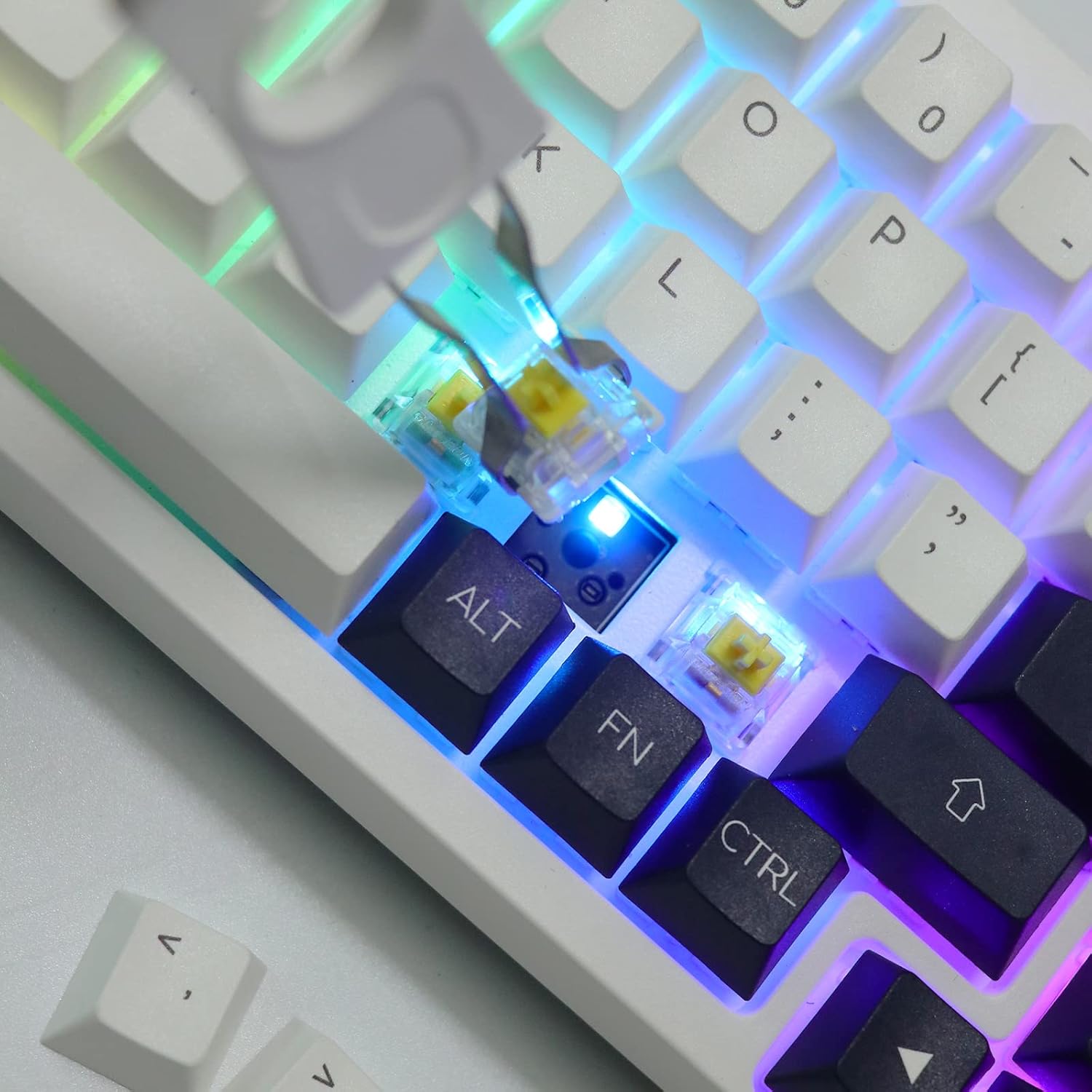
Figi 5.1: A close-up image demonstrating the hot-swappable switch feature, with a switch being removed or inserted.
NAN. Depanaj
6.1 Klavye a pa reponn
- Branche Mode: Asire w kab USB-C a byen konekte ak klavye a ak òdinatè a. Eseye yon lòt pò USB oswa kab.
- 2.4GHz san fil: Verify the 2.4G receiver is properly inserted and the keyboard is in 2.4G mode. Re-pair the keyboard if necessary (FN+R for 3 seconds).
- Mòd Bluetooth: Confirm the keyboard is in Bluetooth mode and paired correctly (FN+Q/W/E for 3 seconds to pair, short press to switch). Check your device's Bluetooth settings.
- Batri: Asire w klavye a gen ase chaj. Konekte li atravè USB-C pou chaje.
6.2 Kle yo pa anrejistre oswa yo tape de fwa
- This can sometimes be caused by a faulty switch. Utilize the hot-swappable feature to replace the problematic switch.
- Ensure keycaps are properly seated on the switches.
- For wireless modes, ensure there is no significant interference or distance between the keyboard and receiver/device.
6.3 Pwoblèm ekleraj RGB
- Check if the RGB backlight is turned off or set to a very dim setting. Use the keyboard's function keys or software to adjust.
- Asire w ke firmwèr klavye a ajou.
7. Espesifikasyon
| Mak | EPOMAKER |
| Modèl | Theory TH68 Pro (Item model number: 3084B) |
| Kantite kle | 67 kle + 1 bouton |
| Ekleraj | RGB |
| Pwogramasyon | Wi |
| Koneksyon | Triple Modes: Bluetooth 5.0 / 2.4GHz Wireless / USB-C Wired |
| Kapasite batri | 2400mAh |
| Longè kab | Apeprè. 1.5m |
| Dimansyon pwodwi | 33cm x 12cm x 3.5cm (12.99"L x 4.72"L x 1.38"H) |
| Pwa pwodwi | Approx. 980g (2.49 pounds) |
| Aparèy konpatib | Laptop, Mac/Win/Android systems |
| Materyèl | Plastik |
8. Garanti ak sipò
EPOMAKER products are designed for reliability and performance. For specific warranty information, please refer to the warranty card included with your product or visit the official EPOMAKER website. If you encounter any issues or require technical assistance, please contact EPOMAKER customer support through their official channels.
Pou plis asistans, tanpri vizite EPOMAKER Store on Amazon.