Entwodiksyon
This manual provides comprehensive instructions for the safe and efficient use of your Azuri Mini 2 True Wireless Twin BT Earphones. Please read this manual thoroughly before using the product and retain it for future reference.
Enfòmasyon sou Sekirite
- Do not expose the earphones or charging case to extreme temperatures, direct sunlight, or fire.
- Avoid using the earphones at high volume levels for extended periods to prevent hearing damage.
- Keep the device away from water and moisture. This product is not water-resistant.
- Pa eseye demonte oswa modifye pwodwi a. Sa ka anile garanti a epi lakòz domaj.
- Sèvi sèlman ak kab ak adaptè chaje yo bay oswa ki sètifye.
Kontni pake
- Azuri Mini 2 True Wireless Twin BT Earphones (Left and Right)
- Ka chaje
- Konsèy zòrèy (divès gwosè)
- USB Chaje Kab
- Manyèl itilizatè
Pwodwi souview
Familiarize yourself with the components of your Azuri Mini 2 earphones.
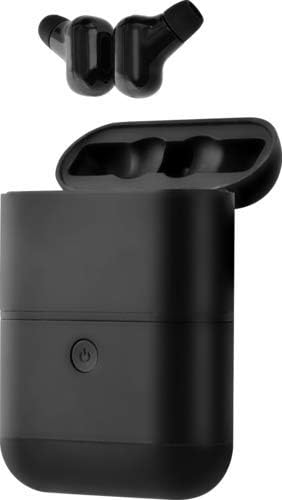
This image displays the Azuri Mini 2 True Wireless Twin BT Earphones, showing both earbuds removed from their charging case, which is open. The earbuds are black, and the charging case is also black with a power button visible on its front.
- Ekouteur: Left and Right, with ear tips.
- Ka chaje: Houses and charges the earbuds, includes a power button.
- Bouton pouvwa: Located on the charging case, used for power management and pairing.
Enstalasyon
1. Chaje ka a chaje
- Konekte kab chaje USB ki vini ak aparèy la nan pò chaje ki sou bwat la.
- Konekte lòt bout kab la nan yon adaptè kouran USB (pa enkli) oubyen nan yon pò USB òdinatè.
- The indicator light on the case will show charging status. A full charge is indicated when the light changes or turns off.
2. Chaje ekoutè yo
- Place the earbuds into their respective slots in the fully charged charging case.
- The earbuds will automatically begin charging. Indicator lights on the earbuds will show charging status.
- Asire w ke kontak chaje yo sou tou de ekoutè yo ak kouvèti a pwòp epi sèk.
3. Pè Bluetooth
- Pwen inisyal:
- Louvri bwat chaje a epi retire tou de ekoutè yo. Y ap limen otomatikman epi antre nan mòd koneksyon.
- Sou aparèy ou an (telefòn entelijan, tablèt, elatriye), aktive Bluetooth.
- Chèche pou available Bluetooth devices and select "Azuri Mini 2" from the list.
- Yon fwa konekte, yon mesaj vokal ap konfime koneksyon an reyisi.
- Re-paire: If the earbuds do not automatically connect to your device, repeat the steps above.
- Itilizasyon yon sèl ekoutè: Ou ka itilize nenpòt ekoutè poukont li. Senpleman retire youn nan ekoutè yo nan bwat la, epi l ap antre nan mòd koneksyon.
Enstriksyon Operasyon
Power On/Off
- Pouvwa sou: Remove earbuds from the charging case. They will power on automatically. Alternatively, press and hold the touch control area on each earbud for 3 seconds.
- Pouvwa Off: Place earbuds back into the charging case. They will power off automatically. Alternatively, press and hold the touch control area on each earbud for 5 seconds.
Lèktur Klas Mizik
- Jwe/Poz: Tape zòn kontwòl taktil la sou nenpòt ekoutè yon fwa.
- Pwochen Track: Tape de fwa sou zòn kontwòl taktil la ki sou ekoutè dwat la.
- Track Previous: Tape de fwa sou zòn kontwòl taktil la ki sou ekoutè gòch la.
- Kontwòl Volim: Ajiste volim nan dirèkteman sou aparèy ki konekte a.
Jesyon Rele
- Reponn/Fen Apèl: Tape zòn kontwòl taktil la sou nenpòt ekoutè yon fwa.
- Rejte apèl: Peze epi kenbe zòn kontwòl taktil la sou nenpòt ekoutè pandan 2 segonn.
Asistan vwa
- Aktive Asistan Vwa: Tape twa fwa sou zòn kontwòl taktil la sou nenpòt ekoutè.
Antretyen
Netwayaj
- Sèvi ak yon twal mou, sèk, epi ki pa gen pousyè pou netwaye ekoutè yo ak bwat chaje a.
- Netwaye kontak chaje yo dousman sou tou de ekoutè yo ak sou bwat la pou asire chaj la byen fèt.
- Retire bout zòrèy yo epi netwaye yo ak yon solisyon savon dou si sa nesesè, apresa rense yo epi seche yo byen anvan ou mete yo ankò.
- Pa sèvi ak pwodui chimik piman bouk, solvang netwayaj, oswa detèjan fò.
Depo
- Lè w pa ap itilize ekoutè yo, sere yo nan bwat chaje yo pou pwoteje yo epi kenbe yo chaje.
- Sere aparèy la nan yon kote ki fre epi sèk, lwen tanperati ekstrèm ak limyè solèy dirèk.
Depanaj
| Pwoblèm | Solisyon posib |
|---|---|
| Ekoutè yo pa konekte ak aparèy la. |
|
| Se yon sèl ekoutè k ap travay. |
|
| Ekoutè yo pa ap chaje. |
|
| Bon kalite son pòv yo. |
|
Espesifikasyon
| Karakteristik | Detay |
|---|---|
| Non modèl | Mini 2 |
| Nimewo Modèl | AZTWMINI2V2-BLK |
| Koneksyon Teknoloji | Bluetooth, San fil |
| Teknoloji kominikasyon san fil | Bluetooth |
| Gamme frekans | 20 Hz - 20,000 Hz |
| Metòd kontwòl | Remote Control (Touch Control) |
| Plasman Zòrèy | Nan-zòrèy |
| Faktè fòm | Nan-zòrèy |
| Izolasyon bri | Okenn |
| Nivo rezistans dlo | Pa reziste dlo |
| Aparèy konpatib | Cell Phone, Tablet, Laptop, Computer, Vehicle |
| Koulè | Nwa |
| Konpozan ki enkli | Konsèy Zòrèy |
Enfòmasyon sou Garanti
Specific warranty details for the Azuri Mini 2 True Wireless Twin BT Earphones are not provided in the product information. Please refer to the warranty card included in your product packaging or contact Azuri customer support for detailed warranty terms and conditions.
Sipò
For further assistance, technical support, or inquiries regarding your Azuri Mini 2 True Wireless Twin BT Earphones, please visit the official Azuri website or contact their customer service department. Contact information is typically available on the product packaging or the brand's official online presence.


