1. Entwodiksyon
Mèsi pou acha aasing the Lenco SPR-100BK Splash-Proof Bluetooth Speaker. This portable speaker delivers powerful sound with strong bass and features FM radio, USB, SD card playback, and integrated light effects. Designed for durability, it is splash-proof, making it suitable for various environments. This manual provides essential information for safe and optimal use of your device.
2. Enstriksyon Sekirite Enpòtan
- Pa ekspoze aparèy la nan tanperati ekstrèm, limyè solèy dirèk, oswa imidite ki wo.
- Ensure the charging port cover is securely closed when near water to maintain splash-proof integrity.
- Pa demonte oswa modifye aparèy la. Konfye tout antretyen bay pèsonèl kalifye.
- Sèvi ak sèlman kab chaje espesifye a.
- Kenbe aparèy la lwen gwo chan mayetik.
- Evite jete oswa sibi aparèy la nan gwo enpak.
3. Pwodwi souview
Familiarize yourself with the components of your Lenco SPR-100BK speaker.
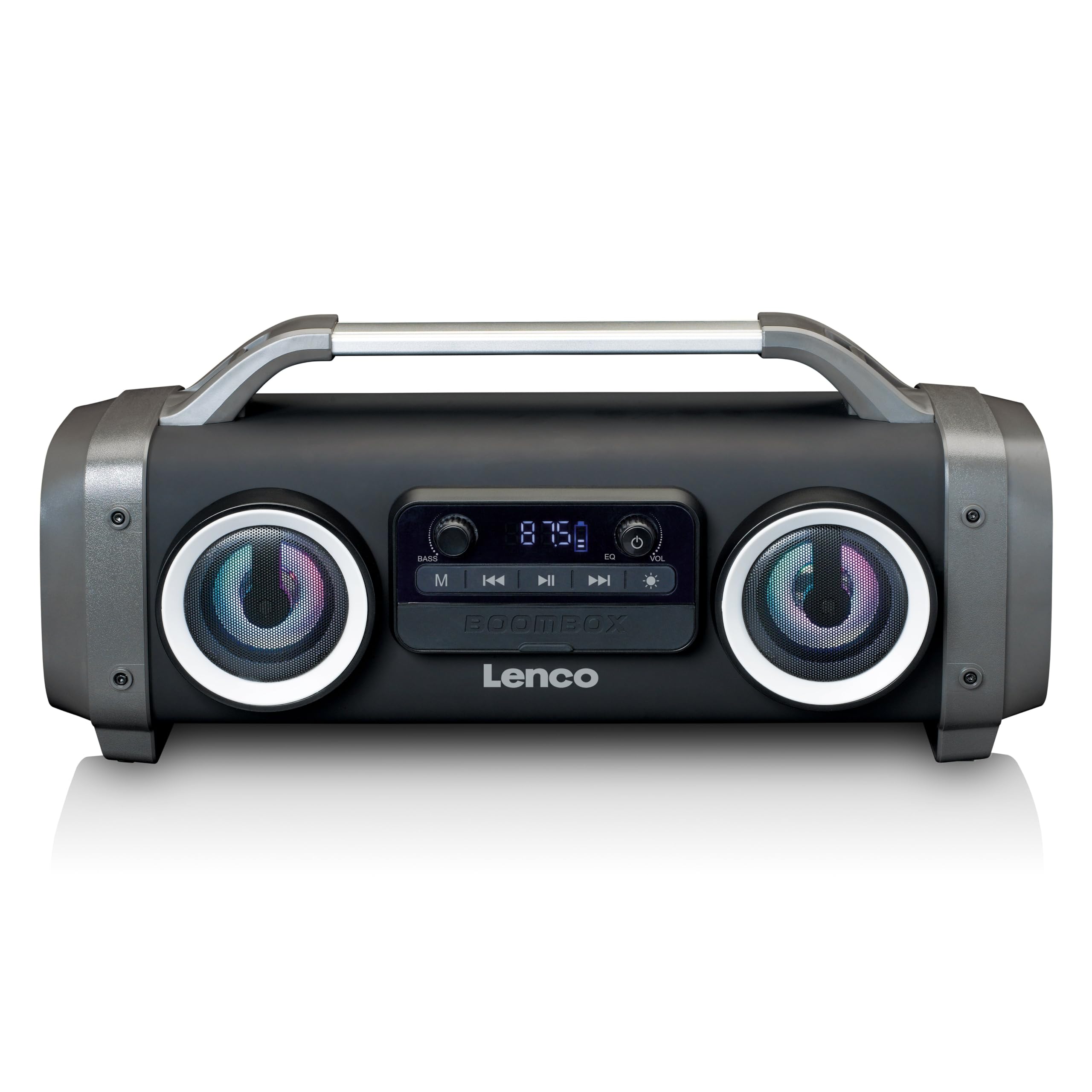
Figi 1: Devan view of the Lenco SPR-100BK speaker, showing the main speaker grille, control panel, and integrated light effects.
3.1 Kontwòl ak Pò
- Bouton pouvwa: Limen oswa etenn oratè a.
- bouton mòd: Switches between Bluetooth, FM Radio, USB, SD, and AUX modes.
- Bouton jwe/poz: Jwe oswa mete odyo a sou poz.
- Volim kontwòl bouton: Ajiste volim mèt la.
- Bass Boost Knob: Ajiste nivo bas la.
- Bouton Efè Limyè: Cycles through or turns off light effects.
- Pò USB: Pou lekti sou yon kle USB.
- Plas kat SD: Pou lekti kat SD.
- Antre AUX (3.5mm): Pou konekte aparèy odyo ekstèn.
- Charging Port (Mini USB): Pou chaje batri entèn lan.
4. Enstalasyon
4.1 Debake
Carefully remove the speaker and all accessories from the packaging. Ensure the following items are present:
- Lenco SPR-100BK Bluetooth Speaker
- USB Chaje Kab
- 3.5mm Audio Cable (AUX cable)
- Manyèl itilizatè
4.2 Chaje batri a
- Locate the Mini USB charging port on the speaker.
- Connect the supplied USB charging cable to the speaker's charging port.
- Connect the other end of the USB cable to a compatible USB power adapter (5V/1A, not included) or a computer's USB port.
- The charging indicator light will illuminate, typically red, during charging. It will turn off or change color (e.g., blue) when fully charged.
- A full charge takes approximately 4-5 hours and provides up to 15 hours of playback (without light effects).
4.3 Premye pouvwa sou
Peze epi kenbe la Bouton pouvwa for a few seconds until the speaker powers on and you hear an audible prompt or see the display light up.
5. Operasyon
5.1 Power On/Off
- Pou limen: Peze epi kenbe bouton an Bouton pouvwa.
- Pou etenn: Peze epi kenbe bouton an Bouton pouvwa ankò.
5.2 Bluetooth Koneksyon
- Limen oratè a. Li pral antre otomatikman nan mòd koneksyon Bluetooth, sa ap parèt ak yon LED k ap flache.
- Aktive Bluetooth sou aparèy mobil ou a (telefòn entelijan, tablèt, elatriye).
- Chèche pou aparèy Bluetooth ki disponib yo epi chwazi "SPR-100BK"nan lis la.
- Yon fwa li konekte, oratè a ap emèt yon son konfimasyon, epi LED la ap sispann flache.
- Mòd True Wireless Stereo (TWS): If you have two SPR-100BK speakers, you can pair them for stereo sound.
- Asire w ke tou de oratè yo limen epi yo an mòd Bluetooth.
- On one speaker (the master), press and hold the Bouton Mode until you hear a TWS pairing prompt.
- The two speakers will automatically connect. Once connected, pair your device to the master speaker as described above.
5.3 FM Radyo
- Peze a Bouton Mode repeatedly until you select FM Radio mode.
- Pou eskane epi sove estasyon yo otomatikman: Peze epi kenbe bouton an Bouton jwe/poz. The speaker will scan for available FM stations and save them automatically.
- To switch between saved stations: Use the Bouton Tras Anvan/Apre (if available, otherwise it will cycle through automatically).
- Nòt: For better FM reception, ensure the included 3.5mm audio cable is plugged into the AUX input, as it acts as an external antenna.
5.4 Lekti Kat USB/SD
- Mete yon kle USB oswa yon kat SD (ak odyo ki sipòte files) into the respective port/slot.
- The speaker will automatically switch to USB or SD mode and begin playback. If not, press the Bouton Mode pou chwazi sous ki kòrèk la.
- Sèvi ak la Bouton jwe/poz epi Bouton Tras Anvan/Apre pou kontwole lekti a.
5.5 Antre AUX
- Connect one end of the supplied 3.5mm audio cable to the AUX input on the speaker.
- Konekte lòt bout la nan priz kas ekoutè a oswa nan pwodiksyon odyo aparèy ekstèn ou an.
- Peze a Bouton Mode pou chwazi mòd AUX.
- Kontwole lekti ak volim nan soti nan aparèy ekstèn ou an.
5.6 Efè limyè
Peze a Limyè efè bouton to cycle through different light modes or to turn the lights off. The speaker features 12 color light effects.
5.7 Ajisteman son
- Volim: Vire a Volim kontwòl bouton to increase or decrease the overall sound level.
- Bass: Vire a Bass Boost Knob to adjust the intensity of the bass.
6. Antretyen
6.1 Netwayaj
Wipe the speaker with a soft, dry cloth. Do not use abrasive cleaners, waxes, or solvents. For stubborn dirt, a slightly damp cloth can be used, ensuring all port covers are sealed.
6.2 Swen Batri
- Pou pwolonje lavi batri a, chaje oratè a nèt anvan premye itilizasyon an.
- Evite vide batri a nèt souvan.
- If storing the speaker for an extended period, charge it to about 50% every few months.
6.3 Depo
Sere oratè a nan yon kote ki fre epi sèk, lwen limyè solèy dirèk ak tanperati ekstrèm.
NAN. Depanaj
| Pwoblèm | Kòz posib | Solisyon |
|---|---|---|
| Oratè a pa limen. | Batri ap vide. | Charge the speaker using the supplied USB cable. |
| Pa gen son. | Volim nan twò ba; mòd ki pa kòrèk la chwazi; aparèy la pa konekte. | Increase volume; press Mode button to select correct source; ensure Bluetooth device is paired or AUX cable is connected. |
| Bluetooth appariement echwe. | Oratè a pa nan mòd koneksyon; aparèy la twò lwen; entèferans. | Ensure speaker is in Bluetooth pairing mode (flashing LED); move device closer; turn off other Bluetooth devices. |
| Resepsyon radyo FM ki fèb. | No external antenna; weak signal. | Plug in the 3.5mm AUX cable to act as an antenna; try moving the speaker to a different location. |
| Lektur USB/SD a pa fonksyone. | Pa sipòte file fòma; kat/kondwi a pa byen mete; pèvèti files. | Asire w files are in a supported format (e.g., MP3); reinsert the USB drive/SD card; try a different drive/card. |
8. Espesifikasyon
| Nimewo Modèl | SPR-100BK |
| Mak | Lenco |
| Sorti pouvwa | 25 Watt RMS |
| Koneksyon | Bluetooth, USB, SD Card, 3.5mm AUX Input |
| Kalite batri | Lityòm-ion (4400 mAh) |
| Lektur Tan | Up to 15 hours (reduced with light effects) |
| Chaje Antre | 5V/1A (Mini USB) |
| Karakteristik espesyal | Splash-proof design, Integrated light effects, FM Radio, TWS function |
| Dimansyon (L x W x H) | 60 x 60 x 85 cm |
| Pwa | 2 Kilogram |
Remak: Espesifikasyon yo sijè a chanje san avètisman davans.
9. Garanti ak sipò
9.1 Enfòmasyon sou Garanti
This Lenco product is covered by a warranty for a period of 2 ane on parts from the date of purchase. This warranty covers manufacturing defects and workmanship under normal use. It does not cover damage caused by misuse, accidents, unauthorized modifications, or normal wear and tear.
9.2 Mizajou lojisyèl
Software updates for this product are guaranteed until 13 avril 2030.
9.3 Sipò pou Kliyan
For technical assistance, warranty claims, or product inquiries, please contact Lenco customer support through their official website or the retailer where the product was purchased. Please have your model number (SPR-100BK) and proof of purchase ready.
Ofisyèl Lenco Websit: www.lenco.com


