Entwodiksyon
Mèsi pou acha aasing the Dolphin RETROBOX SP-411BT Portable Bluetooth AM/FM Radio. This manual provides essential information for the safe and efficient operation of your device. Please read it thoroughly before use and retain it for future reference.
Enfòmasyon sou Sekirite
- Pa ekspoze aparèy la anba lapli oswa imidite pou evite dife oswa chòk elektrik.
- Pa ouvri c laasing. Konfye tout antretyen bay pèsonèl kalifye.
- Evite mete aparèy la toupre sous chalè oswa anba limyè solèy dirèk.
- Asire w ke gen bon vantilasyon epi pa bloke okenn ouvèti vantilasyon.
- Sèvi sèlman ak adaptè kouran ak akseswa ki espesifye yo.
Pwodwi souview
The Dolphin RETROBOX SP-411BT combines classic design with modern audio capabilities. It features AM/FM radio, Bluetooth connectivity, and playback from USB drives and TF cards, all in a portable form factor.

Figi 1: Devan view of the Dolphin RETROBOX SP-411BT radio, showing the main controls, speakers, and frequency display.
Karakteristik kle
- Multi-band Radio: AM/FM/SW reception.
- Koneksyon Bluetooth: Difizyon odyo san fil.
- Media lèktur: USB and TF (Micro SD) card support for MP3 files.
- Konsepsyon pòtab: Lightweight with a shoulder strap and AC cable included.
- Opsyon pouvwa: Operates on AC power or built-in rechargeable battery.
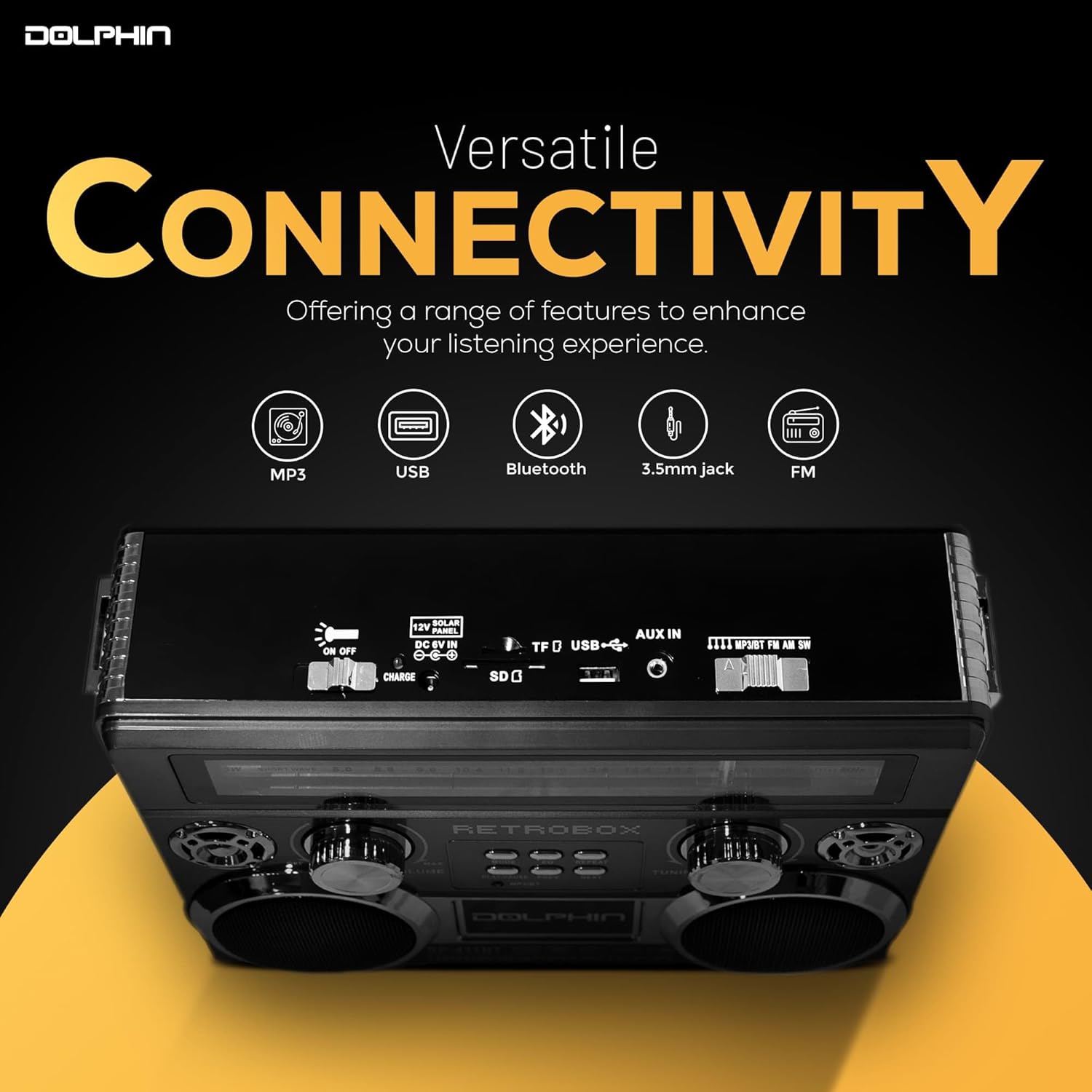
Figi 2: Top view of the radio highlighting various connectivity ports including USB, TF card slot, and AUX in.
Enstalasyon
Debake
Carefully remove the radio and all accessories from the packaging. Verify that all components are present:
- Dolphin RETROBOX SP-411BT Radio
- AC pouvwa kab
- braslè zepòl
- Manyèl Itilizatè (dokiman sa a)
Alimente Aparèy la
The RETROBOX SP-411BT can be powered by its internal rechargeable Lithium Ion battery or directly from an AC power source.
- AC pouvwa: Connect the supplied AC power cable to the AC input port on the back of the radio, then plug the other end into a standard wall outlet. The unit will operate and charge the internal battery.
- Pouvwa batri: The radio includes a built-in rechargeable Lithium Ion battery. Ensure the battery is charged before portable use. A full charge is recommended for optimal performance.

Figi 3: Illustration of the radio's battery power capability, suitable for outdoor use or during power outages.
Enstriksyon Operasyon

Figi 4: Fèmen view of the radio's control panel, including volume, tuning, and playback buttons.
Power On/Off
Vire a VOLIM knob clockwise to turn the radio on. Rotate it counter-clockwise until it clicks to turn the radio off.
Seleksyon mòd
Peze a MÒD button repeatedly to cycle through available modes: FM, AM, SW (Shortwave), Bluetooth, USB, and TF Card.
AM/FM/SW Radio Tuning
- Extend the telescoping antenna for optimal FM and SW reception. For AM, the internal antenna is generally sufficient, but rotating the unit may improve reception.
- Select the desired band (FM, AM, or SW) using the MÒD bouton.
- Vire a REGLAGE knob to scan for radio stations. The frequency will be displayed on the front panel.

Figi 5: The telescoping antenna, which can be extended for improved radio signal reception.
Pè Bluetooth
- Chanje radyo a an mòd Bluetooth avèk la MÒD button. The unit will indicate it is ready for pairing (e.g., a voice prompt or flashing indicator).
- Sou aparèy mobil ou, aktive Bluetooth epi chèche aparèy ki disponib.
- Select "RETROBOX" from the list of devices. Once paired, the unit will confirm the connection.
- You can now play audio from your mobile device through the radio.
Lektur kat USB/TF
- Insert a USB drive or TF (Micro SD) card into the corresponding slot. Ensure the card contains MP3 audio files.
- Switch the radio to USB or TF Card mode using the MÒD button. The unit will automatically begin playing the first compatible audio file.
- Sèvi ak la JWE/POZ, PREV, ak PWOCHÈ bouton pou kontwole lèktur.
- Peze a REPETE button to cycle through repeat modes (e.g., repeat one, repeat all).
Kontwòl Volim
Adjust the overall volume by rotating the VOLIM knob. Rotate clockwise to increase volume, counter-clockwise to decrease.
Equalizer (EQ) Fonksyon
Peze a EQ button to cycle through different equalizer presets, adjusting the audio output to your preference.
Antretyen
Netwayaj
- Toujou dekonekte kab kouran an anvan ou netwaye li.
- Sèvi ak yon twal mou, sèk pou siye eksteryè inite a.
- Pa sèvi ak pwodui netwayaj abrazif, sir, oswa solvan paske yo ka domaje fini an.
Swen batri
- To prolong battery life, fully charge the battery before first use.
- Evite vide batri a nèt souvan.
- If storing the unit for an extended period, charge the battery to approximately 50% and recharge every 3-6 months.
Depo
Store the radio in a cool, dry place away from direct sunlight and extreme temperatures. Disconnect the AC cable if not in use for prolonged periods.
Depanaj
| Pwoblèm | Kòz posib | Solisyon |
|---|---|---|
| Pa gen pouvwa | Unit is off; AC cable not connected; Battery drained. | Rotate VOLUME knob clockwise; Connect AC cable; Charge battery. |
| Pa gen Son | Volume too low; Incorrect mode selected; Source device not playing. | Increase volume; Select correct mode; Ensure source device is playing audio. |
| Move Resepsyon Radyo | Antèn pa lonje; Zòn siyal fèb; Entèferans. | Extend telescoping antenna; Reposition unit; Move away from electronic devices. |
| Bluetooth pa konekte | Radio not in Bluetooth mode; Device not discoverable; Already paired to another device. | Switch to Bluetooth mode; Ensure device Bluetooth is on and discoverable; Disconnect from other devices. |
| USB/TF Card Not Playing | Incorrect mode; Incompatible file format; Corrupted card/drive. | Switch to USB/TF mode; Ensure files are MP3; Try a different card/drive. |
Espesifikasyon
| Karakteristik | Detay |
|---|---|
| Mak | Dolphin |
| Nimewo Modèl | SP-411BT |
| Dimansyon pwodwi | 11 x 3.5 x 8.5 pous (11"L x 3.5"W x 8.5"H) |
| Pwa atik | 3.25 liv |
| Koneksyon Teknoloji | Bluetooth |
| Tuner Teknoloji | FM, AM, SW (3-Band) |
| Sous pouvwa | Battery Powered (1 Lithium Ion battery included), AC Cable |
| Karakteristik espesyal | Lejè |
| Konpozan ki enkli | Shoulder Strap, AC Cable |
Garanti ak sipò
For warranty information or technical support, please refer to the documentation provided with your purchase or contact Dolphin customer service directly. Contact details can typically be found on the manufacturer's official websit la oubyen sou anbalaj pwodwi a.
Tanpri vizite a Dolphin Store pou plis enfòmasyon.




