Entwodiksyon
The NEXX X-Com 2 is a communication system designed for seamless integration with NEXX X.Vilitur and NEXX X.Vilijord helmets. This system allows riders to connect with their technology and communicate with up to 8 other riders over a distance of up to 1.6 kilometers (1.0 mile) in open terrain. It features Bluetooth 4.1, advanced audio distribution, noise cancellation, and an integrated FM radio.
Kontni pake
Anvan ou kòmanse enstalasyon an, tanpri verifye si tout konpozan yo la:
- 1 x X-Com 2 Main Module
- 1 x kontwòl remote
- Mounting Hardware (e.g., clamps, adhesive mounts) - (Assumed)
- Speakers and Microphone Kit - (Assumed)
- USB Charging Cable - (Assumed)
- Manyèl Itilizatè (dokiman sa a)
Pwodwi souview
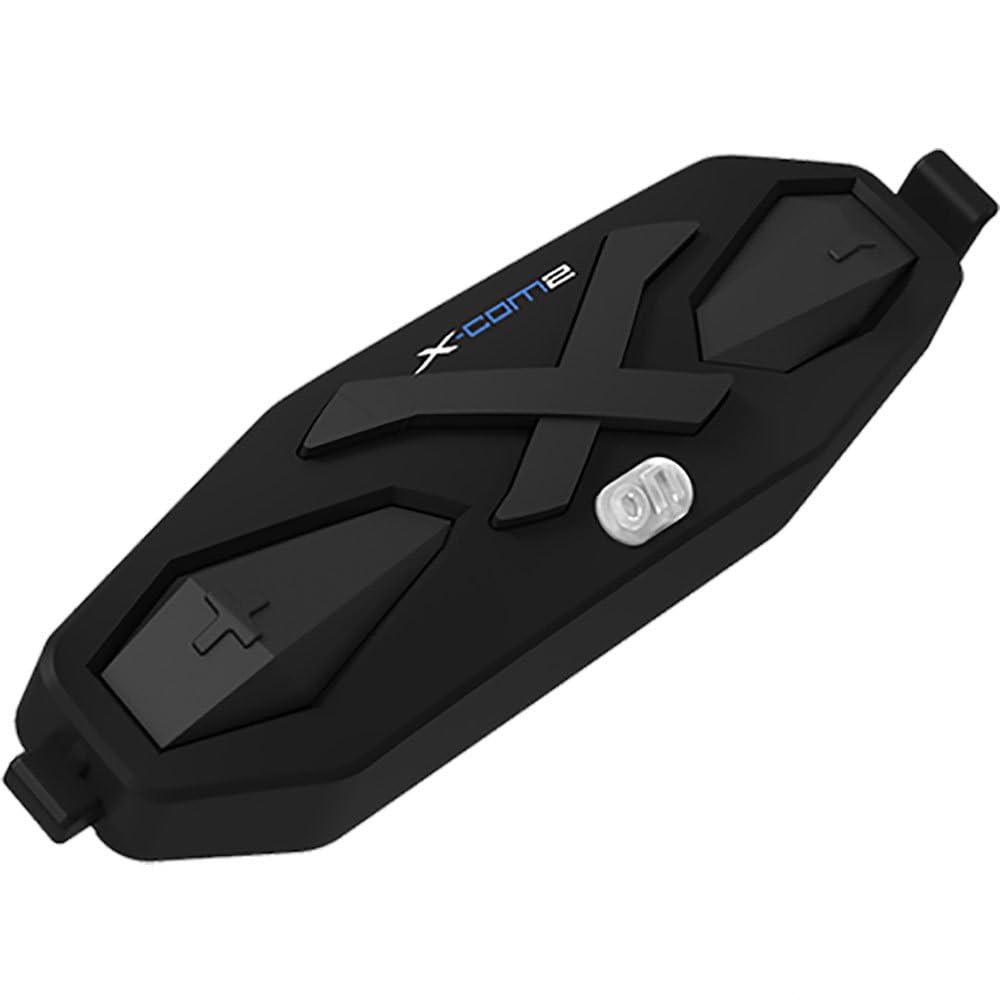
Figi 1: The NEXX X-Com 2 main module. This black, elongated unit features a prominent 'X' design, the 'X-Com2' logo, and several tactile buttons for operation, including a central power/function button and volume/navigation controls.
Main Module Components:
- Bouton pouvwa/fonksyon: Central button for powering on/off, pairing, and accessing main functions.
- Bouton Volim Monte/Pwochen Mizik: Typically located on one side, used to increase volume or navigate forward.
- Bouton Diminye Volim/Mizik Presedan: Typically located on the opposite side, used to decrease volume or navigate backward.
- Pò chaje: Pou konekte kab chaje USB a.
- Pò Oratè/Mikwofòn: For connecting the helmet's audio components.
Enstalasyon ak Enstalasyon
1. Mounting the Main Module:
- Identify the designated mounting area on your NEXX X.Vilitur or X.Vilijord helmet, usually on the left side.
- Chwazi ant cl laamp mount or adhesive mount based on your helmet type and preference.
- Securely attach the mounting bracket to the helmet.
- Slide the X-Com 2 main module onto the mounted bracket until it clicks into place.
2. Installing Speakers and Microphone:
- Carefully remove the helmet's interior padding to access the ear pockets.
- Place the speakers into the designated ear pockets, ensuring they are centered over your ears.
- Route the microphone boom towards your mouth, securing it within the helmet's chin bar area.
- Connect the speaker and microphone cables to the corresponding ports on the X-Com 2 main module.
- Reinstall the helmet's interior padding, ensuring cables are neatly tucked away and do not interfere with comfort or safety.
Enstriksyon Operasyon
Limen/Etenyen:
- Pouvwa sou: Press and hold the Power/Function button for approximately 2 seconds until you hear an audible prompt.
- Pouvwa Off: Press and hold the Power/Function button for approximately 5 seconds until you hear an audible prompt.
Bluetooth mak:
- With the X-Com 2 powered off, press and hold the Power/Function button for 7 seconds until the LED flashes red and blue, indicating pairing mode.
- On your mobile device, enable Bluetooth and search for "NEXX X-Com 2".
- Select the device to pair. A voice prompt will confirm successful pairing.
Fonksyonalite entèkominikasyon:
- The X-Com 2 supports intercom communication with up to 8 riders.
- Kòmanse Entèkom: Briefly press the Intercom button (if available, or a specific combination of main buttons) to connect with the last paired intercom.
- Fini entèrfòn: Briefly press the Intercom button again.
- Refer to the full manual for detailed instructions on multi-rider intercom pairing and group management.
Radyo FM:
- Aktive/Etenn Radyo FM: Double-tap the Power/Function button.
- Estasyon eskanè: Press the Volume Up or Volume Down button to scan for the next available station.
- The unit supports 10 preset station memory.
Kontwòl Volim:
- Press the Volume Up button to increase audio volume.
- Press the Volume Down button to decrease audio volume.
Antretyen
- Netwayaj: Sèvi ak yon mou, damp cloth to wipe the main module. Do not use harsh chemicals or abrasive cleaners.
- Chaje: Charge the device using the provided USB cable. A full charge takes approximately 2.5 hours. Avoid overcharging.
- Depo: Store the X-Com 2 in a cool, dry place when not in use. If storing for extended periods, charge the battery every few months to maintain its lifespan.
- Swen batri: The unit uses a Lithium Polymer Battery. Do not expose to extreme temperatures.
Depanaj
| Pwoblèm | Kòz posib | Solisyon |
|---|---|---|
| Aparèy pa limen. | Batri ap vide. | Chaje aparèy la pou omwen 30 minit. |
| Pa ka konekte ak telefòn nan. | Device not in pairing mode; Bluetooth on phone is off; too many paired devices. | Ensure device is in pairing mode (flashing red/blue). Turn phone's Bluetooth off and on. Delete old Bluetooth connections on phone. |
| Pwoblèm koneksyon entèkom. | Out of range; interference; incorrect pairing. | Ensure riders are within 1.6 km (1.0 mile) in open terrain. Move away from sources of strong electromagnetic interference. Re-pair intercom units. |
| Move kalite odyo / Bri. | Microphone not positioned correctly; excessive wind noise; Advanced Noise Control not active. | Adjust microphone closer to mouth. Ensure helmet vents are closed if causing excessive wind noise. Verify Advanced Noise Control is enabled (automatic). |
Espesifikasyon
- Modèl: 09SEN99200099999X-COM2
- Bluetooth vèsyon: 4.1
- Bluetooth Profiles: Headset Profile (HSP), Men-Lib Profile (HFP), avanse Audio Distribisyon Profile (A2DP), Audio Videyo Remote Control Profile (AVRCP)
- Intercom Working Distance: Up to 1.6 kilometers (1.0 mile) in open terrain
- Max Intercom Riders: Supports up to 8 riders
- Anilasyon bri: Avanse kontwòl bri
- Codec: Kodèk SBC entegre
- Frekans radyo FM: 76 ~ 108MHz (10 preset station memory)
- Tan pou pale: 10 èdtan
- Tan pou chaje: 2.5 èdtan
- Kalite batri: Lityòm Polymère batri
- Tanperati operasyon: -10°C ~ 55°C (-14°F ~ 131°F)
- Main Module Weight: 100 g (3.53 ons)
- Dimansyon pwodwi: 8 x 7 x 8 pous
- Pwa atik: 1.01 liv
Garanti ak sipò
For specific warranty information and detailed support, please refer to the official NEXX website or contact NEXX customer service directly. Keep your proof of purchase for warranty claims.
NEXX Official Websit: www.nexx-helmets.com (Nòt: Sa a se yon espas rezève URL, tanpri verifye ofisyèl aktyèl la website for NEXX products)
Sèvis Kliyan: Refer to the contact information provided on the NEXX official websit la oubyen nan anbalaj pwodwi w la.


