Entwodiksyon
The Magnasonic FS81 Super 8/8mm Film Scanner is designed to convert your cherished 3-inch, 5-inch, and 7-inch Super 8 and 8mm film reels into digital MP4 video files. This device offers a convenient way to preserve old home movies without the need for a computer during the scanning process. It features a built-in 2.3-inch LCD screen for immediate playback and allows for direct saving to an SD card.
1. Enstalasyon
1.1 Sa ki enkli
Anvan ou kòmanse, asire w ke tout konpozan yo prezan nan pake a:
- Super 8/8mm Film Scanner (FS81 unit)
- 7-inch Take-up Reel
- TV Out Cable (RCA)
- Adaptè pouvwa
- USB kab
- Reel Adapter (x2)
- Netwaye twal

Image: All components included with the Magnasonic FS81 Film Scanner, laid out for inspection.
1.2 Connecting Power and SD Card
Connect the power adapter to the DC 12V port on the rear of the scanner and plug it into a power outlet. Insert an SD card (up to 32GB, not included) into the SD card slot on the rear panel. This card will store your digitized videos.

Image: The SD card slot on the back of the scanner, ready for video storage.
1.3 Chaje Fim nan
Place your film reel onto the left spindle and an empty take-up reel onto the right spindle. Thread the film through the scanner's film path, ensuring it passes through the gate and under the rollers as indicated by the diagram on the scanner. Use the provided reel adapters if necessary for smaller reels.

Imaj: Detaye view of the film path and scanning area on the Magnasonic FS81.

Image: The Magnasonic FS81 scanner set up with a film reel, demonstrating its capability to handle 3-inch, 5-inch, and 7-inch Super 8/8mm movie reels.
2. Operasyon Enstriksyon
2.1 Pwosesis eskanè
Once the film is loaded, power on the scanner. The device will automatically scan your film frame-by-frame, converting it into a digital MP4 video file. The scanning time varies depending on the reel size:
- 3-inch reel: Approximately 20 minutes scan time for 3 minutes of film.
- 5-inch reel: Approximately 60 minutes scan time for 7 minutes of film.
- 7-inch reel: Approximately 180 minutes scan time for 20 minutes of film.
The scanner digitizes video only; it does not capture audio.
2.2 Ajiste Anviwònman
Use the control buttons on the scanner to adjust settings such as exposure, sharpness, and framing. These adjustments can be made directly on the device without needing a computer.
2.3 Viewing Scanned Videos
You can playback your scanned videos directly on the built-in 2.3-inch LCD screen. For a larger viewing experience, connect the scanner to a TV or monitor using the included RCA video out cable.

Image: The scanner's TV OUT port connected to a television for viewing digitized films.
2.4 Transfè Files
After scanning, the MP4 video files are saved to the inserted SD card. To transfer these files to your computer, you can either remove the SD card and insert it into a card reader, or connect the scanner directly to your computer using the USB cable.
3. Antretyen
Regular maintenance ensures optimal performance and longevity of your film scanner.
3.1 Cleaning the Film Path
Dust and debris can accumulate on film reels, potentially affecting scan quality. Use the provided cleaning cloth or a soft brush to gently clean the film path and the scanning area before and after each use, especially when handling older films.
NAN. Depanaj
If you encounter issues with your Magnasonic FS81 Film Scanner, refer to the following common solutions:
- Pa gen pouvwa: Ensure the power adapter is securely connected to both the scanner and a working power outlet.
- Film Not Feeding: Check that the film is correctly threaded through the film path and that the reels are properly seated. Ensure the film is not damaged or excessively brittle.
- Kalite imaj pòv: Clean the film path and the scanner's lens. Adjust the exposure and sharpness settings via the scanner's menu. Ensure the original film is in good condition.
- Erè Kat SD: Verify the SD card is inserted correctly. Ensure the SD card is not full and is formatted to a compatible file system (e.g., FAT32). Try a different SD card if the issue persists.
- No Video on TV: Confirm the RCA cable is securely connected to both the scanner's TV OUT port and the TV's video input. Select the correct input source on your television.
Pou plis asistans, tanpri kontakte sèvis kliyan Magnasonic.
5. Espesifikasyon
| Karakteristik | Detay |
|---|---|
| Kalite eskanè | Fim |
| Mak | Magnasonic |
| Non modèl | FS81 |
| Koneksyon Teknoloji | USB, Video Out TV cable |
| Dimansyon pwodwi | 5.1"D x 12.1"W x 7.5"H |
| Rezolisyon | 1080p (1440 x 1080) |
| Pwa atik | 4.4 liv |
| Wattage | 5 wat |
| Kondisyon Minimòm Sistèm | Windows 7 |
| UPC | 061783270448 |
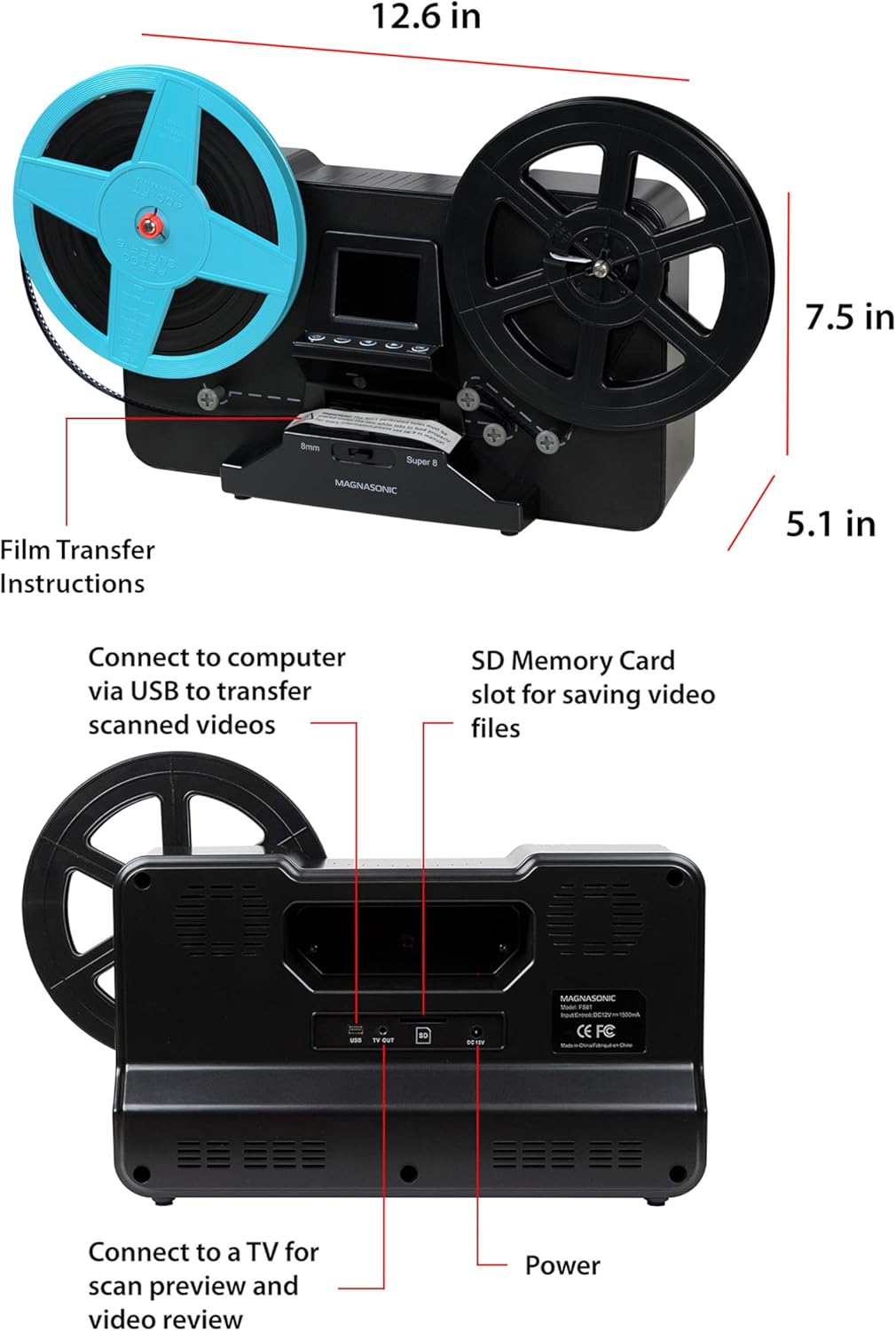
Image: Top and rear views of the Magnasonic FS81 scanner, highlighting its dimensions and connectivity ports like USB, TV OUT, SD card slot, and DC 12V power input.
6. Garanti ak sipò
Magnasonic products come with a manufacturer's warranty. Please refer to the warranty card included in your product packaging for specific terms and conditions. For technical support, troubleshooting, or warranty claims, visit the official Magnasonic websit oswa kontakte depatman sèvis kliyan yo.


