Entwodiksyon
Mèsi pou acha aasing the Pink Gaming Headset K9. This headset is designed to provide an immersive audio experience for gamers across various platforms. Featuring 7.1 virtual surround sound, a noise-canceling retractable microphone, and unique removable cat ears, it combines high-fidelity audio with a distinctive aesthetic. Please read this manual carefully to ensure proper use and maintenance of your new headset.

Image: The Pink Gaming Headset K9, showcasing its over-ear design, integrated microphone, and distinctive removable cat ears.
Kontni pake
- 1x K9 Gaming Headset
- 1x 1-in-2 3.5mm Adapter Cable
Karakteristik pwodwi
50mm Driver with 7.1 Virtual Surround Sound
Equipped with a new generation of 50mm sound units, the K9 headset delivers high audio resolution, a wide frequency response range, and excellent sound field positioning. The integrated 7.1 virtual surround sound technology enhances the gaming experience by clearly reproducing sound details, allowing for precise audio cues.

Imaj: Detaye view of the 50mm audio driver and the soft, skin-friendly earmuffs, highlighting the "Bigger" horn and "Snug" earmuffs for enhanced sound and comfort.
Aesthetic Design with Removable Cat Ears
The headset features a unique and appealing design, including removable cat ears made from safe and odorless silicone material. These cat ears are durable, resistant to deformation, and can be easily attached or detached. The earcups also feature a cool gradient flowing RGB LED lighting effect, adding to the gaming atmosphere.
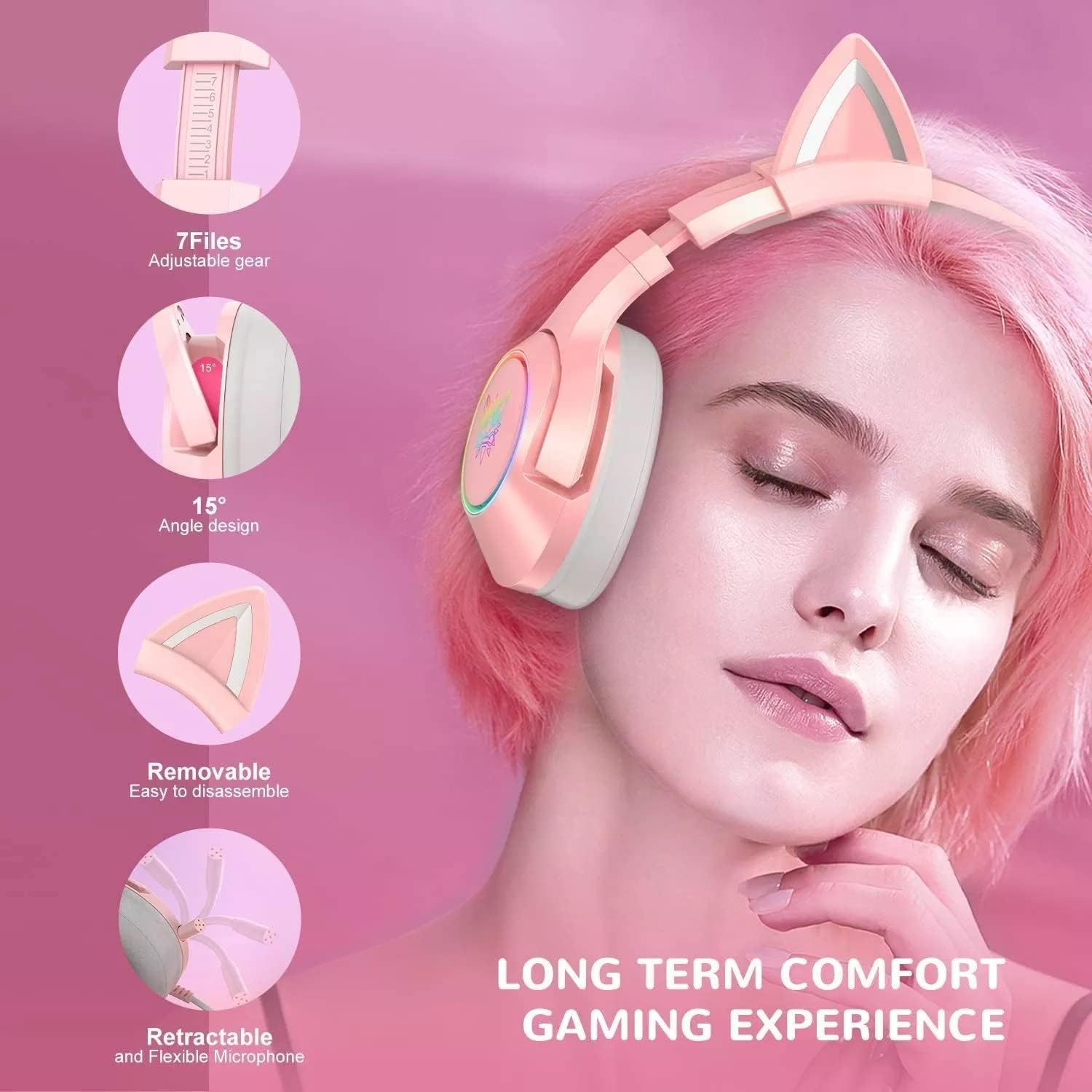
Image: Visual representation of the headset's adjustable headband (7 files), 15-degree angle design for earcups, removable cat ears, and retractable microphone, emphasizing long-term comfort.

Image: A close-up of the headset's earcup displaying the RGB LED lighting effect, designed to activate the gaming atmosphere.
Noise-Canceling Retractable Microphone
The integrated microphone is designed to reduce ambient noise, ensuring clear communication with teammates. Its retractable and flexible design allows for easy adjustment and storage when not in use.
Gwo konpatibilite
The K9 headset offers wide compatibility with various gaming platforms and devices, including PS4, PS Vita, PC, Laptops, Tablets, Smartphones, Nintendo Switch, and other models that support a 3.5mm audio jack.

Image: A diagram illustrating the headset's compatibility with multiple platforms, including PS4/PS Vita, Xbox One (with adapter), Nintendo Switch/3DS, PC/Laptop, and Smart Phones/Tablets, showing the necessary cable connections.
Konfò ak rezistans
Designed for long gaming sessions, the headset features soft, skin-friendly earmuffs and an adjustable headband for a comfortable fit. The construction uses durable plastic and silicone materials for longevity.
Gid Enstalasyon
Connecting to PC/Laptop:
If your PC or laptop has separate audio (headphone) and microphone jacks, use the included 1-in-2 3.5mm adapter cable. Connect the headset's single 3.5mm jack to the adapter, then plug the green plug of the adapter into your PC's headphone jack and the pink plug into the microphone jack.
If your PC or laptop has a single combined 3.5mm audio jack (TRRS), simply plug the headset's single 3.5mm jack directly into it.
Connecting to PS4/PS Vita/Nintendo Switch/Smartphones/Tablets:
Plug the headset's single 3.5mm jack directly into the controller (PS4), console, or device's 3.5mm audio port.
Connecting to Xbox One:
An official Microsoft Xbox One Stereo Headset Adapter (not included) may be required for older Xbox One controllers. For newer controllers with a 3.5mm jack, plug the headset directly into the controller.
Ajisteman anfòm:
Adjust the headband to comfortably fit your head. The earcups are designed with a 15-degree angle for optimal comfort. Ensure the earmuffs fully cover your ears for the best sound isolation and comfort.
Attaching/Removing Cat Ears:
The silicone cat ears can be easily attached or removed from the top of the headband by sliding them on or off.
Enstriksyon Operasyon
Kontwòl Volim:
Locate the volume control wheel on the left earcup or inline control (if present on the cable). Rotate the wheel to increase or decrease the audio volume.
Itilizasyon Mikwofòn:
To use the microphone, gently pull it out from its housing on the left earcup. Position the microphone approximately 1-2 inches from your mouth for optimal voice pickup. To mute the microphone, use the inline mute switch on the cable (if present) or the system settings of your connected device. When not in use, the microphone can be retracted back into the earcup.
RGB dirije ekleraj:
The RGB LED lights on the earcups are powered via the USB connection (if applicable, for PC use). Ensure the USB plug is connected to an available USB port on your device to activate the lighting effect. The lighting is automatic and does not have separate controls on the headset.
Antretyen
Netwayaj:
Wipe the headset with a soft, dry cloth. For stubborn dirt, a slightly damp Ou ka itilize yon twal, men asire w pa gen imidite ki antre nan griy oratè yo oswa nan mikwofòn nan. Pa sèvi ak pwodui chimik ki agresif oswa pwodui netwayaj abrazif.
Depo:
Sere kas ekoutè a nan yon kote ki fre epi sèk, lwen limyè solèy dirèk ak tanperati ekstrèm. Evite mele kab la lè w vlope l byen.
Manyen:
Avoid dropping the headset or subjecting it to strong impacts. Do not pull on the cable to disconnect it; always grasp the plug.
Depanaj
| Pwoblèm | Kòz posib | Solisyon |
|---|---|---|
| Pa gen son ki soti nan kas ekoutè a |
|
|
| Mikwofòn pa mache |
|
|
| RGB lights not on |
|
|
Espesifikasyon
| Karakteristik | Detay |
|---|---|
| Modèl | K9 |
| Gwosè Chofè Oratè | 50mm |
| Enpedans Oratè | 32Ω |
| Sansiblite | 106dB±3dB |
| Gamme frekans | 20Hz-20KHz |
| Gwosè mikwo | Φ6.0mm |
| Enpedans Mikwofòn | 2.2KΩ |
| Mikwofòn sansiblite | -38dB ± 3dB |
| Koneksyon | Filaire (Jack 3.5mm) |
| Kontwòl bri | Anilasyon Bri Aktif (Mikwofòn) |
| Materyèl | Plastik, Silicone |
| Pwa atik | 14.8 ons (apeprè 420g) |
Garanti ak sipò
The manufacturer provides a lifetime quality warranty for this product to ensure customer satisfaction. For any issues, questions, or support needs, please refer to the contact information provided with your purchase or visit the official product support websit.
Tanpri kenbe prèv ou achte pou reklamasyon garanti.


