Entwodiksyon
This manual provides essential information for the safe and efficient operation of your Dual MCR 4 Portable DAB+/FM Radio. This device offers both digital DAB+ and analog FM radio reception, ensuring a wide range of listening options. Its color TFT display enhances usability by showing station names and additional information. With intuitive controls, auxiliary input, and headphone jack, the MCR 4 is designed for versatile and enjoyable audio experiences.
Enfòmasyon sou Sekirite
- Li tout enstriksyon yo ak anpil atansyon anvan ou sèvi ak aparèy la.
- Kenbe aparèy la lwen dlo, imidite, ak tanperati ki wo.
- Pa eseye demonte oswa modifye aparèy la. Konfye tout antretyen bay pèsonèl kalifye.
- Use only the provided power adapter or recommended battery types.
- Asire w ke gen bon vantilasyon toutotou aparèy la pandan l ap fonksyone.
- Jete pil yo yon fason responsab dapre règleman lokal yo.
Kontni pake
Tanpri verifye ke tout atik yo prezan nan pakè a:
- Dual MCR 4 Main Unit
- Adaptè pouvwa
- Manyèl itilizatè
Pwodwi souview
The Dual MCR 4 features a compact design with intuitive controls for easy access to its functions. Key components include:
- Color TFT Display: Montre enfòmasyon sou estasyon an, lè a, ak opsyon meni yo.
- Bouton Rotary: For tuning, volume control, and menu navigation.
- Memory Buttons: To save and recall your favorite radio stations.
- Antèn teleskopik: For optimal radio signal reception.
- Auxiliary Input (AUX-IN): Located at the back, for connecting external audio devices.
- Kas ekoutè Jack: Located at the back, for private listening.
- Mechanical On/Off Switch: Located at the back, for direct power control.
- Passive Membrane: Located at the back, contributing to exceptional sound quality.
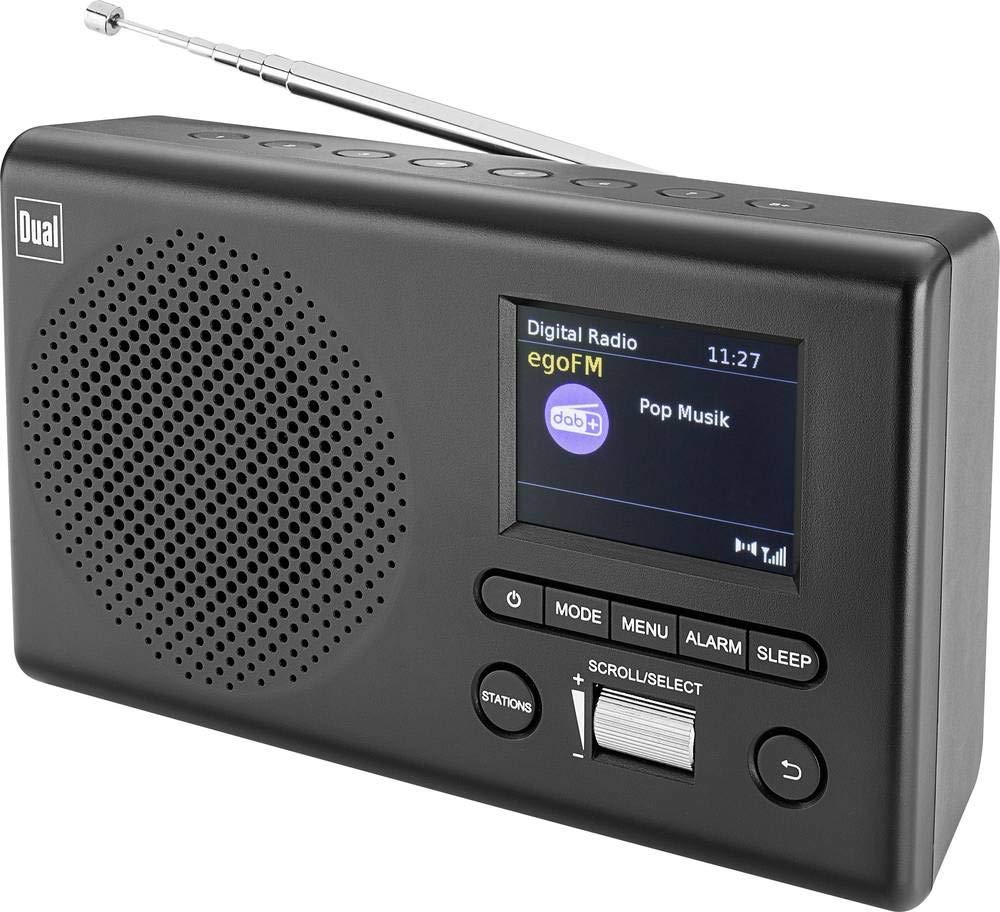
Imaj: Devan view of the Dual MCR 4 Portable DAB+/FM Radio, showing the color TFT display, rotary knob, and control buttons. The radio has a black and silver finish.
Enstalasyon
1. Alimente Aparèy la
The Dual MCR 4 can be powered by either the included AC power adapter or batteries, offering portability.
- Sèvi ak adaptè a AC: Connect the power adapter to the DC IN port on the back of the radio and plug the other end into a standard wall outlet.
- Sèvi ak pil: Open the battery compartment on the bottom/back of the radio and insert the required batteries (type and quantity usually specified inside the compartment or in the full manual). Ensure correct polarity.
2. Ajisteman Antèn
Extend the telescopic antenna fully for optimal reception of both DAB+ and FM radio signals. Adjust its position for the best signal quality.
3. Premye limen ak eskanè estasyon
After connecting power, switch on the radio using the mechanical ON/OFF switch at the back. The radio will typically perform an automatic station scan upon first use, searching for available digital (DAB+) and analog (FM) radio stations. This process may take a few moments.
Enstriksyon Operasyon
1. Operasyon debaz
- Limen/Etenyen: Use the mechanical switch at the back. For standby, a dedicated button on the front might be available (refer to physical unit).
- Kontwòl Volim: Rotate the main rotary knob to adjust the listening volume.
2. Mòd Radyo DAB+
- Selecting DAB+ Mode: Press the MODE button (if available) or navigate through the menu using the rotary knob until DAB+ mode is selected.
- Seleksyon Estasyon: After an automatic scan, use the rotary knob to scroll through the list of available DAB+ stations. Press the knob to confirm your selection.
- Ekonomize Prereglaj: Tune to your desired station. Press and hold a memory button (e.g., 1-5) until the display confirms the station is saved.
- Rapèl Prereglaj: Briefly press the corresponding memory button to recall a saved station.
- Ekspozisyon enfòmasyon: The color TFT display will show station name, program information (DLS), and potentially station logos or slideshows.
3. FM Radio Mode
- Selecting FM Mode: Press the MODE button or navigate through the menu until FM mode is selected.
- Manyèl akor: Rotate the tuning knob to manually adjust the frequency.
- Eskane otomatik: Press and hold the tuning knob or a dedicated scan button to automatically search for the next available FM station.
- Ekonomize Prereglaj: Tune to your desired FM station. Press and hold a memory button until the display confirms the station is saved.
- Rapèl Prereglaj: Briefly press the corresponding memory button to recall a saved station.
4. Auxiliary Input (AUX-IN)
Connect an external audio device (e.g., smartphone, MP3 player) to the AUX-IN port on the back of the radio using a 3.5mm audio cable. Select AUX mode on the radio to play audio from the connected device.
5. Itilizasyon kas ekoutè
For private listening, plug standard 3.5mm headphones into the headphone jack located on the back of the unit. The internal speaker will automatically mute.
Antretyen
- Netwayaj: Siye radyo a avèk yon twal mou epi sèk. Pa sèvi ak pwodui netwayaj abrazif oswa solvan.
- Depo: If storing for an extended period, remove batteries and store the unit in a cool, dry place.
- Swen antèn: Manyen antèn teleskopik la avèk prekosyon pou evite domaj.
Depanaj
| Pwoblèm | Solisyon posib |
|---|---|
| Pa gen pouvwa |
|
| Resepsyon radyo pòv |
|
| Pa gen son ki soti nan moun kap pale |
|
Espesifikasyon
| Mak | Doub |
| Nimewo Modèl | 76074 |
| Koulè | Nwa, Ajan |
| Teknoloji Akor | DAB +, FM |
| Koneksyon Teknoloji | Auxiliary (AUX-IN) |
| Karakteristik espesyal | Portable, Color TFT Display |
| Aparèy konpatib | Headphones, External Audio Devices (via AUX-IN) |
| Sous pouvwa | Mains (AC Adapter), Battery Powered |
| Konpozan ki enkli | Main Unit, Power Adapter, User Manual |
| Itilizasyon Rekòmande | Mizik |
Garanti ak sipò
For warranty information and technical support, please refer to the specific warranty card included with your product or contact Dual customer service. The included user manual provides detailed instructions and contact information.


