1. Entwodiksyon
Thank you for choosing the CHUNGHOP URK-01 Universal Remote Control. This remote is designed to enhance your Roku streaming experience by providing dedicated Roku controls and 12 programmable learning keys for other devices like your TV, soundbar, or receiver. Please read this manual carefully to ensure proper setup and operation.
Kontni pake:
- 1 x CHUNGHOP URK-01 Universal Remote Control
- 1 x manyèl itilizatè

Image: Front, side, and back views of the CHUNGHOP URK-01 Universal Remote Control. The front shows various buttons including power, navigation, volume, channel, and dedicated streaming service buttons. The back shows the battery compartment cover.
2. Konpatibilite
The CHUNGHOP URK-01 Universal Remote Control is compatible with a range of Roku streaming players and features a learning function for IR-enabled remote controls.
Compatible Roku Devices:
- Roku 1
- Roku 2
- Roku 4
- Roku Premier+
- Roku Express +
- Roku Ultra
Pa konpatib ak:
- Roku Sticks
- Roku TV (integrated Roku functionality in smart TVs)
- RF, IP, Bluetooth, or Wi-Fi only remotes (for learning function)
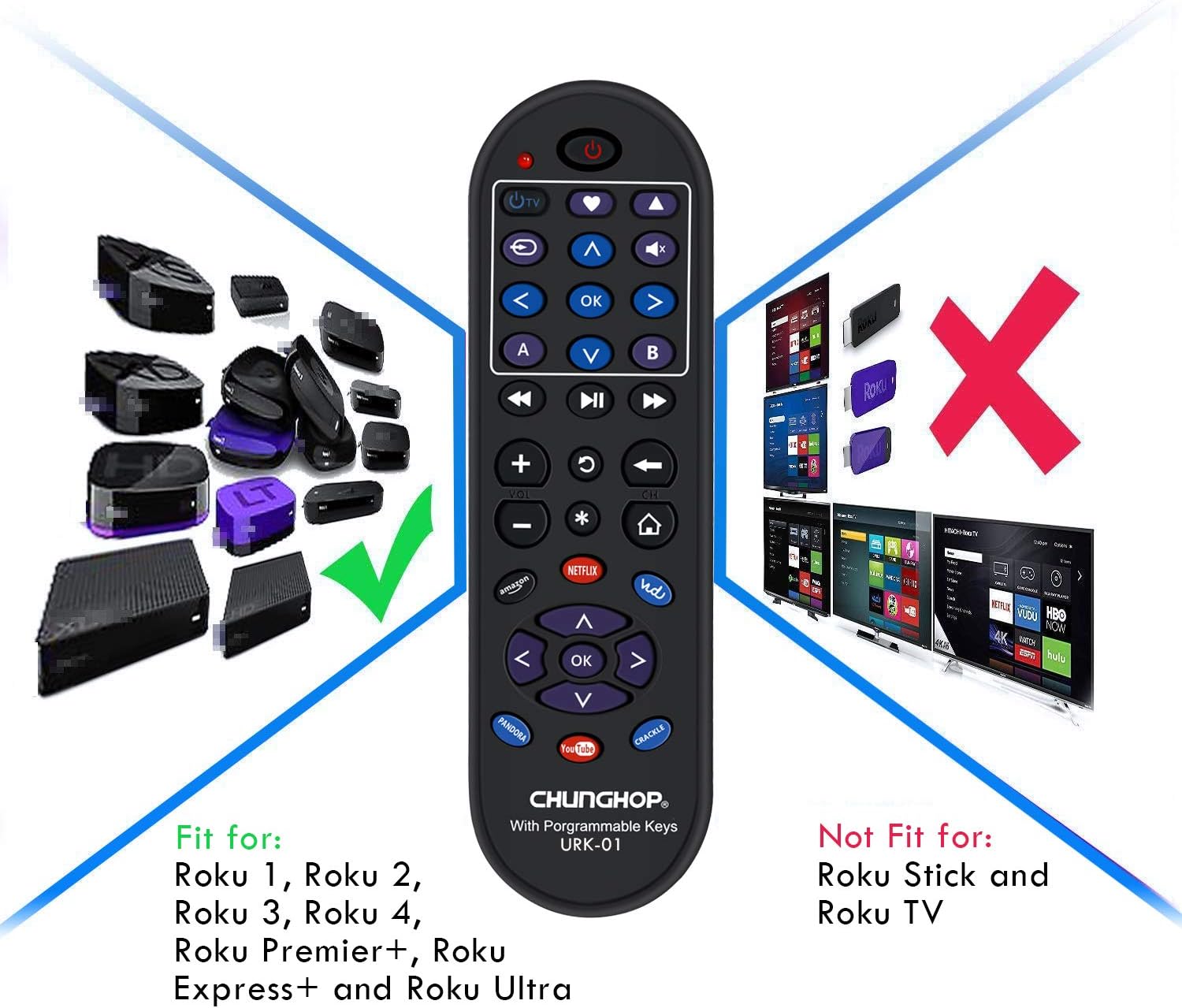
Image: A visual representation of compatible and incompatible Roku devices. On the left, several Roku streaming boxes are shown with a green checkmark, indicating compatibility. On the right, Roku Sticks and Roku TVs are shown with a red 'X', indicating incompatibility.
3. Enstalasyon
3.1 Enstalasyon batri
- Louvri kouvèti a lòj batri sou do a nan kontwòl la remote.
- Mete de (2) pil AAA, asire w polarite ki kòrèk la (+ ak -) jan yo endike anndan konpatiman an.
- Fèmen kouvèti lòj batri a byen.

Image: The back of the CHUNGHOP URK-01 remote control with the battery cover removed, showing the slots for two AAA batteries and their polarity markings.
4. Programming Learning Keys
The URK-01 remote features 12 programmable keys (located in the top section) that can learn functions from your original IR remote controls for devices such as your TV, soundbar, or receiver. This allows you to consolidate frequently used functions onto one remote.
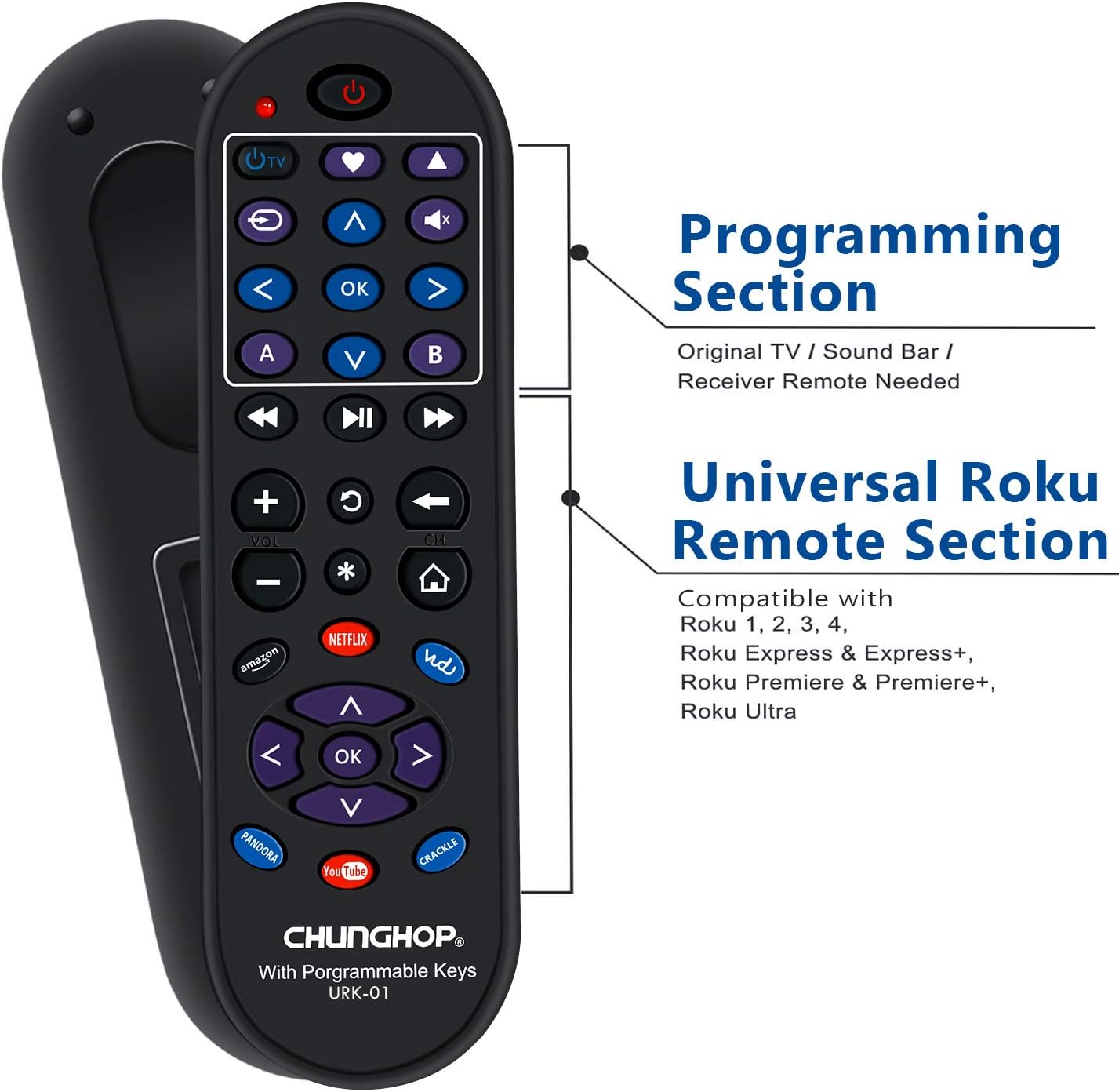
Image: A diagram of the CHUNGHOP URK-01 remote control, clearly labeling the top section as the 'Programming Section' (requiring an original TV/Sound Bar/Receiver remote) and the lower section as the 'Universal Roku Remote Section' (compatible with Roku 1, 2, 3, 4, Roku Express & Express+, Roku Premiere & Premiere+, Roku Ultra).
4.1 Identifying Programmable Keys
The 12 programmable keys are located at the top of the remote, including the TV Power, Heart, Up Arrow, Mute, Rewind, OK, Fast Forward, A, V, and B buttons. These keys are designed to learn functions from other IR remotes.

Imaj: Yon gwo plan view of the CHUNGHOP URK-01 remote control, with a magnified inset highlighting the 12 programmable keys. These keys are labeled 'TV', 'Heart', 'Up Arrow', 'Mute', 'Rewind', 'OK', 'Fast Forward', 'A', 'V', 'B', and two other directional keys.
4.2 Etap pwogramasyon
To program a learning key, you will need your original remote control for the device you wish to control (e.g., TV, soundbar). Ensure the original remote is functional and has fresh batteries.
- Peze epi kenbe la POUVWA epi BÈN buttons on the URK-01 remote simultaneously for approximately 3 seconds until the red LED indicator light turns on. Then release both buttons.
- Press the specific key on the URK-01 remote that you wish to program (e.g., TV Power button). The red LED will flash rapidly, indicating it is ready to learn.
- Place the URK-01 remote and your original remote control head-to-head, approximately 1 inch apart.
- Press and hold the corresponding key on your original remote control (e.g., the Power button of your TV remote) until the red LED on the URK-01 remote turns solid, indicating successful learning.
- Repeat steps 2-4 for any other keys you wish to program.
- Pou sòti nan mòd pwogramasyon, peze la POUVWA epi BÈN buttons on the URK-01 remote simultaneously for approximately 3 seconds. The red LED will turn off.

Image: A visual guide demonstrating how to program the CHUNGHOP URK-01 remote. It shows the URK-01 remote and an original remote facing each other, with infrared signals being transferred during the learning process.
Video: The Programming Steps for URK-01
Video: This video demonstrates the step-by-step process of programming the learning keys on the CHUNGHOP URK-01 Universal Remote Control. It visually guides the user through entering programming mode, selecting a key to learn, positioning the remotes, and confirming successful learning.
5. Operasyon Enstriksyon
5.1 Roku Control Section
The lower section of the URK-01 remote is pre-programmed for compatible Roku streaming players. Simply point the remote at your Roku device and use the navigation, playback, and volume controls as you would with your original Roku remote.
5.2 Dedicated Shortcut Keys
The remote includes six dedicated shortcut keys for popular streaming services:
- Amazon
- NETFLIX
- Vudu
- PANDORA
- YouTube
- KRAKE
Pressing these buttons will directly launch the corresponding application on your Roku streaming player, provided the app is installed and configured.

Imaj: Yon gwo plan view of the CHUNGHOP URK-01 remote control, with an inset highlighting the six dedicated shortcut buttons for Amazon, NETFLIX, Vudu, PANDORA, YouTube, and CRACKLE.
6. Antretyen
6.1 Ranplasman batri
When the remote's performance degrades or the LED indicator light does not respond, it is time to replace the batteries. Always replace both AAA batteries with new ones. Do not mix old and new batteries, or different types of batteries.
6.2 Netwayaj
To clean the remote, use a soft, dry cloth. Do not use liquid cleaners, abrasive pads, or chemical solvents, as these may damage the remote's surface or internal components.
NAN. Depanaj
- Remote not responding to Roku device:
Ensure the remote has fresh batteries. Verify line-of-sight between the remote and the Roku device. Confirm your Roku device is one of the compatible models (not a Roku Stick or Roku TV). - Learning keys not programming:
Ensure your original remote is functional and has fresh batteries. Make sure the remotes are placed head-to-head, about 1 inch apart. Hold the original remote's button down until the URK-01's LED turns solid. If the signal light flashes but learning fails, try new batteries in the URK-01. - Shortcut keys not working:
Ensure your Roku streaming player is powered on and connected to the internet. Verify that the corresponding streaming application is installed and logged in on your Roku device. - LED indicator not lighting up:
Check battery installation and replace with new batteries if necessary.
8. Espesifikasyon
| Mak | CHUNGHOP |
| Nimewo Modèl | URK-01 (Item Model Number: 7731000173205) |
| Aparèy konpatib | Roku Streaming Player (Roku 1, 2, 4, Premier+, Express+, Ultra) |
| Max Kantite Aparèy Sipòte | 1 (Roku section) + Learning Keys for other IR devices |
| Karakteristik espesyal | Universal, 12 Learning Keys |
| Sous pouvwa | 2 x AAA pil (pa enkli) |
| Pwa atik | 2.08 ons |
| Dimansyon pake | 7.05 x 3.39 x 1.1 pous |
9. Garanti ak sipò
For warranty information and customer support, please refer to the product packaging or contact CHUNGHOP customer service directly. Contact details can typically be found on the manufacturer's websit la oubyen atravè pwen acha ou a.


