1. Entwodiksyon
Thank you for choosing the Kungfuking Surge Protector Power Strip with USB Ports. This device is designed to provide convenient power access and surge protection for your electronic devices. It features two AC outlets and two USB ports, along with a 6.56 ft extension cord and a flat plug for versatile placement. This manual provides essential information for safe installation, operation, and maintenance of your power strip.

Figure 1: Kungfuking Surge Protector Power Strip (Model: Kungfuking 2AC+2USB)
2. Enstriksyon Sekirite Enpòtan
Tanpri li epi konprann tout enstriksyon sekirite yo anvan ou itilize pwodui sa a. Si ou pa swiv enstriksyon sa yo, sa ka lakòz chòk elektrik, dife, oswa blesi grav.
- PA FÈ exceed the electrical ratings of 120V, 12A, 60Hz, and 2.1A for USB ports.
- PA FÈ use in wet environments or near water.
- PA FÈ disassemble or modify the device.
- PA FÈ use with aquariums or other water-related products.
- PA FÈ ploge nan yon lòt tiyo pouvwa relocable.
- PA FÈ use if the cord or plug is damaged.
- Kenbe soti nan atenn timoun yo.
- Asire w ke ploge a konplètman antre nan priz miray la.
- Pwodwi sa a se pou itilize andedan kay la sèlman.
3. Pwodwi Features
The Kungfuking Surge Protector Power Strip is designed for convenience and safety, offering multiple power options in a compact form factor.
- 2 plòg AC: Provides standard power for electronic devices.
- 2 pò USB-A: Delivers 5V/2.1A for charging smartphones, tablets, and other USB-powered devices.
- 6.56 FT Extension Cord: Offers flexibility in placement, reaching distant outlets.
- Konsepsyon ploge plat: Minimizes obstruction and allows furniture to be placed closer to the wall.
- Pwoteksyon vag: Pwoteje aparèy ki konekte kont monte kouran ak pike.
- Konstriksyon dirab: Built with fireproof ABS+PC materials for enhanced safety.
- Konsepsyon monte: Can be easily mounted on or under desks, walls, or other surfaces.

Figi 2: Karakteristik ak Espesifikasyon kle yo

Figure 3: All-in-One Charging Station in use
4. Enstalasyon ak Enstalasyon
The power strip can be installed in various locations to suit your needs. Mounting screws are included for secure installation.
4.1 Montaj Opsyon
The power strip offers flexible mounting options:
- Under Desk/Table: Mount horizontally or vertically under a desk or table to keep surfaces clear.
- Mi Mount: Secure to a wall for convenient access, such as near a TV or bedside.
- Side of Cabinets/Headboards: Install vertically on the side of furniture for discreet power access.

Figure 4: Installation Options and Dimensions
4.2 Etap enstalasyon yo
- Chwazi yon kote: Select a flat, stable surface for mounting, ensuring it is within reach of a wall outlet and your devices.
- Make twou vis: Place the power strip in the desired position and mark the locations for the mounting screws using a pencil.
- Drill Pilot Holes (Optional): For wood surfaces, you may pre-drill small pilot holes to prevent wood splitting.
- Secure the Power Strip: Use the provided screws to firmly attach the power strip to the surface. Ensure it is securely fastened before use.
- Konekte ak pouvwa: Plug the power strip's flat plug into a standard 120V wall outlet. The flat plug design allows for placement behind furniture.
4.3 Egzample Enstalasyon
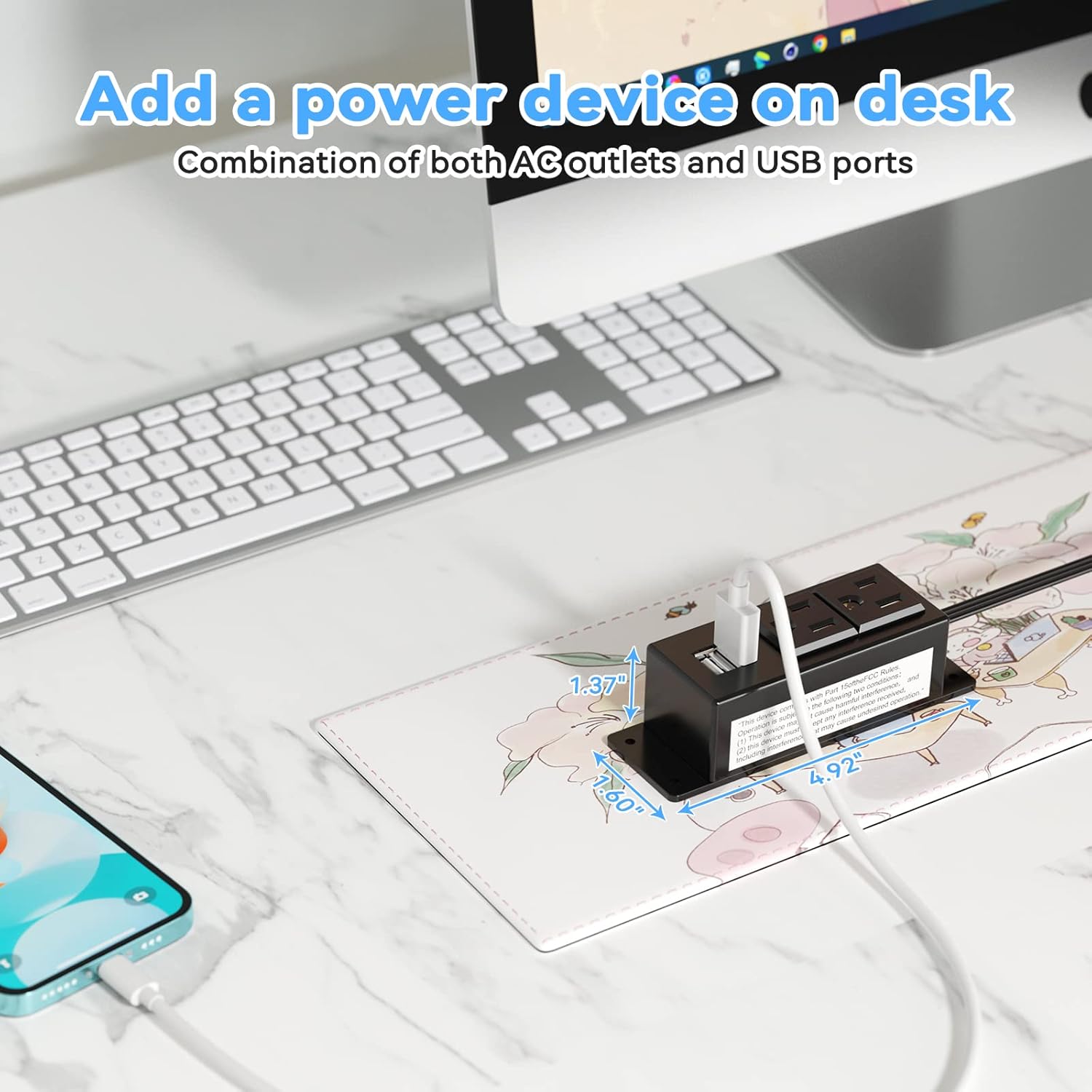
Figure 5: Desk Surface Installation

Figure 6: Under-Desk Installation

Figure 7: Wall-Mounted for TV

Figure 8: Nightstand Installation

Figure 9: Kitchen Cabinet Installation

Figure 10: Flat Plug for Space-Saving Placement
5. Operasyon Enstriksyon
Using your Kungfuking Surge Protector Power Strip is straightforward:
- Ploge nan priz miray la: Ensure the power strip's flat plug is securely connected to a grounded 120V AC wall outlet.
- Konekte Aparèy AC yo: Insert the power cords of your electronic devices into the two AC outlets.
- Konekte aparèy USB: Plug your USB charging cables into the two USB-A ports to charge compatible devices.
- Pouvwa sou: The power strip is designed for continuous operation once plugged in. There is no on/off switch.
- Siveye Itilizasyon: Avoid overloading the power strip by ensuring the total power consumption of connected devices does not exceed the rated capacity (12A, 120V).
NAN. Depanaj
If you encounter issues with your power strip, refer to the following common problems and solutions:
| Pwoblèm | Kòz posib | Solisyon |
|---|---|---|
| Pa gen kouran nan priz kouran AC oswa pò USB yo. |
|
|
| Aparèy USB yo pa ap chaje. |
|
|
| Power strip feels hot. |
|
|
7. Espesifikasyon
| Karakteristik | Detay |
|---|---|
| Modèl | Kungfuking 2AC+2USB |
| AC plòg | 2 |
| Pò USB | 2 (USB-A) |
| Antre Voltage | 120V AC |
| AC aktyèl Rating | 12A |
| Frekans | 60Hz |
| USB Sòti | 5V / 2.1A (Total) |
| Longè kòd | 6.56 FT (2 meters) |
| Kalite ploge | Ploge plat |
| Materyèl | Ignifuje ABS + PC |
| Dimansyon (Apeprè) | 4.92 x 3.74 x 1.37 pous (L x W x H) |
| Pwa (Apeprè) | 10.5 ons |
| Karakteristik espesyal | Surge Protection, Mountable Design |
8. Antretyen
Proper maintenance ensures the longevity and safe operation of your power strip:
- Netwayaj: Dekonekte priz kouran an nan miray la anvan ou netwaye li. Sèvi ak yon twal sèk epi mou pou siye deyò a. Pa sèvi ak pwodui netwayaj likid oswa espre.
- Enspeksyon: Periodically inspect the power cord, plug, and housing for any signs of damage, such as cuts, fraying, or cracks. If damage is found, discontinue use immediately.
- Depo: Lè w pa itilize priz la pou yon bon bout tan, sere l nan yon kote ki fre epi sèk, lwen limyè solèy dirèk ak imidite.
9. Garanti ak sipò
Kungfuking products are designed for reliability and performance. For warranty information, technical support, or any questions regarding your product, please refer to the contact information provided at the point of purchase or visit the official Kungfuking websit.
Tanpri kenbe prèv ou achte pou reklamasyon garanti.


