1. Entwodiksyon
Mèsi pou acha aasing the Dolphin SP-850RBT Portable Karaoke Speaker. This manual provides essential information for the safe and efficient operation of your device. Please read it thoroughly before use and retain it for future reference. The SP-850RBT is designed to deliver powerful sound with versatile connectivity options, including Bluetooth, AUX, USB, SD/TF card, and FM radio, complemented by dynamic LED lights and microphone input for karaoke.
2. Enfòmasyon sou Sekirite
- Pa ekspoze oratè a nan dlo, imidite, oswa tanperati ekstrèm.
- Pa louvri oratè a casing. Konfye tout antretyen bay pèsonèl kalifye.
- Kenbe oratè a lwen sous chalè ak limyè solèy dirèk.
- Asire bon vantilasyon; pa bouche okenn ouvèti vantilasyon.
- Sèvi sèlman ak adaptè kouran ki vini ak aparèy la pou chaje.
- Evite koute mizik nan yon volim twò wo pandan yon bon bout tan pou evite domaj nan zòrèy ou.
- Jete pil ak konpozan elektwonik yo yon fason responsab dapre règleman lokal yo.
3. Pake kontni
Tanpri verifye ke tout atik yo prezan:
- Dolphin SP-850RBT Portable Karaoke Speaker
- Mikwofòn branche
- Kontwòl Remote
- Pouvwa kab
- Manyèl Enstriksyon (dokiman sa a)
4. Pwodwi souview
The Dolphin SP-850RBT is a versatile portable speaker designed for various audio needs, from casual listening to karaoke parties. It features dual 8-inch woofers, integrated LED lights, and multiple input options.
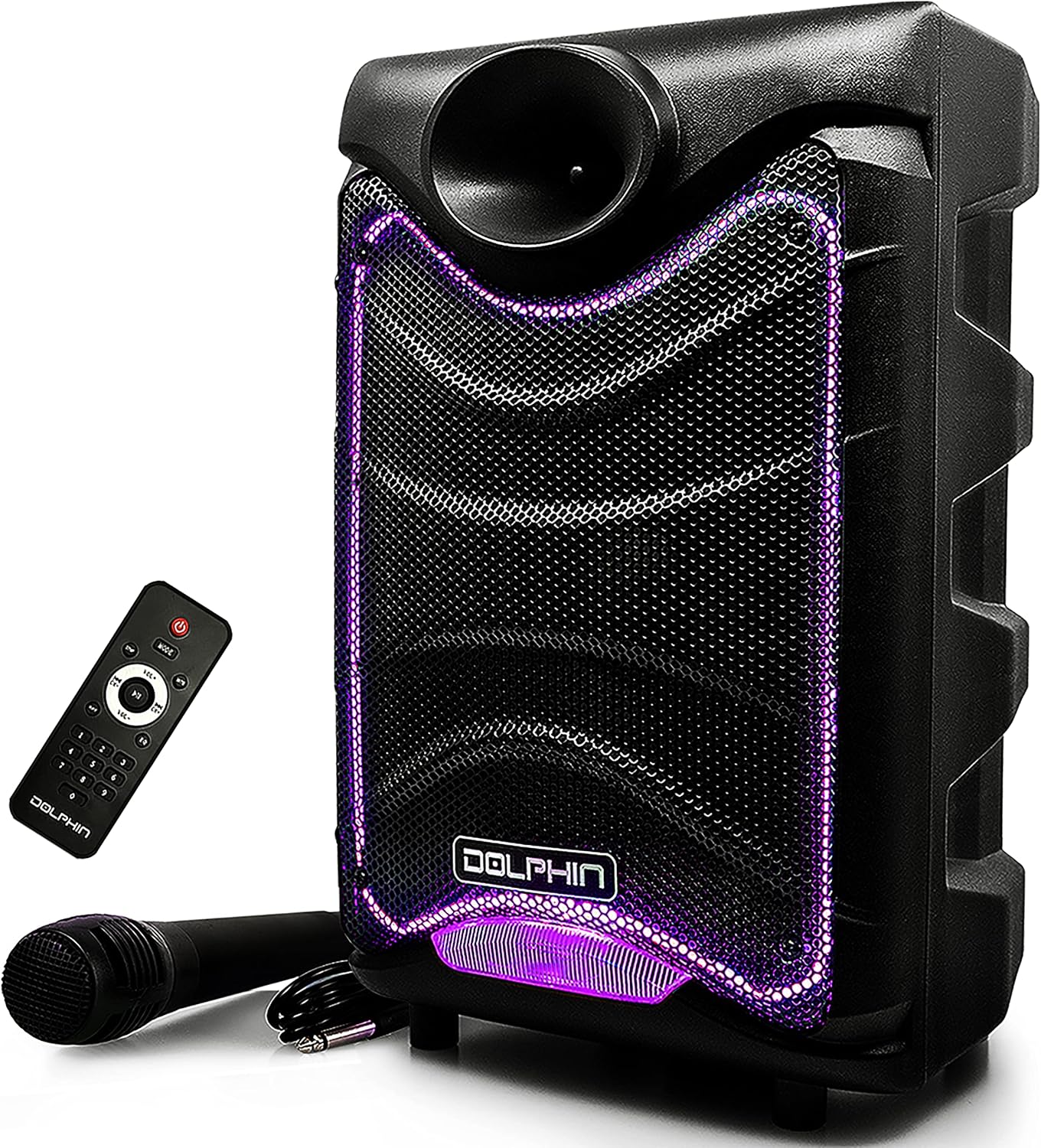
Image: Dolphin SP-850RBT speaker, remote control, and wired microphone.
Karakteristik Panel Kontwòl
Familiarize yourself with the control panel located on the rear of the speaker for optimal operation.

Imaj: Detaye view of the SP-850RBT control panel.
- Pouvwa switch: Limen oswa etenn oratè a.
- Dirije switch: Controls the integrated LED lights.
- bouton mòd: Switches between Bluetooth, AUX, USB, SD/TF, and FM radio modes.
- Bouton jwe/poz: Kontwole lèktur medya yo.
- Bouton Track Previous/Next: Navige nan mizik oswa estasyon FM yo.
- Volim bouton: Ajiste volim mèt la.
- Bouton bas: Ajiste nivo bas la.
- Treble bouton: Ajiste nivo treble a.
- Bouton Volim Mikwofòn: Ajiste volim antre mikwofòn nan.
- Bouton eko: Adjusts the microphone echo effect.
- Mic Input (1/4"): Connects the wired microphone.
- Antre AUX: Connects external audio devices via a 3.5mm cable.
- Pò USB: Pou lekti sou yon kle USB.
- Plas kat SD/TF: For SD or TF card playback.
- DC Antre: Pou chaje oratè a.
5. Enstalasyon
5.1 Chaje Oratè a
- Connect the provided power cable to the DC input port on the speaker.
- Branche lòt bout kab kouran an nan yon priz miray estanda.
- The charging indicator light (if present) will illuminate. The speaker contains a built-in 1800 mAh lithium battery. A full charge typically takes several hours.
- Disconnect the power cable once fully charged or when operating on battery power.
5.2 Limen/Etenyen
- To power on, toggle the Power Switch to the 'ON' position.
- To power off, toggle the Power Switch to the 'OFF' position.
6. Operasyon Enstriksyon
6.1 Bluetooth Pairing
- Power on the speaker. The speaker will automatically enter Bluetooth mode, indicated by a flashing 'BLUE' on the display and an audible prompt.
- Aktive Bluetooth sou aparèy mobil ou a (telefòn entelijan, tablèt, elatriye).
- Chèche pou available Bluetooth devices and select 'DOLPHIN SP-850RBT' from the list.
- Once paired, the speaker will emit an audible confirmation, and 'BLUE' will stop flashing.
- Kounye a ou kapab jwe odyo soti nan aparèy ou an atravè oratè a.
6.2 Antre AUX
- Connect one end of a 3.5mm audio cable to the AUX input port on the speaker.
- Konekte lòt bout kab la nan priz pwodiksyon odyo aparèy ekstèn ou an (pa egzanp, lektè MP3, laptop).
- Press the 'Mode' button on the speaker or remote control until 'AUX' is displayed.
- Adjust the volume on both the speaker and your external device.
6.3 USB / SD / TF Card Playback
- Insert a USB flash drive or an SD/TF card (with pre-loaded MP3 audio files) into the corresponding port/slot.
- The speaker will automatically switch to USB or SD/TF mode and begin playing audio. If not, press the 'Mode' button to select the correct input.
- Sèvi ak bouton Jwe/Pòz ak Tras Presedan/Swivan an pou kontwole lekti a.
6.4 FM Radyo
- Peze bouton 'Mòd' la jiskaske 'FM' parèt.
- Press and hold the Play/Pause button to initiate an automatic scan for FM stations. The speaker will save all found stations.
- Use the Previous/Next Track buttons to navigate through the saved FM stations.
6.5 Itilizasyon Mikwofòn
- Connect the wired microphone to the 1/4" Mic Input jack.
- Adjust the 'Mic Volume' knob to control the microphone's output level.
- Adjust the 'Echo' knob to add an echo effect to your voice.
6.6 Kontwòl Limyè LED
- Toggle the 'LED' switch on the control panel to turn the sound-activated 7-color LED lights on or off.

Image: SP-850RBT speaker with its LED lights active.
6.7 WaveSync Technology (Pairing Two Speakers)
The SP-850RBT features WaveSync Technology, allowing you to wirelessly pair two compatible Dolphin speakers for a stereo sound experience.

Image: Two Dolphin speakers demonstrating WaveSync pairing.
- Ensure both SP-850RBT speakers are powered on and in Bluetooth mode, but not yet paired with any device.
- On one of the speakers (this will be the primary speaker), press and hold the 'WaveSync' button (or a dedicated pairing button if available, otherwise refer to the manual for specific WaveSync pairing instructions).
- The primary speaker will search for the secondary speaker. Once connected, both speakers will emit an audible confirmation.
- Now, pair your mobile device to the primary speaker via Bluetooth as described in section 6.1. Audio will play through both speakers in stereo.
6.8 Ajisteman son
Use the 'Volume', 'Bass', and 'Treble' knobs on the control panel to fine-tune the audio output to your preference.
7. Antretyen
7.1 Netwayaj
- Toujou etenn epi debranche oratè a anvan ou netwaye li.
- Sèvi ak yon twal mou epi sèk pou siye sifas ekstèn yo.
- Do not use liquid cleaners, aerosols, or abrasive chemicals, as these may damage the finish or internal components.
7.2 Depo
- Sere oratè a nan yon kote ki fre epi sèk, lwen limyè solèy dirèk ak tanperati ekstrèm.
- Si w ap sere l pou yon bon bout tan, asire w ke batri a chaje pasyèlman (anviwon 50%) pou pwolonje dire lavi li. Rechaje l chak kèk mwa si w pa ap itilize l.
NAN. Depanaj
| Pwoblèm | Kòz posib | Solisyon |
|---|---|---|
| Oratè a pa limen. | Batri a fin itilize; Kab kouran an pa konekte; Entèriptè kouran an etenn. | Charge the speaker; Ensure power cable is securely connected; Turn the power switch to 'ON'. |
| Pa gen son. | Volume is too low; Incorrect input mode selected; Device not playing audio. | Increase speaker and device volume; Press 'Mode' to select correct input; Ensure audio is playing on the connected device. |
| Bluetooth pa konekte. | Speaker not in Bluetooth mode; Device Bluetooth is off; Speaker already connected to another device; Device too far. | Press 'Mode' to enter Bluetooth mode; Enable Bluetooth on your device; Disconnect from other devices; Move device closer to speaker (within 30 feet). |
| Mikwofòn pa mache. | Microphone not properly connected; Mic Volume knob is low. | Ensure microphone is fully plugged into the 1/4" jack; Increase 'Mic Volume' knob. |
| Son defòme. | Volume too high; Audio source quality is poor. | Reduce speaker and device volume; Try a different audio source or file. |
9. Espesifikasyon
| Karakteristik | Spesifikasyon |
|---|---|
| Nimewo Modèl | SP-850RBT |
| Mak | Dolphin |
| Koneksyon Teknoloji | AUX, Bluetooth, USB |
| Antre odyo | 1/4" Microphone Jack, AUX |
| Sous pouvwa | DC (Pil ityòm-ion rechargeable) |
| Batri | 1 batri ityòm ion obligatwa (enkli) |
| Materyèl | ABS plastik |
| Kantite Chanèl | 2 |
| Enpedans | 4 Ohm |
| Dimansyon pwodwi (L x W x H) | 9.5 x 10.5 x 18.5 pous |
| Pwa atik | 7.7 liv (3.5 kilogram) |
| UPC | 850006218240 |
| Manifakti | General Sound Co |
10. Garanti ak sipò
Dolphin products are crafted for customer satisfaction. For warranty information, technical support, or service inquiries, please refer to the warranty card included with your product or visit the official Dolphin websit. Ou ka vizite tou Dolphin Store on Amazon pou plis enfòmasyon.


