1. Entwodiksyon
This manual provides detailed instructions for the installation, operation, and maintenance of your Antec NX210 Mid-Tower ATX Computer Cabinet. Please read this manual thoroughly before beginning assembly or use to ensure proper functionality and safety.
The Antec NX210 is designed to accommodate ATX, Micro-ATX, and ITX motherboards, offering ample space for components and efficient cooling with pre-installed ARGB fans.
2. Enfòmasyon sou Sekirite
Obsève prekosyon sekirite sa yo pandan enstalasyon ak operasyon:
- Always disconnect the power supply from the wall outlet before installing or removing any components to prevent electric shock.
- Handle components with care to avoid damage from static electricity. Consider using an anti-static wrist strap.
- Keep the cabinet away from direct sunlight, heat sources, and moisture.
- Ensure proper ventilation to prevent overheating. Do not block air vents.
- Kenbe ti pyès ak zouti yo lwen timoun yo.
3. Pake kontni
Verifye ke tout atik yo prezan nan pakè a:
- Antec NX210 Mid-Tower ATX Computer Cabinet
- 4 x 120mm ARGB Fans (3 pre-installed in front, 1 pre-installed in rear)
- Accessory Box (screws, cable ties, etc.)
- Manyèl Itilizatè (dokiman sa a)
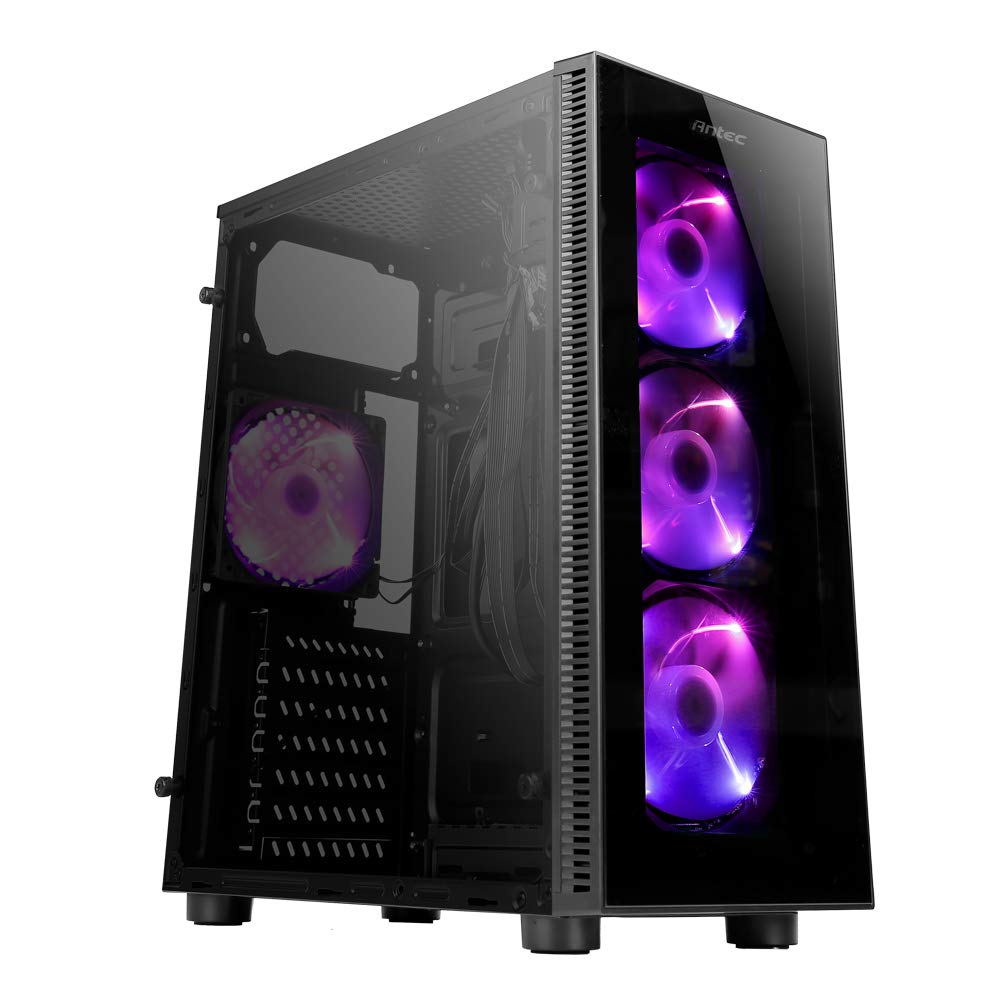
Image: Antec NX210 Mid-Tower ATX Computer Cabinet, showcasing its tempered glass side panel and front ARGB fans.
4. Product Features and Layout
4.1 Ekstèn Views

Imaj: Devan ak dèyè views of the Antec NX210 cabinet, highlighting the tempered glass front panel with ARGB fans and the rear I/O panel layout.

Image: Left side (tempered glass) and right side (solid panel) views of the Antec NX210 cabinet.
4.2 Top I/O Panel
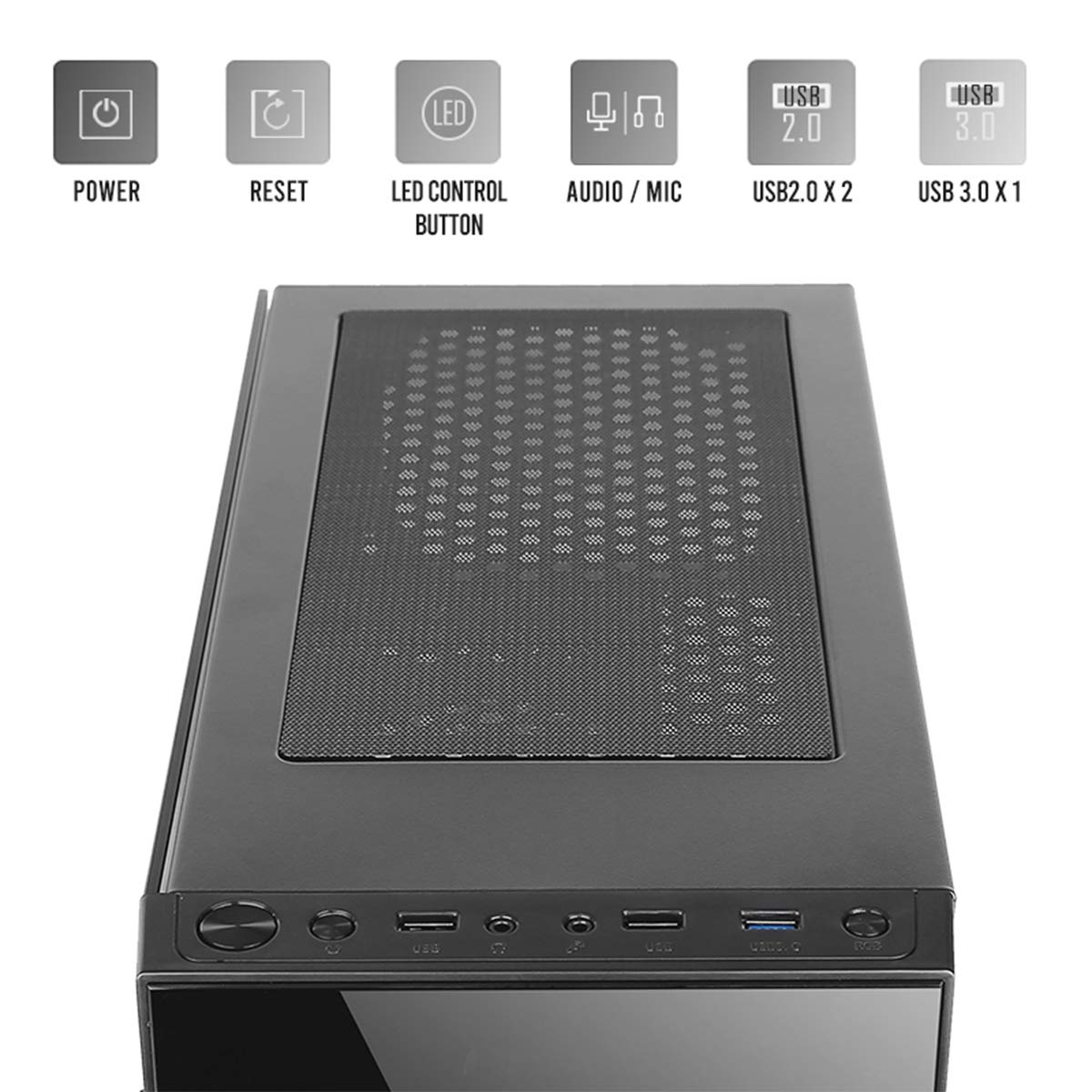
Image: Close-up of the top I/O panel, showing the Power button, Reset button, LED Control button, Audio/Mic jacks, 2x USB 2.0 ports, and 1x USB 3.0 port.
- Bouton pouvwa: To turn the system on or off.
- Bouton Reyajiste: Pou rekòmanse sistèm lan.
- Bouton kontwòl LED: To cycle through ARGB lighting effects for the pre-installed fans.
- Audio / Mic Jacks: Pou konekte kas ekoutè ak mikwofòn.
- Pò USB 2.0 (x2): Pou konekte aparèy USB 2.0.
- Pò USB 3.0 (x1): For connecting USB 3.0 devices, offering faster data transfer speeds.
4.3 Internal Layout and Component Support

Image: Diagram illustrating the internal layout of the Antec NX210, indicating locations for motherboard, SSDs, HDDs, GPU, CPU cooler, and PSU.
- Sipò pou plak mèr: Up to ATX (also supports Micro-ATX, ITX).
- 2.5" SSD Support: 3 drive bays.
- 3.5" HDD Support: 1 drive bay.
- Graphics Card Support: Jiska 310mm nan longè.
- CPU Cooler Support: Jiska 155mm nan wotè.
- Sipò PSU: Up to 220mm in length (top-mounted).
4.4 Sistèm refwadisman

Image: Diagram showing fan and radiator mounting options for the Antec NX210, including pre-installed fans.
- Fanatik pre-enstale: 4 x 120mm ARGB fans (3 in front, 1 in rear).
- Front Fan Support: 3 x 120mm.
- Rear Fan Support: 1 x 120mm.
- Sipò pou radyatè: Front up to 240mm, Rear up to 120mm.
5. Enstalasyon ak Enstalasyon
Follow these general steps for installing components into your Antec NX210 cabinet. Specific component manuals should be consulted for detailed installation instructions.
5.1 Prepare kabinè a
- Place the cabinet on a stable, flat surface.
- Remove the tempered glass side panel by unscrewing the thumbscrews at the rear and carefully pulling the panel away.
- Remove the right-side metal panel by unscrewing the thumbscrews at the rear.
5.2 Enstalasyon mèr
- Install the I/O shield into the rear opening of the cabinet.
- Align your motherboard with the standoffs inside the cabinet. Ensure the standoffs match your motherboard's form factor (ATX, Micro-ATX, ITX).
- Sere kat manman an byen sere ak vis yo bay yo.
5.3 Enstalasyon Power Supply Unit (PSU).
- The Antec NX210 supports a top-mounted ATX PS2 power supply.
- Slide the PSU into the designated top compartment from the rear of the cabinet.
- Secure the PSU with screws from the rear of the cabinet.
5.4 Enstalasyon Disk Depo (HDD/SSD)
- Disk Di 3.5 pous: Locate the 3.5" drive bay. Slide the HDD into the bay and secure it with screws.
- SSD 2.5 pous: Locate the 2.5" SSD mounting points behind the motherboard tray. Secure the SSDs with screws.
5.5 Enstalasyon Kat Grafik (GPU)
- Remove the necessary PCIe slot covers from the rear of the cabinet.
- Insert the graphics card into the appropriate PCIe slot on the motherboard.
- Fikse kat grafik la ak vis.
5.6 Jesyon kab
Utilize the cable routing cutouts and tie-down points behind the motherboard tray to manage cables. This improves airflow and aesthetics.
5.7 Connecting Front Panel Cables
Connect the front panel cables (Power SW, Reset SW, HDD LED, Power LED, USB 2.0, USB 3.0, HD Audio) to the corresponding headers on your motherboard. Refer to your motherboard manual for exact pin layouts.
6. Operasyon Enstriksyon
6.1 Limen
After all components are installed and cables connected, close both side panels. Connect the power cable to the PSU and a wall outlet. Press the Power button on the top I/O panel to turn on your system.
6.2 ARGB Fan Control
The pre-installed ARGB fans are connected to an internal controller. Use the Dirije bouton kontwòl on the top I/O panel to cycle through various lighting modes and effects. The fans will display a default lighting effect upon initial power-up.
7. Antretyen
Regular maintenance helps ensure optimal performance and longevity of your computer cabinet.
- Filtè Pousyè: The Antec NX210 features a dust filter on the top panel. Regularly remove and clean this filter to prevent dust buildup and maintain good airflow.
- Netwayaj enteryè: Periodically open the side panels and use compressed air to remove dust from internal components and fan blades. Ensure the system is powered off and unplugged before cleaning.
- Netwayaj eksteryè: Siye sifas eksteryè yo ak yon mou, damp twal. Evite pwodui netwayaj abrazif oswa solvan.
NAN. Depanaj
Si ou rankontre pwoblèm, konsidere etap debaz sa yo pou rezoud pwoblèm:
- Pa gen pouvwa:
- Asire w ke PSU a byen konekte nan priz miray la epi ke switch pouvwa ki sou PSU a nan pozisyon 'ON'.
- Verify that the front panel Power button cable is correctly connected to the motherboard header.
- Check all internal power connections (24-pin ATX, 8-pin CPU, PCIe power for GPU).
- Fans Not Spinning / ARGB Not Working:
- Ensure all fan power cables are securely connected to the motherboard or fan controller.
- Verify ARGB cables are correctly connected to the internal controller and the controller is powered.
- Try pressing the LED Control Button on the top I/O panel to cycle effects.
- Pò USB yo pa fonksyone:
- Check that the USB 2.0 and USB 3.0 front panel cables are correctly connected to the corresponding headers on your motherboard.
For more complex issues, consult the manuals for your individual components or seek professional assistance.
9. Espesifikasyon

Image: Diagram showing the physical dimensions of the Antec NX210 cabinet.
| Karakteristik | Detay |
|---|---|
| Modèl | NX210 |
| Kalite Ka | Mid Tower |
| Dimansyon (L x W x H) | 43.99 x 38.99 x 21.01 cm (apeprè 395 x 210 x 445 mm) |
| Materyèl | SPCC, Vè apeze |
| Sipò pou plak mèr | ATX, Mikwo-ATX, ITX |
| Fant ekspansyon | 7 |
| Kondwi Bays | 1 x 3.5" HDD, 3 x 2.5" SSD |
| Front I / O pò | Power, Reset, LED Control Button, MIC/Audio, 2 x USB 2.0, 1 x USB 3.0 |
| Fanatik pre-enstale | 4 x 120mm ARGB fans (3 front, 1 rear) |
| Sipò pou fanatik (devan) | 3 x 120mm |
| Sipò Fanatik (Dèyè) | 1 x 120mm |
| Sipò Radyatè (Devan) | Jiska 240mm |
| Sipò Radyatè (Dèyè) | Jiska 120mm |
| Max GPU Longè | 310mm |
| Max CPU Cooler Wotè | 155mm |
| Sipò PSU | ATX PS2 (Top Mounted), Max length 220mm |
| Filtè Pousyè | Top |
| Pwa atik | 4.8 kg |
10. Garanti ak sipò
The Antec NX210 Computer Cabinet comes with a 1 ane garanti apati dat acha a. Tanpri konsève prèv acha ou pou reklamasyon garanti.
For technical support or warranty inquiries, please contact Antec customer service or your local distributor.
Manifakti: Antec Inc. 8F, No 107, Jhouzih St, Neihu District, Taipei City 114, Taiwan
Enpòtatè (End): Acro Engineering Company, Khasra No 522/1, Village Jonapur, Delhi - 110 030
Ou ka jwenn plis enfòmasyon ak resous sipò sou sit ofisyèl la Magazen Antec sou Amazon.


