1. Pwodwi souview
The OOYCYOO 100 Amp MPPT Solar Charge Controller, Model KP60 100, is designed for efficient management of solar power systems. It automatically identifies 12V or 24V battery systems and is compatible with various battery types, including AGM, Sealed, Gel, Flooded, and Lithium. This controller features advanced Maximum Power Point Tracking (MPPT) technology to maximize energy harvest from solar panels, ensuring optimal charging for your battery bank.
Key features include a backlit LCD display for real-time monitoring, enhanced safety protections, and a high DC/DC transfer efficiency of up to 98.7%.

Figi 1: Devan view of the OOYCYOO 100 Amp MPPT Solar Charge Controller, showing the LCD display and connection terminals.
2. Enstriksyon Sekirite
Tanpri li tout enstriksyon ak avètisman yo ak anpil atansyon anvan enstalasyon ak itilizasyon. Si ou pa swiv enstriksyon sa yo, ou ka pran chòk elektrik, pran dife oswa pran gwo blesi.
- Ensure all wiring is correctly polarized and securely connected to prevent damage to the controller and connected devices.
- Always disconnect the solar panel array and battery before installing or adjusting the controller.
- Enstale kontwolè a nan yon zòn ki byen ayere, lwen materyèl ki ka pran dife ak limyè solèy dirèk.
- Do not disassemble or attempt to repair the controller. Refer to qualified personnel for service.
- Sèvi ak disjonktè oswa fizib ki apwopriye pou tout koneksyon yo pou pwoteje kont surkouran.
- Wear appropriate personal protective equipment, including eye protection and insulated gloves, during installation.
3. Konpozan pwodwi ak koneksyon
The controller features clearly labeled terminals for solar panel input, battery connection, and load output. It also includes a remote temperature sensor port and USB charging ports.

Figi 2: Detaye view of the controller's LCD display, 5S Reset button, Solar Panel Terminal, Battery Terminal, Load Terminal, USB 5V2A ports, Remote Temp Sensor port, and RS485 Communication Port.
Kontni pake:
- 1 x OOYCYOO 100A MPPT Solar Charge Controller (Model K2500W)
- 1 x Capteur Tanperati
- 1 x Manyèl Itilizatè (Angle)
4. Espesifikasyon teknik
The following table outlines the technical specifications for the OOYCYOO 100 Amp MPPT Solar Charge Controller (Model KP60 100).
| Paramèt | Spesifikasyon |
|---|---|
| Rated chaj aktyèl | 100A |
| Sistèm nominal Voltage | 12V/24VDC Auto Identifying |
| 12V System Max. PV Input Power | 1300W |
| 24V System Max. PV Input Power | 2600W |
| Max. PV Open Circuit Voltage (Voc) | 100VDC |
| Batri Voltage Range | 9V ~ 32V |
| Power Terminal Wire Gauge | 10 AWG |
| Dimansyon (L x W x H) | 12 x 7.8 x 3.2 pous (30.5 x 19.8 x 8.1 cm) |
| Pwa | 8.84 liv (4 kg) |
| Kalite ekspozisyon | LCD |
| Tanperati Fonksyònman | Jiska 45 ° C (113 ° F) |
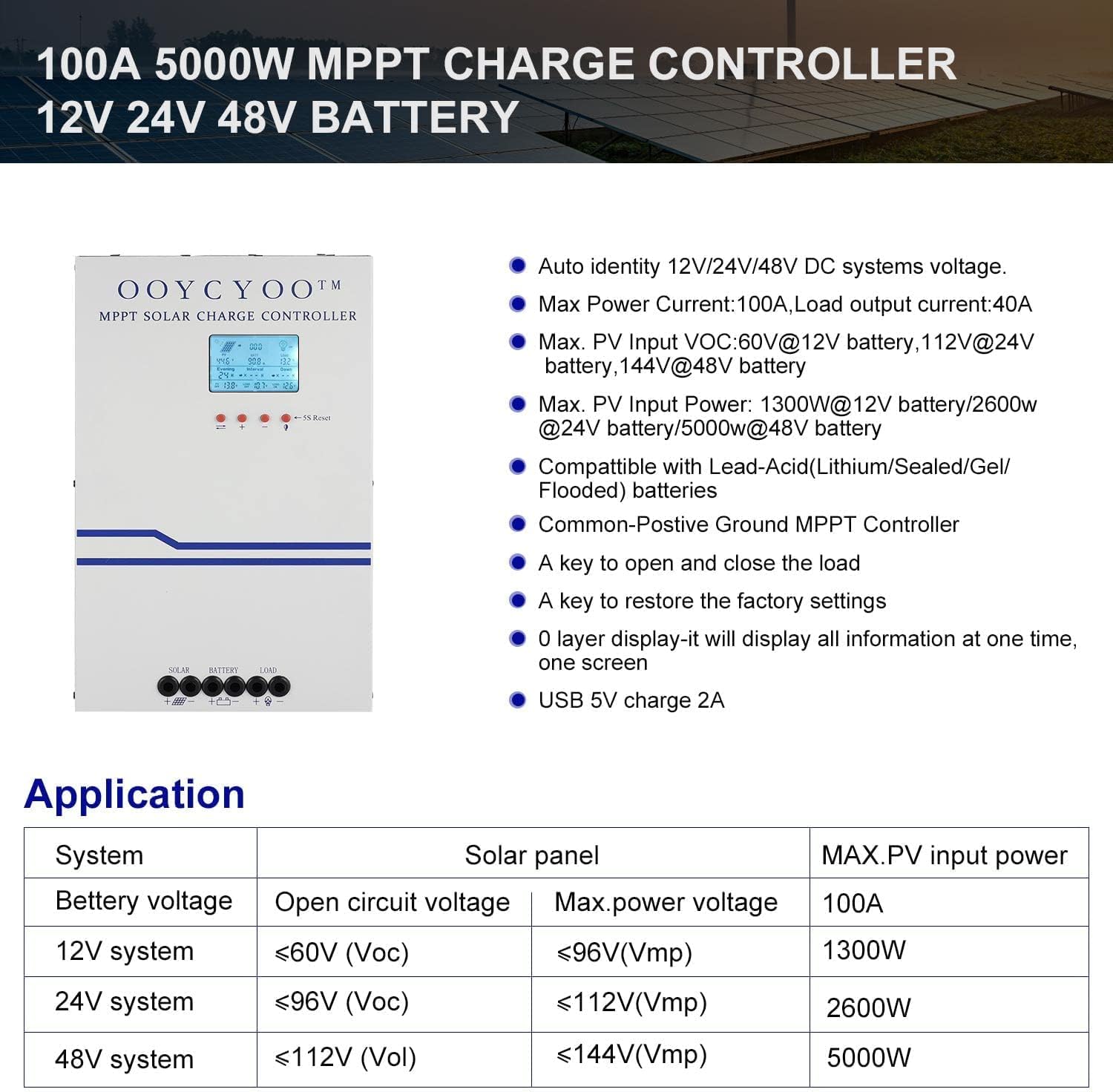
Figure 3: Application table detailing maximum PV input power and voltage for 12V, 24V, and 48V systems.
5. Gid Enstalasyon
Bon enstalasyon enpòtan anpil pou operasyon san danje epi efikas kontwolè chaj solè ou a. Swiv etap sa yo ak anpil atansyon:
5.1 Monte kontwolè a
- Chwazi yon kote ki sèk, byen ayere, pwoteje kont limyè solèy dirèk, tanperati ki wo ak imidite.
- Ensure sufficient clearance around the controller for proper airflow, especially around the cooling vents.
- Monte kontwolè a vètikalman sou yon sifas ki pa ka pran dife avèk eleman fikse ki apwopriye yo.
5.2 Koneksyon fil elektrik
Connect the components in the following order: Battery > Solar Panel > Load. Always ensure correct polarity.
- Konekte batri a: Connect the battery cables to the battery terminals on the controller. Ensure the positive (+) and negative (-) terminals are correctly matched. The controller will automatically detect the battery voltage (12V oswa 24V).
- Konekte panèl solè a: Connect the solar panel cables to the PV input terminals on the controller. Verify correct polarity. Ensure the open circuit voltage (Voc) of your solar array does not exceed 100VDC.
- Konekte chaj la: Connect your DC load to the load output terminals. Ensure the load current does not exceed the controller's rated load current.
- Konekte Capteur Tanperati a: Plug the remote temperature sensor into its designated port. This sensor helps the controller optimize charging based on battery temperature.
The controller is compatible with various battery types:

Figure 4: The controller supports AGM, Sealed, Gel, Flooded, and Lithium-Iron phosphate batteries for 12V/24V/48V systems.
6. Gid operasyon
Once installed, the controller will begin operation. The LCD display provides real-time system status and allows for configuration.
6.1 LCD Display
The backlit LCD display shows various parameters such as battery voltage, charging current, solar panel voltage, load status, and accumulated energy (KWH). Use the buttons below the display to navigate through the different screens and access settings.
6.2 Anviwònman debaz yo
The controller allows users to set parameters for different battery types (Lithium, LiFePO4, Li(NiCoMn)O2, Flooded, Sealed, Gel). Refer to the on-screen menu for specific adjustments to absorption voltage, flote voltage, ak ba voltage disconnect settings. A load timer function is also available for controlling DC loads.
6.3 Operasyon Vantilatè Refwadisman
The built-in cooling fan activates automatically when the internal temperature exceeds 45°C (113°F) and turns off when the temperature drops below 40°C (104°F). This mechanism ensures optimal performance and extends the lifespan of the controller.
7. Antretyen
Regular maintenance helps ensure the longevity and optimal performance of your solar charge controller.
- Netwayaj: Periodically clean the controller's exterior with a dry cloth. Ensure cooling vents are free from dust and debris.
- Koneksyon: Chak ane, enspekte tout koneksyon fil elektrik yo pou wè si yo byen sere epi si yo pa kowoze. Koneksyon ki lach yo ka lakòz surchof ak domaj.
- Anviwònman: Verify that the installation environment remains dry and well-ventilated.
NAN. Depanaj
The controller incorporates multiple protection functions to safeguard your system. If an issue arises, check the LCD display for error codes or indicators.
8.1 Fonksyon Pwoteksyon
- PV Over Current/Power Protection
- PV Short Circuit Protection
- Pwoteksyon polarite ranvèse PV
- Night Reverse Charging Protection
- Pwoteksyon polarite ranvèse batri
- Battery Over Voltage Pwoteksyon
- Pwoteksyon Batri sou Egzeyat
- Battery Overheating, Controller Overheating Protection
- Lithium Battery Low Temperature Protection
- Chaje Pwoteksyon Kout Awondisman
- Chaj Pwoteksyon Surcharge
- TVS High Voltage Pwoteksyon Transient
8.2 Pwoblèm komen
- Pa gen chaj: Check solar panel connections, ensure sufficient sunlight, and verify battery voltage nan zòn operasyon an.
- Chaj la pa fonksyone: Check load connections, ensure battery voltage se pi wo a volim ki batage disconnect setting, and verify load timer settings.
- Surchof: Ensure adequate ventilation around the controller and that cooling vents are clear.
- Kòrèk Voltage Lekti: Verify all connections are secure and the temperature sensor is properly installed.
If issues persist after checking these points, please contact customer support.
9. Garanti ak sipò
The OOYCYOO 100 Amp MPPT Solar Charge Controller is a professional product. For any questions or technical assistance, please contact us directly via email. We are committed to providing prompt support and ensuring your satisfaction.
Tanpri gade dokiman acha ou a pou kondisyon ak tèm garanti espesifik yo.


