1. Entwodiksyon
This manual provides detailed instructions for the installation, configuration, and operation of your COMFAST JOOWIN Outdoor Access Point WiFi Extender AC1200. This device is designed to provide reliable and extended wireless network coverage in outdoor environments, supporting various operating modes including Access Point, Repeater, and Router. Please read this manual thoroughly before use to ensure proper setup and optimal performance.
2. Pake kontni
Verify that all items are present in your package. If any items are missing or damaged, please contact your retailer.
- 1 x JOOWIN Outdoor Access Point WiFi Extender AC1200
- 1 x PoE Power Adapter (Passive PoE)
- 1 x Ethernet kab
- 2 x Mounting Straps/Ties
- 1 x Gid Enstalasyon Rapid
3. Pwodwi souview
The JOOWIN Outdoor Access Point AC1200 features a weatherproof casing designed for outdoor deployment. It includes integrated antennas and multiple ports for power and network connectivity.
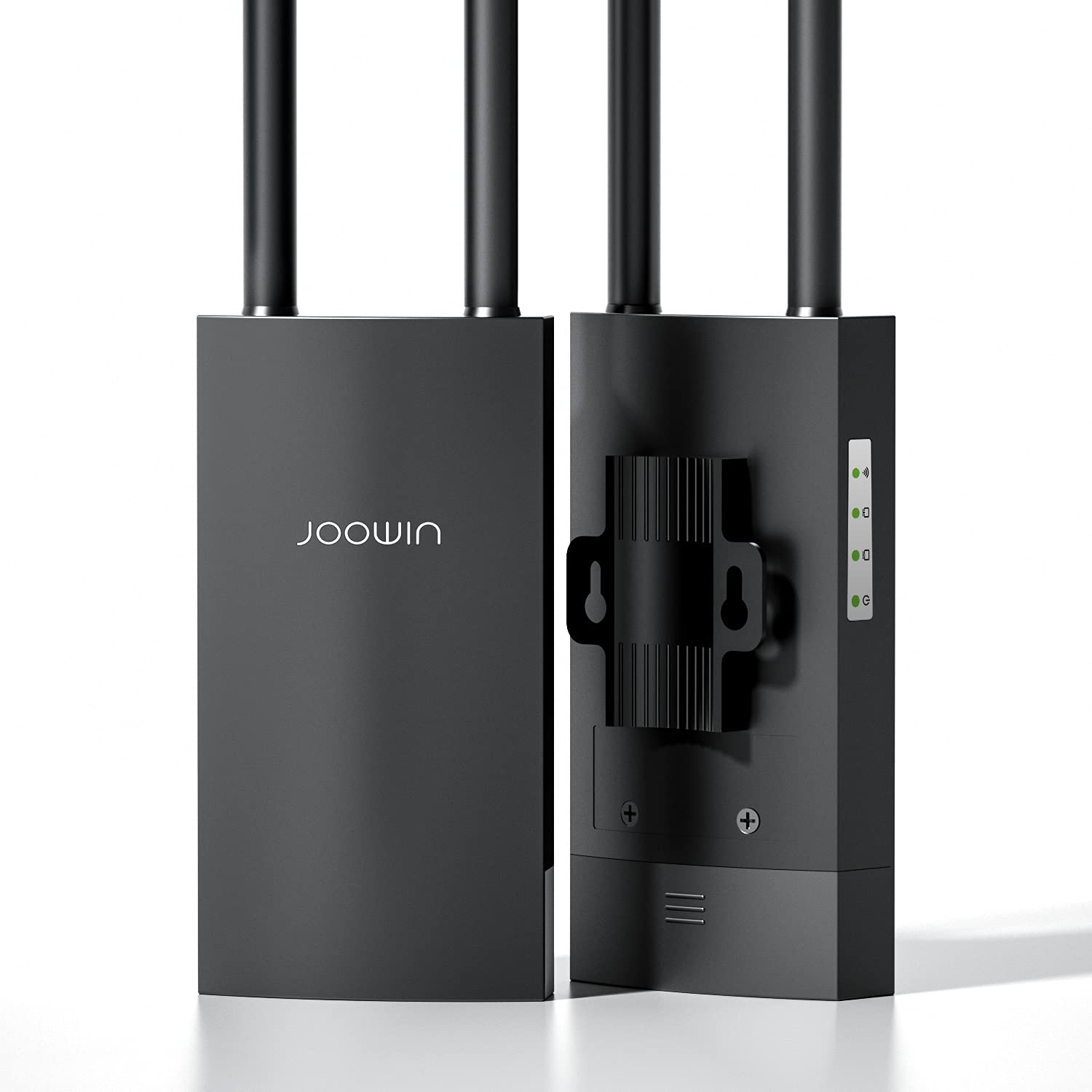
Figi 3.1: Devan view of the JOOWIN Outdoor Access Point AC1200, showing its compact, weatherproof design suitable for outdoor installation.
3.1 Endikatè ki ap dirije
- Pouvwa dirije: Indicates power status. Solid green when powered on.
- LED WAN/LAN: Indicates network activity on the Ethernet port. Blinks when data is transmitted.
- LED WiFi: Indicates wireless activity. Blinks when wireless data is transmitted.
3.2 Pò ak bouton
- LAN/WAN Port (PoE IN): Used for both data connection and power input via the Passive PoE adapter.
- Bouton Reyajiste: Press and hold for approximately 10 seconds to restore factory default settings.
4. Enstalasyon
4.1 Enstalasyon Fizik
Choose a suitable outdoor location for installation, ensuring clear line-of-sight to the desired coverage area. Mount the device using the provided mounting straps to a pole or mast. Ensure the device is positioned vertically with the ports facing downwards to prevent water ingress.
Figi 4.1: Illustrates the outdoor access point mounted on a pole using the provided straps, demonstrating proper vertical orientation.
4.2 Alimante Aparèy la (PoE)
- Connect one end of the Ethernet cable to the LAN/WAN (PoE IN) port on the outdoor access point.
- Connect the other end of this Ethernet cable to the "PoE" port on the provided Passive PoE adapter.
- Connect a second Ethernet cable from your router or network switch to the "LAN" port on the Passive PoE adapter.
- Plug the power cord from the PoE adapter into an electrical outlet. The Power LED on the access point should illuminate.
4.3 Koneksyon Rezo Inisyal
After powering on, the device will broadcast a default Wi-Fi network (SSID). You can connect to this network from a computer or mobile device to access the web-based management interface for configuration.
- Defo SSID: JOOWIN_XXXX (XXXX represents the last four digits of the MAC address)
- Modpas Default: None (or check the quick installation guide)
5. Operasyon Modes
The JOOWIN AC1200 supports multiple operating modes to suit various network requirements:
5.1 Mòd Pwen Aksè (AP)
In AP mode, the device connects to a wired network and broadcasts a wireless signal, allowing wireless clients to connect to the existing wired network. This is ideal for extending Wi-Fi coverage from a wired router.
5.2 Repeater Mode
Repeater mode extends the range of an existing wireless network by receiving the signal and re-transmitting it. This mode is useful for eliminating Wi-Fi dead zones without requiring a wired connection to the main router.
5.3 Routeur Mode
In Router mode, the device acts as a primary router, connecting to an internet source (e.g., a modem) and providing both wired and wireless network access to clients. This mode is suitable for creating a new network.
6. Konfigirasyon
6.1 Aksè nan Web Entèfas Jesyon
- Connect your computer or mobile device to the access point's default Wi-Fi network (e.g., JOOWIN_XXXX).
- Louvri a web navigatè a epi antre adrès IP pa defo a: 192.168.10.1 (or refer to the quick installation guide for the specific default IP).
- Enter the default username and password. Typically, both are admin.
- Follow the on-screen wizard to select your desired operating mode and configure network settings (SSID, password, security type).
Nòt: It is highly recommended to change the default administrator password for security reasons after initial setup.
6.2 Anviwònman san fil debaz yo
- SSID: Change the default network name to a unique identifier.
- Kalite sekirite: WPA2-PSK is recommended for optimal security.
- Modpas: Mete yon modpas inik ak solid pou rezo Wi-Fi ou a.
- Chèn: For best performance, select a less congested channel (e.g., 1, 6, or 11 for 2.4GHz).
7. Antretyen
7.1 Mizajou Firmware
Tcheke manifakti a regilyèman websit pou mizajou firmwèr. Mizajou firmwèr yo ka amelyore pèfòmans, ajoute nouvo fonksyonalite, epi adrese vilnerabilite sekirite yo. Swiv enstriksyon ki vini ak pake mizajou firmwèr la ak anpil atansyon.
7.2 Netwayaj
Ensure the device's exterior is kept clean. Use a soft, dry cloth to wipe away dust and dirt. Do not use liquid cleaners or abrasive materials.
NAN. Depanaj
| Pwoblèm | Kòz posib | Solisyon |
|---|---|---|
| Pa gen kouran / LED kouran an etenn | Power adapter not connected, faulty outlet, or faulty PoE connection. | Check power connections, try a different outlet, ensure Ethernet cable is securely connected to PoE adapter and device. |
| Pa ka jwenn aksè web koòdone jesyon | Incorrect IP address, device not powered on, or IP conflict. | Verify default IP (192.168.10.1), ensure device is powered, check computer's IP settings (should be DHCP or in the same subnet). Try resetting the device. |
| Pa gen koneksyon entènèt | Incorrect operating mode, upstream network issue, or incorrect WAN settings. | Check your main router's internet connection. Verify the access point's operating mode and WAN settings (e.g., DHCP, Static IP, PPPoE). |
| Weak Wi-Fi signal or slow speed | Obstructions, interference, or improper placement. | Relocate the device to a more central position with fewer obstructions. Change Wi-Fi channel to avoid interference. Ensure antennas are properly oriented (if external). |
If problems persist, please contact technical support.
9. Espesifikasyon
- Modèl: AC1200
- Mak: KONFAST
- Gwoup Gwoup Frekans: Doub-Band (2.4GHz ak 5GHz)
- Estanda san fil: IEEE 802.11ac/a/b/g/n
- Pousantaj done: Up to 1200Mbps (300Mbps for 2.4GHz, 867Mbps for 5GHz)
- Antèn: Integrated Omni-directional
- Pò: 1 x 10/100Mbps WAN/LAN (PoE IN)
- Pwovizyon pou pouvwa: Passive PoE (24V/0.5A)
- Dimansyon: 13.9 x 3.31 x 1.73 pous (35.3 x 8.4 x 4.4 cm)
- Pwa atik: 1.28 liv (0.58 kg)
- Tanperati operasyon: -30 ° C a 70 ° C (-22 ° F a 158 ° F)
- Tanperati Depo: -40 ° C a 85 ° C (-40 ° F a 185 ° F)
- Imidite: 10% a 90% ki pa kondanse
- Rating enpèrmeabilize: IP66 (or similar, typical for outdoor APs)
- ASIN: B07SBDHG6W
- UPC: 800629427949
10. Garanti ak sipò
This product comes with a standard manufacturer's warranty. Please refer to the warranty card included in your package or visit the COMFAST official website for detailed warranty terms and conditions. For technical support, troubleshooting assistance, or further inquiries, please contact COMFAST customer service through their official websit la oswa enfòmasyon kontak yo bay nan dokimantasyon pwodwi ou a.
Manifakti: JOOWIN
Mak: KONFAST


