1. Entwodiksyon
This manual provides comprehensive instructions for the proper use, setup, and maintenance of your SKYVIK SIGNI One 10mm Fisheye Lens Kit. Please read this manual thoroughly before using the product to ensure optimal performance and longevity.
The SKYVIK SIGNI One 10mm Fisheye Lens is designed to enhance mobile photography by providing a 210° angle fisheye effect with controlled distortion and no black corners or vignetting. It is crafted from premium grade Aluminium Alloy and features multi-coated aspherical glass to reduce reflections and light flares.
2. Pake kontni
Upon unboxing, please verify that all components listed below are present and in good condition.
- SKYVIK SIGNI One 10mm Fisheye Lens
- Premium ka pote
- Netwaye twal
- Pote Étui
- Clip inivèsèl

Image: All components included in the SKYVIK SIGNI One 10mm Fisheye Lens Kit.
3. Enstalasyon ak Enstalasyon
Follow these steps to properly attach the fisheye lens to your mobile device.
- Retire bouchon pwoteksyon yo: Carefully remove the large protective cap from the front of the lens and the small protective cap from the back of the lens.

Image: Illustration of removing the front and back protective caps from the lens.
- Screw Lens onto Clip: Align the threads of the fisheye lens with the universal clip and gently screw the lens onto the clip until it is securely fastened.

Image: The fisheye lens securely screwed onto the universal clip.
- Mount Clip onto Phone: Position the universal clip over your phone's main camera lens. Ensure the fisheye lens is centered over your phone's camera for optimal image quality. The soft rubber on the clip protects your device from scratches.
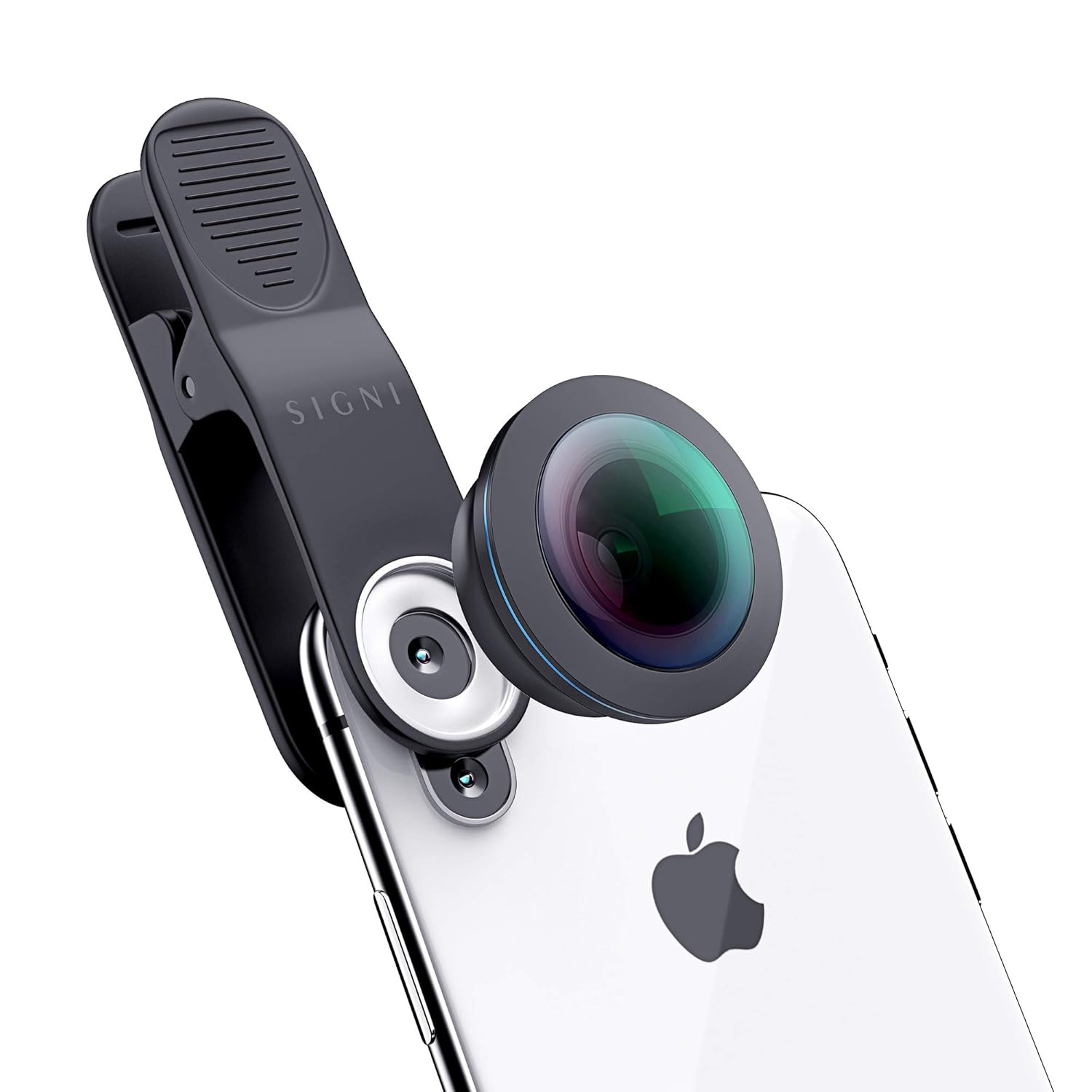
Image: The lens and clip mounted on a smartphone, showing proper alignment.
Nòt konpatibilite: This lens is compatible with most mobile devices. However, it is NOT compatible with the following models: Oneplus 8 Pro, Vivo S1 Pro, Vivo V15 Pro, Vivo V17 Pro, Mi 10i, and Poco X2.
4. Operasyon Enstriksyon
Once the lens is securely attached, you can begin capturing unique fisheye photos and videos.
- Camera Application: Open your phone's native camera application.
- Framing Your Shot: Look through your phone's screen to compose your shot. The fisheye lens will provide a wide, distorted view, characteristic of fisheye photography.
- Controlled Distortion: The 210° angle offers significant field of view. For a more pronounced fisheye effect, slightly tilt the phone. For a super wide-angle effect with less distortion, keep the phone flat and horizontal.
- Ekleraj: Ensure adequate lighting for best results. The multi-coated glass helps reduce glare and reflections.

Imaj: Egzamples of photos captured using the fisheye lens, showcasing its unique perspective.
5. Swen ak Antretyen
Proper care will extend the life and maintain the performance of your lens.
- Netwaye lantiy la: Use the provided cleaning cloth to gently wipe the lens surfaces. For stubborn smudges, a small amount of lens cleaning solution applied to the cloth can be used. Avoid harsh chemicals or abrasive materials.
- Depo: Always store the lens in its premium carrying case or pouch with both protective caps on when not in use. This protects the lens from dust, scratches, and impacts.
- Manyen: Avoid dropping the lens or subjecting it to strong impacts. While durable, the optical elements can be damaged.
- Kondisyon anviwònman: Do not expose the lens to extreme temperatures, high humidity, or direct sunlight for prolonged periods.
NAN. Depanaj
If you encounter issues with your SKYVIK SIGNI One Fisheye Lens, refer to the following common problems and solutions.
| Pwoblèm | Kòz posib | Solisyon |
|---|---|---|
| Black corners/vignetting in photos. | Lens not perfectly centered over phone camera. | Adjust the universal clip to ensure the fisheye lens is precisely aligned with your phone's main camera. |
| Blurry or unclear images. | Dirty lens surface; improper focus; lens not securely attached. | Clean the lens with the provided cloth. Ensure your phone's camera is properly focused. Re-attach the lens to the clip and the clip to the phone securely. |
| Lens does not fit phone. | Modèl telefòn ki pa konpatib. | Refer to the compatibility list in Section 3. If your phone is listed as incompatible, the lens will not fit correctly. |
| Excessive glare or reflections. | Strong light source directly hitting the lens. | Adjust your shooting angle to avoid direct harsh light. The multi-coated glass minimizes this, but extreme conditions can still cause it. |
7. Spécifications pwodwi
| Karakteristik | Detay |
|---|---|
| Nimewo Modèl | CL-FE10 |
| Kalite lantiy | Fisheye |
| Longè Fokal | 10 mm |
| Ang nan View | 210° |
| Materyèl | Premium Grade Aluminium Alloy, Multi-Coated Aspherical Glass |
| Dimansyon pwodwi | 10 x 5 x 5 cm |
| Pwa atik | 300 g |
| Manifakti | SKYVIK TECHNOLOGIES |
8. Enfòmasyon sou Garanti
The SKYVIK SIGNI One 10mm Fisheye Lens Kit comes with a SKYVIK Worry-free 12 months Warranty from the date of purchase. This warranty covers manufacturing defects and ensures reliable performance of your product. Please retain your proof of purchase for warranty claims.
For detailed warranty terms and conditions, please refer to the official SKYVIK websit oswa kontakte sipò kliyan.
9. Sipò pou Kliyan
If you require assistance, have questions, or need to report an issue, please contact SKYVIK customer support:
- Telefòn: 18001238830
- Manifakti: SKYVIK TECHNOLOGIES
Our friendly customer support team is available to assist you.


