Enstriksyon Sekirite Enpòtan
Please read these instructions carefully before using your Coredy R650 Ultra Robot Vacuum and retain them for future reference. Failure to follow these instructions may result in electric shock, fire, or serious injury.
- Timoun ki gen laj 8 an ak pi wo a ak moun ki gen kapasite fizik, sansoryèl oswa mantal redwi oswa ki pa gen eksperyans ak konesans yo kapab itilize aparèy sa a si yo te ba yo sipèvizyon oswa enstriksyon konsènan itilizasyon aparèy la an sekirite epi yo konprann danje ki genyen ladan yo. .
- Timoun yo ta dwe sipèvize pou asire ke yo pa jwe ak aparèy la.
- Netwayaj ak antretyen itilizatè pa dwe fèt pa timoun san sipèvizyon.
- Sèlman sèvi ak adaptè kouran orijinal manifakti a bay la.
- Pa sèvi ak aspiratè robo a nan anviwònman mouye oswa toupre dlo.
- Remove all loose cables, small objects, and fragile items from the floor before operation to prevent entanglement or damage.
- Do not operate the robot vacuum in areas with open flames or flammable materials.
- Asire w ke baz chaje a mete sou yon sifas ki plat kont yon miray, ak ase espas vid toutotou li.
- Do not carry the robot vacuum by its handle when it is powered on.
- Turn off the robot vacuum and unplug the charging base before performing any maintenance or cleaning.
Kontni pake
Verifye ke tout konpozan yo prezan epi yo an bon kondisyon lè w ap debalaje.
- 1x Coredy R650 Ultra Robotic Vacuum Cleaner
- 1x chaje waf
- 1x 500ml Dust Bin (pre-installed)
- 2x Side Brushes (one pair)
- 1x Filter (pre-installed)
- 1x kontwòl Remote
- 1x pouvwa adaptè
- 1x Cleaning Tool
- 1x manyèl itilizatè

Image: The Coredy R650 Ultra Robot Vacuum, its remote control, and a smartphone displaying the Coredy app interface.
Pwodwi souview
Robot Vacuum Components
- Kouvri Top: Houses the power button and Wi-Fi indicator.
- Bouton pouvwa: Kòmanse oswa mete netwayaj la sou poz, limen/etenn li.
- Poubèl: Collects debris, located at the rear of the robot.
- Bwòs bò yo: Two rotating brushes on the front sides for edge and corner cleaning.
- Bwòs prensipal: V-shaped roller brush located underneath for deep cleaning.
- Wou kondwi: Two large wheels for movement across various surfaces.
- Rou Inivèsèl: Front wheel for navigation.
- Kontak chaje: Two metal strips on the bottom for connecting to the charging base.
- Drop Sensors: Located on the bottom to prevent falls.
- Detèktè enfrawouj: Front-facing sensors for obstacle detection.
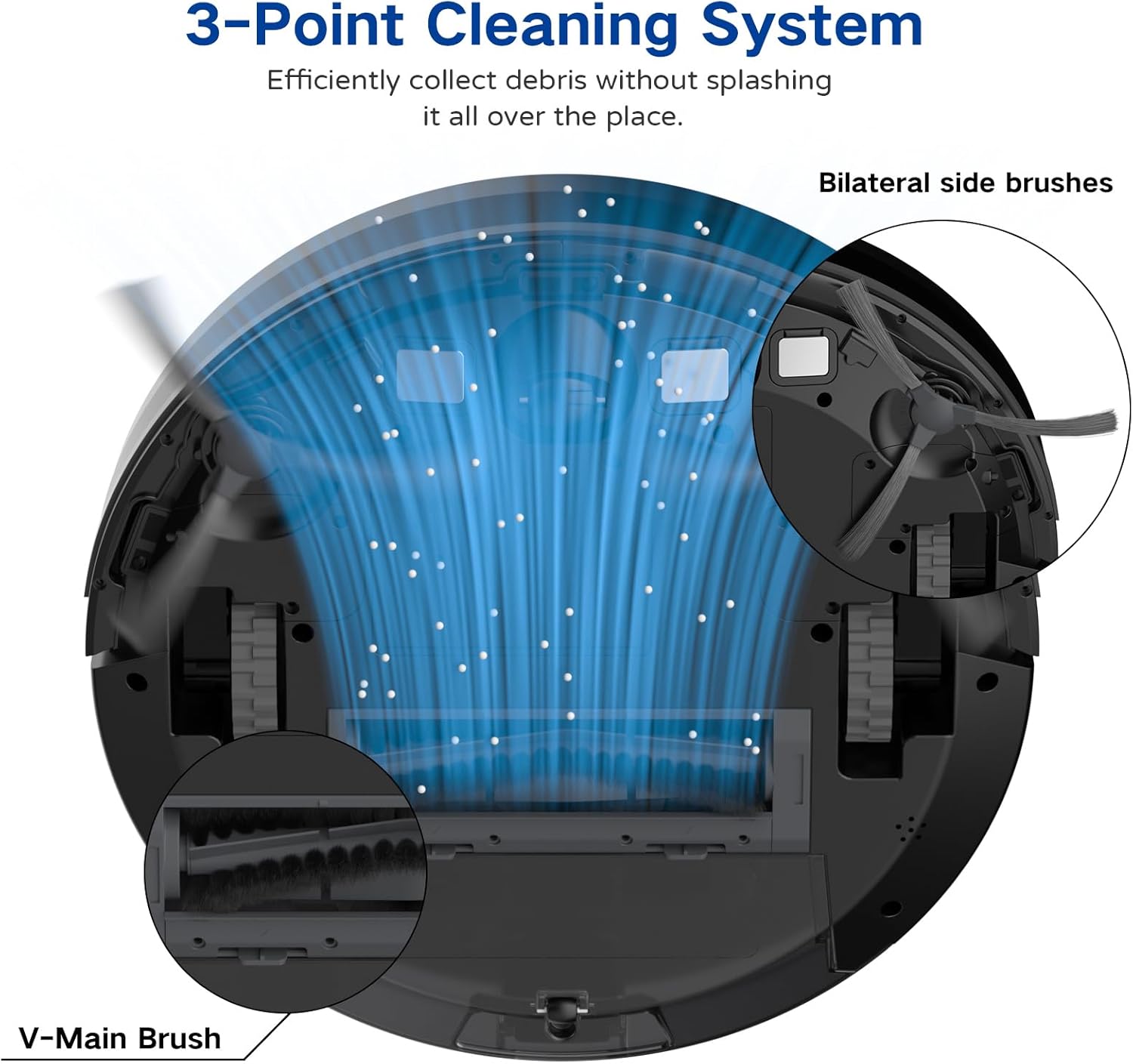
Image: A diagram illustrating the robot vacuum's 3-Point Cleaning System, showing bilateral side brushes and the V-main brush efficiently collecting debris.
Chaje Eleman baz
- Broch chaje: Connect with the robot's charging contacts.
- Endikatè pouvwa: Montre estati chaj la.
- Pouvwa Port: Konekte ak adaptè pouvwa a.
Enstalasyon
1. Pozisyonman baz chaje a
Place the charging base on a hard, level surface against a wall. Ensure there is at least 3 feet (1 meter) of clear space to the front and 1.5 feet (0.5 meters) to each side of the charging base to allow the robot to dock properly. Plug the power adapter into the charging base and then into a wall outlet.
2. Premye Chajman
Place the robot vacuum onto the charging base, ensuring the charging contacts align. The robot will begin charging automatically. For first-time use, charge the robot for at least 5-6 hours until the indicator light turns solid green, indicating a full charge.
3. Enstale bwòs bò yo
Attach the two side brushes to the posts on the bottom of the robot by pressing them down until they click into place. Ensure they are securely fastened.
4. Connecting to the Coredy App
- Download the 'Coredy' app from the App Store (iOS) or Google Play Store (Android).
- Anrejistre yon kont epi konekte.
- Follow the in-app instructions to add your R650 Ultra robot vacuum to your account. This typically involves connecting your phone to a 2.4GHz Wi-Fi network and then connecting the robot to the same network.

Image: A hand interacting with a smartphone showing the Coredy app, which displays a real-time map of the robot's cleaning path and offers control options.
5. Entegrasyon Asistan Vwa (Alexa/Asistan Google)
Once connected to the Coredy app, you can link your robot vacuum to Amazon Alexa or Google Assistant for voice control.
- Louvri aplikasyon Alexa a oswa Google Home la.
- Ale nan seksyon 'Konpetans ak Jwèt' (Alexa) oubyen 'Fonksyone avèk Google' (Google Home).
- Chèche pou the 'Coredy' skill/service and enable it.
- Log in with your Coredy app account credentials when prompted.
- Discover devices. You can now use voice commands like "Alexa, turn on Coredy R650 Ultra" or "Hey Google, start cleaning with Coredy R650 Ultra."

Image: The Coredy R650 Ultra Robot Vacuum positioned near its charging dock, with an Amazon Echo Dot in the background, illustrating voice control capabilities.
Fonksyone aspiratè robo a
Kòmanse/Sispann Netwayaj la
- Manyèl Kòmanse: Press the power button on the robot or the 'Clean' button on the remote control.
- Kontwòl aplikasyon: Use the Coredy app to start or stop cleaning.
- Kontwòl vwa: Use compatible voice assistants (e.g., "Alexa, start Coredy R650 Ultra").
- Pòz: Press the power button on the robot or the 'Clean' button on the remote during operation to pause. Press again to resume.
Mòd netwayaj
The R650 Ultra offers various cleaning modes to suit different needs:
- Netwayaj oto: The robot automatically cleans in a Z-shaped path, adjusting to different floor types.
- Netwayaj Spot: The robot intensely cleans a specific small area in a spiral pattern.
- Netwayaj Edge: Robo a netwaye sou mi yo ak kwen mèb yo.
- Manyèl kontwòl: Use the remote control or app to direct the robot manually.

Image: The Coredy R650 Ultra Robot Vacuum cleaning a hard floor, illustrating its Gyroscopic Dynamic Navigation and Z-shaped cleaning path for thorough coverage.
Planifikasyon Netwayaj
You can schedule cleaning times using the Coredy app or the remote control. Refer to the app's interface or the remote control section of this manual for detailed instructions on setting schedules.
Asistans pouvwa Ajisteman
The R650 Ultra features adjustable suction power, with a maximum of 2200 Pa. It also includes an Auto Carpet Boost feature that automatically increases suction when carpet is detected.
Otomatik Recharge
When the battery level is low or a cleaning cycle is complete, the robot will automatically return to its charging base to recharge.
Antretyen
Antretyen regilye asire pèfòmans optimal epi pwolonje lavi aspiratè robo ou a.
1. Vide fatra a
It is recommended to empty the dustbin after each use.
- Peze bouton pou lage bwat pousyè a epi rale bwat pousyè a deyò.
- Open the dustbin cover and empty the contents into a trash bin.

Image: The Coredy R650 Ultra Robot Vacuum on a wooden floor, with its 500ml dustbin detached and placed beside it, highlighting its capacity.
2. Netwaye filtè a
Clean the filter weekly, or more frequently if you have pets or high usage.
- Retire filtè a nan bwat fatra a.
- Tap the filter gently to remove loose dirt.
- Rinse the filter under running water. Ensure it is completely dry before reinstalling.
3. Netwaye bwòs prensipal la
Clean the main brush weekly.
- Vire robo a epi retire kouvèti bwòs prensipal la.
- Retire bwòs prensipal la.
- Use the provided cleaning tool to remove hair and debris wrapped around the brush.
- Re-enstale bwòs prensipal la ak kouvèti.
4. Netwaye Bwòs Side yo
Tcheke bwòs bò yo regilyèman pou wè si gen cheve ki mele oswa debri.
- Rale bwòs bò yo dousman anlè pou retire yo.
- Remove any hair or debris.
- Reattach the side brushes, ensuring they click into place.
5. Netwayaj Capteur ak Kontak Chaje
Wipe the drop sensors, infrared sensors, and charging contacts on both the robot and the charging base with a clean, dry cloth monthly.
Depanaj
If you encounter issues with your Coredy R650 Ultra, refer to the table below for common problems and solutions.
| Pwoblèm | Kòz posib | Solisyon |
|---|---|---|
| Robo pa limen | Batri fèb; Entèriptè a etenn | Chaje robo a; Asire w ke switch pouvwa a limen. |
| Robo pa chaje | Kontak chajman yo sal; Baz chajman an debranche | Clean charging contacts; Ensure charging base is plugged in. |
| Robo a bloke souvan | Obstacles on floor; Robot stuck under furniture | Clear floor of cables/small items; Use boundary strips or block off low-clearance areas. |
| Pèfòmans netwayaj pòv | Bwat fatra a plen; Bwòs yo mele; Filtè a bouche | Vide bwat pousyè a; Netwaye bwòs prensipal la ak bwòs bò yo; Netwaye oswa ranplase filtè a. |
| Pa ka konekte ak Wi-Fi/Aplikasyon an | Incorrect Wi-Fi password; 5GHz Wi-Fi network; Robot too far from router | Verify password; Ensure 2.4GHz Wi-Fi; Move robot closer to router. |
Espesifikasyon
Technical specifications for the Coredy R650 Ultra Robot Vacuum.
| Karakteristik | Detay |
|---|---|
| Mak | Coredy |
| Non modèl | Coredy R650 Ultra Robotic Vacuum Cleaner |
| Pouvwa pou aspirasyon | Jiska 2200 Pa |
| Lavi batri | Jiska 120 minit |
| Kapasite pou fatra | 500 mililit |
| Dimansyon pwodwi | 12.7"L x 12.7"L x 2.76"H |
| Metòd kontwòl | Aplikasyon, Kontwòl remote, Kontwòl vwa |
| Aparèy konpatib | Amazon Echo, Google Home, Telefòn entelijan |
| Kalite filtre | Katouch (HEPA) |
| Kalite Navigasyon | Gyroscopic Dynamic Navigation |

Image: A technical drawing illustrating the top and side dimensions of the Coredy R650 Ultra Robot Vacuum, showing its 12.7-inch diameter and 2.72-inch height.
Garanti ak sipò
For warranty information, please refer to the warranty card included in your product packaging or visit the official Coredy website. If you require technical support or have questions not covered in this manual, please contact Coredy customer service through the contact information provided on their websit la oubyen nan dokimantasyon acha ou a.


